Install & configure Collabora CODE for Nextcloud with Docker
Collabora Online is a LibreOffice-based online office suite with collaborative editing, which supports all major documents, spreadsheet and presentation file formats and works together with all modern browsers. The Nextcloud Office integration app provides an interface for editing documents in Nextcloud with Collabora Online.
Collabora CODE (Collabora Office Development Edition) is the development version of Collabora Online. It is perfect for testing, home use or small teams but not recommended for production environments. Collabora CODE together with Nextcloud Office enables editing Office documents within your Nextcloud instance.
There are various methods to run Collabora CODE together with Nextcloud Office:
- Collabora CODE Docker service
- Standalone Docker community instance, instructions below
- Collabora Online - Built-in CODE Server
- Built-in CODE Server installed from Nextcloud app store
- Collabora CODE Linux server
- Standalone server from source using Linux installation packages
TIP
Regardless which Collabora CODE service you’re planning to use, Nextcloud Office is required and must be installed on your Nextcloud instance to provide an interface for editing documents in Nextcloud.
Example Collabora CODE Docker service with reverse proxy.
- Install Docker on host
- Create a DNS entry for subdomain like
office.mydomain.tld - Set reverse proxy host for office domain to forward and encrypt HTTP & WSS (WebSockets Support) for port 9980 to
https://office.mydomain.tld.
Create and run docker Stack:
- or create a
docker-compose.yamlin place and execute in docker
name: 'code'

services:
  collabora:
    image: collabora/code:latest
    container_name: collabora
    environment:
      - aliasgroup1=https://cloud.mydomain.tld:443,https://cloud\\.mydomain\\.tld:443 # enable for aliasgroup1
      # - aliasgroup2=https://cloud.otherdomain.tld:443,https://cloud\\.otherdomain\\.tld:443 # enable for aliasgroup2
      # - aliasgroup3=https://cloud.somedomain.tld:443,https://cloud\\.somedomain\\.tld:443 # enable for aliasgroup3
      - username=admin
      - password=********         # Replace with a strong password
      - dictionaries=en_GB en_US de_DE
      - extra_params=
      --o:ssl.enable=false
      --o:ssl.termination=true
      --o:logging.level=warning
    ports:
      - "9980:9980"
    restart: always
TIP
Permitted client domain instead of WOPI clients, see example below
- Prefer using
- aliasgroupinstead of- server_namefor environment definition.
- Aliasgroups ensures that only permitted encrypted client domains will be able to connect.
- Define
- aliasgroupiterating 1,2,3 for multiple encrypted client domains.- Be aware of the syntax for defining client domains using
\\as separator before.extra parameters etc. see configuration documentation
-extra_params=
--o:ssl.enable=false # disable ssl termination in coolswd/collabora--o:ssl.termination=true # forward http to reverse proxy = ssl termination--o:logging.level=warning # log level, verbosity--o:logging.level_startup=warning # log level at start up, verbosity--o:logging.disable_server_audit=true # disable server-audit
dictionaries
- dictionariesadd dictionaries space separateden_US en_GB de_DEetc.
Collabora CODE docker options (multiple permitted client domains)
Each aliasgroup represents the allowed client domain, which will prevent unregistered clients from accessing the CODE service. Thus using aliasgroups resolves the issue of allowed WOPI client IP’s.
- aliasgroup1=https://cloud.mydomain.tld:443,https://cloud\\.mydomain\\.tld:443
## - aliasgroup2=https://cloud.otherdomain.tld:443,https://cloud\\.otherdomain\\.tld:443
## - aliasgroup3=https://cloud.somedomain.tld:443,https://cloud\\.somedomain\\.tld:443
TIP
be aware of the syntax when defining client domains using
\\as separator before.
Collabora docker options
there are several options available see documentation:
example optional parameters:
- extra_params=
 --o:ssl.enable=false                  # disable collabora/coolswd ssl termination
 --o:ssl.termination=true              # enable reverse proxy ssl termination
 --o:user_interface.mode=compact       # web ui view
 --o:mount_jail_tree=true              # refer to documentation
 --o:home_mode.enable=true             # refer to documentation
 --o:logging.level=warning             # logging level, verbosity
 --o:logging.level_startup=warning     # log level at start up, verbosity
 --o:logging.disable_server_audit=true # enable disable server audit
-
assuming a reverse proxy is handling ssl termination,
coolswdtermination would be disabled:ssl.enable=falseandssl.termination=true -
alternatively, without a reverse proxy letting
coolswdhandle ssl termination usingCertbotoracme.sh→coolswdtermination would be enabled:ssl.enable=trueandssl.termination=false -
Disable server-audit: enable/disable server audit
see official docs for details:
- CODE Docker image — SDK https://sdk.collaboraonline.com/ documentation
- Configuration — SDK https://sdk.collaboraonline.com/ documentation
Dictionaries
`- dictionaries` add dictionaries space separated `en_US en_GB de_DE` etc.
By default only limited set of spelling dictionaries and thesauri are configured for CODE, mainly for performance reasons. The default set of languages is the following:
de_DE en_GB en_US es_ES fr_FR it nl pt_BR pt_PT ru. With the dictionaries environment variable you can change this list. The dictionaries environment variable should contain the space separated list of language codes (optionally followed by country code). In order to save resources, it makes sense to load only those dictionaries that are actually needed.
Collabora CODE statistics and administration interface
https://office.mydomain.tld/browser/dist/admin/admin.html
Upgrade Collabora Code Docker image
- stop docker container see Docker stop
- remove image see Docker rm
- start docker stack see Docker compose start
Reverse proxy
official Collabora reverse proxy settings for Nginx and Apache
Example: NPM, NGINX Reverse Proxy Manager configuration
Be aware that you are forwarding http and Websockets support (WSS) only!
Example: Configure Apache as Reverse Proxy for Collabora
Example: Reverse proxy settings in Apache2 config (SSL termination)
Troubleshooting
TIP
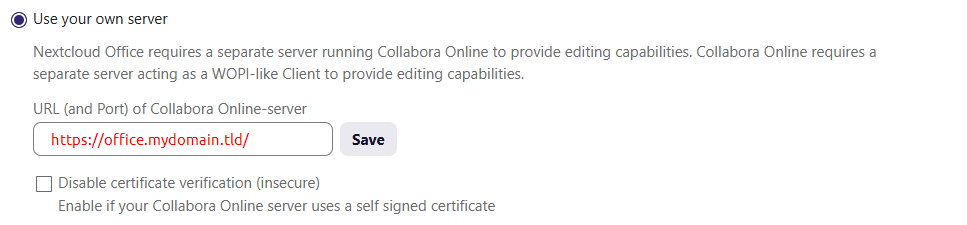
later Office versions (8.x.x) require a
/slash at the end of your URL to connect successfully!
Resources
 and
and  → only a small warning remains - don’t use 26.04.2.3.1
 ) I crafted this instructions.
  → run command from the directory whee your docker-compose file lives.