Nextcloud Office - What package does require what to get it working correctly

I have a separate thread because my Nextcloud office stopped working.

Reading through some posts and howtos, my mind began to bend and now, I am more confused that ever before.

In the app store, I can find the following apps:

  • Collabora Online - Built-in CODE Server
  • Nextcloud Office (Collabra), Version 10.3.0 at this point of time
  • Nextcloud Office, Version 11.0.4 at this point of time

Now, there are 2 packages called “Nextcloud Office”, but they seem to have different requirements.

Let me describe my setup:

  • First, I installed “Collabora Online - Built-in CODE Server” which also correctly appeared as installed app. When I click on the settings of it, I get showed that I have to configure it in the Nextcloud Office.
  • Then, I installed “Nextcloud Office” (Version 11.0.4). But when I go to the settings, it asks me for the url of the collabra server. So I guess this would be the wrong package, therefor I deinstalled it.
  • Third, I installed “Nextcloud Office (Collabra)”. In the settings of it, I have the possibility of selecting “use integrated CODE server”, which I did. It shows the info the a new server has to be created. After some time, this message changes to:

Failed to connect to the remote server: Call to a member function xpath() on false

But I did read quite some things and I really want to clear the fog. So here are the general questions:

  1. If I want to use the “Collabora Online - Built-in CODE Server” app, do I still have to configure my webserver (apache2 on my system) as a reverse proxy?
  2. If answer to question 1 is “yes”, I guess I do have to install a docker image for the CODE server - am I right? If so, where do I get this? And is there a up-to-date howto configure apache2 then? I got across many, some writing something about a package called “coolwsb” - but I am not sure at all if this is needed.
  3. If answer to question 1 is “no”, so how to I get this running? At the moment, I still have some apache2 config for reverse proxy, but as I am totally confused, I am not sure if I rather should disable this.

Don’t get me wrong: I am not complaining, but I really do stand in a big fog and I think I need someone explain me what where how when? :slight_smile:

Hey @Michael_Herber, yeah you’re right, its kind of foggy :laughing:

so let me try to explain the situation as I understand it;

Collabora Online Office a.k.a Nextcloud Office (Collabora)

Collabora CODE (Collabora Online Development Edition) is available for Nextcloud in two main installation methods:

  • as a built-in app
    • Built-in Collabora CODE Server, which is installed in Nextcloud as an app richdocumentscode together with Nextcloud Office (Collabora) richdocuments or “Nextcloud Office (Collabra)” and is meant as a standalone single user online office for Nextcloud.
  • as an external service
    • Collabora CODE Server, which can be installed as a Service using Docker or Linux installation packages, but the server runs “outside” Nextcloud and only requires the Nextcloud office (Collabora) richdocuments or “Nextcloud Office (Collabra)” app. see Collabora CODE for Nextcloud with Docker

So in your case, you have a Nextcloud Docker Install and Built-in Collabora CODE richdocumentscode app and Nextcloud Office (Collabora) richdocuments app to run Nextcloud Office (Collabora) in your Nextcloud instance… provided that is supported by the Docker-Install-method.

Euro-Office Documentserver a.k.a Nextcloud Office

The foggy naming-conventions are typical for new open source developments. To put it simply, Nexcloud GmbH began developing their own Euro-Office Documentserver and wanted to call it Nextcloud Office too, but Nextcloud office (Collabora) was the default Nextcloud office suite called “Nextcloud Office”.

Now they are gently renaming Collabora office to “Nextcloud Office (Collabora)” so that their own office suite can become “Nextcloud Office”, without giving their good partner “Collabora” the boot.

  • Euro-Office Documentserver
    • Nextcloud Office, v. 11.0.x eurooffice works with the new Euro-Office Documentserver
    • Euro-Office Documentserver is a service which you can install as a Docker service or Linux package install… on the same host, or on a different host and requires Nextcloud Office connector app euroofice in Nextcloud

The great thing is, they can both be used simultaneously, you will need two services though.

So until the renaming is complete it will be a little foggy… be patient :person_shrugging:


So to put it simply:

we’re talking about three installations; a) Built-in Collabora Server app (your setup), b) Collabora Server standalone, c) Euro-Office Documentserver standalone

Collabora Built-in server & Nextcloud Office (Collabora)

  • Collabora Online Office Built-in Server app = richdocumentscode
    • and Nextcloud Office (Collabora) app = richdocuments

Collabora office service & Nextcloud Office (Collabora)

Euro-Office Documentserver & Euro-Office a.k.a Nextcloud Office

Hi,

thanks for your answer, it think it clears the fog a little bit.

So in your case, you have a Nextcloud Docker Install and Built-in Collabora CODE richdocumentscode app and Nextcloud Office (Collabora) richdocuments app to run Nextcloud Office (Collabora) in your Nextcloud instance… provided that is supported by the Docker-Install-method.

Wait, here the setup differs a little bit: I do not have a Nextcloud Docker installation. Nextcloud is installed directly under /var/www/nextcloud and I am using apache2 as webserver. As this worked with Nextcloud Office in the past, I guess it should not have to do with Nextcloud itself running as docker (what I do not want to do, because I would then have to reinstall all…)

Also, as I thought that maybe some docker installation is negatively influencing the setup, I did delete all docker containers:

# docker ps
CONTAINER ID IMAGE COMMAND CREATED STATUS PORTS NAMES

I do however have the apps that you mentioned installed:

Enabled:

  • activity: 6.0.0
  • app_api: 33.0.0
  • bruteforcesettings: 6.0.0
  • calendar: 6.5.4
  • circles: 33.0.0
  • cloud_federation_api: 1.17.0
  • comments: 1.23.0
  • contacts: 8.7.7
  • contactsinteraction: 1.14.1
  • cookbook: 0.11.10
  • dashboard: 7.13.0
  • dav: 1.36.1
  • end_to_end_encryption: 2.2.4
  • federatedfilesharing: 1.23.0
  • federation: 1.23.0
  • files: 2.5.0
  • files_downloadlimit: 5.1.0
  • files_external: 1.25.1
  • files_pdfviewer: 6.0.0
  • files_reminders: 1.6.0
  • files_sharing: 1.25.2
  • files_trashbin: 1.23.0
  • files_versions: 1.26.0
  • firstrunwizard: 6.0.0
  • logreader: 6.0.0
  • lookup_server_connector: 1.21.0
  • mail: 5.11.4
  • nextcloud_announcements: 5.0.0
  • notifications: 6.0.0
  • oauth2: 1.21.0
  • password_policy: 5.0.0
  • photos: 6.0.0
  • privacy: 5.0.0
  • profile: 1.2.0
  • provisioning_api: 1.23.0
  • recommendations: 6.0.0
  • related_resources: 4.0.0
  • richdocuments: 10.3.0
  • richdocumentscode: 26.4.302
  • serverinfo: 5.0.0
  • settings: 1.16.0
  • sharebymail: 1.23.0
  • support: 5.0.0
  • survey_client: 5.0.0
  • systemtags: 1.23.0
  • text: 7.0.1
  • theming: 2.8.0
  • twofactor_backupcodes: 1.22.0
  • twofactor_nextcloud_notification: 7.0.0
  • twofactor_totp: 15.0.0
  • updatenotification: 1.23.0
  • user_ldap: 1.24.0
  • user_status: 1.13.0
  • viewer: 6.0.0
  • weather_status: 1.13.0
  • webhook_listeners: 1.5.0
  • workflowengine: 2.15.0
    Disabled:
  • admin_audit: 1.23.0
  • deck: 1.17.5 (installed 1.17.5)
  • encryption: 2.21.0
  • epubviewer: 1.9.7 (installed 1.9.7)
  • files_rightclick: 0.15.1 (installed 1.6.0)
  • music: 3.2.1 (installed 3.2.1)
  • spreed: 23.0.10 (installed 23.0.10)
  • suspicious_login: 11.0.0

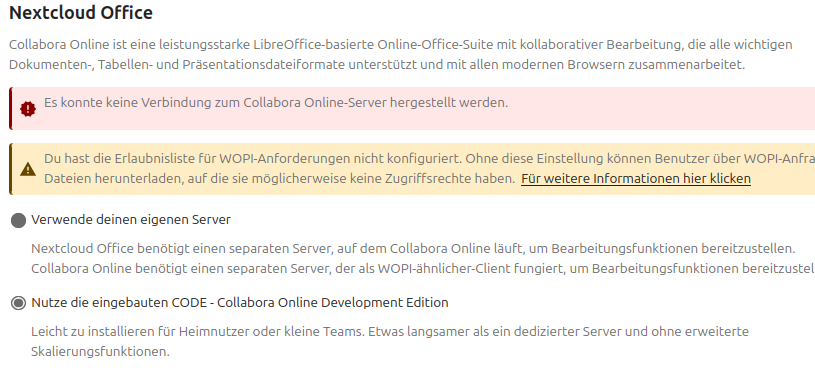
Nevertheless, it is not working. When I go to Administation → Nextcloud Office, I get the following:

What may be interesting here is that I cannot change the options below anymore. I could select it right after the installation, but I don’t know what changed.

A good question is certainly: Is there any way I can check if the integrated CODE (=richdocumentscode) is correctly running?

Perhaps anyone can help me to fix this?

see that’s why we have a support template which saves time and misunderstandings… you didn’t complete that and we need those details to help you. we will certainly need some logs too.

in your case it would be important to know more about your servers host configuration especially FQDN configuration, as that is important for Built-in Collabora server, see How to manage Hosts and FQDN for Nextcloud snap… now its clear you’re not using snap, but host & FQDN configuration is the same → so include reverse proxy configuration and show us cat /etc/hosts.

In general I would recommend to avoid built-in CODE app.. it is hard to troubleshoot and almost impossible to configure.. answers for most remaining questions you find in Collabora integration guide (if it’s running well too ;))

Sure, I understand that you need the basics. Here we go:

The Basics

  • Nextcloud Server version (e.g., 29.x.x): 33.0.8

  • Operating system and version (e.g., Ubuntu 24.04): Ubuntu 26.04

  • Web server and version (e.g, Apache 2.4.25): Apache2 2.4.66-2ubuntu2.4

  • Reverse proxy and version _(e.g. nginx 1.27.2): Apache2 2.4.66-2ubuntu2.4

  • PHP version (e.g, 8.3): 8.5

  • Is this the first time you’ve seen this error? (Yes / No): No

  • When did this problem seem to first start? After Update to 33.0.8

  • Installation method (e.g. AIO, NCP, Bare Metal/Archive, etc.) Server archive under /var/www

  • Are you using Cloudflare, mod_security, or similar? (Yes / No) No


    Web server / Reverse Proxy

The output of your Apache/nginx/system log in /var/log/____:

Not used at the moment, I want to use the integrated CODE


The output of occ config:list system or similar is best, but, if not possible, the contents of your config.php file from /path/to/nextcloud is fine (make sure to remove any identifiable information!):

{
    "system": {
        "instanceid": "***REMOVED SENSITIVE VALUE***",
        "passwordsalt": "***REMOVED SENSITIVE VALUE***",
        "secret": "***REMOVED SENSITIVE VALUE***",
        "trusted_domains": [
            "my.domain.net",
            "office.my.domain.net"
        ],
        "datadirectory": "***REMOVED SENSITIVE VALUE***",
        "dbtype": "mysql",
        "version": "33.0.8.2",
        "overwrite.cli.url": "https:\/\/my.domain.net\/",
        "overwritehost": "my.domain.net",
        "overwriteprotocol": "https",
        "dbname": "***REMOVED SENSITIVE VALUE***",
        "dbhost": "***REMOVED SENSITIVE VALUE***",
        "dbport": "",
        "dbtableprefix": "oc_",
        "mysql.utf8mb4": true,
        "dbuser": "***REMOVED SENSITIVE VALUE***",
        "dbpassword": "***REMOVED SENSITIVE VALUE***",
        "installed": true,
        "maintenance": false,
        "memcache.local": "\\OC\\Memcache\\APCu",
        "default_phone_region": "DE",
        "mail_smtpmode": "smtp",
        "mail_smtpsecure": "ssl",
        "mail_sendmailmode": "smtp",
        "mail_from_address": "***REMOVED SENSITIVE VALUE***",
        "mail_domain": "***REMOVED SENSITIVE VALUE***",
        "mail_smtphost": "***REMOVED SENSITIVE VALUE***",
        "mail_smtpport": "465",
        "mail_smtpauth": 1,
        "mail_smtpname": "***REMOVED SENSITIVE VALUE***",
        "mail_smtppassword": "***REMOVED SENSITIVE VALUE***",
        "mail_smtpauthtype": "LOGIN",
        "theme": "",
        "loglevel": 1,
        "ldapProviderFactory": "OCA\\User_LDAP\\LDAPProviderFactory",
        "app_install_overwrite": [
            "documentserver_community"
        ],
        "maintenance_window_start": "1"
    }
}


The output of occ app:list (if possible).

Enabled:

  • activity: 6.0.0
  • app_api: 33.0.0
  • bruteforcesettings: 6.0.0
  • calendar: 6.5.4
  • circles: 33.0.0
  • cloud_federation_api: 1.17.0
  • comments: 1.23.0
  • contacts: 8.7.7
  • contactsinteraction: 1.14.1
  • cookbook: 0.11.10
  • dashboard: 7.13.0
  • dav: 1.36.1
  • end_to_end_encryption: 2.2.4
  • federatedfilesharing: 1.23.0
  • federation: 1.23.0
  • files: 2.5.0
  • files_downloadlimit: 5.1.0
  • files_external: 1.25.1
  • files_pdfviewer: 6.0.0
  • files_reminders: 1.6.0
  • files_sharing: 1.25.2
  • files_trashbin: 1.23.0
  • files_versions: 1.26.0
  • firstrunwizard: 6.0.0
  • logreader: 6.0.0
  • lookup_server_connector: 1.21.0
  • mail: 5.11.4
  • nextcloud_announcements: 5.0.0
  • notifications: 6.0.0
  • oauth2: 1.21.0
  • password_policy: 5.0.0
  • photos: 6.0.0
  • privacy: 5.0.0
  • profile: 1.2.0
  • provisioning_api: 1.23.0
  • recommendations: 6.0.0
  • related_resources: 4.0.0
  • richdocuments: 10.3.0
  • richdocumentscode: 26.4.302
  • serverinfo: 5.0.0
  • settings: 1.16.0
  • sharebymail: 1.23.0
  • support: 5.0.0
  • survey_client: 5.0.0
  • systemtags: 1.23.0
  • text: 7.0.1
  • theming: 2.8.0
  • twofactor_backupcodes: 1.22.0
  • twofactor_nextcloud_notification: 7.0.0
  • twofactor_totp: 15.0.0
  • updatenotification: 1.23.0
  • user_ldap: 1.24.0
  • user_status: 1.13.0
  • viewer: 6.0.0
  • weather_status: 1.13.0
  • webhook_listeners: 1.5.0
  • workflowengine: 2.15.0
    Disabled:
  • admin_audit: 1.23.0
  • deck: 1.17.5 (installed 1.17.5)
  • encryption: 2.21.0
  • epubviewer: 1.9.7 (installed 1.9.7)
  • files_rightclick: 0.15.1 (installed 1.6.0)
  • music: 3.2.1 (installed 3.2.1)
  • spreed: 23.0.10 (installed 23.0.10)
  • suspicious_login: 11.0.0

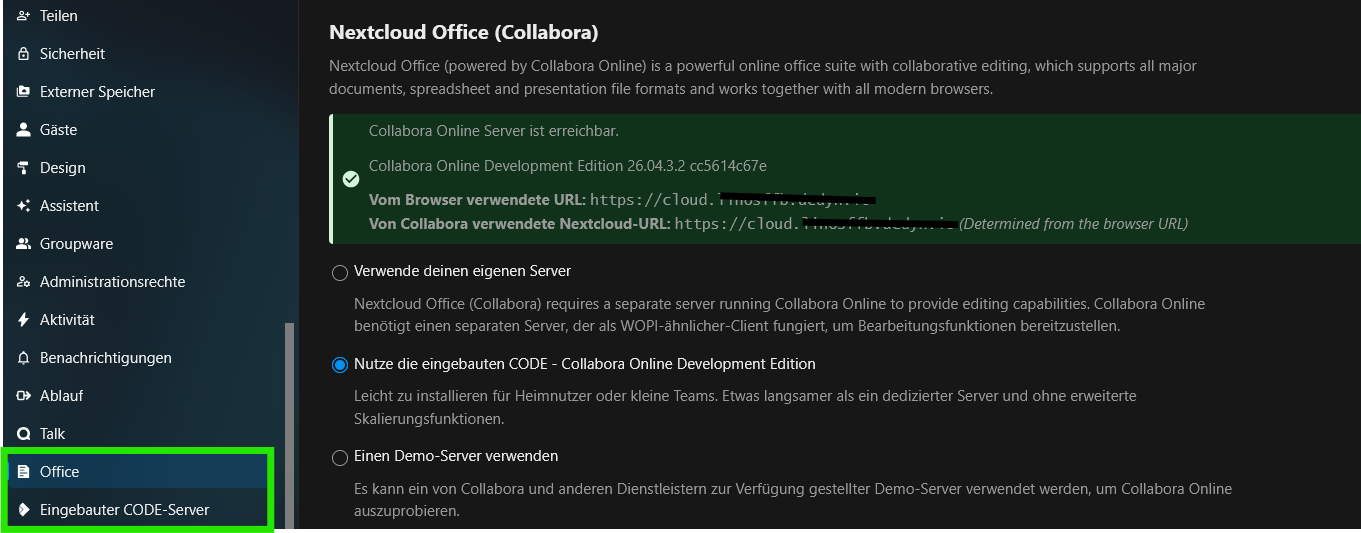
sometimes it takes a while for the “Built-in CODE Server” auto-configuration to succeed. refreshing a couple of times might help.

it is important that the “Built-in CODE Server” auto-configuration can determine the correct URL incl. HTTPS (valid certificates), thus correct DNS discovery of your certified FQDN must be ascertained.

please show us that reverse proxy and host-configuration

NOTE:

sometimes it takes a while for the “Built-in CODE Server” auto-configuration to succeed. refreshing a couple of times might help.

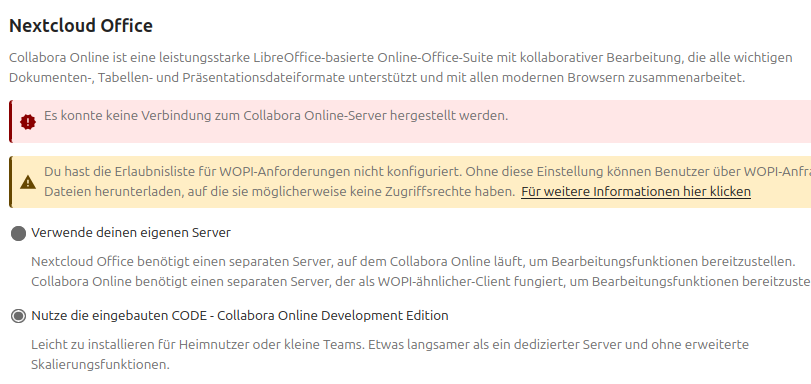
I already noticed that, but in that case it does only change to

it is important that the “Built-in CODE Server” auto-configuration can determine the correct URL incl. HTTPS (valid certificates), thus correct DNS discovery of your certified FQDN must be ascertained.

please show us that reverse proxy and host-configuration

I will copy & paste it below, but before it I have general questions:

  • As I want to use the integrated CODE server, do I need the reverse proxy at all?
  • May it be that the setup of the reverse proxy prevents the integrated CODE to work correctly? I would then simply deactivate the apache2 config for office.my.domain.net

Here is the file:

<VirtualHost *:443>
ServerName office.my.domain.net
ServerAdmin webmaster@domain.xx
DocumentRoot /var/www/nextcloud
RewriteEngine on

AllowEncodedSlashes NoDecode

SSLProxyEngine On
SSLProxyVerify None
SSLProxyCheckPeerCN Off
SSLProxyCheckPeerName Off

ProxyPreserveHost On

ProxyPass /loleaflet https://127.0.0.1:9980/loleaflet retry=0
ProxyPassReverse /loleaflet https://127.0.0.1:9980/loleaflet

ProxyPass /hosting/discovery https://127.0.0.1:9980/hosting/discovery retry=0
ProxyPassReverse /hosting/discovery https://127.0.0.1:9980/hosting/discovery

ProxyPassMatch “/lool/(.*)/ws$” wss://127.0.0.1:9980/lool/$1/ws nocanon

ProxyPass /lool/adminws wss://127.0.0.1:9980/lool/adminws

ProxyPass /lool https://127.0.0.1:9980/lool
ProxyPassReverse /lool https://127.0.0.1:9980/lool

ProxyPass /hosting/capabilities https://127.0.0.1:9980/hosting/capabilities retry=0
ProxyPassReverse /hosting/capabilities https://127.0.0.1:9980/hosting/capabilities

SSLCertificateFile /fullchain.pem
SSLCertificateKeyFile /privkey.pem
Include /etc/letsencrypt/options-ssl-apache.conf

NOTE:

Again, do I need this, as I want to use the integrated CODE? Or should I switch to a docker CODE solution?

  1. /lool endpoint was changed ages ago to /cool (please follow the Collabora integration guide we referred already)
  2. built-in CODE is supposed to live in {cloud}/apps/richdocumentscode/proxy.php?req= and doesn’t require dedicated reverse proxy config. looks you are using kind of mix between both variants

from my experience dedicated CODE is easier to maintain, so if you can prefer this one over built-in CODE

agree :100: see Collabora CODE for Nextcloud with Docker but you will need a reverse proxy see 101: reverse proxy

Short answer is: I got it running.

If anyone stumbles across this, I want to shortly list what I did:

  • deinstalled all richtdocuments* apps
  • removed all existing docker containers
  • assured that the package “docker.io” is installed on my systtem
  • followed Making sure you're not a bot! to install a CODE docker container and started it
  • followed the points “CODE Linux Pakete” and “Einrichten eines Reverse-Proxys und SSL” on
  • Installed richdocuments app
  • restarted apache2
  • In administrative settings of Nextcloud, I am using the simply URL of my reverse proxy apache2 conf
  • Office is now correctly running

So, are there any open points?

Yes, because I think that some people may come across the same questions. So here they are:

  • I understand that /etc/coolwsd/coolwsd.xml is the main config file for CODE. But the file I have here at the moment is still the file that came with installation. What I didn´t find is any simple explanation how to start with a proper own version of the file - can somebody point me where to start reading about this?
  • What I don’t get at all at the moment is “wopi”. I did read quite some things, but my brain still refuses to understand which functionality it has in the whole system
  • Concerning wopi - I can add a token via Nextcloud web interface. But how can I check which ones are active and which ones can be deleted (because eg. they might even be a security issue like “0.0.0.0/0”, as far as I read, this should not be used in productive environments.

Greets!

congrats :sparkler:

you find the description of the wopi protocol on very top of the Collabora integration guide

you find the explanation in the article you referred above CODE Docker image and other COOL/CODE docs

I have the feeling you are motivated and try a lot to get things done but you don’t invest time to understand the topic. System administration requires understanding of underlying concepts and sometimes a lecture of 50 pages article is needed to get things sorted - if don’t want to do a deep dive into the topic you will never understand what is the problem and keep trying random tutorials until it works..

I understand what you are saying. For me, it’s a little bit hard to get from an overview to the bottom. Let me try to explain: I am also working with some tools that offer a REST API and most of these developers offer a website with all endpoints (would be parameters in coolwsd.xml here in the way I am thinking).

Sure, these websites do help. But for some general questions like “should a create an own version of coolwsd.xml and what are the starters here?” I didn´t find any good explanation. The sites you mentioned helped me very much - I got it working for now.

I am the type of person that works from top down here, that means “first, I try to get it working, even if I create some issues (security or others) here. Second, I am getting into really configuring all to my needs”. I am doing this because if it works in first place and then, I change something and it stops working - that is a bad thing for the installation, but a good thing for me, as I then have to understand why the changes I made broke the setup - that’s learning to me :slight_smile:

So I am going to try to put all the pieces together in my brain, but it’s going on slow…

Anyhow, thanks a lot so far.