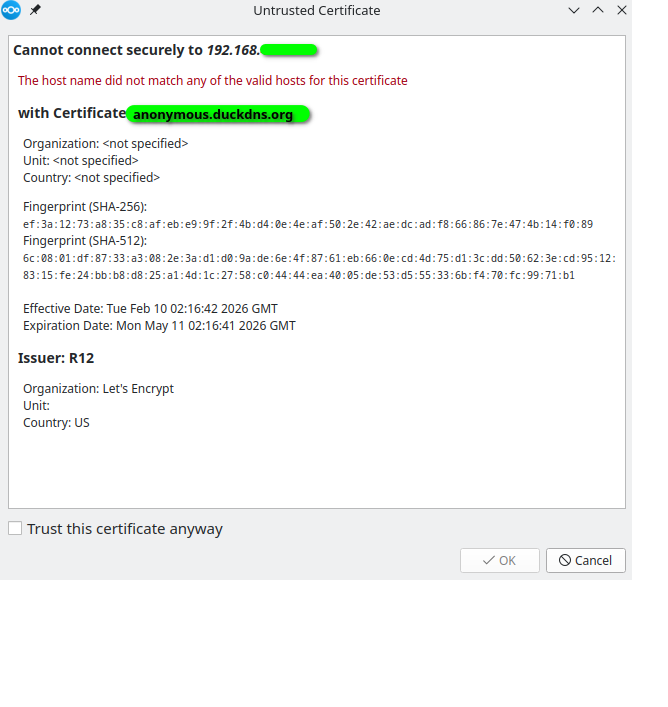
Hello all! I’m having some trouble with ye olde “Untrusted Certificate” popup on a self-hosted home server. Please help, even if you need to tell me I’m making a newbie mistake.
What do I want: To stop getting the “Untrusted Certificate” warnings upon which I need to check “Trust this certificate anyway.” AND to ensure that my home setup is “safe enough” for a bare-bones basic home server.
What is my setup / problem: I’m running the nextcloud snap on a laptop running ubuntu server. I can access and move files, but I get this popup warning, and every now and then a computer will reject the server entirely, often claiming something like “unacceptable certificate.” But according to the image I’ve shared below, and according to the process I followed ( How to manage Lets Encrypt for Nextcloud snap ), I think I do have valid certificates from Letsencrypt. I’ve tried rebooting, wiping certificates, reinstalling the server etc…
Did I try to look this up beforehand: I believe I have read every article on the internet with “untrusted letsencrypt certificate” in the title except the one that will actually help me with this. If you find it, please share here!
Extra questions: Does this have anything to do with UFW and ports? Or trusted domains? Or using a proxy? I don’t think I want/need a proxy.
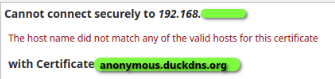
you’re trying to connect using the IP address (192.168.*.*). But a certificate is always bound to a domain name (anonymous.duckdns.org) and NEVER to an IP address.
Your message clearly states this:
You need to configure your local DNS so that your domain points to the local IP address on your local network and connect only using the domain-name.
generally though, if you’re not prepared to enable public access with lets encrypt certificates, you’re on your own. self signed certificates are possible but your instance almost unusable.
@ernolf Thanks for the quick help! I read your page, and I think I am understanding the flow charts partially, but not enough to know how to implement it on the server itself. Maybe I don’t understand where to find the basic parts of a network within CLI directories; I want to learn what these things are, and how to point them places:
“outside client” = Is this my domain provider? If this is my duckDNS, then this is currently pointed at the public IP of my home network. Are you saying I can put my local IP into this somehow? I can’t enter the :443 ending as suggested in your link’s flowchart; I do have the port open on UFW and my router though.
”inside client” = Is this my /etc/hosts file? This is currently as follows:
“reverse proxy container” = What is this? Does there exist a “proxy” and also a “reverse proxy”? I don’t know about these. Does a vanilla snap server give me one of these?
Thanks again! I’ll try to read more about this soon.
@scubamuc Thanks so much for teaching me! I don’t know if I want to host multiple services; I just want one fileserver to manage/share files for my family: no websites. As far as your comment “if you’re not prepared to enable public access…”, I think I do want public access (i.e. to access my home server when I am at work). But obviously I have the letsencrypt certificates done incorrectly.
Another newbie question: How do I share my config file to you from my server? I don’t know how to get it from the server’s CLI to the present computer I am using. I guess I will have to read again these articles you linked (which you yourself wrote!). I don’t see anything labelled trusted_proxies in my config; what should I be looking for?
Just a small correction here: let’s encrypt plans to offer IP based certificates. I suspect these will be for public ips only,. Here just for completeness.
I try to answer some of your questions in a quick manner.
A client is always a computer or software/browser connecting to your server. So, it is your mobile phone, your laptop at work, or whatever you use to browse the web.
The distinction intern vs extern comes from the fact that your local LAN is significantly faster and might allow direct access to the files without passing the data twice over the internet gateway.
Ideally, you would configure the clients such that you have a unique name to access the NC. This should be independent of the location where you / your client are. So, instead of an IP address, you use the same name internally.
To do this, you must configure a DNS server locally. DNS maps the name of a machine to an IP address. Yous DynDNS is a special kind of DNS that adopts according to your changing IP for public resolution. You could reuse the DynDNS entry but this should locally resolve to 192.168...
The reverse proxy is a HTTP server that takes requests and redirects them to the appropriate software that serves the actual website. It is sort of an intermediate layer to abstract the communication. So, the reverse proxy is located “close by” the server.
In contrast, a (forward) proxy is close by the client and allows access to the internet. This is this discussion not of interest, so ignore about the forward proxies. If we write proxy, we are talking about reverse proxies.
As the (rev) proxy is intended to address different servers, it is not part of the actual snap. You as the administrator are responsible to setup the infrastructure to access the services. The proxy is part of said infrastructure. Possible proxies are apache, nginx, traefik, caddy, or others. Some are more complex and more powerful than others.
enter the following command into the servers shell:
sudo nextcloud.occ config:list
copy the output and paste it right here in the forum… its redacted so no sensitive values are posted. thus we’ll be able to get an idea of your config.
great, encryption will be the easy part, we just need to find out where you took a wrong turn
it would help if you could post your Lets Encrypt logs too. You’ll get a nice output to copy and paste if you enter the following command in your host shell:
oh don’t worry, before long you’ll get the hang of self hosting and you’ll be considering a reverse proxy… but for the time being you can forget reverse proxies then
remember, what you’re doing is fun and you’re learning interesting stuff… don’t be shy to ask! that’s what we’re here for
do consider reading the docs first. it may be tedious and you’re itching to get going, but a good background will ensure less frustration. you’ll find the original docs here, they’re easy to read wiki style:
Yep, only publicly routable IP addresses are supported, and only short-lived certificates (6 days) issued via HTTP-01 or TLS-ALPN-01 challenges.
So it’s definitely not something that will be very useful in a homelab, because…
Most people only have a dynamic IP address at home, so once it changes, the certificate becomes invalid. Maybe you could implement some kind of automation that renews the certificate whenever the IP address changes? However, even if that were possible, it still wouldn’t be all that useful to host a service with an ever-changing IP address.
You can only host one site or one service per IP. There are no subdomains for IP addresses (okay, you could use subdirectories, but many modern web apps don’t support that).
Local/private IP addresses don’t work, as mentioned. So in a homelab or self-hosting context this would at best be interesting for people hosting something on a VPS.
It doesn’t work at all with CGNAT.
There are probably more reasons, these are just the ones that came to mind right now.
I do not think you have any missconfiguration within you NC-Server Config. It seems you have a valid Let’s Encrypt Certificate and it will be also renewed all 90 / 45 days. So all is fine.
The Problem is within your LAN you use the IPv4-Adress of the NC-Server and not its FQDN (Fully Qualified Domain Name), what is recommended.
Have you ever tried to edit your local Doman Name Server (DNS). Every LAN has one. Mostly its part of the Router or your local Firewall. Simple home Network Routers like most gets from its Cable, DSL or Fiber ISP’s use internal TLD’s (Top-Level-Domains) like localdomain or such.
So the internal name of your NC-Server is somewhat like nextcloud.localdomain. WHat you now have to do is simply set an aliasname for your NC-Server in your Routers DNS or your Firewalls DNS. Depending on the DNS what is used this might be an alias like:
anonymous.duckdns.org -> 192.168.xxx.yyy (xxx.yyy need to be replaced with your NC-Servers IP) or
anonymous.duckdns.org -> nextcloud.localdomain
With such a setup all local clients within your local network using the Routers or Firewalls DNS will be able to use the FQDN of your NC-Server and will get as result the IPv4-Adress. Outside of your LAN they will use another DNS and will be able to use also the FQDN and access the NC-Server using NAT and Port forwarding.
When I first had set up my home nextcloud server, I could only access anonymous.duckdns.org when I was not on my home network. I couldn’t figure out why, so I pointed all my home computers/phones at the server’s IP (192.168.xxx.yyy) and it was able to function for file sharing, albeit getting the untrusted domain popup. I do think I already had the top part of my /etc/hosts/ set up properly (that’s my FQDN?). Side note, I cannot remember if my work computer (i.e. that stays at my workplace) ever received the “untrusted domain” error. But now, after editing my /etc/hosts/ by appending the line 192.168.xxx.yyy anonymous.duckdns.org, all home devices did not have the error popupI
Thanks so much! And thank you also to everyone else who taught me! I guess I’ll have to check out these further links and see what else I’ll need.
Well what you discribe is most likely caused by dns rebind protection of many common home network routers. To get rigit of that you need to either disable the feature entirely or whitelist specific domain names (like anonymous.duckdns.org).
Editing the /etc/hosts/ is only a solution for devices that are not mobile, like notebooks or smartphones.
@adelaar Would I still need to disable DNS rebind protection if all of my clients now seem to be working just fine? Also, I’m not sure I’ve found the setting you’re describing; I’ll look for it. Thanks again!
Well even Gemini would tell you what dns rebind protection means and do:
DNS rebind protection is a security feature in routers and DNS resolvers that blocks malicious websites from using DNS tricks to access private, local network devices (e.g., smart home devices, routers, NAS). It works by ensuring DNS responses for public domains do not return private IP addresses. It is commonly enabled by default in routers like Google Wifi, pfSense, and FRITZ!Box
So if you wanna reach your NC-Server inside of your LAN using the NC-Servers FQDN (NC.yourDomain.tld) and your router does not deliver a Private ip-Adress, e.g. 192.168.178.9, it is often caused by dns rebind protection.