Support intro
Sorry to hear you’re facing problems. 
The community help forum (help.nextcloud.com) is for home and non-enterprise users. Support is provided by other community members on a best effort / “as available” basis. All of those responding are volunteering their time to help you.
If you’re using Nextcloud in a business/critical setting, paid and SLA-based support services can be accessed via portal.nextcloud.com where Nextcloud engineers can help ensure your business keeps running smoothly.
Getting help
In order to help you as efficiently (and quickly!) as possible, please fill in as much of the below requested information as you can.
Before clicking submit: Please check if your query is already addressed via the following resources:
- most of office issues are handled in Collabora integration guide
- Official documentation (searchable and regularly updated)
- How to topics and FAQs
- Forum search
(Utilizing these existing resources is typically faster. It also helps reduce the load on our generous volunteers while elevating the signal to noise ratio of the forums otherwise arising from the same queries being posted repeatedly).
Some or all of the below information will be requested if it isn’t supplied; for fastest response please provide as much as you can. 
The Basics
- Nextcloud Server version (e.g., 29.x.x):
34.0.1snap1
- Operating system and version (e.g., Ubuntu 24.04):
Debian 13
- Web server and version (e.g, Apache 2.4.25):
Apache 2.4.68
- Reverse proxy and version _(e.g. nginx 1.27.2)
nginx 1.26.3
- PHP version (e.g, 8.3):
php 8.4.23
- Is this the first time you’ve seen this error? (Yes / No):
Yes
- When did this problem seem to first start?
During Nextcloud Office setup, on ~/index.php/settings/admin/eurooffice form page
- Installation method (e.g. AlO, NCP, Bare Metal/Archive, etc.)
Bare Metal
- Are you using CloudfIare, mod_security, or similar? (Yes / No)
No
Summary of the issue you are facing:
I have Euro-Office document server (version 9.3.1, manually downloaded and installed the amd64 release), running on port :80. My Nextcloud instance works nad is running on port :81. I can curl http://:80 & :81 successfully with no errors in the terminal.
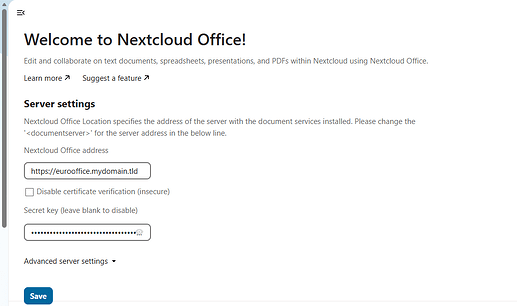
As per the integration instruction here: GitHub - Euro-Office/eurooffice-nextcloud · GitHub , I navigate to ~/settings/admin/eurooffice in the Nextcloud web application, and fill out the form as follows:
Nextcloud Office Address: http://<server-ip>:80/
✓ Disable Certificate Verification
Secret Key: Retrieved from /etc/euro-office/documentserver/local.json
When I submit the form, I get the error below:
Request Failed with Status Code 500
I’ve tried changing from port :80 to :8080, restarting nginx, restarting my server, reinstalling euro-office
Steps to replicate it (hint: details matter!):
-
Change Nextcloud port with
sudo snap set nextcloud ports.http=81 -
Install Euro-Office 9.3.1 as per the documentation
-
Install eurooffice-nextcloud as per the documentation
-
Retrieve JWT secret from `
/etc/euro-office/documentserver/local.json` -
Navigate to
~/settings/admin/euroofficein the Nextcloud web application. App directory is: `/var/snap/nextcloud/current/nextcloud/extra-apps` -
Nextcloud Office Address:
http://<server-ip>:81, ✓ Disable Certificate Verification, set JWT secret -
Request Failed with Status Code 500
Log entries
Nextcloud
Please provide the log entries from your Nextcloud log that are generated during the time of problem (via the Copy raw option from Administration settings->Logging screen or from your nextcloud.log located in your data directory). Feel free to use a pastebin/gist service if necessary.
Message

Log entry actions
Fatal
	eurooffice

ErrorFailed opening required '/var/snap/nextcloud/53763/nextcloud/extra-apps/eurooffice/lib/AppInfo/../../vendor/autoload.php' (include_path='/snap/nextcloud/53763/htdocs/3rdparty/pear/archive_tar:/snap/nextcloud/53763/htdocs/3rdparty/pear/console_getopt:/snap/nextcloud/53763/htdocs/3rdparty/pear/pear-core-minimal/src:/snap/nextcloud/53763/htdocs/3rdparty/pear/pear_exception:/snap/nextcloud/current/htdocs/apps:/var/snap/nextcloud/current/nextcloud/extra-apps')

Warning
	PHP

require_once(/var/snap/nextcloud/53763/nextcloud/extra-apps/eurooffice/lib/AppInfo/../../vendor/autoload.php): Failed to open stream: No such file or directory at /var/snap/nextcloud/53763/nextcloud/extra-apps/eurooffice/lib/AppInfo/Application.php#79

Fatal
	eurooffice

ErrorFailed opening required '/var/snap/nextcloud/53763/nextcloud/extra-apps/eurooffice/lib/AppInfo/../../vendor/autoload.php' (include_path='/snap/nextcloud/53763/htdocs/3rdparty/pear/archive_tar:/snap/nextcloud/53763/htdocs/3rdparty/pear/console_getopt:/snap/nextcloud/53763/htdocs/3rdparty/pear/pear-core-minimal/src:/snap/nextcloud/53763/htdocs/3rdparty/pear/pear_exception:/snap/nextcloud/current/htdocs/apps:/var/snap/nextcloud/current/nextcloud/extra-apps')
Error during app service registration: Failed opening required '/var/snap/nextcloud/53763/nextcloud/extra-apps/eurooffice/lib/AppInfo/../../vendor/autoload.php' (include_path='/snap/nextcloud/53763/htdocs/3rdparty/pear/archive_tar:/snap/nextcloud/53763/htdocs/3rdparty/pear/console_getopt:/snap/nextcloud/53763/htdocs/3rdparty/pear/pear-core-minimal/src:/snap/nextcloud/53763/htdocs/3rdparty/pear/pear_exception:/snap/nextcloud/current/htdocs/apps:/var/snap/nextcloud/current/nextcloud/extra-apps')

Warning
	PHP

require_once(/var/snap/nextcloud/53763/nextcloud/extra-apps/eurooffice/lib/AppInfo/../../vendor/autoload.php): Failed to open stream: No such file or directory at /var/snap/nextcloud/53763/nextcloud/extra-apps/eurooffice/lib/AppInfo/Application.php#79
Web Browser
If the problem is related to the Web interface, open your browser inspector Console and Network tabs while refreshing (reloading) and reproducing the problem. Provide any relevant output/errors here that appear.
XHRPUT
http://localhost:81/index.php/apps/eurooffice/ajax/settings/address
[HTTP/1.1 500 Internal Server Error 50ms]


PUT

scheme
	http
host
	localhost:81
filename
	/index.php/apps/eurooffice/ajax/settings/address
Address
	127.0.0.1:81
Status
500
Internal Server Error
VersionHTTP/1.1
Transferred3.27 kB (2.65 kB size)
Referrer Policyno-referrer
Request PriorityHighest
DNS ResolutionSystem


    Connection
    	close
    Content-Security-Policy
    	default-src 'self'; script-src 'self' 'nonce-n33Ot2fnRexDqqD8PSiyWQwtCfQB2Re14qmbi1rZIBs='; style-src 'self' 'unsafe-inline'; frame-src *; img-src * data: blob:; font-src 'self' data:; media-src *; connect-src *; object-src 'none'; base-uri 'self';
    Content-Type
    	text/html; charset=UTF-8
    Date
    	Thu, 23 Jul 2026 19:49:20 GMT
    Referrer-Policy
    	no-referrer
    Server
    	Apache
    Transfer-Encoding
    	chunked
    X-Content-Type-Options
    	nosniff
    X-Frame-Options
    	SAMEORIGIN
    X-Permitted-Cross-Domain-Policies
    	none
    X-Robots-Tag
    	noindex, nofollow

    Accept
    	application/json, text/plain, */*
    Accept-Encoding
    	gzip, deflate, br, zstd
    Accept-Language
    	en-US,en;q=0.5
    Connection
    	keep-alive
    Content-Length
    	184
    Content-Type
    	application/json
    Cookie
    	---
    Host
    	localhost:81
    Origin
    	http://localhost:81
    Priority
    	u=0
    requesttoken
    	---
    Sec-Fetch-Dest
    	empty
    Sec-Fetch-Mode
    	cors
    Sec-Fetch-Site
    	same-origin
    User-Agent
    	Mozilla/5.0 (X11; Linux x86_64; rv:140.0) Gecko/20100101 Firefox/140.0
    X-Requested-With
    	XMLHttpRequest, XMLHttpRequest
Web server / Reverse Proxy
The output of your Apache/nginx/system log in /var/log/____:
PASTE HERE
Configuration
Nextcloud
The output of occ config:list system or similar is best, but, if not possible, the contents of your config.php file from /path/to/nextcloud is fine (make sure to remove any identifiable information!):
PASTE HERE
Apps
The output of occ app:list (if possible).
Tips for increasing the likelihood of a response
- Use the
preformatted textformatting option in the editor for all log entries and configuration output. - If screenshots are useful, feel free to include them.
- If possible, also include key error output in text form so it can be searched for.
- Try to edit log output only minimally (if at all) so that it can be ran through analyzers / formatters by those trying to help you.