Hello
i tried to follow the documentation but i can’t understand where is the problem 
Before i upgrade from nc 29 it worked fine without any modify in the configuration
i’m available to do a remote session to see together the issue if you want
don’t forget this forum is for SOHO users and help you to solve your problems - for personal professional support insert  coins
coins
I’m not sure how collabora works in Nextcloud from snap version and built-in CODE. But to me it looks like a problem that your domain is not trusted. Is there a coolwsd.xml file you can edit?
did you try to reconfigure CODE as suggested in the documentation?
Configure built-in CODE & Office for Nextcloud snap on AMD64
These steps (in sequence) are required to reconfigure/reset and configure built-in CODE & Nextcloud office on Nextcloud snap.
- disable CODE:
sudo nextcloud.occ app:disable richdocumentscode - disable Office:
sudo nextcloud.occ app:disable richdocuments - delete configs:
sudo nextcloud.occ config:app:delete richdocuments public_wopi_url - delete configs:
sudo nextcloud.occ config:app:delete richdocuments wopi_url - enable Office:
sudo nextcloud.occ app:enable richdocuments - enable CODE:
sudo nextcloud.occ app:enable richdocumentscode
You should get a green check if you’ve followed the above sequence for your device.
Built-in CODE & Nextcloud office is tested by default for each Nextcloud snap release;
I don’t think this is true as visible in this screenshot:
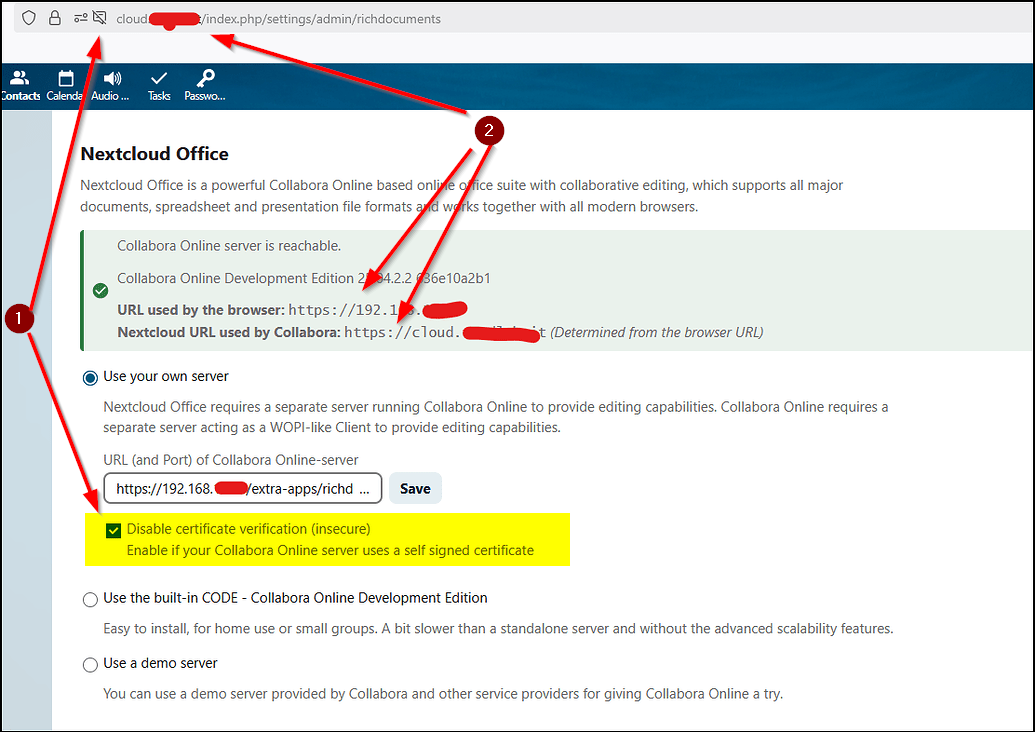
you are using untrusted TLS certificates and local local IPs - which is clearly a red flag.
Please read and understand the collabora integration guide. If you don’t understand repeat until you understand.
I’m not an absolute expert on Collabora, but one important thing to keep in mind is that Collabora must be directly accessible from both the Nextcloud server and the clients. So, if you’re using a local IP address, the Nextcloud server may be able to connect and everything will show up as green and OK, but clients still won’t be able to access it.
Ideally, you should serve Collabora using a separate VirtualHost in Apache, under a dedicated subdomain like e.g. office.yourdomain.tld, using a reverse proxy configuration with its own valid SSL certificate: Proxy settings — SDK https://sdk.collaboraonline.com/ documentation
An alternative would be to serve Collabora under the same subdomain as your Nextcloud, and include the reverse proxy configuration for Collabora in the same Apache VirtualHost that serves your Nextcloud instance.
However, as far as I understand, the latter option is potentially less secure, so I’d recommend going with the first approach.
Example:
<IfModule mod_ssl.c>
<VirtualHost *:443>
ServerName office.domain.tld

# Restrict access to Collabora admin console (optional)
<Location /browser/dist/admin>
Order Deny,Allow
Deny from  all
Allow from 192.168.202.202
</Location>

# Encoded slashes need to be allowed
AllowEncodedSlashes NoDecode

# Container uses a unique non-signed certificate
SSLProxyEngine On
SSLProxyVerify None
SSLProxyCheckPeerCN Off
SSLProxyCheckPeerName Off

# keep the host
ProxyPreserveHost On

# static html, js, images, etc. served from coolwsd
# browser is the client part of LibreOffice Online
ProxyPass           /browser https://127.0.0.1:9980/browser retry=0
ProxyPassReverse    /browser https://127.0.0.1:9980/browser

# WOPI discovery URL
ProxyPass           /hosting/discovery https://127.0.0.1:9980/hosting/discovery retry=0
ProxyPassReverse    /hosting/discovery https://127.0.0.1:9980/hosting/discovery

# Main websocket
ProxyPassMatch "/cool/(.*)/ws$" wss://127.0.0.1:9980/cool/$1/ws nocanon

# Admin Console websocket
ProxyPass   /cool/adminws wss://127.0.0.1:9980/cool/adminws

# Download as, Fullscreen presentation and Image upload operations
ProxyPass           /cool https://127.0.0.1:9980/cool
ProxyPassReverse    /cool https://127.0.0.1:9980/cool

# Endpoint with information about availability of various features
ProxyPass           /hosting/capabilities https://127.0.0.1:9980/hosting/capabilities retry=0
ProxyPassReverse    /hosting/capabilities https://127.0.0.1:9980/hosting/capabilities

Header always set Strict-Transport-Security "max-age=63072000"

ErrorLog ${APACHE_LOG_DIR}/error.log
CustomLog ${APACHE_LOG_DIR}/access.log combined

SSLCertificateFile /etc/letsencrypt/live/office.domain.tld/fullchain.pem
SSLCACertificateFile /etc/letsencrypt/live/office.domain.tld/fullchain.pem
SSLCertificateKeyFile /etc/letsencrypt/live/office.domain.tld/privkey.pem

SSLEngine on
SSLProtocol -all +TLSv1.2 +TLSv1.3
SSLCipherSuite TLSv1.3 TLS_CHACHA20_POLY1305_SHA256:TLS_AES_256_GCM_SHA384
SSLCipherSuite TLS_CHACHA20_POLY1305_SHA256:ECDHE-RSA-CHACHA20-POLY1305:ECDHE-ECDSA-CHACHA20-POLY1305:DHE-RSA-CHACHA20-POLY1305:PSK-CHACHA20-POLY1305:ECDHE-PSK-CHACHA20-POLY1305:DHE-PSK-CHACHA20-POLY1305:RSA-PSK-CHACHA20-POLY1305:DHE-RSA-AES256-GCM-SHA384:DH-RSA-AES256-GCM-SHA384:DHE-DSS-AES256-GCM-SHA384:DH-DSS-AES256-GCM-SHA384:ADH-AES256-GCM-SHA384:TLS_AES_256_GCM_SHA384:ECDHE-ECDSA-AES256-GCM-SHA384:ECDH-ECDSA-AES256-GCM-SHA384:ECDHE-RSA-AES256-GCM-SHA384:ECDH-RSA-AES256-GCM-SHA384:DHE-RSA-AES256-CCM8:DHE-RSA-AES256-CCM:PSK-AES256-CCM:DHE-PSK-AES256-CCM:PSK-AES256-CCM8:DHE-PSK-AES256-CCM8:ECDHE-ECDSA-AES256-CCM:ECDHE-ECDSA-AES256-CCM8
SSLHonorCipherOrder on
SSLCompression off
SSLSessionTickets off
SSLOptions +StrictRequire
SSLOpenSSLConfCmd Curves secp384r1:secp256r1
SSLOpenSSLConfCmd ECDHParameters secp384r1
</VirtualHost>
</IfModule>
These steps (in sequence) are required to reconfigure/reset and configure built-in CODE & Nextcloud office on Nextcloud snap.

disable CODE: sudo nextcloud.occ app:disable richdocumentscode
disable Office: sudo nextcloud.occ app:disable richdocuments
delete configs: sudo nextcloud.occ config:app:delete richdocuments public_wopi_url
delete configs: sudo nextcloud.occ config:app:delete richdocuments wopi_url
enable Office: sudo nextcloud.occ app:enable richdocuments
enable CODE: sudo nextcloud.occ app:enable richdocumentscode
Hello, i tried this steps and everyone complete successfully
yes i have green checks when access with cloud.mydomain.com and with local IP. If i remove the tick “disable certificate verification” i have red error.
Failed to connect to the remote server: cURL error 51: SSL: no alternative certificate subject name matches target host name '192.168.***.***' (see https://curl.haxx.se/libcurl/c/libcurl-errors.html) for https://192.168.***.***/extra-apps/richdocumentscode/proxy.php?req=/hosting/discovery
When access with local IP, in nextcloud offce setting i have selected use built-in code
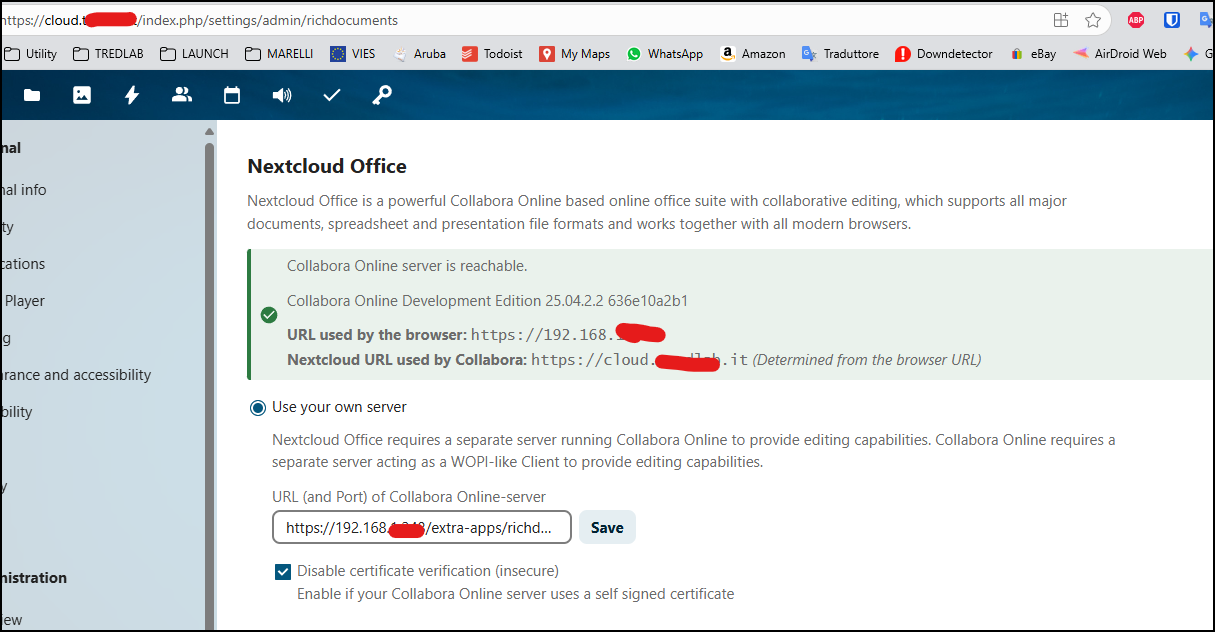
If you’re using the built-in CODE server (richdocumentscode), you don’t need to configure anything manually—just make sure the “Use built-in CODE server” option is enabled.
If it still doesn’t work, it’s likely because the client doesn’t trust the self-signed certificate, or it might still be trying to connect via the URL you previously used. In that case, try switching to “Use your own server” and then back to “Use built-in server”—that can sometimes reset things.
That said, this setup isn’t exactly ideal. Even though it can work in theory, to avoid issues like this, you should always access your Nextcloud via its domain name, don’t switch between using the IP address and the domain.
Check out 101: Split-Brain DNS (split-horizon) to learn how you can configure your local network to always access Nextcloud via domain name, even from within your LAN.
we’ll need to have a look at your logs, your config.php and app list etc, so please run the debugging script and post the results here.
your screen shot says something else… please double check you settings. we’ve discussed that previously already!
the strange thing that happen ( i don’t know if it’s normal) is that when i access with local IP and check the setting, is selected built in code, while if access with cloud.mydomain.it it automatically select “use your own server” and put the local IP address
Yeah, switching back and forth between IP and domain isn’t exatley ideal. I don’t have reliable solution for you. But I added a few things to my previous post you might want to consider, in order to avoid those issues…
debug script output.pdf (183,5 KB)
can’t paste here the result as it is too long
i see different options selected when i enter with cloud.mydomain.it and my local IP. when i access with local IP and check the setting, is selected built in code, while if access with cloud.mydomain.it it automatically select use your own server and there is the link https://192.168.+++.+++/extra-apps/richdocumentscode/proxy.php?req=
It do it automatically
@Gianmarco_S, this certainly points to a certificate error.
:"cURL error 51: SSL: no alternative certificate subject name matches target host
name '192.168.1.248' (see https://curl.haxx.se/libcurl/c/libcurl-errors.html)
please post your redacted config.php
Yes, it does that, but that’s not really a problem; it also happens when you’re using a domain name. The actual issue is that it sticks with the IP address when you access your Nextcloud instance via its domain name rather than switching back to the domain.
You could try manually replacing the IP with your domain in the URL, but even if that works, you’ll likely run into the same issue again the next time you access the instance using the IP.
By the way, what do your trusted_domain, overwrite.cli.url, overwritehost, and overwriteprotocol settings look like in your config.php?
If overwritehost ist set, you could try to remove it from your config.php. However, as long as you’re switching back and forth between the domain and the IP address Nextcloud Office will probably never work fully reliable in every situation.
So, once again, my recommendation: only use the domain name, even from within your LAN and then configure your config.php like this:
'trusted_domains' =>
  array (
    0 => 'cloud.yourdomain.tld',
  ),
'overwrite.cli.url' => 'https://cloud.yourdomain.tld',
'overwritehost' => 'cloud.yourdomain.tld',
'overwriteprotocol' => 'https',
i posted the config.php file and i’m missing only the string
‘overwritehost’ => ‘cloud.yourdomain.tld’,
Have i to add it?
"trusted_domains": [
        "{{ * }}",
        "cloud.mydomain.it",
        "localhost",
        "nextcloud.local",
        "***Public IP***"
    ],
    "datadirectory": "***REMOVED SENSITIVE VALUE***",
    "dbtype": "mysql",
    "version": "31.0.6.2",
    "overwrite.cli.url": "https:\/\/cloud.mydomain.it",
    "overwriteprotocol": "https",
    "htaccess.RewriteBase": "\/",
I’m trying to investigate about the TLS certificate. when i run
ping cloud.mydomain.it
it give me
64 bytes from cloud.mydomain.it (127.0.1.1): icmp_seq=58 ttl=64 time=0.040 ms
is 127.0.1.1 correct? or it have to show the public ip address?
the ip 127.0.1.1 is set in the host file