unfortunately a lot of information to help you is missing as you ignored the required support template. Please edit into your post and add as many information as possible. This will give us the technical info and logs needed to help you!
you still didn’t add any logs and referring to a 5y old tutorial doesn’t tell us if you follow the guide exactly or made some changes (which I assume you did, especially from the the Nextcloud collabora docker loading document fails I have the feeling you are doing strange things with local IPs or maybe no TLS which is always bad). Please add logs from all components, especially browser F12 logs might be interesting as copy&paste is a client-side task.
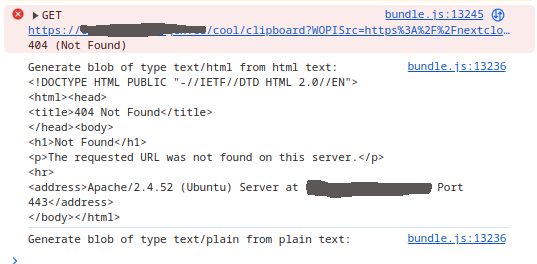
Here is the browser log entry after I select, right click and select copy
The collabora_error.log is empty.
The nextcloud_error.log has
[Fri Apr 11 10:29:13.098923 2025] [proxy:warn] [pid 201939] [client 93.174.93.12:60000] AH01092: no HTTP 0.9 request (with no host line) on incoming request and preserve host set forcing hostname to be nextcloud.phagex.eu for uri /
Here is the link to the last line of the nextcloud.log Nextcloud.log - Google Docs
I hope this makes sense for you now.
If you have a more recent tutorial, I am more than happy to read it if you point me to it.
Here are the changes I made to KarlF12’s protocol (quoted from the original post).
The problem is pretty clear from the error message: URL not found on this server (coming from Apache reverse proxy?) likely this results from the outdated /lool directive in the tutorial
PS… and please post your effective config and logs output here in the forum if possible - nobody is willing to puzzle your config from multiple sources.
Thank’s wws for the quick and ultimately helpful feedback — indeed, switching from /lool to /cool solved the issue. Appreciate being pointed in the right direction.
wws and vawaver, I’ll admit the PS stung a bit, but fair enough — next time I’ll make sure to provide the full config and logs upfront. Thanks again for the support!