Hello together,
-
Nextcloud snap (31)
-
Nextcloud Android app 3.34.0 on GrapheneOS (Android 16, Pixel 9a) from F-Droid, so no Play services dependency AFAIK
Problem:
-
Uploading files to Nextcloud via Share menu on Android or auto-uploading files from Android results in an error. I can’t tell you the exact text as it is almost instantly disappearing.
-
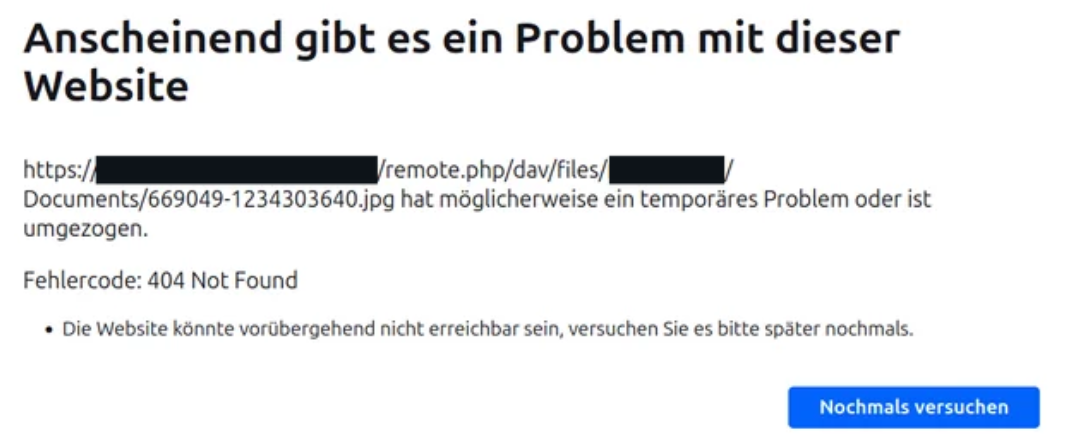
In Nextcloud I can open and view the file, but downloading it results in a 404 (below). Nextcloud sync via Linux desktop client also throws an error as it can’t sync the file to Desktop folder.
-
Uploading a file manually via Desktop browser is working and I can also download the file again without any problems.
-
Syncing pictures via EasySync (a Webdav client) from my phone to Nextcloud worked without any problems so Webdav is working and there seems to be an issue with the Nextcloud android app.
Any ideas or someone with the same problem here?
The Basics
-
Nextcloud Server version: Hub 10 (31.0.10)
-
Operating system and version Ubuntu 22.04.05 LTS on Proxmox (VM)
-
Web server and version Apache 2.4.52
-
Reverse proxy and version Nginx Proxy Manager
-
PHP version 8.3.23
-
Is this the first time you’ve seen this error? Yes
-
When did this problem seem to first start? One-two weeks ago
-
Installation method Snap on Proxmox VM
-
Are you using Cloudflare, mod_security, or similar? No
Summary of the issue you are facing:
-
Uploading files to Nextcloud via Share menu on Android or auto-uploading files from Android results in an error. I can’t tell you the exact text as it is almost instantly disappearing.
-
In Nextcloud I can open and view the file, but downloading it results in a 404 (below). Nextcloud sync via Linux desktop client also throws an error as it can’t sync the file to Desktop folder.
-
Uploading a file manually via Desktop browser is working and I can also download the file again without any problems.
-
Syncing pictures via EasySync (a Webdav client) from my phone to Nextcloud worked without any problems so Webdav is working and there seems to be an issue with the Nextcloud android app.
-
The “new” special permission for access to all files in Android was (already) set for Nextcloud. Neither did re-assigning the permission help nor re-installing the Android app.
Steps to replicate it (hint: details matter!):
-
Taking a photo an Android with Nextcloud auto-upload set up
-
Open Nextcloud in Desktop browser. Opening the uploaded photo is working. Downloading fails with a 404.
-
Adding the auto-upload folder to Nextcloud client (Linux Mint) results in neverending errors as it’s trying to sync the file and not finding it.
Log entries
Nextcloud
Please provide the log entries from your Nextcloud log that are generated during the time of problem (via the Copy raw option from Administration settings->Logging screen or from your nextcloud.log located in your data directory). Feel free to use a pastebin/gist service if necessary.
Nothing related there.
Web Browser
If the problem is related to the Web interface, open your browser inspector Console and Network tabs while refreshing (reloading) and reproducing the problem. Provide any relevant output/errors here that appear.
Could not open file /SofortUpload/Camera/IMG_20251110_125617_878.jpg TypeError: can't access property "filename", h is undefined

GET
https://cloud.example.de/remote.php/dav/files/example/SofortUpload/Camera/IMG_20251110_125617_878.jpg
NS_ERROR_NET_ERROR_RESPONSE


GET
https://cloud.example.de/remote.php/dav/files/example/SofortUpload/Camera/IMG_20251110_125617_878.jpg
Status
404
Not Found
VersionHTTP/1.1
Übertragen988 B (0 B Größe)
Referrer Policyno-referrer
Anfrage-PrioritätHighest
DNS-AuflösungSystem
Web server / Reverse Proxy
The output of your Apache/nginx/system log in /var/log/____:
192.168.180.4 192.168.180.146 - - [10/Nov/2025:12:25:59 +0000] “PUT /remote.php/dav/files/example/SofortUpload/Camera/IMG_20251110_132526_147.jpg HTTP/1.1” 201 1265 “-” “Mozilla/5.0 (Android) Nextcloud-android/3.34.0”
192.168.180.4 192.168.180.146 - - [10/Nov/2025:12:25:59 +0000] “PROPFIND /remote.php/dav/files/example/SofortUpload/Camera/IMG_20251110_132526_147.jpg HTTP/1.1” 207 2846 “-” “Mozilla/5.0 (Android) Nextcloud-android/3.34.0”
192.168.180.4 192.168.180.146 - - [10/Nov/2025:12:25:59 +0000] “PROPFIND /remote.php/dav/files/example/Sync/DCIM/Camera/ HTTP/1.1” 207 2385 “-” “okhttp/5.1.0”
192.168.180.4 192.168.180.140 - - [10/Nov/2025:12:26:00 +0000] “GET /index.php/apps/files/files/24663?dir=/SofortUpload/Camera HTTP/1.1” 200 15548 “-” “Mozilla/5.0 (Windows NT 10.0; Win64; x64; rv:144.0) Gecko/20100101 Firefox/144.0”
192.168.180.4 192.168.180.140 - - [10/Nov/2025:12:26:00 +0000] “REPORT /remote.php/dav/files/example/ HTTP/1.1” 207 697 “-” “Mozilla/5.0 (Windows NT 10.0; Win64; x64; rv:144.0) Gecko/20100101 Firefox/144.0”
192.168.180.4 192.168.180.140 - - [10/Nov/2025:12:26:00 +0000] “GET /ocs/v2.php/apps/files/api/v1/folder-tree?path=%2F&depth=1 HTTP/1.1” 200 866 “-” “Mozilla/5.0 (Windows NT 10.0; Win64; x64; rv:144.0) Gecko/20100101 Firefox/144.0”
192.168.180.4 192.168.180.140 - - [10/Nov/2025:12:26:01 +0000] “PROPFIND /remote.php/dav/files/example/SofortUpload/Camera/ HTTP/1.1” 207 3647 “-” “Mozilla/5.0 (Windows NT 10.0; Win64; x64; rv:144.0) Gecko/20100101 Firefox/144.0”
192.168.180.4 192.168.180.146 - - [10/Nov/2025:12:25:59 +0000] “GET /index.php/core/preview?fileId=24674&x=256&y=256&a=1&mode=cover&forceIcon=0 HTTP/1.1” 200 14021 “-” “Mozilla/5.0 (Android) Nextcloud-android/3.34.0”
192.168.180.4 192.168.180.140 - - [10/Nov/2025:12:26:01 +0000] “GET /core/img/favicon-touch.png HTTP/1.1” 200 3018 “-” “Mozilla/5.0 (Windows NT 10.0; Win64; x64; rv:144.0) Gecko/20100101 Firefox/144.0”
192.168.180.4 192.168.180.140 - - [10/Nov/2025:12:26:01 +0000] “GET /ocs/v2.php/apps/user_status/api/v1/user_status HTTP/1.1” 200 903 “-” “Mozilla/5.0 (Windows NT 10.0; Win64; x64; rv:144.0) Gecko/20100101 Firefox/144.0”
192.168.180.4 192.168.180.140 - - [10/Nov/2025:12:26:01 +0000] “PUT /ocs/v2.php/apps/user_status/api/v1/heartbeat?format=json HTTP/1.1” 200 903 “-” “Mozilla/5.0 (Windows NT 10.0; Win64; x64; rv:144.0) Gecko/20100101 Firefox/144.0”
192.168.180.4 192.168.180.140 - - [10/Nov/2025:12:26:01 +0000] “GET /ocs/v2.php/apps/notifications/api/v2/notifications HTTP/1.1” 200 1519 “-” “Mozilla/5.0 (Windows NT 10.0; Win64; x64; rv:144.0) Gecko/20100101 Firefox/144.0”
192.168.180.4 192.168.180.146 - - [10/Nov/2025:12:26:00 +0000] “PUT /remote.php/dav/files/example/Sync/DCIM/Camera/IMG_20251110_132526_147.jpg HTTP/1.1” 201 1900 “-” “okhttp/5.1.0”
192.168.180.4 192.168.180.140 - - [10/Nov/2025:12:26:01 +0000] “GET /apps/dashboard/img/dashboard.svg HTTP/1.1” 200 940 “-” “Mozilla/5.0 (Windows NT 10.0; Win64; x64; rv:144.0) Gecko/20100101 Firefox/144.0”
192.168.180.4 192.168.180.140 - - [10/Nov/2025:12:26:01 +0000] “GET /ocs/v2.php/apps/recommendations/api/v1/recommendations HTTP/1.1” 200 1104 “-” “Mozilla/5.0 (Windows NT 10.0; Win64; x64; rv:144.0) Gecko/20100101 Firefox/144.0”
192.168.180.4 192.168.180.146 - - [10/Nov/2025:12:26:01 +0000] “PROPFIND /remote.php/dav/files/example/Sync/DCIM/Camera/IMG_20251110_132526_147.jpg HTTP/1.1” 207 2365 “-” “okhttp/5.1.0”
192.168.180.4 192.168.180.140 - - [10/Nov/2025:12:26:02 +0000] “GET /index.php/core/preview?fileId=24674&x=250&y=250 HTTP/1.1” 200 11875 “-” “Mozilla/5.0 (Windows NT 10.0; Win64; x64; rv:144.0) Gecko/20100101 Firefox/144.0”
192.168.180.4 192.168.180.140 - - [10/Nov/2025:12:26:02 +0000] “GET /index.php/core/preview?fileId=24674&x=32&y=32&mimeFallback=true&v=6e51bf&a=0 HTTP/1.1” 200 2577 “-” “Mozilla/5.0 (Windows NT 10.0; Win64; x64; rv:144.0) Gecko/20100101 Firefox/144.0”
192.168.180.4 192.168.180.140 - - [10/Nov/2025:12:26:02 +0000] “GET /index.php/core/preview?fileId=24682&x=250&y=250 HTTP/1.1” 200 11875 “-” “Mozilla/5.0 (Windows NT 10.0; Win64; x64; rv:144.0) Gecko/20100101 Firefox/144.0”
192.168.180.4 192.168.180.140 - - [10/Nov/2025:12:26:04 +0000] “GET /index.php/apps/files/api/v1/views HTTP/1.1” 200 848 “-” “Mozilla/5.0 (Windows NT 10.0; Win64; x64; rv:144.0) Gecko/20100101 Firefox/144.0”
192.168.180.4 192.168.180.140 - - [10/Nov/2025:12:26:04 +0000] “PROPFIND /remote.php/dav/files/example/SofortUpload/Camera/IMG_20251110_132526_147.jpg HTTP/1.1” 207 1484 “-” “Mozilla/5.0 (Windows NT 10.0; Win64; x64; rv:144.0) Gecko/20100101 Firefox/144.0”
192.168.180.4 192.168.180.140 - - [10/Nov/2025:12:26:04 +0000] “GET /index.php/apps/files/api/v1/views HTTP/1.1” 200 848 “-” “Mozilla/5.0 (Windows NT 10.0; Win64; x64; rv:144.0) Gecko/20100101 Firefox/144.0”
192.168.180.4 192.168.180.140 - - [10/Nov/2025:12:26:04 +0000] “PROPFIND /remote.php/dav/files/example/SofortUpload/Camera/ HTTP/1.1” 207 3661 “-” “Mozilla/5.0 (Windows NT 10.0; Win64; x64; rv:144.0) Gecko/20100101 Firefox/144.0”
192.168.180.4 192.168.180.140 - - [10/Nov/2025:12:26:04 +0000] “GET /index.php/core/preview?fileId=24674&x=3840&y=2160&a=true&etag=6e51bf06458072aae6b38dc1b01cfc51 HTTP/1.1” 200 2153169 “-” “Mozilla/5.0 (Windows NT 10.0; Win64; x64; rv:144.0) Gecko/20100101 Firefox/144.0”
Configuration
Nextcloud
The output of occ config:list system or similar is best, but, if not possible, the contents of your config.php file from /path/to/nextcloud is fine (make sure to remove any identifiable information!):
{
    "system": {
        "apps_paths": [
            {
                "path": "\/snap\/nextcloud\/current\/htdocs\/apps",
                "url": "\/apps",
                "writable": false
            },
            {
                "path": "\/var\/snap\/nextcloud\/current\/nextcloud\/extra-apps",
                "url": "\/extra-apps",
                "writable": true
            }
        ],
        "supportedDatabases": [
            "mysql"
        ],
        "memcache.locking": "\\OC\\Memcache\\Redis",
        "memcache.local": "\\OC\\Memcache\\Redis",
        "redis": {
            "host": "***REMOVED SENSITIVE VALUE***",
            "port": 0
        },
        "log_type": "file",
        "logfile": "\/var\/snap\/nextcloud\/current\/logs\/nextcloud.log",
        "logfilemode": 416,
        "maintenance_window_start": 1,
        "instanceid": "***REMOVED SENSITIVE VALUE***",
        "passwordsalt": "***REMOVED SENSITIVE VALUE***",
        "secret": "***REMOVED SENSITIVE VALUE***",
        "trusted_domains": [
            "192.168.180.5",
            "cloud.example.de",
            "127.0.1.1",
            "nextcloud.example.de"
        ],
        "trusted_proxies": "***REMOVED SENSITIVE VALUE***",
        "allow_local_remote_servers": true,
        "ratelimit.protection.enabled": false,
        "datadirectory": "***REMOVED SENSITIVE VALUE***",
        "dbtype": "mysql",
        "version": "31.0.10.2",
        "overwriteprotocol": "https",
        "forwarded_for_headers": [
            "HTTP_X_FORWARDED",
            "HTTP_FORWARDED_FOR"
        ],
        "dbname": "***REMOVED SENSITIVE VALUE***",
        "dbhost": "***REMOVED SENSITIVE VALUE***",
        "dbport": "",
        "dbtableprefix": "oc_",
        "mysql.utf8mb4": true,
        "dbuser": "***REMOVED SENSITIVE VALUE***",
        "dbpassword": "***REMOVED SENSITIVE VALUE***",
        "installed": true,
        "maintenance": false,
        "loglevel": 2,
        "mail_smtpmode": "smtp",
        "mail_smtpsecure": "ssl",
        "mail_sendmailmode": "smtp",
        "mail_from_address": "***REMOVED SENSITIVE VALUE***",
        "mail_domain": "***REMOVED SENSITIVE VALUE***",
        "mail_smtphost": "***REMOVED SENSITIVE VALUE***",
        "mail_smtpport": "465",
        "mail_smtpauth": true,
        "mail_smtpname": "***REMOVED SENSITIVE VALUE***",
        "mail_smtppassword": "***REMOVED SENSITIVE VALUE***"
    }
}
Apps
The output of occ app:list (if possible).
Enabled:
- activity: 4.0.0
- app_api: 5.0.2
- bookmarks: 15.2.1
- bruteforcesettings: 4.0.0
- calendar: 5.5.8
- circles: 31.0.0
- cloud_federation_api: 1.14.0
- comments: 1.21.0
- contacts: 7.3.6
- contactsinteraction: 1.12.1
- dashboard: 7.11.0
- dav: 1.33.0
- federatedfilesharing: 1.21.0
- federation: 1.21.0
- files: 2.3.1
- files_downloadlimit: 4.0.0
- files_external: 1.23.0
- files_pdfviewer: 4.0.0
- files_reminders: 1.4.0
- files_sharing: 1.23.1
- files_trashbin: 1.21.0
- files_versions: 1.24.0
- firstrunwizard: 4.0.0
- geoblocker: 0.5.18
- logreader: 4.0.0
- lookup_server_connector: 1.19.0
- mail: 5.5.13
- nextcloud_announcements: 3.0.0
- notifications: 4.0.0
- oauth2: 1.19.1
- oidc_login: 3.2.2
- ownershiptransfer: 1.3.0
- password_policy: 3.0.0
- photos: 4.0.0
- privacy: 3.0.0
- profile: 1.0.0
- provisioning_api: 1.21.0
- recommendations: 4.0.0
- related_resources: 2.0.0
- richdocuments: 8.7.6
- richdocumentscode: 25.4.504
- serverinfo: 3.0.0
- settings: 1.14.0
- sharebymail: 1.21.0
- support: 3.0.0
- survey_client: 3.0.0
- systemtags: 1.21.1
- tasks: 0.17.0
- text: 5.0.2
- theming: 2.6.1
- twofactor_backupcodes: 1.20.0
- user_oidc: 8.1.0
- user_status: 1.11.0
- viewer: 4.0.0
- weather_status: 1.11.0
- webhook_listeners: 1.2.0
- workflowengine: 2.13.0
Disabled:
- admin_audit: 1.21.0
- encryption: 2.19.0
- spreed: 21.1.5 (installed 21.1.5)
- suspicious_login: 9.0.1
- twofactor_nextcloud_notification: 5.0.0
- twofactor_totp: 13.0.0-dev.0
- user_ldap: 1.22.0
EDIT for the support template
EDIT2: Added Apache logs. Looked into the wrong log file. 
