The Basics
- Nextcloud Server version (e.g., 29.x.x):
32.0.0
- Operating system and version (e.g., Ubuntu 24.04):
*Linux 6.12.24-Unraid, using the Linuxserver "nextcloud" Docker container - Web server and version (e.g, Apache 2.4.25):
nginx/1.28.0 (fpm-fcgi)
- Reverse proxy and version _(e.g. nginx 1.27.2)
Linuxserver "swag" Docker container
- PHP version (e.g, 8.3):
8.4.13
- Is this the first time you’ve seen this error? (Yes / No):
Yes
- When did this problem seem to first start?
After updating to Nextcloud 32, but I do not regularly use the web UI
- Installation method (e.g. AlO, NCP, Bare Metal/Archive, etc.)
Docker (see OS entry) on unRAID
- Are you using CloudfIare, mod_security, or similar? (Yes / No)
no
Summary of the issue you are facing:
When any user logs in to the Nextcloud web UI for the first time after the update to version 32, they are forced to watch a video and click to dismiss a modal dialog after it finishes:
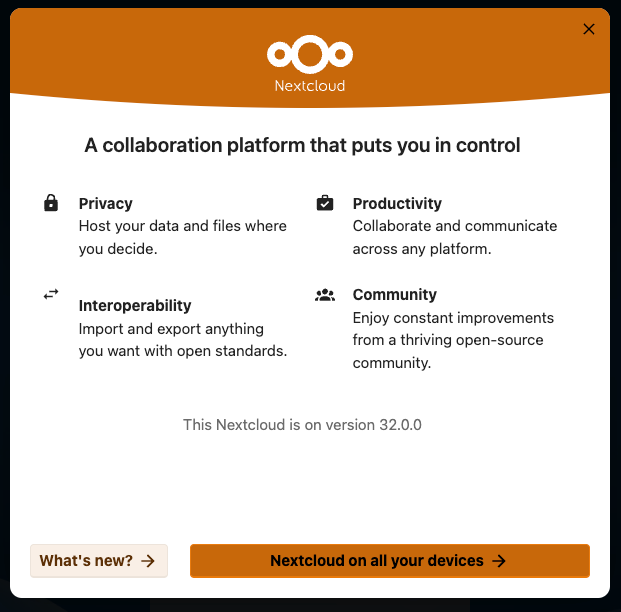
This is particularly bad when autoplay is disabled (as it should be!) because the first frame is blank. Frankly, it gives the impression that the server has been pwned in those circumstances 
As the server admin, I do not want users to be forced to watch a video and then dismiss a modal (because I get the complaints!). After logging in, they should be taken straight to their dashboard, without having to click through an advertisement for the software they are already using.
How do I permanently disable this?
Steps to replicate it (hint: details matter!):
- Log in to a server running Nextcloud 32 with a user that has not logged in to it since the upgrade.
Log entries
Nextcloud
Please provide the log entries from your Nextcloud log that are generated during the time of problem (via the Copy raw option from Administration settings->Logging screen or from your nextcloud.log located in your data directory). Feel free to use a pastebin/gist service if necessary.
No applicable log entries generated
Web Browser
If the problem is related to the Web interface, open your browser inspector Console and Network tabs while refreshing (reloading) and reproducing the problem. Provide any relevant output/errors here that appear.
No relevant output/errors
Web server / Reverse Proxy
The output of your Apache/nginx/system log in /var/log/____:
Logs not enabled on reverse proxy
Configuration
Nextcloud
The output of occ config:list system or similar is best, but, if not possible, the contents of your config.php file from /path/to/nextcloud is fine (make sure to remove any identifiable information!):
{
    "system": {
        "datadirectory": "***REMOVED SENSITIVE VALUE***",
        "instanceid": "***REMOVED SENSITIVE VALUE***",
        "passwordsalt": "***REMOVED SENSITIVE VALUE***",
        "secret": "***REMOVED SENSITIVE VALUE***",
        "trusted_domains": [
            "***REMOVED SENSITIVE VALUE***"
        ],
        "dbtype": "mysql",
        "version": "32.0.0.13",
        "overwrite.cli.url": "***REMOVED SENSITIVE VALUE***",
        "dbname": "***REMOVED SENSITIVE VALUE***",
        "dbhost": "***REMOVED SENSITIVE VALUE***",
        "dbport": "",
        "dbtableprefix": "oc_",
        "mysql.utf8mb4": true,
        "dbuser": "***REMOVED SENSITIVE VALUE***",
        "dbpassword": "***REMOVED SENSITIVE VALUE***",
        "installed": true,
        "mail_smtpmode": "smtp",
        "mail_smtphost": "***REMOVED SENSITIVE VALUE***",
        "mail_sendmailmode": "smtp",
        "mail_smtpport": "465",
        "mail_from_address": "***REMOVED SENSITIVE VALUE***",
        "mail_domain": "***REMOVED SENSITIVE VALUE***",
        "mail_smtpauth": 1,
        "mail_smtpname": "***REMOVED SENSITIVE VALUE***",
        "mail_smtppassword": "***REMOVED SENSITIVE VALUE***",
        "maintenance": false,
        "memcache.local": "\\OC\\Memcache\\APCu",
        "filelocking.enabled": true,
        "memcache.locking": "\\OC\\Memcache\\APCu",
        "upgrade.disable-web": true,
        "loglevel": 0
    }
}
Apps
The output of occ app:list (if possible).
Enabled:
  - activity: 5.0.0-dev.0
  - app_api: 32.0.0
  - bruteforcesettings: 5.0.0-dev.0
  - circles: 32.0.0
  - cloud_federation_api: 1.16.0
  - comments: 1.22.0
  - contactsinteraction: 1.13.1
  - dashboard: 7.12.0
  - dav: 1.34.2
  - federatedfilesharing: 1.22.0
  - federation: 1.22.0
  - files: 2.4.0
  - files_downloadlimit: 5.0.0-dev.0
  - files_pdfviewer: 5.0.0-dev.0
  - files_reminders: 1.5.0
  - files_sharing: 1.24.0
  - files_trashbin: 1.22.0
  - files_versions: 1.25.0
  - firstrunwizard: 5.0.0-dev.0
  - logreader: 5.0.0-dev.0
  - lookup_server_connector: 1.20.0
  - nextcloud_announcements: 4.0.0-dev.0
  - notifications: 5.0.0-dev.0
  - oauth2: 1.20.0
  - password_policy: 4.0.0-dev.0
  - photos: 5.0.0-dev.1
  - privacy: 4.0.0-dev.0
  - profile: 1.1.0
  - provisioning_api: 1.22.0
  - related_resources: 3.0.0-dev.0
  - serverinfo: 4.0.0-dev.0
  - settings: 1.15.1
  - sharebymail: 1.22.0
  - support: 4.0.0-dev.0
  - systemtags: 1.22.0
  - text: 6.0.0-dev.0
  - theming: 2.7.0
  - twofactor_backupcodes: 1.21.0
  - twofactor_totp: 14.0.0
  - unroundedcorners: 1.1.5
  - updatenotification: 1.22.0
  - user_status: 1.12.0
  - viewer: 5.0.0-dev.0
  - weather_status: 1.12.0
  - webhook_listeners: 1.3.0
  - workflowengine: 2.14.0
Disabled:
  - admin_audit: 1.22.0
  - encryption: 2.20.0
  - files_external: 1.24.0
  - files_rightclick: 1.6.0 (installed 1.6.0)
  - geoblocker: 0.5.11 (installed 0.5.11)
  - gpxpod: 7.0.4 (installed 7.0.4)
  - listman: 27.1.4 (installed 27.1.4)
  - recommendations: 5.0.0-dev.0 (installed 1.1.0)
  - survey_client: 4.0.0-dev.0 (installed 1.10.0)
  - suspicious_login: 10.0.0-dev.0
  - twofactor_nextcloud_notification: 6.0.0-dev.0
  - user_ldap: 1.23.0
Tips for increasing the likelihood of a response
- Use the
preformatted textformatting option in the editor for all log entries and configuration output. - If screenshots are useful, feel free to include them.
- If possible, also include key error output in text form so it can be searched for.
- Try to edit log output only minimally (if at all) so that it can be ran through analyzers / formatters by those trying to help you.