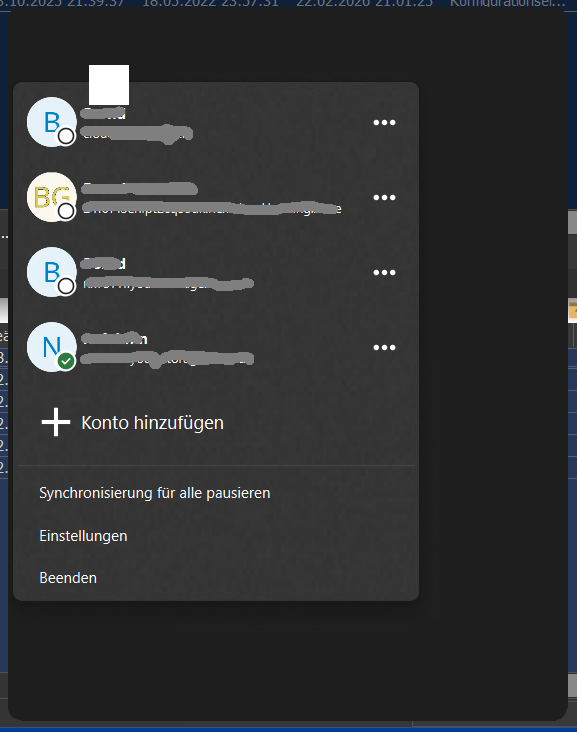
Edited 2026-01-15. Around the time of the update to v4.0.1 the popup from the system tray icon is blank but the problem remains after reverting to older versions.
I reported the issue here (see screenshots) but didn’t get an answer since November 25. Meanwhile it looks like it is not an issue especially of v4 but rather of an incompatibility of the desktop client and updates of Windows or drivers that have happened in the meantime.
The issue exists on three different Windows 11 computers in two different places in all Windows user accounts and regards several Nextcloud servers. So I wonder why there are not more complaints about this issue. There are no other display issues on these computers.
This makes me think if there are some interactions between the NC client and other software. You don’t use anything that does modifications to the windows appearance?
On the task bar, I can see a number of symbols for programs running in the background. Did you try to stop a few of them? I suppose your 3 different Window 11 computers have a similar set of software? You don’t have one of them with a freshly installed Win11 and nothing else?
On your Nextcloud itself, do you use theming (I’m not sure how much the client would adopt to specific coloring)?
Thank you for your answer! I had the same idea because I do have modifications to the task bar (Windhawk) and the system theme (switch from light to dark in the evening). These were active already when the popup still worked. I already disabled them and the issue persists.
Because I don’t have a computer with a fresh system, today I booted in safe mode and then started Nextcloud - and the issue persists.
The 3 computers are one at home and two at my mini-job location. All are several years old, have different hardware - though all have Intel graphics - and on the two computers at my mini-job there is less software running in the background and nothing that modifies the system UI.
I don’t know anything about theming the Nextcloud client.
No, that is a service they offer for enterprise customers (or you compile a version yourself), I meant the regular Nextcloud theming of the web version. I don’t know if the client might pick up the color scheme or something like that.
Ah ok, so it worked in the past. I’ve just read that your tests with the 3.17 didn’t work either. Do you know a specific version of the client where it still worked and you can try with this version again? It might be a change in something else that create the conflict with the Nextcloud client, however this should not happen.
Ok, just Intel graphics alone, there would be many more people having this issue. Do you have a software that runs on all 3 computers that is not used by many people?
Normally, I’d hope to get a bit more information from the developers what might influence the coloring of the menu, are these OS settings or in which way other programs or apps might be able to create something so you can do a more targeted research.
It definitely worked with v3.17 before the update to v4.0. I think it still worked with 4.0 and not with 4.0.1. But now it doesn’t work with any version that previously worked. Please see my verbose issue report linked in my OP. So it is very likely that there is some conflict that may not be directly caused by v4 but happened in the time of the update.
The only programs that run in the background of all three computers that come to my mind are Everything and PDF24. But as I wrote in my previous post I started Windows on my home computer in safe mode (no background programs running) and the issue persisted. I will be at work on Tuesday and will have a look.
This behavior was reported as a bug in late 2024 and should be fixed since the 3.16.0 line (the fix landed across commits in Nov/Dec 2024 and Jan 2025).
I’m not convinced that @jtr’s PR #9041 is the root fix for what you’re seeing. Your note that even downgrading no longer changes anything points to a different cause (Windows configuration, drivers, theming tools, shell modifications, etc.).
This is not only a “blank tray popup” — your Windows Application log shows actual Nextcloud crashes:
Faulting app: nextcloud.exe (4.0.6.9498)
Faulting module: Qt6WebEngineCore.dll
Exception code: 0x80000003 (breakpoint)
Your system is hybrid GPU (Intel UHD 630 + NVIDIA Quadro P1000) and you also have per-app GPU preferences configured.
That combination can affect Qt/QtWebEngine rendering and can also trigger “blank/transparent popup” behavior.
Next steps:
A) Confirm when it crashes
Win+R → eventvwr.msc → Windows Logs → Application
Filter for “Application Error” and check if a new crash entry appears exactly when you click the tray icon / open the UI.
B) Force the GPU for nextcloud.exe and test both modes
Test “Power saving” (integrated GPU) and “High performance” (discrete GPU)
After each change: fully exit Nextcloud and restart it.
C) Eliminate Windows mixed theme as a trigger
Settings → Personalization → Colors
Set “App mode” to match “Windows mode” (both Dark or both Light)
Restart Nextcloud (and optionally restart Windows Explorer)
D) If it still crashes: collect a real crash dump:
Below are two either/or options to enable Windows crash dumps for nextcloud.exe (so we stop guessing and can see what actually crashes).
Please pick Option A (Admin) if you can run an elevated terminal. If not, use Option B (Per-user) .
Option A — System-wide (requires Admin)
Open Command Prompt / Windows Terminal as Administrator , create a dump folder, then add the WER “LocalDumps” registry keys for nextcloud.exe .
After enabling one option above, reproduce the tray popup crash again (same steps that currently trigger the problem).
When the crash happens, Windows should write a .dmp file.
If you used Option A , look in: C:\NC-Dumps
If you used Option B , look in: %LOCALAPPDATA%\NC-Dumps
You should see one or more files like:
nextcloud.exe.<pid>.dmp (name can vary)
possibly a matching .tmp or .log
A dump can contain very sensitive data (memory contents), including:
parts of URLs, filenames, local paths
possibly tokens/cookies depending on what was in memory at crash time
So please do not post the dump publicly in the forum thread.
Best next step:
If you’re comfortable sharing it, upload the .dmp privately (same bucket as before) and tell me the exact filename and folder path you used.
If you are not comfortable uploading it, you can still use it yourself to confirm it was generated and then delete it.
Meaningful details can be extracted from a dump (crashing module, call stack, exception code, threads, loaded DLLs, GPU/Qt-related modules). That’s exactly what we need to determine whether this is a theme/compositor issue, a GPU driver path, or something else.
Thank you so much for your detailed answer and instructions. This issue is really a hard one.
A. The crash you found in the archive is and was the only nextcloud.exe crash in a long time. The next one was 2 months ago with a different library (Qt6Core.dll). I could not force another crash with all the tests I did following your instructions.
B. I tested all possible settings - none makes a difference.
C. I did that before and repeated all possible combinations - no difference.
I once again did a Windows restart into safe mode - still the same issue.
Edit: All 3 computers have in common the managed Nextcloud account at Hetzner used for my employer (https://nx#####.your-storageshare.de). The two computers at work only have that one account. At my home computer I have more accounts added. Is there anything in the Nextcloud server that might cause this issue?