When running docker compose up I get "Docker socket is not readable by the www-data user. Cannot continue"

Support intro

Sorry to hear you’re facing problems. :slightly_frowning_face:

The community help forum (help.nextcloud.com) is for home and non-enterprise users. Support is provided by other community members on a best effort / “as available” basis. All of those responding are volunteering their time to help you.

If you’re using Nextcloud in a business/critical setting, paid and SLA-based support services can be accessed via portal.nextcloud.com where Nextcloud engineers can help ensure your business keeps running smoothly.

Getting help

In order to help you as efficiently (and quickly!) as possible, please fill in as much of the below requested information as you can.

Before clicking submit: Please check if your query is already addressed via the following resources:

(Utilizing these existing resources is typically faster. It also helps reduce the load on our generous volunteers while elevating the signal to noise ratio of the forums otherwise arising from the same queries being posted repeatedly).

I’ve made all the newbie mistakes known to man when it comes to permissions. I’ve tried to retroactively fix the issue but to no avail.

The Basics

  • Operating system and version (e.g., Ubuntu 24.04):
    • Description: Ubuntu 24.04.4 LTS
  • Is this the first time you’ve seen this error? (Yes / No):
    • Yes
  • When did this problem seem to first start?
    • I was getting a folder permissions error in my server. I basically have a user folder that I seemed to have lost permissions to overnight. Everything was working fine. In an attempt to fix that I believe I changed permissions for my folders and consequently broke everything else.
  • nstallation method (e.g. AlO, NCP, Bare Metal/Archive, etc.)
    • Nextcloud aio using docker containers
  • Are you using CloudfIare, mod_security, or similar? (Yes / No)
    • Using Cloudflare to tunnel the nc.website.net

Summary of the issue you are facing:

Like I said, I’ve changed permission and haven’t been able to run the program since. It’s a rookie mistake and I even considered completely re-installing Ubuntu to try to fix it, but I already have data in the server and a mounted drive that took me quite some time to get set up. I will follow any and all instructions to provide logs, but please keep in mind I am fairly green when it comes to linux. I appreciate any and all help in advance. I’ll post the errors I’m getting and any supplemental information I can get.

The INITIAL problem I was dealing with was a folder permission issue encountered on the server. I googled the issue and I believe my first mistake was running this:

# Set ownership to www-data (UID 33) and group 0

sudo chown -R 33:0 /path/to/your/folder

# Set permissions to 750 (owner rwx, group r-x, others none)

sudo chmod -R 750 /path/to/your/folder

I didn’t encounter any initial issue here. However, the next time I tried to run:

docker compose up

OR:

sudo docker run --sig-proxy=false --name nextcloud-aio-mastercontainer --restart always --publish 80:80 --publish 8080:8080 --publish 8443:8443 --volume nextcloud_aio_mastercontainer:/mnt/docker-aio-config --volume /var/run/docker.sock:/var/run/docker.sock:ro nextcloud/all-in-one:latest

It returned:

nextcloud-aio-mastercontainer  | sudo: /etc/sudo.conf is owned by uid 1000, should be 0
nextcloud-aio-mastercontainer  | sudo: /etc/sudoers is owned by uid 1000, should be 0
nextcloud-aio-mastercontainer  | sudo: error initializing audit plugin sudoers_audit
nextcloud-aio-mastercontainer  | Trying to fix docker.sock permissions internally…
nextcloud-aio-mastercontainer  | Adding internal www-data to group www-data
nextcloud-aio-mastercontainer  | sudo: /etc/sudo.conf is owned by uid 1000, should be 0
nextcloud-aio-mastercontainer  | sudo: /etc/sudoers is owned by uid 1000, should be 0
nextcloud-aio-mastercontainer  | sudo: error initializing audit plugin sudoers_audit
nextcloud-aio-mastercontainer  | Docker socket is not readable by the www-data user. Cannot continue.

This is where you’re going to get mad at me. I have since run a myriad of commands and permissions.

Now, the folders I have messed with:

/var/run/docker.sock

srwxr-x— 1 root docker 0 May 3 15:55 /var/run/docker.sock

Relevant groups and their permissions:

getent group ashrite
ashrite:x:1000:www-data

##

getent group www-data
www-data:x:998:ashrite

## 

getent group docker
docker:x:33:ashrite,www-data

I have probably borked this beyond repair but am posting in hopes someone can guide me to the light. I appreciate your taking time to read this.

Configuration

Nextcloud compose.yaml : NOTE: I have not made any changes to my compose.yaml. Issues are just stemming from permission changes.

name: nextcloud-aio # Add the container to the same compose project like all the sibling containers are added to automatically.
services:
  nextcloud-aio-mastercontainer:
    image: ghcr.io/nextcloud-releases/all-in-one:latest # This is the container image used. You can switch to ghcr.io/nextcloud-releases/all-in-one:beta if you want to help testing ne>
    init: true # This setting makes sure that signals from main process inside the container are correctly forwarded to children. See https://docs.docker.com/reference/compose-file/se>
    restart: always # This makes sure that the container starts always together with the host OS. See https://docs.docker.com/reference/compose-file/services/#restart
    container_name: nextcloud-aio-mastercontainer # This line is not allowed to be changed as otherwise AIO will not work correctly
    volumes:
      - nextcloud_aio_mastercontainer:/mnt/docker-aio-config # This line is not allowed to be changed as otherwise the built-in backup solution will not work
      - /var/run/docker.sock:/var/run/docker.sock:ro # May be changed on macOS, Windows or docker rootless. See the applicable documentation. If adjusting, don't forget to also set 'W>
      - /media/ExternalStorageWD:/nextcloud_aio_mastercontainer
# devices: ["/dev/dri"] # Uncomment to enable hardware acceleration. ⚠️⚠️⚠️ Warning: this only works if the '/dev/dri' device is present on the host! If it should not exist on your host,>
    network_mode: bridge # This adds the container to the same network as docker run would do. Comment this line and uncomment the line below and the networks section at the end of th>
    # networks: ["nextcloud-aio"]
    ports:
      - 80:80 # Can be removed when running behind a web server or reverse proxy (like Apache, Nginx, Caddy, Cloudflare Tunnel and else). See https://github.com/nextcloud/all-in-one/b>
      - 8080:8080 # This is the AIO interface, served via https and self-signed certificate. See https://github.com/nextcloud/all-in-one#explanation-of-used-ports
     #  - 11000:11000 
 #  - "8443:8443" # Can be removed when running behind a web server or reverse proxy (like Apache, Nginx, Caddy, Cloudflare Tunnel and else). See https://github.com/nextcloud/all-in-o>
    # security_opt: ["label:disable"] # Is needed when using SELinux. See https://github.com/nextcloud/all-in-one#are-there-known-problems-when-selinux-is-enabled
    environment: # Is needed when using any of the options below
      # AIO_DISABLE_BACKUP_SECTION: false # Setting this to true allows to hide the backup section in the AIO interface. See https://github.com/nextcloud/all-in-one#how-to-disable-the>
       APACHE_PORT: 11000 # Is needed when running behind a web server or reverse proxy (like Apache, Nginx, Caddy, Cloudflare Tunnel and else). See https://github.com/nextcloud/all-i>
       APACHE_IP_BINDING: 0.0.0.0 # Should be set when running behind a web server or reverse proxy (like Apache, Nginx, Caddy, Cloudflare Tunnel and else) that is running on the same>
      # APACHE_ADDITIONAL_NETWORK: frontend_net # (Optional) Connect the apache container to an additional docker network. Needed when behind a web server or reverse proxy (like Apach>
      # BORG_RETENTION_POLICY: --keep-within=7d --keep-weekly=4 --keep-monthly=6 # Allows to adjust borgs retention policy. See https://github.com/nextcloud/all-in-one#how-to-adjust-b>
      # AIO_LOG_LEVEL: warn # Allows to globally adjust the log level of the included AIO components. Supported values: debug, info, warn, error. See https://github.com/nextcloud/all->
      # COLLABORA_SECCOMP_DISABLED: false # Setting this to true allows to disable Collabora's Seccomp feature. See https://github.com/nextcloud/all-in-one#how-to-disable-collaboras-s>
      # DOCKER_API_VERSION: 1.44 # You can adjust the internally used docker api version with this variable. ⚠️⚠️⚠️ Warning: please note that only the default api version (unset this var>
      # FULLTEXTSEARCH_JAVA_OPTIONS: "-Xms1024M -Xmx1024M" # Allows to adjust the fulltextsearch java options. See https://github.com/nextcloud/all-in-one#how-to-adjust-the-fulltextse>
      # NEXTCLOUD_DATADIR: /mnt/ncdata # Allows to set the host directory for Nextcloud's datadir. ⚠️⚠️⚠️ Warning: do not set or adjust this value after the initial Nextcloud installatio>
       NEXTCLOUD_MOUNT: /media/ExternalStorageWD/
SKIP_DOMAIN_VALIDATION: true

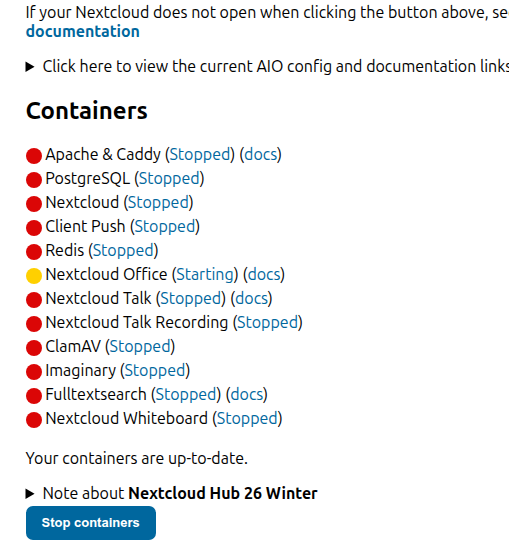
Update: I managed to remake the ww-data user and give it permissions through adding it to the docker group. I actually got to the Nextcloud AIO admin portal https://i.p:8080.

Now the issue is all the containers don’t have permissions. I have given docker group permission to all relevant folders but I’m clearly doing something wrong. Any input would be great. Here’s the output after running docker compose up

docker compose up
WARN[0000] volume “nextcloud_aio_mastercontainer” already exists but was created for project “nextcloud” (expected “nextcloud-aio”). Use external: true to use an existing volume
Attaching to nextcloud-aio-mastercontainer
nextcloud-aio-mastercontainer | Initial startup of Nextcloud All-in-One complete!
nextcloud-aio-mastercontainer | You should be able to open the Nextcloud AIO Interface now on port 8080 of this server!
nextcloud-aio-mastercontainer | E.g. ``https://internal.ip.of.this.server:8080
nextcloud-aio-mastercontainer | ⚠️ Important: do always use an ip-address if you access this port and not a domain as HSTS might block access to it later!
nextcloud-aio-mastercontainer |
nextcloud-aio-mastercontainer | If your server has port 80 and 8443 open and you point a domain to your server, you can get a valid certificate automatically by opening the Nextcloud AIO Interface via:
nextcloud-aio-mastercontainer | ``https://your-domain-that-points-to-this-server.tld:8443
nextcloud-aio-mastercontainer | [04-May-2026 03:28:33] NOTICE: fpm is running, pid 191
nextcloud-aio-mastercontainer | [04-May-2026 03:28:33] NOTICE: ready to handle connections
nextcloud-aio-mastercontainer | NOTICE: PHP message: Slim Application Error
nextcloud-aio-mastercontainer | Type: GuzzleHttp\Exception\ClientException
nextcloud-aio-mastercontainer | Code: 404
nextcloud-aio-mastercontainer | Message: Client error: POST http://127.0.0.1/v1.44/networks/nextcloud-aio/connect resulted in a 404 Not Found response:
nextcloud-aio-mastercontainer | {“message”:“network sandbox for container 6401ff7af0b2aa1f7f0b3134e34ae280e7dfdb4b0ed7bd10d12b79d052d8e427 not found”}
nextcloud-aio-mastercontainer | File: /var/www/docker-aio/php/vendor/guzzlehttp/guzzle/src/Exception/RequestException.php
nextcloud-aio-mastercontainer | Line: 111
nextcloud-aio-mastercontainer | Trace: #0 /var/www/docker-aio/php/vendor/guzzlehttp/guzzle/src/Middleware.php(72): GuzzleHttp\Exception\RequestException::create(Object(GuzzleHttp\Psr7\Request), Object(GuzzleHttp\Psr7\Response), NULL, Array, NULL)
nextcloud-aio-mastercontainer | #1 /var/www/docker-aio/php/vendor/guzzlehttp/promises/src/Promise.php(209): GuzzleHttp\Middleware::{closure:{closure:{closure:GuzzleHttp\Middleware::httpErrors():60}:61}:67}(Object(GuzzleHttp\Psr7\Response))
nextcloud-aio-mastercontainer | #2 /var/www/docker-aio/php/vendor/guzzlehttp/promises/src/Promise.php(158): GuzzleHttp\Promise\Promise::callHandler(1, Object(GuzzleHttp\Psr7\Response), NULL)
nextcloud-aio-mastercontainer | #3 /var/www/docker-aio/php/vendor/guzzlehttp/promises/src/TaskQueue.php(52): GuzzleHttp\Promise\Promise::{closure:GuzzleHttp\Promise\Promise::settle():156}()
nextcloud-aio-mastercontainer | #4 /var/www/docker-aio/php/vendor/guzzlehttp/promises/src/Promise.php(251): GuzzleHttp\Promise\TaskQueue->run(true)
nextcloud-aio-mastercontainer | #5 /var/www/docker-aio/php/vendor/guzzlehttp/promises/src/Promise.php(227): GuzzleHttp\Promise\Promise->invokeWaitFn()
nextcloud-aio-mastercontainer | #6 /var/www/docker-aio/php/vendor/guzzlehttp/promises/src/Promise.php(272): GuzzleHttp\Promise\Promise->waitIfPending()
nextcloud-aio-mastercontainer | #7 /var/www/docker-aio/php/vendor/guzzlehttp/promises/src/Promise.php(229): GuzzleHttp\Promise\Promise->invokeWaitList()
nextcloud-aio-mastercontainer | #8 /var/www/docker-aio/php/vendor/guzzlehttp/promises/src/Promise.php(69): GuzzleHttp\Promise\Promise->waitIfPending()
nextcloud-aio-mastercontainer | #9 /var/www/docker-aio/php/vendor/guzzlehttp/guzzle/src/Client.php(189): GuzzleHttp\Promise\Promise->wait()
nextcloud-aio-mastercontainer | #10 /var/www/docker-aio/php/src/Docker/DockerActionManager.php(823): GuzzleHttp\Client->request(‘POST’, ‘``http://127.0.0``…’, Array)
nextcloud-aio-mastercontainer | #11 /var/www/docker-aio/php/src/Docker/DockerActionManager.php(850): AIO\Docker\DockerActionManager->ConnectContainerIdToNetwork(‘nextcloud-aio-c…’, ‘9980’, ‘nextcloud-aio’, true, ‘’)
nextcloud-aio-mastercontainer | #12 /var/www/docker-aio/php/src/Controller/DockerController.php(45): AIO\Docker\DockerActionManager->ConnectContainerToNetwork(Object(AIO\Container\Container))
nextcloud-aio-mastercontainer | #13 /var/www/docker-aio/php/src/Controller/DockerController.php(30): AIO\Controller\DockerController->PerformRecursiveContainerStart(‘nextcloud-aio-c…’, true, Object(Closure))
nextcloud-aio-mastercontainer | #14 /var/www/docker-aio/php/src/Controller/DockerController.php(268): AIO\Controller\DockerController->PerformRecursiveContainerStart(‘nextcloud-aio-a…’, true, Object(Closure))
nextcloud-aio-mastercontainer | #15 /var/www/docker-aio/php/src/Controller/DockerController.php(249): AIO\Controller\DockerController->startTopContainer(true, Object(Closure))
nextcloud-aio-mastercontainer | #16 /var/www/docker-aio/php/vendor/slim/slim/Slim/Handlers/Strategies/RequestResponse.php(39): AIO\Controller\DockerController->StartContainer(Object(Slim\Psr7\Request), Object(Slim\Psr7\Response), Array)
nextcloud-aio-mastercontainer | #17 /var/www/docker-aio/php/vendor/slim/slim/Slim/Routing/Route.php(362): Slim\Handlers\Strategies\RequestResponse->__invoke(Array, Object(Slim\Psr7\Request), Object(Slim\Psr7\Response), Array)
nextcloud-aio-mastercontainer | #18 /var/www/docker-aio/php/vendor/slim/slim/Slim/MiddlewareDispatcher.php(73): Slim\Routing\Route->handle(Object(Slim\Psr7\Request))
nextcloud-aio-mastercontainer | #19 /var/www/docker-aio/php/vendor/slim/slim/Slim/MiddlewareDispatcher.php(73): Slim\MiddlewareDispatcher->handle(Object(Slim\Psr7\Request))
nextcloud-aio-mastercontainer | #20 /var/www/docker-aio/php/vendor/slim/slim/Slim/Routing/Route.php(321): Slim\MiddlewareDispatcher->handle(Object(Slim\Psr7\Request))
nextcloud-aio-mastercontainer | #21 /var/www/docker-aio/php/vendor/slim/slim/Slim/Routing/RouteRunner.php(74): Slim\Routing\Route->run(Object(Slim\Psr7\Request))
nextcloud-aio-mastercontainer | #22 /var/www/docker-aio/php/vendor/slim/csrf/src/Guard.php(482): Slim\Routing\RouteRunner->handle(Object(Slim\Psr7\Request))
nextcloud-aio-mastercontainer | #23 /var/www/docker-aio/php/vendor/slim/slim/Slim/MiddlewareDispatcher.php(178): Slim\Csrf\Guard->process(Object(Slim\Psr7\Request), Object(Slim\Routing\RouteRunner))
nextcloud-aio-mastercontainer | #24 /var/www/docker-aio/php/vendor/slim/twig-view/src/TwigMiddleware.php(117): Psr\Http\Server\RequestHandlerInterface@anonymous->handle(Object(Slim\Psr7\Request))
nextcloud-aio-mastercontainer | #25 /var/www/docker-aio/php/vendor/slim/slim/Slim/MiddlewareDispatcher.php(129): Slim\Views\TwigMiddleware->process(Object(Slim\Psr7\Request), Object(Psr\Http\Server\RequestHandlerInterface@anonymous))
nextcloud-aio-mastercontainer | #26 /var/www/docker-aio/php/src/Middleware/AuthMiddleware.php(54): Psr\Http\Server\RequestHandlerInterface@anonymous->handle(Object(Slim\Psr7\Request))
nextcloud-aio-mastercontainer | #27 /var/www/docker-aio/php/vendor/slim/slim/Slim/MiddlewareDispatcher.php(283): AIO\Middleware\AuthMiddleware->__invoke(Object(Slim\Psr7\Request), Object(Psr\Http\Server\RequestHandlerInterface@anonymous))
nextcloud-aio-mastercontainer | #28 /var/www/docker-aio/php/vendor/slim/slim/Slim/Middleware/ErrorMiddleware.php(77): Psr\Http\Server\RequestHandlerInterface@anonymous->handle(Object(Slim\Psr7\Request))
nextcloud-aio-mastercontainer | #29 /var/www/docker-aio/php/vendor/slim/slim/Slim/MiddlewareDispatcher.php(129): Slim\Middleware\ErrorMiddleware->process(Object(Slim\Psr7\Request), Object(Psr\Http\Server\RequestHandlerInterface@anonymous))
nextcloud-aio-mastercontainer | #30 /var/www/docker-aio/php/vendor/slim/slim/Slim/MiddlewareDispatcher.php(73): Psr\Http\Server\RequestHandlerInterface@anonymous->handle(Object(Slim\Psr7\Request))
nextcloud-aio-mastercontainer | #31 /var/www/docker-aio/php/vendor/slim/slim/Slim/App.php(209): Slim\MiddlewareDispatcher->handle(Object(Slim\Psr7\Request))
nextcloud-aio-mastercontainer | #32 /var/www/docker-aio/php/vendor/slim/slim/Slim/App.php(193): Slim\App->handle(Object(Slim\Psr7\Request))
nextcloud-aio-mastercontainer | #33 /var/www/docker-aio/php/public/index.php(220): Slim\App->run()
nextcloud-aio-mastercontainer | #34 {main}
nextcloud-aio-mastercontainer | Tips: To display error details in HTTP response set “displayErrorDetails” to true in the ErrorHandler constructor.

Hello @ashrite, welcome to the Nextcloud community! :handshake:

Likely you did something wrong here

would be interesting to understand where/from which folder you run this command. is /var/run/docker.sock the only file you changed the permission? why - if there is misleading instructions in the docs would be great to point them out

which files and folder? please provide ls -al output of /mnt/docker-aio-config and / var/run/docker.sock

As rookie I recommend starting here (and all 101 articles for deeper understanding)

AiO as a Docker-based installation stores it’s data in few pre-defined locations it should be easy to extract it there to start from scratch..

It wasn’t the only folder whose permission I changed. I’ll show you the permissions I’m currently working with. I do not have a /mnt/ folder.

ls -l /nextcloud (where docker is running)

-rwxrwx— 1 root docker 10570 May 3 16:41 compose.yaml
-rwxrwx— 1 root docker 0 Oct 25 2025 -d
drwxrwx— 5 root docker 4096 May 1 18:15 ncdata
drwxrwx— 4 root docker 4096 Oct 25 2025 npm
ashrite@Tuf-a15:/nextcloud$

Here is ls -al of /var/run/docker.sock

srw-rw---- 1 root docker 0 May 3 22:17 /var/run/docker.sock

ls -l of /var/run

lrwxrwxrwx 1 root docker 4 Feb 15 2025 /var/run → /run

This is what my admin page currently looks like:

What do you mean by “where Docker is running”?

Your also mentioned both Compose and run commands. These are generally mutually exclusive and would bring up entirely separate deployments.

Unless we know what your live / production environment was/is, it’s challenging to provide concrete advice.

I’m unclear about your data volumes setup. By default AIO uses entirely Docker managed named volumes.

Your run command followed that approach.

Your Compose approach sort of does but then also has this weird volume entry:

- /media/ExternalStorageWD:/nextcloud_aio_mastercontainer

Can you elaborate what your goal is/was here?

And what folder/files originally had permission problems?

I realize this is very complicated and part of why I dug my own hole deeper and deeper. I should’ve stopped earlier, but alas. So to run the program what I use is go to: cd /nextcloud
From here I can run docker compose pull and docker compose up. I didn’t realize using the docker run command would pull from a different place but it still worked before the same way. Right now though, neither are working. I did manage to get to the :8080 management screen which I wasn’t able to before So that’s a step forward. I was trying to find info on what permissions are given with a fresh install but I can’t find it. I was hoping to find something like docker needs and uses permissions in these files with these permission. However, I’ve clearly gone off the deep end and have broken more than I can fix right now which I apologize for if this isn’t making any sense.

I can give you the relevant groups with their IDs and permissions if that helps. I’m willing to provide any and all info. If this is a case of having to nuke it and start from scratch, then I can do that as well. Although I might need help saving data that was already in the server.

If it’s of any help. I followed this guide that I followed to install. I’m NO longer running Nginx proxy, just Cloudflare.

I’m certain I changed permissions for file/folders I shouldn’t have trying to fix the initial issue while following information found online rather than asking direct questions.

Some of the files/folders I’ve changed permissions for:

/var/lib/docker

sudo ls -al /var/lib/docker
total 104
drwx--x---+  12 root    docker  4096 May  4 12:05 .
drwxr-xr-x+  81 root    root    4096 May  1 08:03 ..
drwxrwx---+   3 ashrite docker  4096 Nov  7 12:44 buildkit
drwx--x---+   4 root    docker  4096 May  4 12:20 containers
-rwxrwx---+   1 ashrite docker    36 Nov  7 12:44 engine-id
drwxrwx---+   3 ashrite docker  4096 Nov  7 12:44 image
drwxrwx---+   3 ashrite docker  4096 Nov  7 12:44 network
-rwxrwx---+   1 ashrite docker  1572 Nov  7 12:37 nuke-graph-directory.sh
drwx--x---+ 169 root    docker 49152 May  4 12:20 overlay2
drwxrwx---+   3 ashrite docker  4096 Nov  7 12:44 plugins
drwx------    2 root    docker  4096 May  4 12:05 runtimes
drwxrwx---+   2 ashrite docker  4096 Nov  7 12:44 swarm
drwx------    3 root    docker  4096 May  4 12:10 tmp
drwx-----x+  12 root    docker  4096 May  4 12:05 volumes

/nextcloud

total 32
drwxrwx---  4 root    docker   4096 May  4 11:59 .
drwxr-xr-x 26 root    root     4096 May  3 13:42 ..
-rwxrwx---  1 root    docker  10570 May  3 16:41 compose.yaml
-rw-rw-r--  1 ashrite ashrite  1024 May  4 11:59 .compose.yaml.swp
-rwxrwx---  1 root    docker      0 Oct 25  2025 -d
drwxrwx---  5 root    docker   4096 May  1 18:15 ncdata
drwxrwx---  4 root    docker   4096 Oct 25  2025 npm

sudo ls -l /var/run/docker.sock
srw-rw---- 1 root docker 0 May  4 12:05 /var/run/docker.sock

sudo ls -al /var/run/docker
total 0
drwx------  7 root root  160 May  4 12:05 .
drwxr-xr-x 37 root root 1120 May  4 12:36 ..
drwxr-xr-x  3 root root   60 May  4 13:25 containerd
drw-------  2 root root   60 May  4 12:05 libnetwork
srwxr-xr-x  1 root root    0 May  4 12:05 metrics.sock
drwxr-xr-x  2 root root   60 May  4 13:25 netns
drwx------  2 root root   40 May  4 12:05 plugins
drwx------  3 root root   60 May  4 12:05 runtime-runc

I’ll delete this if it’s security risky of course, but that’s what I have so far. Thank you and I apologize for any inconvenience.

in my debian system both /var/run/docker and /var/lib/docker are owned by root:root and ..docker.sock by root:docker..

/nextcloud is little harder..

  • compose.yml should be your user (the one who starts the stack if you are using compose approach)..
  • I assume you want to store you data in /nextcloud/ncdata?
    then the owner should be 33:0 or 33:33 by default (translates to www-data:www-data on Debian/Ubuntu)
  • -d and .compose.yaml.swp look like crap

what did you plan with this settings?

  • From my understanding NEXTCLOUD_MOUNT is used to share directories between host and NC - likely it will not prevent startup of the app.. but I would comment out just to remove clutter
  • /media/ExternalStorageWD:/nextcloud_aio_mastercontainer it looks you tried to put the data of your system into ExternalWDStorage? which doesn’t work this way..

There are soo many knobs to turn so it will be really hard to fix the system. I would recommend to focus on backup/extract your data and start from ground zero.

Okay, I understand. Seems like nuking is the option here. Thank you for your time and help!