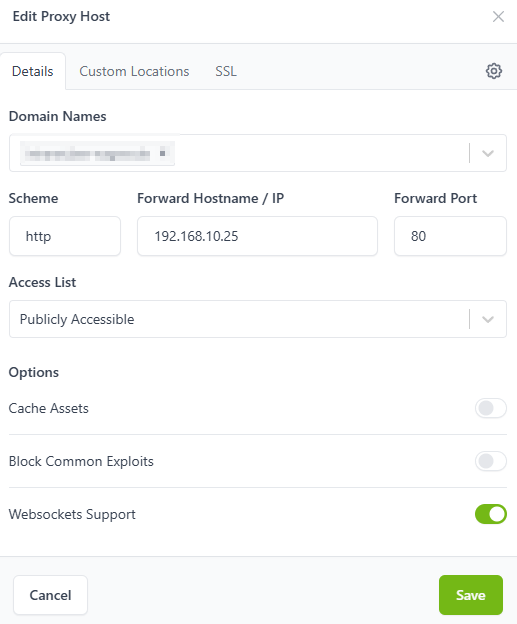
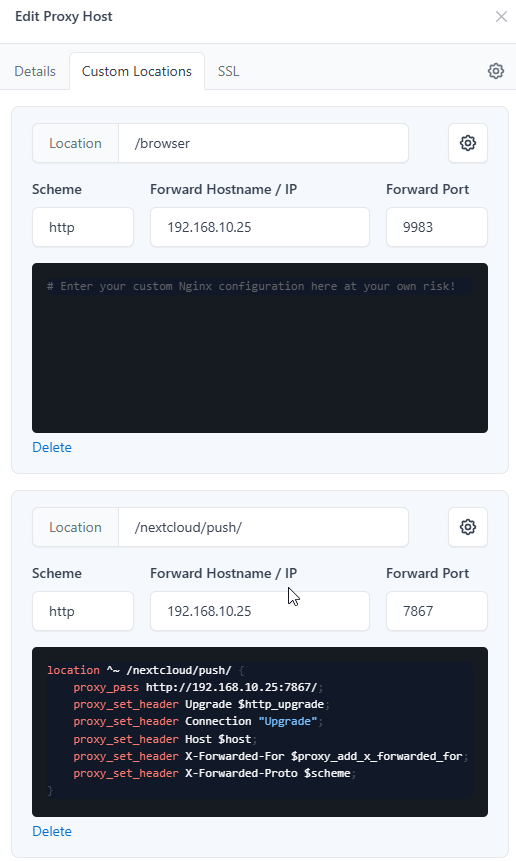
Fritzbox → Portforwarding 80&443 to NginxProxyManager –> Proxy Host created forarding Traffic via Port 80 to my Nextcloud Container. In the container nextcloud is run ning in the subfolder /nextcloud
Everything is working, but in the webbrowser I can see an error in the console:
index.js:91 WebSocket connection to ‘wss://servername.fqdn/nextcloud/push/ws’ failed:
What else do I need to do to get this error message away? Some of the settings I had to set otherwise my IOS Devices were not able to connect any longer.
Unfortunatley you bypassed the support template, so important information is still missing.
To know for sure if your setup is correct, you need to explain exactly where and how your notify_push service is running. How are your containers orchestrated?
Your information is far too superficial, because even the smallest details matter in this area.
I tried to download now the testclient which is giving more information:
test_client-x86_64-pc-windows-gnu.exe ``https://webserver.example.com/nextcloud`` benjamin PASSWORD [2026-01-12 16:00:40.153061 +01:00] INFO [test_client] test_client/src/main.rs:39: Found push server at wss://webserver.example.com/nextcloud/push/ws Error: x Can’t connect to server |-> URL error: URL scheme not supported `-> URL scheme not supported
On the server itseld the test is successful:
sudo -u www-data php /var/www/html/nextcloud/occ notify_push:self-test ✓ redis is configured ✓ push server is receiving redis messages ✓ push server can load mount info from database ✓ push server can connect to the Nextcloud server ✓ push server is a trusted proxy ✓ push server is running the same version as the app
So I believe i have to tell NGINX as reverse proxy to forward the WSS or WS scheme - but I have no clue how …
I remember that before I was switching to NGINX Proxy Manager I setup my Router to forward Port 80 to my Nextcloud Apache Webserver - there it worked. Now with using NPM it seems that I am only allowed to specify HTTP and HTTPS as protocoll, so this might show why in my backend no client is connected:
sudo -u www-data php /var/www/html/nextcloud/occ notify_push:metrics Active connection count: 0 Active user count: 0 Total connection count: 0 Total database query count: 9 Events received: 1518 Messages sent: 0 Messages sent (file): 0 Messages sent (notification): 0 Messages sent (activity): 0 Messages sent (custom): 0
The challenge was that with one setting the notify_push service was working, but IOS Devices were no longer able to connect. Modifying the settings then resulted in the ability of IOS clients to connect but client_pus did not work.
this was my solution:
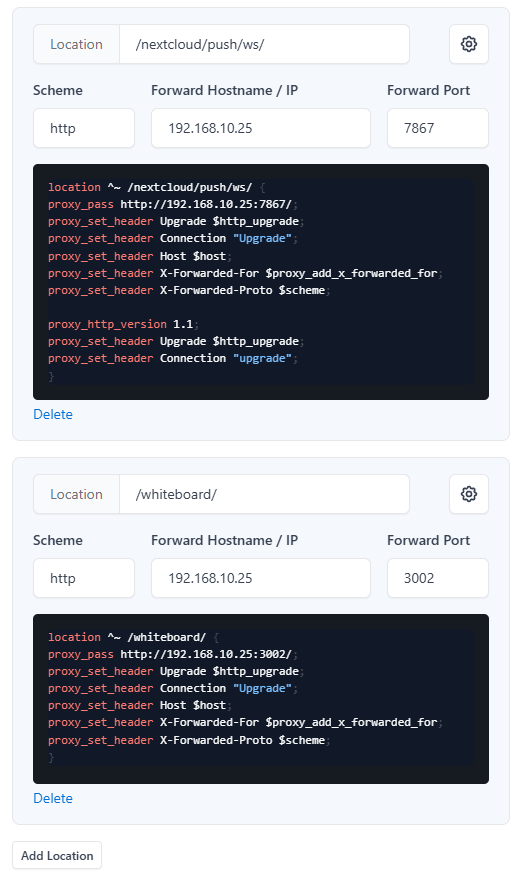
In NGINX Proxy Manager on my “Proxy Host” pointing to my nextcloud server I removed all existing custom locations. For this Proxy Host i addede the following custom Configuration:
On the Nextcloud Server I edited the local apache config /etc/apache2/sites-enabled/001-nextcloud.conf and added the following lines at the end of the VirtualHost section:
        # ProxyPass for Notify_Push
        ProxyPass /nextcloud/push/ws ws://127.0.0.1:7867/ws
        ProxyPassReverse /nextcloud/push/ws ws://127.0.0.1:7867/ws

        ProxyPass /nextcloud/push/ http://127.0.0.1:7867/
        ProxyPassReverse /nextcloud/push/ http://127.0.0.1:7867/

        # ProxyPass for Whiteboard
        ProxyPass /whiteboard/ http://192.168.10.25:3002

        # ProxyPass for browser
        ProxyPass /browser http://192.168.10.25:9983
Then I enabled the following modules for the Apache Webserverand restarted the Apache Webserver
In your 3rd screen shot you have an explicit handler in Nginx/NPM for location ^~ /nextcloud/push/ws/. That’s the culprit in your original configuration. Nginx doesn’t need that, plus the one you have is pointed at the root of notify_push (instead of [...]7867/ws) which wouldn’t be right anyhow.
You can see the documentation that covers this here.
One more thing:
My whole setup is not working, when I enable “HTTP/2” in the NGINX ProxyManager. Then the IOS Devices can not connect again. Any Idea how this can be?