Unable to Paste from System into Nextcloud Office

Hello,

We are using the following setup:

  • Nextcloud Office: Version 8.7.4 (AGPL-licensed)

  • Collabora Online - Built-in CODE Server: Version 25.4.403 (APACHE-licensed)

We are facing the following issue:

  • Copying and pasting from the system (desktop, laptop, etc.) into Nextcloud Office does not work.

  • Copy and paste inside Nextcloud Office itself works fine.

Is this a known issue with this version combination? Is there any configuration required to enable copy-paste from external sources into Nextcloud Office?

Thank you for your support.
1 Like

Hey @Wilsong welcome back…

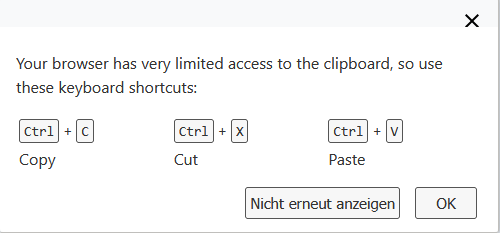
the following message is displayed when pasting from system to browser document;

suggesting the use of Ctrl+vto paste from system to active document.

…. hmmm possibly not an issue in that sense, but rather some browser security feature! So here’s that dreaded answer “its not a bug, its a feature:rofl:

If any application allows pasting, but not “Collabora Online - Built-in CODE Server”, it seems to be a bug.

I ran into the same issue with Firefox 142.0.1on my Nextcloud server.

On my old Univention Server copy and paste into browser works with “Collabora Online CODE Server” 24.04.12.4 and Nextcloud 29.x in the Firefox.

So it seems to be an issue with “Collabora Online - Built-in CODE Server” Copy and paste into Notes works - so it seems not to be a security-block.

In the error console I found:

Feature Policy: Unknown functionality (feature) "clipboard-write" is ignored.

and under “Debug”:

JSDialog: dialog info with id: “modal-dialog-copy_paste_download_progress” not found. proxy.php:29992:61

JSDialog: old data was: {}

1 Like

Hi there,

we’re having the same issue. It doesn’t seem to be a browser issue, since the very same browsers used to work before; however, we did updates to Debian 13 and Nextcloud 31.0.8 before this issue showed up.

When pasting something from outside the browser into a spreadsheet in Nextcloud Office, a 400 Bad Request error is returned while accessing /apps/richdocumentscode/proxy.php?req=/cool/clipboard.

In coolwsd.log the following message shows up (hostname xxx-ed out)

wsd-296329-296367 2025-09-11 17:34:36.134597 +0200 [ websrv_poll ] ERR  #29: #29 Exception while processing incoming request: [POST /cool/clipboard?WOPISrc=https%3A%2F%2Fxxx%2Findex.php%2Fapps%2Frichdocuments%2Fwopi%2Ffiles%xxx&ServerI…]: Malformed multipart message| wsd/ClientRequestDispatcher.cpp:1252

Generally, coolwsd.log grows really fast, including a lot of Serial mismatch messages like this:

wsd-296329-296369 2025-09-11 17:34:19.398557 +0200 [ docbroker_001 ] ERR  #-1: Serial mismatch 191 vs. 190| wsd/ProxyProtocol.cpp:164

We use

  • the build-in CODE server (Collabora Online Development Edition 25.04.4.3 997d8ce391)
  • Nextcloud 31.0.8
  • Nextcloud Office 8.7.4
  • Debian 13 + PHP 8.4.12

@Wilsong , could you check your coolwsd.log for similar events?

1 Like

hard to say without more logs, but likely there is something wrong with TLS or security headers e.g. feature-policy..

for me with dedicated CODE it works well (without intermediate dialog as described by scubamuc)

maybe this video help understand mechanics and challenges of copy&paste in browser applications

Nextcloud log creates no log entry, while attempt to paste.

Firefox error console (press F12):

NetworkError: A network error occurred. proxy.php:23
https://nextcloud.mydomain.de/apps/richdocumentscode/proxy.php?req=/browser/997d8ce391/src/layer/tile/TileWorker.js:23
GET
https://nextcloud.mydomain.de/apps/richdocumentscode/proxy.php?req=/browser/997d8ce391/images/lc_saved.svg
[HTTP/2 200 6ms]

GET
https://nextcloud.mydomain.de/apps/richdocumentscode/proxy.php?req=/browser/997d8ce391/images/lc_saved.svg
Status
200
VersionHTTP/2
Übertragen696 B (400 B Größe)
Referrer Policyno-referrer
Anfrage-PrioritätHigh
DNS-AuflösungSystem

cache-control
max-age=11059200
content-encoding
gzip
content-length
229
content-type
image/svg+xml
date
Fri, 12 Sep 2025 15:49:40
etag
“997d8ce391”
referrer-policy
no-referrer
server

strict-transport-security
max-age=15552000;includeSubdomains
x-content-type-options
nosniff
X-Firefox-Spdy
h2
x-frame-options
SAMEORIGIN
x-permitted-cross-domain-policies
none
x-robots-tag
noindex, nofollow
x-xss-protection
1; mode=block

Accept
image/avif,image/webp,image/png,image/svg+xml,image/;q=0.8,/*;q=0.5
Accept-Encoding
gzip, deflate, br, zstd
Accept-Language
de,en-US;q=0.7,en;q=0.3
Connection
keep-alive
Cookie
oc_sessionPassphrase=mfhpxxxxxxxxxxxxxxxxxxxxxxxxxxxxxxxxxxxxxxxxoo%2FNCaoX2; __Host-nc_sameSiteCookielax=true; __Host-nc_sameSiteCookiestrict=true; oceixlmtsz3y=937d39xxxxxxxxxxxxxxxxxt1iu; AMCV_F61712535xxxxxxxxxxxxx0D45%40AdobeOrg=1585540135xxxxxxxxxxxxxxxxxxxxxxxxxxxxxxxxxxxxxlkAcUniQYPHaMWWgdJ3xzPWQmdj0y%7CMCCIDH%7C-1595xxxxxx4%7CMCOPTOUT-1757108898s%7CNONE%7CMCAID%7CNONE%7CvVersion%7C4.4.0; AMCVS_F6171253512D2B8C0A490D45%40AdobeOrg=1; qmexp=1757103504407; s_ppv=us_en%253Asupport%253AKB%253Apd029622%2C27%2C2%2C10092%2C16%2C62; s_ips=601.6999999880791; s_tp=37484; s_cc=true; nc_username=myuser; nc_token=pfgv0zxxxxxxxxxxxxxxxxxxx5xK; nc_session_id=937dxxxxxxxxxxxxxxxxxlst1iu
Host
nextcloud.mydomain.de
Priority
u=4, i
Sec-Fetch-Dest
image
Sec-Fetch-Mode
no-cors
Sec-Fetch-Site
same-origin
TE
trailers
User-Agent
Mozilla/5.0 (Windows NT 10.0; Win64; x64; rv:142.0) Gecko/20100101 Firefox/142.0

Apache access.log (contains two lines containing “clipboard”:

79.194.180.212 - - [12/Sep/2025:18:58:19 +0200] “POST /apps/richdocumentscode/proxy.php?req=/cool/https%3A%2F%2Fnextcloud.mydomain.de%2Findex.php%2Fapps%2Frichdocuments%2Fwopi%2Ffiles%2F351883_oceixlmtsz3y%3Faccess_token%3Dsaxxxxxxxxxxxxxxxxxxxxxxxxxxli1sm%26access_token_ttl%3D0%26no_auth_header%3D/ws?WOPISrc=https%3A%2F%2Fnextcloud.mydomain.de%2Findex.php%2Fapps%2Frichdocuments%2Fwopi%2Ffiles%2F351883_oceixlmtsz3y&compat=/ws/25axxxxxxxxxxxxxxxxxxxxxxxxxd123/write/129 HTTP/2.0” 200 24 “-” “Mozilla/5.0 (Windows NT 10.0; Win64; x64; rv:142.0) Gecko/20100101 Firefox/142.0”
79.194.180.212 - - [12/Sep/2025:18:58:19 +0200] “POST /apps/richdocumentscode/proxy.php?req=/cool/clipboard?WOPISrc=https%3A%2F%2Fnextcloud.mydomain.de%2Findex.php%2Fapps%2Frichdocuments%2Fwopi%2Ffiles%2F351883_oceixlmtsz3y&ServerId=8xxxxxx7&ViewId=5&Tag=4b83fca20e83ee04 HTTP/2.0” 200 24 “-” “Mozilla/5.0 (Windows NT 10.0; Win64; x64; rv:142.0) Gecko/20100101 Firefox/142.0”
79.194.180.212 - - [12/Sep/2025:18:58:19 +0200] “POST /apps/richdocumentscode/proxy.php?req=/cool/https%3A%2F%2Fnextcloud.mydomain.de%2Findex.php%2Fapps%2Frichdocuments%2Fwopi%2Ffiles%2F351883_oceixlmtsz3y%3Faccess_token%3Dsaxxxxxxxxxxxxxxxxxxxxxxxxxxli1sm%26access_token_ttl%3D0%26no_auth_header%3D/ws?WOPISrc=https%3A%2F%2Fnextcloud.mydomain.de%2Findex.php%2Fapps%2Frichdocuments%2Fwopi%2Ffiles%2F351883_oceixlmtsz3y&compat=/ws/25axxxxxxxxxxxxxxxxxxxxxxxxxd123/write/130 HTTP/2.0” 200 24 “-” “Mozilla/5.0 (Windows NT 10.0; Win64; x64; rv:142.0) Gecko/20100101 Firefox/142.0”
79.194.180.212 - - [12/Sep/2025:18:58:20 +0200] “POST /apps/richdocumentscode/proxy.php?req=/cool/https%3A%2F%2Fnextcloud.mydomain.de%2Findex.php%2Fapps%2Frichdocuments%2Fwopi%2Ffiles%2F351883_oceixlmtsz3y%3Faccess_token%3Dsaxxxxxxxxxxxxxxxxxxxxxxxxxxli1sm%26access_token_ttl%3D0%26no_auth_header%3D/ws?WOPISrc=https%3A%2F%2Fnextcloud.mydomain.de%2Findex.php%2Fapps%2Frichdocuments%2Fwopi%2Ffiles%2F351883_oceixlmtsz3y&compat=/ws/25axxxxxxxxxxxxxxxxxxxxxxxxxd123/write/130 HTTP/2.0” 200 24 “-” “Mozilla/5.0 (Windows NT 10.0; Win64; x64; rv:142.0) Gecko/20100101 Firefox/142.0”
79.194.180.212 - - [12/Sep/2025:18:58:20 +0200] “POST /apps/richdocumentscode/proxy.php?req=/cool/clipboard?WOPISrc=https%3A%2F%2Fnextcloud.mydomain.de%2Findex.php%2Fapps%2Frichdocuments%2Fwopi%2Ffiles%2F351883_oceixlmtsz3y&ServerId=8xxxxxx7&ViewId=5&Tag=4b83fca20e83ee04 HTTP/2.0” 200 24 “-” “Mozilla/5.0 (Windows NT 10.0; Win64; x64; rv:142.0) Gecko/20100101 Firefox/142.0”
79.194.180.212 - - [12/Sep/2025:18:58:20 +0200] “POST /apps/richdocumentscode/proxy.php?req=/cool/https%3A%2F%2Fnextcloud.mydomain.de%2Findex.php%2Fapps%2Frichdocuments%2Fwopi%2Ffiles%2F351883_oceixlmtsz3y%3Faccess_token%3Dsaxxxxxxxxxxxxxxxxxxxxxxxxxxli1sm%26access_token_ttl%3D0%26no_auth_header%3D/ws?WOPISrc=https%3A%2F%2Fnextcloud.mydomain.de%2Findex.php%2Fapps%2Frichdocuments%2Fwopi%2Ffiles%2F351883_oceixlmtsz3y&compat=/ws/25axxxxxxxxxxxxxxxxxxxxxxxxxd123/write/131 HTTP/2.0” 200 24 “-” “Mozilla/5.0 (Windows NT 10.0; Win64; x64; rv:142.0) Gecko/20100101 Firefox/142.0”

IMO this is related to you previously posted

if the browser doesn’t allow copy&paste obviously there is no corresponding request.

But how to enable it? If I try to paste, the screen flickers and nothing else happens. The dialog displayed above neither appears in Firefox nor in Edge browser.

Even after disabling and re-enabling Nextcloud Office and the built-in CODE server, the issue is still not fixed.

I have also observed that the close button is not visible in Nextcloud Office when opening PPT, XLS, and DOC files.

For reference, I have attached the file and a video showing the copy/paste issue and the missing close button on the Right side of the xls

Even with odt, odf … - files

As we don’t know what is the reason for broken search chances are low simple re-installing of application will improve. What you need is digging into the problem and looking through the logs to understand the reason.

:thinking: ..and from you video it looks like copy&paste works
yes in fact closing is invisible - but still exists and works (it’s slightly visible on mouse-over) → please upvote this Github issue

As I informed earlier, copy and paste works inside Nextcloud Office. However, when I copy from my system (desktop, laptop, or browser) to Nextcloud Office, it is not working — it just keeps blinking.

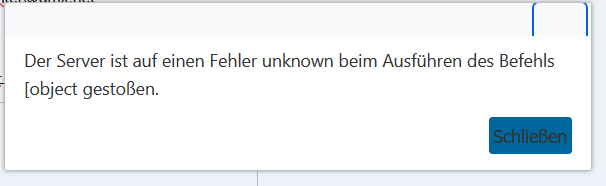
After update to Nextcloud 30.0.15 I now get an error message, if I try to paste into an text document:

In english:

The server encountered an unknown error while executing the command [object

@ everyone, seems like collabora CODE and richdocumentscode are having some issues described here:

1 Like

The bug reports now explain, why it does not work. I was sure from beginning, that the copy and paste issue cannot be browser-related. Thank you @scubamuc :+1:

1 Like

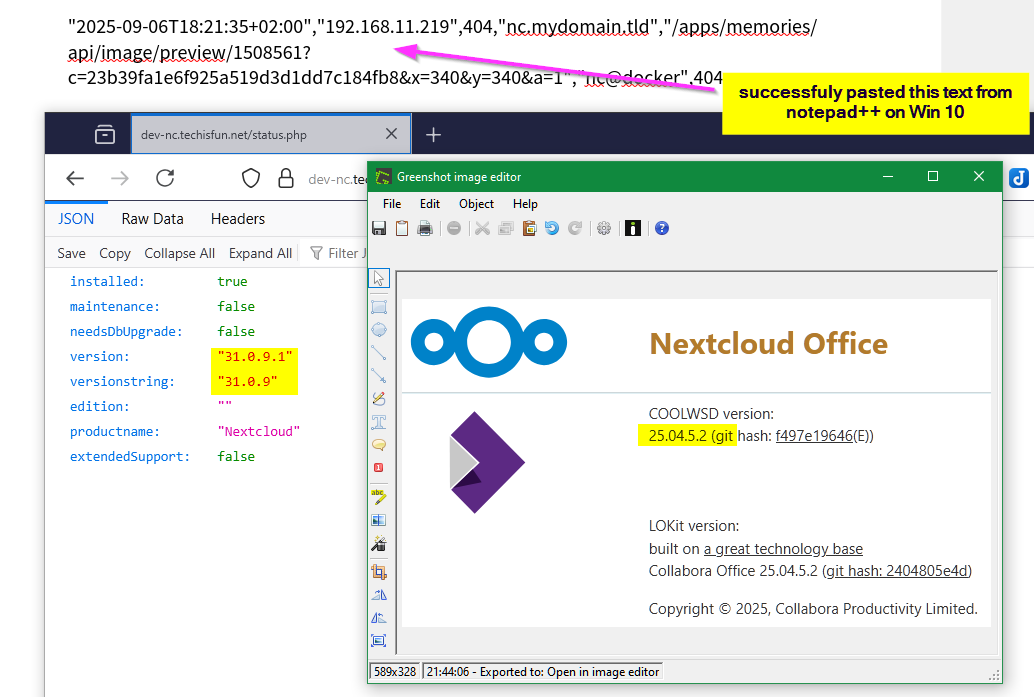
I can not say about 25.4.403 but even after upgrading to NC 31.0.9.1 copy&paste works without issues!

COOLWSD version: 25.04.5.2(git hash: f497e19646 (E))
LOKit version: Collabora Office 25.04.5.2(git hash: 2404805e4d)
Served by: Debian GNU/Linux 13 (trixie)
Server ID: bc64765a
WOPI host: nextcloud 31.0.9.1 - richdocuments 8.7.4

UPDATE: 25.04.4.3.1 works well in my full-docker installation. (Win10+Firefox)

COOLWSD version: 25.04.4.3(git hash: 997d8ce391 (E))
LOKit version: Collabora Office 25.04.4.3(git hash: fde3225f62)
Served by: Debian GNU/Linux 13 (trixie)
Server ID: aec66afb
WOPI host: nextcloud 31.0.9.1 - richdocuments 8.7.4
1 Like

due to the listed issues, I couldn’t test C&P on 31.0.9.1:

Same here

Nextcloud version 31.0.9

Collabora Online Development Edition 25.04.4.3 997d8ce391

Operating System: Linux 5.15.0-1085-raspi aarch64

CPU: Raspberry Pi 4 Model B Rev 1.4 (4 threads)

Memory: 7.62 GB

PHP:

Version: 8.3.25

Memory limit: 512 MB

Max execution time: 3600

Upload max size: 16 GB

OPcache Revalidate Frequency: 0

Extensions: Core, date, libxml, openssl, pcre, zlib, filter, hash, json, random, Reflection, SPL, session, standard, sodium, cgi-fcgi, mysqlnd, PDO, xml, apcu, bcmath, bz2, calendar, ctype, curl, dom, mbstring, FFI, fileinfo, ftp, gd, gettext, gmp, iconv, igbinary, imagick, imap, intl, ldap, exif, memcache, msgpack, mysqli, pdo_mysql, Phar, posix, readline, shmop, SimpleXML, soap, sockets, sysvmsg, sysvsem, sysvshm, tokenizer, xmlreader, xmlrpc, xmlwriter, xsl, zip, memcached, redis, Zend OPcache

Database:

Type: mysql

Version: 10.6.22

Using Version 30.0.15 . Yes doesn’t work. On any browser. ( Google / Outlook Drives no issues.)

COOLWSD version: 25.04.4.3(git hash: 997d8ce391 (E))
LOKit version: Collabora Office 25.04.4.3(git hash: fde3225f62)
Served by: Ubuntu 24.04.3 LTS
Server ID: 809ee4b5
WOPI host: nextcloud 30.0.15.1 - richdocuments 8.5.11

Edited: PS - It works on android mobile device but it does not work on a Macbook. I have not tried Windows.

Today, I got the update for Collabora Online – Built-in CODE Server Version 25.4.503. I have updated it and can now see the close button. However, I am still facing an issue with copy-paste.

Copying and pasting from my system doument into a Nextcloud Office document is not working.

Note: Copy-paste works fine within a Nextcloud Office document (with in the excel sheet), but it does not work when I try to copy from my system/browser into the document.

Can someone please help me fix this issue?