Support intro
Sorry to hear you’re facing problems. 
The community help forum (help.nextcloud.com) is for home and non-enterprise users. Support is provided by other community members on a best effort / “as available” basis. All of those responding are volunteering their time to help you.
If you’re using Nextcloud in a business/critical setting, paid and SLA-based support services can be accessed via portal.nextcloud.com where Nextcloud engineers can help ensure your business keeps running smoothly.
Getting help
In order to help you as efficiently (and quickly!) as possible, please fill in as much of the below requested information as you can.
Before clicking submit: Please check if your query is already addressed via the following resources:
- Official documentation (searchable and regularly updated)
- How to topics and FAQs
- Forum search
(Utilizing these existing resources is typically faster. It also helps reduce the load on our generous volunteers while elevating the signal to noise ratio of the forums otherwise arising from the same queries being posted repeatedly).
The Basics
- Nextcloud Server version (e.g., 29.x.x):
32.0.1
- Operating system and version (e.g., Ubuntu 24.04):
Debian 12
- Web server and version (e.g, Apache 2.4.25):
Apache 2.4.65
- Reverse proxy and version _(e.g. nginx 1.27.2)
NGINX Proxy Manager
- PHP version (e.g, 8.3):
PHP 8.4.13
- Is this the first time you’ve seen this error? (Yes / No):
Yes
- When did this problem seem to first start?
When I wanted to start a Talk meeting, it told me it couldnt reach the HPB.
- Installation method (e.g. AlO, NCP, Bare Metal/Archive, etc.)
AIO
- Are you using CloudfIare, mod_security, or similar? (Yes / No)
No
Summary of the issue you are facing:
I want to turn on HPB for Talk but i get the following error:
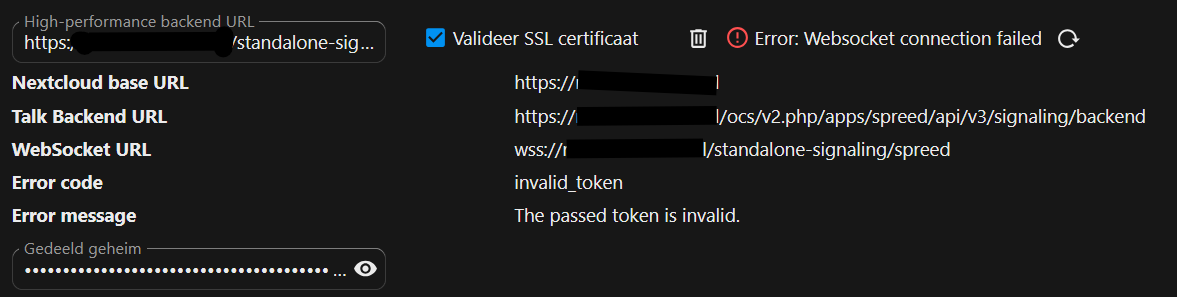
The wierd thing is that i have turned on Websocket support in NGINX Proxy Manager:
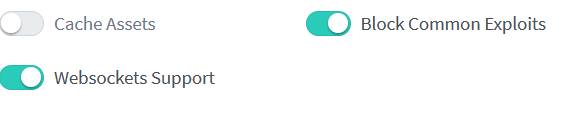
I use Selfsigned SSL certs and my nextcloud-aio-nextcloud container has the root cert installed and trusted so this isnt a problem.
Steps to replicate it (hint: details matter!):
-
Use Nginx Proxy Manager with self signed certs
-
Install Nextcloud AIO with Talk
-
Try to connect with the HPB
Log entries
Nextcloud
Please provide the log entries from your Nextcloud log that are generated during the time of problem (via the Copy raw option from Administration settings->Logging screen or from your nextcloud.log located in your data directory). Feel free to use a pastebin/gist service if necessary.
https://pastebin.com/5AGt6kAY
Configuration
Nextcloud
The output of occ config:list system or similar is best, but, if not possible, the contents of your config.php file from /path/to/nextcloud is fine (make sure to remove any identifiable information!):
<?php
$CONFIG = array (
  'one-click-instance' => true,
  'one-click-instance.user-limit' => 100,
  'memcache.local' => '\\OC\\Memcache\\APCu',
  'apps_paths' =>
  array (
    0 =>
    array (
      'path' => '/var/www/html/apps',
      'url' => '/apps',
      'writable' => false,
    ),
    1 =>
    array (
      'path' => '/var/www/html/custom_apps',
      'url' => '/custom_apps',
      'writable' => true,
    ),
  ),
  'check_data_directory_permissions' => false,
  'memcache.distributed' => '\\OC\\Memcache\\Redis',
  'memcache.locking' => '\\OC\\Memcache\\Redis',
  'redis' =>
  array (
    'host' => 'nextcloud-aio-redis',
    'password' => 'passwd',
    'port' => 6379,
  ),
  'overwritehost' => 'next.mydomain.com',
  'overwriteprotocol' => 'https',
  'passwordsalt' => 'passwdsalt',
  'secret' => 'secret',
  'trusted_domains' =>
  array (
    0 => 'localhost',
    1 => 'next.mydomain.com',
  ),
  'datadirectory' => '/mnt/ncdata',
  'dbtype' => 'pgsql',
  'version' => '32.0.1.2',
  'overwrite.cli.url' => 'https://next.mydomain.com/',
  'dbname' => 'nextcloud_database',
  'dbhost' => 'nextcloud-aio-database:5432',
  'dbport' => '',
  'dbtableprefix' => 'oc_',
  'dbuser' => 'oc_nextcloud',
  'dbpassword' => 'dbpasswd',
  'installed' => true,
  'instanceid' => 'instance',
  'maintenance' => false,
  'updatechecker' => true,
  'updatedirectory' => '/nc-updater',
  'loglevel' => 2,
  'app_install_overwrite' =>
  array (
    0 => 'nextcloud-aio',
    1 => 'externalportal',
  ),
  'log_type' => 'file',
  'logfile' => '/var/www/html/data/nextcloud.log',
  'log_rotate_size' => 10485760,
  'log.condition' =>
  array (
    'apps' =>
    array (
      0 => 'admin_audit',
    ),
  ),
  'preview_max_x' => 2048,
  'preview_max_y' => 2048,
  'jpeg_quality' => 60,
  'enabledPreviewProviders' =>
  array (
    1 => 'OC\\Preview\\Image',
    2 => 'OC\\Preview\\MarkDown',
    3 => 'OC\\Preview\\MP3',
    4 => 'OC\\Preview\\TXT',
    5 => 'OC\\Preview\\OpenDocument',
    6 => 'OC\\Preview\\Movie',
    7 => 'OC\\Preview\\Krita',
    0 => 'OC\\Preview\\Imaginary',
    23 => 'OC\\Preview\\ImaginaryPDF',
  ),
  'enable_previews' => true,
  'upgrade.disable-web' => true,
  'mail_smtpmode' => 'smtp',
  'trashbin_retention_obligation' => 'auto, 30',
  'versions_retention_obligation' => 'auto, 30',
  'activity_expire_days' => 30,
  'simpleSignUpLink.shown' => false,
  'share_folder' => '/Shared',
  'one-click-instance.link' => 'https://nextcloud.com/all-in-one/',
  'upgrade.cli-upgrade-link' => 'https://github.com/nextcloud/all-in-one/discussions/2726',
  'maintenance_window_start' => 100,
  'allow_local_remote_servers' => true,
  'davstorage.request_timeout' => 3600,
  'documentation_url.server_logs' => 'https://github.com/nextcloud/all-in-one/discussions/5425',
  'htaccess.RewriteBase' => '/',
  'dbpersistent' => false,
  'auth.bruteforce.protection.enabled' => true,
  'ratelimit.protection.enabled' => true,
  'files_external_allow_create_new_local' => false,
  'trusted_proxies' =>
  array (
    0 => '127.0.0.1',
    1 => '::1',
    10 => '172.18.0.0/16',
  ),
  'preview_imaginary_url' => 'http://nextcloud-aio-imaginary:9000',
  'preview_imaginary_key' => 'key',
);