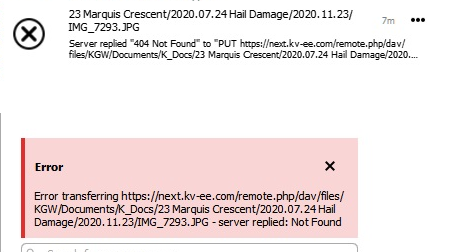
I am running a new installation of NextCloud 20.0.10 on a shared server.
I have several folders set up to sync between my home system and the cloud, using the Win64 desktop client.
Everything works great except JPG and PNG files, all of which fail with the following errors (although nothing shows in the log file on the server side).
Other files in the same folders sync fine, including other image types like ICO and GIF. Images range in size, but are not large; ICO and GIF files in the same folder are similar size.
If I copy one of the JPGs that doesn’t sync and rename it with a TXT extension, it syncs fine.
Turns out the culprit was a CDN service, including image optimization among other things, that was activated on my hosting account by default. Once it was deactivated, image files uploaded just fine. Hopefully this is useful to someone, even without completing the full support template.
Disabling this feature corrected the issue, so I have no idea what particular setting or process was causing the problem.
I should also note that it was Hostinger support who figured it out, even though they weren’t familiar with the issue. Don’t want to leave the impression it was something they did.