Status des Aufgabenverarbeitungsprozesses!

Ich habe einen neuen Nextcloud Server mit Ubuntu 26 und natĂŒrlich die neueste NC 33.5 Version. Es funktioniert alles, (vieles mit Hilfe der KI, was wirklich gut lĂ€uft). Nur ein Problem bekomme ich nicht weg, ich bekomme eine Fehlermeldung mit "Status des Aufgabenverarbeitungsprozesses

Der Aufgabenverarbeitungsprozess scheint nicht zu laufen. Er wurde bislang noch nicht ausgefĂŒhrt" laut KI lĂ€uft wohl der cronjob nicht, doch weiter unten bei Grundeinstellung cron ausgewĂ€hlt und es ist grĂŒn hinterlegt sodass auch oben die Zeit steht wann es wieder aktualisiert wird. unter crontab -u www-data -l wird folgendes angezeigt; #/5 * * * * /usr/bin/php8.5 -f /var/www/nc/cron.php >/dev/null 2>&1
#
/5 * * * * /usr/bin/php8.5 -d memory_limit=1024M -d open_basedir=none -f /var/www/nc/cron.php >/dev/null 2>&1
@reboot /usr/bin/php8.5 -d memory_limit=1024M -d open_basedir=none -d date.timezone=“Europe/Berlin” -f /var/www/nc/cron.php >/dev/null 2>&1
*/5 * * * * /usr/bin/php8.5 -d memory_limit=1024M -d open_basedir=none -d date.timezone=“Europe/Berlin” -f /var/www/nc/cron.php >/dev/null 2>&1
root@webserver:/home/jens# da wo eine # davor ist habe ich schon getestet. Was kann das sein bzw. ist es ein BUG? hat jemand eine Idee?

php ist 8.5

Tja, das # bedeutet ja auch, dass die Zeile auskommentiert wurde. Ist also nichts weiter als ein Kommentar.

auch ohne # hat es nicht funktioniert.

Dann musst du wohl zunÀchst mehr Infos zu der von dir gewÀhlten Konfiguration und Installationsmethode liefern.

nextcloud ist direkt auf den server installiert. dazu ein Docker mit onlyoffice. log von cron sagt erfolgreich ausgefĂŒhrt (Jun 10 08:10:01 webserver CRON[1603899]: pam_unix(cron:session): session opened for user www-data(uid=33) by www-data(uid=0)
Jun 10 08:10:01 webserver CRON[1603901]: (www-data) CMD (/usr/bin/php8.5 -f /var/www/nc/cron.php)
Jun 10 08:10:02 webserver CRON[1603899]: pam_unix(cron:session): session closed for user www-data) aber nextcloud 33.05 sagt das Problem mit der Aufgabenverwaltung

habe es jetzt mit dem systemmd eingerichtet, selbes Problem. die logs sagen alles ausgefĂŒhrt, auch unter Grundeinstellung kommt grĂŒn “wurde gerade ausgefĂŒhrt” aber auf der Übersichtsseite kommt “Status des Aufgabenverarbeitungsprozesses” wahrscheinlich ein BUG von Nextcloud

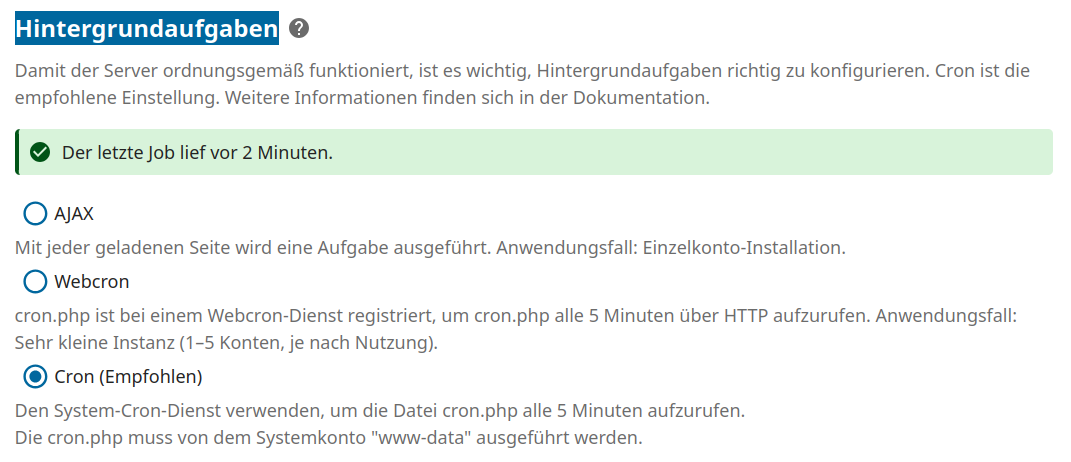
Das glaube ich nicht! Siehe:

Wie man sieht lÀuft der Cronjob bei mir. Du hast vermutlich irgendwo einen Konfigurationsfehler eingebaut.

Da du auch bereits seit 2022 hier angemeldet bist, solltest du wissen, dass man hier ein Support-Template ausfĂŒllen kann und sollte, wenn man qualifizierte Hilfe erwartet.
So ist das leider weiterhin nur “Stochern im Nebel”.

Ok, wo finde ich das Support-Template. Bin gerade mit dem Smartphone unterwegs.

Wird dir normal automatisch angezeigt, wenn du einen neuen Beitrag verfasst, mit der Auswahl Support im Kategorie-Feld:

Some or all of the below information will be requested if it isn’t supplied; for fastest response please provide as much as you can. :heart:

The Basics

  • Nextcloud Server version (e.g., 29.x.x):
    • replace me
  • Operating system and version (e.g., Ubuntu 24.04):
    • replace me
  • Web server and version (e.g, Apache 2.4.25):
    • replace me
  • Reverse proxy and version _(e.g. nginx 1.27.2)
    • replace me
  • PHP version (e.g, 8.3):
    • replace me
  • Is this the first time you’ve seen this error? (Yes / No):
    • replace me
  • When did this problem seem to first start?
    • replace me
  • Installation method (e.g. AlO, NCP, Bare Metal/Archive, etc.)
    • replace me
  • Are you using CloudfIare, mod_security, or similar? (Yes / No)
    • replace me

Summary of the issue you are facing:

[
]

Steps to replicate it (hint: details matter!):

Log entries

Nextcloud

Please provide the log entries from your Nextcloud log that are generated during the time of problem (via the Copy raw option from Administration settings->Logging screen or from your nextcloud.log located in your data directory). Feel free to use a pastebin/gist service if necessary.

PASTE HERE

Web Browser

If the problem is related to the Web interface, open your browser inspector Console and Network tabs while refreshing (reloading) and reproducing the problem. Provide any relevant output/errors here that appear.

PASTE

Web server / Reverse Proxy

The output of your Apache/nginx/system log in /var/log/____:

PASTE HERE

Configuration

Nextcloud

The output of occ config:list system or similar is best, but, if not possible, the contents of your config.php file from /path/to/nextcloud is fine (make sure to remove any identifiable information!):

PASTE HERE

Apps

The output of occ app:list (if possible).

Tips for increasing the likelihood of a response

  • Use the preformatted text formatting option in the editor for all log entries and configuration output.
  • If screenshots are useful, feel free to include them.
    • If possible, also include key error output in text form so it can be searched for.
  • Try to edit log output only minimally (if at all) so that it can be ran through analyzers / formatters by those trying to help you.

The Basics

  • Nextcloud Server version (e.g., 29.x.x):
    • 33.05
  • Operating system and version (e.g., Ubuntu 24.04):
    • Ubuntu 26 LTS
  • Web server and version (e.g, Apache 2.4.25):
    • Nginx 1.28
  • Reverse proxy and version _(e.g. nginx 1.27.2)
    • Nginx 1.28
  • PHP version (e.g, 8.3):
    • 8.5
  • Is this the first time you’ve seen this error? (Yes / No):
    • Yes
  • When did this problem seem to first start?
    • Update from 33.02
  • Installation method (e.g. AlO, NCP, Bare Metal/Archive, etc.)
    • Bare Metall
direkt auf Server
  • Are you using CloudfIare, mod_security, or similar? (Yes / No)
    • No

Nextcloud WEB Verzeichnis

/Var/www/nc

Nextcloud Datenverzeichnis

/mnt/nc/von100

Rechte sind alle gesetzt.

Log von Cron und Systems hatte ich schon angehÀngt.

Nextcloud log: Hello,

I am running Nextcloud 33.0.5.1 (native installation on Ubuntu) with a remote MySQL database and data directory located on an external mount (/mnt/nc/von100).

The background cron job is actually running perfectly fine via systemd-timer and terminates with status=0/SUCCESS every 5 minutes. However, the admin overview interface still stubbornly reports: “The asynchronous tasks process doesn’t seem to be running. It hasn’t been executed yet.” and “Your data directory is not writable.”

Here are the raw log entries from my nextcloud.log showing that cron.php is actively and successfully executing the background jobs (it only tripped over a temporary IMAP sync issue for account 9, which has since been removed):

{"reqId":"wLYAUEcrPXzOJ2JIn4mZ","level":3,"time":"2026-06-09T17:45:47+02:00","remoteAddr":"","user":"--","app":"mail","method":"","url":"--","scriptName":"cron.php","message":"Cron mail sync failed for account 9","userAgent":"--","version":"33.0.5.1","occ_command":["cron.php"],"exception":{"Exception":"OCA\\Mail\\Exception\\ServiceException","Message":"IMAP error synchronizing account 9: Error connecting to mail server.","Code":11}}
{"reqId":"x8mWLOKLdZQE444JxMMM","level":3,"time":"2026-06-09T18:50:01+02:00","remoteAddr":"","user":"--","app":"mail","method":"","url":"--","scriptName":"/var/www/nc/cron.php","message":"Cron mail sync failed for account 9","userAgent":"--","version":"33.0.5.1","occ_command":["/var/www/nc/cron.php"],"exception":{"Exception":"OCA\\Mail\\Exception\\ServiceException","Message":"IMAP error synchronizing account 9: Error connecting to mail server.","Code":11}}

The systemd configuration is verified, file permissions belong to www-data:www-data, and the cron status in Administration settings → Basic settings correctly shows a green checkmark.

It seems to be a purely cosmetic UI/caching bug on the main admin overview page in NC33 failing to sync with the database/fast-cache timestamp. Has anyone else experienced this specific behavior with external mount paths or remote databases in NC33?

systemmd Log: sudo grep -a -i “nginx” /var/log/syslog | tail -n 20
2026-06-09T06:43:28.907727+02:00 webserver systemd[1]: Stopping nginx.service - A high performance web server and a reverse proxy server

2026-06-09T06:43:33.941341+02:00 webserver systemd[1]: nginx.service: Deactivated successfully.
2026-06-09T06:43:33.941436+02:00 webserver systemd[1]: Stopped nginx.service - A high performance web server and a reverse proxy server.
2026-06-09T06:43:33.941479+02:00 webserver systemd[1]: nginx.service: Consumed 2min 1.051s CPU time over 1d 10h 10min 21.018s wall clock time, 106.8M memory peak.
2026-06-09T06:43:33.943163+02:00 webserver systemd[1]: Starting nginx.service - A high performance web server and a reverse proxy server

2026-06-09T06:43:34.003867+02:00 webserver systemd[1]: Started nginx.service - A high performance web server and a reverse proxy server.
2026-06-09T10:22:15.430029+02:00 webserver systemd[1]: Stopping nginx.service - A high performance web server and a reverse proxy server

2026-06-09T10:23:50.963447+02:00 webserver systemd[1]: Started nginx.service - A high performance web server and a reverse proxy server.
2026-06-09T10:23:53.355010+02:00 webserver dockerd[2751]: time=“2026-06-09T10:23:53.354922561+02:00” level=info msg=“sbJoin: gwep4 ‘’->‘a3684ab95b53’, gwep6 ‘’->‘’” eid=a3684ab95b53 ep=mailcowdockerized-nginx-mailcow-1 net=mailcowdockerized_mailcow-network nid=0b4b7cfeacf1
2026-06-09T17:41:09.629558+02:00 webserver systemd[1]: Reloading nginx.service - A high performance web server and a reverse proxy server

2026-06-09T17:41:09.683237+02:00 webserver nginx[763934]: 2026/06/09 17:41:09 [notice] 763934#763934: signal process started
2026-06-09T17:41:09.684225+02:00 webserver systemd[1]: Reloaded nginx.service - A high performance web server and a reverse proxy server.
2026-06-09T17:48:35.622273+02:00 webserver systemd[1]: Started nginx.service - A high performance web server and a reverse proxy server.
2026-06-09T17:48:37.478038+02:00 webserver dockerd[2752]: time=“2026-06-09T17:48:37.477977210+02:00” level=info msg=“sbJoin: gwep4 ‘’->‘f069cc5571a5’, gwep6 ‘’->‘’” eid=f069cc5571a5 ep=mailcowdockerized-nginx-mailcow-1 net=mailcowdockerized_mailcow-network nid=0b4b7cfeacf1
2026-06-09T20:28:20.686235+02:00 webserver systemd[1]: Stopping nginx.service - A high performance web server and a reverse proxy server

2026-06-09T20:28:25.545336+02:00 webserver systemd[1]: nginx.service: Deactivated successfully.
2026-06-09T20:28:25.545408+02:00 webserver systemd[1]: Stopped nginx.service - A high performance web server and a reverse proxy server.
2026-06-09T20:28:25.545447+02:00 webserver systemd[1]: nginx.service: Consumed 4.786s CPU time over 2h 39min 50.020s wall clock time, 80.5M memory peak.
2026-06-09T20:28:25.547486+02:00 webserver systemd[1]: Starting nginx.service - A high performance web server and a reverse proxy server

2026-06-09T20:28:25.635241+02:00 webserver systemd[1]: Started nginx.service - A high performance web server and a reverse proxy server.
root@webserver:

app liste :sudo -u www-data /usr/bin/php8.5 --define apc.enable_cli=1 -d memory_limit=1024M -d open_basedir=none /var/www/nc/occ app:list
Enabled:

  • activity: 6.0.0
  • app_api: 33.0.0
  • assistant: 3.4.3
  • bruteforcesettings: 6.0.0
  • calendar: 6.4.2
  • circles: 33.0.0
  • cloud_federation_api: 1.17.0
  • comments: 1.23.0
  • contacts: 8.5.1
  • contactsinteraction: 1.14.1
  • dashboard: 7.13.0
  • dav: 1.36.0
  • federatedfilesharing: 1.23.0
  • federation: 1.23.0
  • files: 2.5.0
  • files_antivirus: 6.2.0
  • files_downloadlimit: 5.1.0
  • files_external: 1.25.1
  • files_fulltextsearch: 33.0.0
  • files_pdfviewer: 6.0.0
  • files_reminders: 1.6.0
  • files_sharing: 1.25.2
  • files_trashbin: 1.23.0
  • files_versions: 1.26.0
  • firstrunwizard: 6.0.0
  • fulltextsearch: 33.0.0
  • fulltextsearch_elasticsearch: 33.0.0
  • guests: 4.7.5
  • logreader: 6.0.0
  • lookup_server_connector: 1.21.0
  • mail: 5.9.1
  • nextcloud_announcements: 5.0.0
  • notes: 6.0.0
  • notifications: 6.0.0
  • notify_push: 1.3.3
  • oauth2: 1.21.0
  • onlyoffice: 10.0.0
  • password_policy: 5.0.0
  • photos: 6.0.0
  • previewgenerator: 5.13.0
  • privacy: 5.0.0
  • profile: 1.2.0
  • provisioning_api: 1.23.0
  • recommendations: 6.0.0
  • related_resources: 4.0.0
  • serverinfo: 5.0.0
  • settings: 1.16.0
  • sharebymail: 1.23.0
  • support: 5.0.0
  • survey_client: 5.0.0
  • systemtags: 1.23.0
  • text: 7.0.1
  • theming: 2.8.0
  • twofactor_backupcodes: 1.22.0
  • twofactor_totp: 15.0.0
  • updatenotification: 1.23.0
  • user_status: 1.13.0
  • viewer: 6.0.0
  • weather_status: 1.13.0
  • webhook_listeners: 1.5.0
  • workflowengine: 2.15.0
    Disabled:
  • admin_audit: 1.23.0
  • duplicatefinder: 1.7.3 (installed 1.7.3)
  • encryption: 2.21.0
  • files_fulltextsearch_tesseract: 32.0.0 (installed 32.0.0)
  • suspicious_login: 11.0.0
  • testing: 1.23.0
  • twofactor_nextcloud_notification: 7.0.0
  • user_ldap: 1.24.0
    root@webserver:

hier noch die config.php

cat config.php

<?php $CONFIG = array ( 'instanceid' => 'XXX', 'passwordsalt' => 'XXX', 'secret' => 'XXX', 'trusted_domains' => array ( 0 => 'xxx.de', 1 => '192.168.178.200', 2 => '172.17.0.1', ), 'trusted_proxies' => array ( 0 => '127.0.0.1', 1 => '172.17.0.1', ), 'datadirectory' => '/mnt/nc/von100', 'dbtype' => 'mysql', 'version' => '33.0.5.1', 'overwrite.cli.url' => 'https://xxx.de', 'dbname' => 'nc32_db', 'dbhost' => '192.168.178.98:3307', 'dbport' => '', 'dbtableprefix' => 'oc_', 'mysql.utf8mb4' => true, 'dbuser' => 'nc_user', 'dbpassword' => '', 'installed' => true, 'maintenance' => false, 'memcache.local' => '\\OC\\Memcache\\APCu', 'default_phone_region' => 'DE', 'overwriteprotocol' => 'https', 'logtimezone' => 'Europe/Berlin', 'maintenance_window_start' => 1, 'trashbin_retention_obligation' => 'auto, 30', 'memcache.distributed' => '\\OC\\Memcache\\Redis', 'memcache.locking' => '\\OC\\Memcache\\Redis', 'redis' => array ( 'host' => '127.0.0.1', 'port' => 6380, 'password' => 'XXX', 'timeout' => 0.0, ), 'auth.bruteforce.protection.enabled' => false, 'mail_smtpmode' => 'smtp', 'mail_sendmailmode' => 'smtp', 'mail_from_address' => 'xx', 'mail_domain' => 'xxx.de', 'mail_smtphost' => 'xxx.test.de', 'mail_smtpport' => '123', 'mail_smtpauth' => true, 'mail_smtpname' => 'xx.xxx.de', 'mail_smtppassword' => 'XXX', 'mail_smtpsecure' => 'ssl', 'loglevel' => 3, 'theme' => '', 'enable_previews' => true, 'enabledPreviewProviders' => array ( 0 => 'OC\\Preview\\PNG', 1 => 'OC\\Preview\\JPEG', 2 => 'OC\\Preview\\GIF', 3 => 'OC\\Preview\\HEIC', 4 => 'OC\\Preview\\BMP', 5 => 'OC\\Preview\\XBitmap', 6 => 'OC\\Preview\\MP3', 7 => 'OC\\Preview\\TXT', 8 => 'OC\\Preview\\MarkDown', 9 => 'OC\\Preview\\Movie', 10 => 'OC\\Preview\\MKV', 11 => 'OC\\Preview\\MP4', 12 => 'OC\\Preview\\AVI', 13 => 'OC\\Preview\\PDF', 14 => 'OC\\Preview\\Imaginary', ), 'preview_imaginary_url' => 'http://127.0.0.1:9000', 'app_install_overwrite' => array ( 1 => 'duplicatefinder', ), 'config_preset' => 2, 'data-fingerprint' => 'XXX', 'allow_local_remote_servers' => true, 'check_data_directory_permissions' => false, 'mail_smtpstreamoptions' => array ( 'ssl' => array ( 'allow_self_signed' => false, 'verify_peer' => true, 'verify_peer_name' => true, ), ), 'content_security_policy_component_restrictions' => array ( 'onlyoffice' => array ( 'script-src' => array ( 0 => 'https://onlyoffice.xxx.de', ), 'frame-src' => array ( 0 => 'https://onlyoffice.xxx.de', ), 'connect-src' => array ( 0 => 'https://onlyoffice.xxx.de', ), ), ), 'onlyoffice' => array ( 'editors_check_interval' => 0, ), 'serverid' => 1, ); root@webserver: wenn noch etwas fehlt kurz anschreiben.
So etwas wie die config.php / systemmd Log gehört in den Vorformatierten Text (Strg E), damit es lesbar ist und nicht Sonderzeichen verschluckt werden.


cat config.php
<?php
$CONFIG = array (
  'instanceid' => 'xxx',
  'passwordsalt' => 'xxx',
  'secret' => 'xxx',
  'trusted_domains' => 
  array (
    0 => 'nc.xxx.de',
    1 => '192.168.178.200',
    2 => '172.17.0.1',
  ),
  'trusted_proxies' => 
  array (
    0 => '127.0.0.1',
    1 => '172.17.0.1',
  ),
  'datadirectory' => '/mnt/nc/von100/',
  'dbtype' => 'mysql',
  'version' => '33.0.5.1',
  'overwrite.cli.url' => 'https://nc.xxx.de',
  'dbname' => 'xxx',
  'dbhost' => '192.168.178.98:3307',
  'dbport' => '',
  'dbtableprefix' => 'oc_',
  'mysql.utf8mb4' => true,
  'dbuser' => 'xxx',
  'dbpassword' => 'xxx',
  'installed' => true,
  'maintenance' => false,
  'memcache.local' => '\\OC\\Memcache\\APCu',
  'default_phone_region' => 'DE',
  'overwriteprotocol' => 'https',
  'logtimezone' => 'Europe/Berlin',
  'maintenance_window_start' => 1,
  'trashbin_retention_obligation' => 'auto, 30',
  'memcache.distributed' => '\\OC\\Memcache\\Redis',
  'memcache.locking' => '\\OC\\Memcache\\Redis',
  'redis' => 
  array (
    'host' => '127.0.0.1',
    'port' => 6380,
    'password' => 'xxx',
    'timeout' => 0.0,
  ),
  'auth.bruteforce.protection.enabled' => false,
  'mail_smtpmode' => 'smtp',
  'mail_sendmailmode' => 'smtp',
  'mail_from_address' => 'nc',
  'mail_domain' => 'xxx.de',
  'mail_smtphost' => 'mail.xxx.de',
  'mail_smtpport' => '465',
  'mail_smtpauth' => true,
  'mail_smtpname' => 'nc@xxx.de',
  'mail_smtppassword' => 'xxx',
  'mail_smtpsecure' => 'ssl',
  'loglevel' => 3,
  'theme' => '',
  'enable_previews' => true,
  'enabledPreviewProviders' => 
  array (
    0 => 'OC\\Preview\\PNG',
    1 => 'OC\\Preview\\JPEG',
    2 => 'OC\\Preview\\GIF',
    3 => 'OC\\Preview\\HEIC',
    4 => 'OC\\Preview\\BMP',
    5 => 'OC\\Preview\\XBitmap',
    6 => 'OC\\Preview\\MP3',
    7 => 'OC\\Preview\\TXT',
    8 => 'OC\\Preview\\MarkDown',
    9 => 'OC\\Preview\\Movie',
    10 => 'OC\\Preview\\MKV',
    11 => 'OC\\Preview\\MP4',
    12 => 'OC\\Preview\\AVI',
    13 => 'OC\\Preview\\PDF',
    14 => 'OC\\Preview\\Imaginary',
  ),
  'preview_imaginary_url' => 'http://127.0.0.1:9000',
  'app_install_overwrite' => 
  array (
    1 => 'duplicatefinder',
  ),
  'config_preset' => 2,
  'data-fingerprint' => 'xxx',
  'allow_local_remote_servers' => true,
  'check_data_directory_permissions' => false,
  'mail_smtpstreamoptions' => 
  array (
    'ssl' => 
    array (
      'allow_self_signed' => false,
      'verify_peer' => true,
      'verify_peer_name' => true,
    ),
  ),
  'content_security_policy_component_restrictions' => 
  array (
    'onlyoffice' => 
    array (
      'script-src' => 
      array (
        0 => 'https://onlyoffice.xxx.de',
      ),
      'frame-src' => 
      array (
        0 => 'https://onlyoffice.xxx.de',
      ),
      'connect-src' => 
      array (
        0 => 'https://onlyoffice.xxx.de',
      ),
    ),
  ),
  'onlyoffice' => 
  array (
    'editors_check_interval' => 0,
  ),
  'serverid' => 1,
);
root@webserver: 


So hier die config.php

Also bei Grundeinstellung wird mit einen grĂŒnen Band bestĂ€tigt das, Der letzte Job lief vor 4 Minuten., lĂ€uft aber unter der Übersichtseite kommen die Fehler; Cron-Fehler

Es war nicht möglich, den Cron-Job ĂŒber die CLI auszufĂŒhren. Es sind folgende technische Fehler aufgetreten: - Your data directory is not writable. Permissions can usually be fixed by giving the web server write access to the root directory. See Documentation Redirect. und Status des Aufgabenverarbeitungsprozesses

Der Aufgabenverarbeitungsprozess scheint nicht zu laufen. Er wurde bislang noch nicht ausgefĂŒhrt.

sudo journalctl -u nextcloud-cron.service -n 15 --no-pager
Jun 10 19:25:20 webserver systemd[1]: nextcloud-cron.service: Deactivated successfully.
Jun 10 19:25:20 webserver systemd[1]: nextcloud-cron.service: Consumed 1.208s CPU time over 31.821s wall clock time, 228.9M memory peak.
Jun 10 19:29:48 webserver systemd[1]: Started nextcloud-cron.service - Nextcloud Cron Service.
Jun 10 19:29:49 webserver systemd[1]: nextcloud-cron.service: Deactivated successfully.
Jun 10 19:34:48 webserver systemd[1]: Started nextcloud-cron.service - Nextcloud Cron Service.
Jun 10 19:34:50 webserver systemd[1]: nextcloud-cron.service: Deactivated successfully.
Jun 10 19:39:48 webserver systemd[1]: Started nextcloud-cron.service - Nextcloud Cron Service.
Jun 10 19:39:49 webserver systemd[1]: nextcloud-cron.service: Deactivated successfully.
Jun 10 19:44:48 webserver systemd[1]: Started nextcloud-cron.service - Nextcloud Cron Service.
Jun 10 19:45:16 webserver systemd[1]: nextcloud-cron.service: Deactivated successfully.
Jun 10 19:45:16 webserver systemd[1]: nextcloud-cron.service: Consumed 1.193s CPU time over 28.503s wall clock time, 233.4M memory peak.
Jun 10 19:49:48 webserver systemd[1]: Started nextcloud-cron.service - Nextcloud Cron Service.
Jun 10 19:49:49 webserver systemd[1]: nextcloud-cron.service: Deactivated successfully.
Jun 10 19:54:48 webserver systemd[1]: Started nextcloud-cron.service - Nextcloud Cron Service.
Jun 10 19:54:49 webserver systemd[1]: nextcloud-cron.service: Deactivated successfully.
root@webserver:


Endlich brauchbare Infos

und da hast du doch den Grund fĂŒr den Fehler.

Also sorg dafĂŒr, dass der Cronjob auch Schreibrechte im data directory bekommt.

Nachtrag:

In der Fehlermeldung steht zwar, dass du dem web server write access to the root directory geben sollst, aber ich denke, dass der web server write access hat, denn ansonsten könntest du ja auch keine Dateien auf den NC-Server hochladen.

Daher vermute ich, so weit ich das deinen dĂŒrftigen bisherigen Angaben entnehmen kann, dass der Cronjob mit unpassenden Benutzerrechten gestartet wird.

Welcher Benutzter fĂŒhrt den Cronjob denn aus?

Es sollte der sein, der auch den Webserver ausfĂŒhrt und dem das data directory gehört. In den meisten FĂ€llen gehört dem User www-data das data directory und startet den Webserver. Somit muss auch der User www-data den Cronjob starten und ausfĂŒhren.


ls -la /mnt/nc/von100
total 174140
drwxr-x— 10 www-data www-data 4096 Jun 10 17:26 .
drwxr-xr-x 4 www-data www-data 36864 May 27 17:20 ..
-rwxr-x— 1 www-data www-data 542 Jun 3 16:02 .htaccess
-rwxr-x— 1 www-data www-data 52 Jun 3 16:02 .ncdata
-rwxr-x— 1 www-data www-data 0 Nov 23 2025 .nextcloud-backup-restore
-rw-r–r-- 1 www-data www-data 0 Jun 10 17:26 .ocdata
drwxr-x— 8 www-data www-data 4096 Apr 26 10:09 ‘user1’
drwxr-x— 8 www-data www-data 4096 Sep 23 2025 ‘user2l’
drwxr-x— 3 www-data www-data 4096 May 14 13:21 user3
drwxr-x— 5 www-data www-data 4096 Jun 9 10:28 user4
drwxr-x— 4 www-data www-data 4096 May 10 08:47 user5
drwxr-x— 10 www-data www-data 4096 May 12 20:37 appdata_oc2mfiiaunej
drwxr-x— 14 www-data www-data 4096 May 19 19:10 appdata_ocyq4h3k84y9
-rwxr-x— 1 www-data www-data 0 Jun 3 16:02 index.html
-rw-r----- 1 www-data www-data 62603016 Jun 10 20:47 nextcloud.log
-rwxr-x— 1 www-data www-data 115170020 Jun 9 11:05 nextcloud.log.1
drwxr-x— 4 www-data www-data 4096 Jun 3 16:02 updater-ocyq4h3k84y9
-rwxr-x— 1 www-data www-data 434627 Jun 3 16:02 updater.log
root@webserver: ls -la /var/www/nc
total 940
drwxr-x— 15 www-data www-data 4096 Jun 3 16:02 .
drwxr-xr-x 7 www-data www-data 4096 Jun 9 08:45 ..
-rw-r–r-- 1 www-data www-data 7245 Jun 3 16:02 .htaccess
-rw-r–r-- 1 www-data www-data 306 Jun 3 16:02 .user.ini
drwxr-xr-x 42 www-data www-data 4096 Jun 3 16:02 3rdparty
-rw-r–r-- 1 www-data www-data 26339 Jun 3 16:02 AUTHORS
-rw-r–r-- 1 www-data www-data 34520 Jun 3 16:02 COPYING
drwxr-xr-x 2 www-data www-data 4096 Jun 3 16:02 LICENSES
-rw-r–r-- 1 www-data www-data 36893 Jun 3 16:02 REUSE.toml
drwxr-x— 71 www-data www-data 4096 Jun 9 10:29 apps
-rw-r–r-- 1 www-data www-data 3541 Jun 3 16:02 composer.json
-rw-r–r-- 1 www-data www-data 3434 Jun 3 16:02 composer.lock
drwxr-x— 2 www-data www-data 4096 Jun 10 17:41 config
-rw-r–r-- 1 www-data www-data 4126 Jun 3 16:02 console.php
drwxr-xr-x 25 www-data www-data 4096 Jun 3 16:02 core
-rw-r–r-- 1 www-data www-data 1913 Jun 3 16:02 cron.php
drwxr-x— 2 www-data www-data 4096 Dec 3 2024 data
drwxr-xr-x 2 www-data www-data 53248 Jun 3 16:02 dist
-rw-r–r-- 1 www-data www-data 331 Jun 3 16:02 index.html
-rw-r–r-- 1 www-data www-data 3695 Jun 3 16:02 index.php
drwxr-xr-x 7 www-data www-data 4096 Jun 3 16:02 lib
-rw-r–r-- 1 www-data www-data 596 Jun 3 16:02 occ
drwxr-x— 2 www-data www-data 4096 Feb 1 12:07 ocs
drwxr-xr-x 2 www-data www-data 4096 Jun 3 16:02 ocs-provider
-rw-r–r-- 1 www-data www-data 666887 Jun 3 16:02 package-lock.json
-rw-r–r-- 1 www-data www-data 3866 Jun 3 16:02 package.json
-rw-r–r-- 1 www-data www-data 3059 Jun 3 16:02 public.php
-rw-r–r-- 1 www-data www-data 4760 Jun 3 16:02 remote.php
drwxr-xr-x 4 www-data www-data 4096 Jun 3 16:02 resources
-rw-r–r-- 1 www-data www-data 26 Jun 3 16:02 robots.txt
-rw-r–r-- 1 www-data www-data 1490 Jun 3 16:02 status.php
drwxr-x— 3 www-data www-data 4096 Jun 3 16:02 themes
drwxr-x— 2 www-data www-data 4096 Nov 7 2024 updater
-rw-r–r-- 1 www-data www-data 446 Jun 3 16:02 version.php

Beachte meinen Nachtrag.

ich habe den cronjob auf systemmd umgestellt.

hier die config von systemmd

[Unit]
Description=Nextcloud Cron Service
After=network.target

[Service]
User=www-data
ExecStart=/usr/bin/php --define apc.enable_cli=1 -d open_basedir="/var/www/nc/:/mnt/nc/von100/" /var/www/nc/cron.php
KillMode=process

# Erlaubt Systemd den direkten Lese-/Schreibzugriff auf das Dateisystem
ReadWritePaths=/mnt/nc/von100/
ProtectSystem=full

# Schaltet die strikten Sandboxen aus, die /mnt blockieren:
ProtectHome=false
PrivateDevices=false

[Install]
WantedBy=multi-user.target


KI sagt es hÀngt mit den neuen Sicherheitslinien von php8.5 zusammen oder sowas,

as ZurĂŒckkehren beider Fehler nach dem Löschen der Sessions zeigt, dass der Webserver (PHP-FPM) den Pfad /mnt/nc/von100/ blockiert, sobald er live prĂŒfen möchte, ob das Verzeichnis beschreibbar ist.

Da wir bereits alle Systemd-Sandboxen geöffnet haben, gibt es unter Ubuntu/Debian nur noch eine einzige logische Ursache: Das Sicherheits-Framework AppArmor oder SELinux blockiert PHP-FPM auf Systemebene davor, in Verzeichnisse außerhalb des Standard-Web-Pfads (/var/www/) zu schreiben.

Wir lösen diese Blockade, indem wir den Mountpoint so einrichten, dass das System ihn wie ein lokales Web-Verzeichnis behandelt.

Die endgĂŒltige Lösung: Der Bind-Mount

Anstatt zu versuchen, PHP-FPM mĂŒhsam zu ĂŒberreden, auf /mnt zuzugreifen, spiegeln (mounten) wir das Verzeichnis /mnt/nc/von100/ direkt in Ihr erlaubtes Nextcloud-Verzeichnis hinein (z. B. nach /var/www/nc/data/). FĂŒr PHP-FPM sieht es dann wie ein völlig normaler, lokaler Ordner aus, und alle Sicherheits-Sperren greifen ins

Zu systemmd sag ich nix. Nutze weiterhin die bewÀhrte crontab von www-data.

Erlaube mir noch eine generelle Anmerkung:

Ich finde deine Systemarchitektur fragwĂŒrdig.

  1. /mnt sollte zum temporÀren Einbinden von Dateisystemen DatentrÀgern verwendet werden.
  2. ich wĂŒrde die Standardpfade der Installation eines Nextcloud-Servers immer unverĂ€ndert lassen. Diese sind fĂŒr gewöhnlich:
  • /var/www/
  • /var/nextcloud_data/
    Auch bei mir befinden sich /var/www/ und /var/nextcloud_data/ auf einem anderen DatentrÀger als das Root-Verzeichnis des NC-Servers.

Dieser interne zusĂ€tzliche DatentrĂ€ger ist jedoch in /media eingehĂ€ngt und ich nutze in der /etc/fstab die <options> bind um die Verzeichnisse des zusĂ€tzlichen DatentrĂ€gers fĂŒr /var/www/ und /var/nextcloud_data/ eben genau dort ins Dateisystem einzubinden.

Alternativ zur Option bind in der /etc/fstab kann man auch ln -s verwenden. In der /etc/fstab ist es aber ĂŒbersichtlicher.