PHP-FPM security hardening: /usr/ is read-only now — data dir does not belong there

I just wanted to share this to make sure anyone else running into this issue might save a few hours compared to me. I don’t need support anymore, which is why I removed the template information here.

Overview:

Latest stable NC 33 with PHP 8.4 (recommended) - specifically 8.4.21-3+0~20260514.49+debian12 - and nginx, bare metal. PHP packages via https://deb.sury.org. User data directory in /usr/path/to/nextcloud/dataoutside the webserver. Running this setup for years.

Spoiler: Recent PHP updates broke Nextcloud:

  • Website shows “Error” and mentions the data directory is not writable (German description in [*1] below)
  • API down

Root cause:
security enhancements of php8.4-fpm.service file shipped by https://deb.sury.org.

Fix:

  1. sudo nano /lib/systemd/system/php8.4-fpm.service
  2. Add ReadWritePaths=/usr/path/to/nextcloud/data
  3. sudo systemctl daemon-reload; sudo service php8.4-fpm restart; sudo service nginx restart
  4. NC up and running again. Interestingly, now even without that line, Nextcloud loads - but /settings/admin/overviewshows several new warnings [*2]

I did not yet completely track down this, few questions still unanswered. In the end it’s “same same but different” as in the only partly related forum topics (man I searched everything) here:

Full story:

[*1]

Fehler

Das Datenverzeichnis ist schreibgeschützt.

Berechtigungen können zumeist korrigiert werden, indem dem Webserver Schreibzugriff auf das Wurzel-Verzeichnis eingeräumt wird. Siehe auch https://docs.nextcloud.com/server/33/go.php?to=admin-dir_permissions.

[*2]
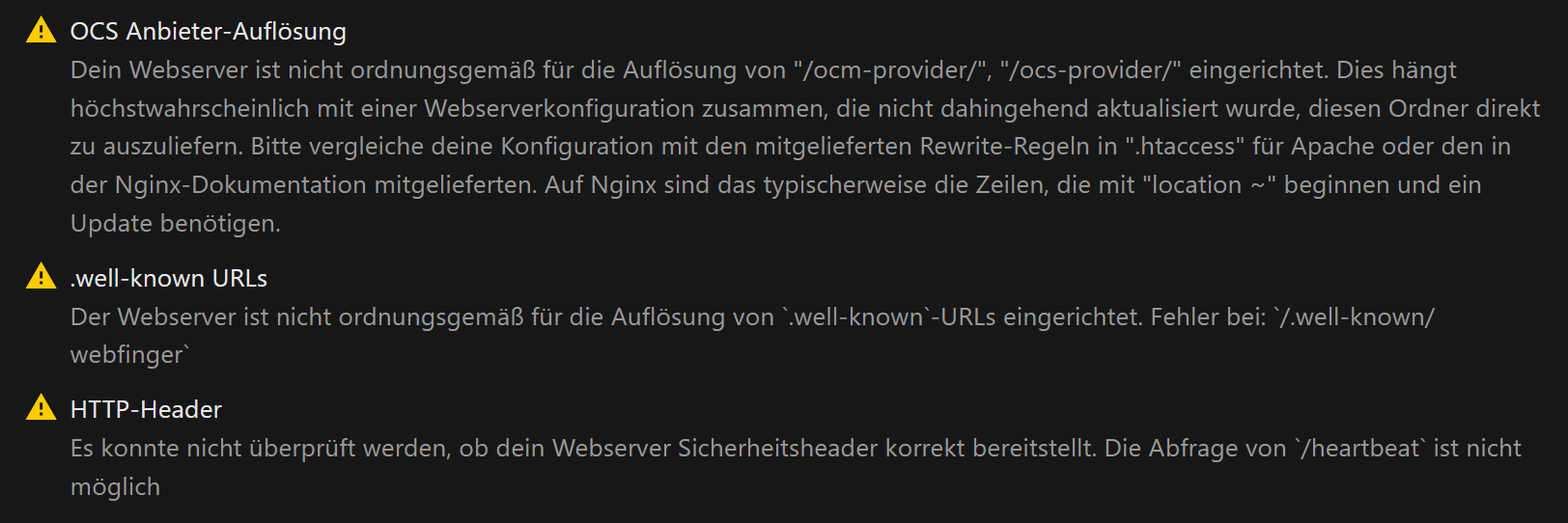

OCS Anbieter-Auflösung
Dein Webserver ist nicht ordnungsgemäß für die Auflösung von "/ocm-provider/", "/ocs-provider/" eingerichtet. Dies hängt höchstwahrscheinlich mit einer Webserverkonfiguration zusammen, die nicht dahingehend aktualisiert wurde, diesen Ordner direkt zu auszuliefern. Bitte vergleiche deine Konfiguration mit den mitgelieferten Rewrite-Regeln in ".htaccess" für Apache oder den in der Nginx-Dokumentation mitgelieferten. Auf Nginx sind das typischerweise die Zeilen, die mit "location ~" beginnen und ein Update benötigen.
.well-known URLs
Der Webserver ist nicht ordnungsgemäß für die Auflösung von `.well-known`-URLs eingerichtet. Fehler bei: `/.well-known/webfinger`
HTTP-Header
Es konnte nicht überprüft werden, ob dein Webserver Sicherheitsheader korrekt bereitstellt. Die Abfrage von `/heartbeat` ist nicht möglich

Thank you for sharing this — the root cause analysis is useful. But there are two things worth addressing before others follow the same path.

The actual root cause: wrong data directory location

Your data directory is under /usr/. According to the Filesystem Hierarchy Standard (FHS), /usr/ is defined as a read-only hierarchy. No application should write runtime data there. systemd’s ProtectSystem=full is not fighting against you here — it is correctly enforcing what the FHS has always required. The hardening change from deb.sury.org simply made visible a misconfiguration on your system, that existed all along.

Correct locations for Nextcloud data are — and this is basic Linux knowledge, not a Nextcloud-specific rule:

  • /var/ — designed for variable/writable application data
  • /srv/ — designed for data served by this system
  • /mnt/yourdisk/ — for dedicated storage
  • A dedicated home directory

In all cases the directory must be owned by the web server user (www-data), or at minimum have www-data as the owning group with write permission.

The real fix is to move the data directory to one of these locations — not to poke a hole in a security boundary that should not have been crossed in the first place. This how-to covers the migration: HOWTO: Change / Move data directory after installation.

If moving is not an option right now: use a drop-in override

Do not edit /lib/systemd/system/php8.4-fpm.service directly — that file is owned by the php8.4-fpm package and will be silently overwritten on the next update from deb.sury.org, breaking your setup again without warning.

The correct way to customise a package-provided systemd unit is a drop-in override file, which lives in /etc/systemd/system/ and survives package updates. The easiest way to create one:

sudo systemctl edit php8.4-fpm

Add only the section and line you need:

[Service]
ReadWritePaths=/usr/path/to/nextcloud/data

Save and close — systemd writes this to /etc/systemd/system/php8.4-fpm.service.d/override.conf automatically.

To verify the merged result at any time:

sudo systemctl cat php8.4-fpm

To remove the override and go back to the package defaults:

sudo systemctl revert php8.4-fpm
sudo systemctl daemon-reload

To get an overview of all drop-in overrides on your system:

sudo systemd-delta

This shows every unit file that has been customised, overridden, or masked — useful to keep track of what you have changed over time.

One more thing

You mention several warnings still open and things that work “interestingly” without the fix in place. That, combined with a data directory in a non-standard location, suggests the setup may have more loose ends than the PHP issue alone. If you run into further problems, filling in the support template will make it much easier for others to help.


ernolf

Thanks! That was extremely helpful. I don’t remember (but can check my data directory migration documentation in the archive) which guide I used back then. It’s been many years, possibly even back in ownCloud times. I definitely did not randomly choose /usr, it was part of the guide.

I will migrate the data directory (/var or /srv, will read, learn and decide) and remove the systemd file changes (even they will get overwritten anyway, interesting learning). From a first quick view at the guide you linked it seems to be a pretty good (clearly better) one :slight_smile: Only interesting part is step 6 at solution 1, but nothing impossible to achieve.

The „warnings still open“ are what is in footnote 2. Only when the systemd file does not contain the line mentioned, those warning exist (where I would expect Nextcloud to show the read-only warning again, kinda strange). Now they are gone.

No guarantee when running a service including the predecessor for more than 10 years, but unlikely. Everything stock, just a custom data dir location.

Thanks for this detailed explanation, that would’ve saved me a lot of headaches… yesterday :smiley:

My data directory is also located under /usr, i’m planning to migrate to /var aswell.

I temporarily fixed the errors by editing php8.4-fpm systemd unit and adding the following ;

systemctl edit php8.4-fpm.service
[Service]
ReadWritePaths=/usr/path/to/nextcloud /path/to/userdata
ProtectSystem=true

ProtectSystem=true seems more relaxed than Full ?

At least that fixed the Webdav, OCS, .well-known and HTTP Headers errors remaining in the admin overview.

I could not track down which guide was used in early 2018 when i migrated the data directory from /var/www/owncloud/data to /usr/new/nextcloud/data/directory, in my archived docs I only found https://docs.nextcloud.com/server/12/admin_manual/configuration_server/harden_server.html#place-data-directory-outside-of-the-web-root which says it’s recommended to store user data outside the web root. Possibly it was Is there a safe and reliable way to move data directory out of web root? but I don’t remember, it’s been a long time - and not really that important. Recommendations change over time, don’t they.

Anyway, using HowTo: Change / Move data directory after installation worked fine so far. Not as smooth as expected, but overall fine. @MichaIng is doing a really great job over there, thanks once again.

php8.4-fpm overrides have been reverted, everything back to standard regarding PHP-FPM hardening settings, no excludes anymore.

Fantastic post! Can confirm this worked for me on Debian 13.5 with Sury PHP repository packages. Thank you for the post!