Nextcloud TURN is not healthy, talk calls will not connect off of local network

Support intro

Sorry to hear you’re facing problems :slightly_frowning_face:

help.nextcloud.com is for home/non-enterprise users. If you’re running a business, paid support can be accessed via portal.nextcloud.com where we can ensure your business keeps running smoothly.

In order to help you as quickly as possible, before clicking Create Topic please provide as much of the below as you can. Feel free to use a pastebin service for logs, otherwise either indent short log examples with four spaces:

example

Or for longer, use three backticks above and below the code snippet:

longer
example
here

Some or all of the below information will be requested if it isn’t supplied; for fastest response please provide as much as you can :heart:

Some useful links to gather information about your Nextcloud Talk installation:
Information about Signaling server: /index.php/index.php/settings/admin/talk#signaling_server
Information about TURN server: /index.php/settings/admin/talk#turn_server
Information about STUN server: /index.php/settings/admin/talk#stun_server

Nextcloud version (eg, 24.0.1): Nextcloud Hub 25 Autumn (32.0.4)
Talk Server version (eg, 14.0.2): Talk 22.0.9

Reverse proxy and version: caddy-tailscale latest
Custom Signaling server configured: no
Custom TURN server configured: no
Custom STUN server configured: no

The issue you are facing:

The nextcloud talk turn is not healthy, calls will not connect off of local network.

Is this the first time you’ve seen this error? (Y/N): N

Steps to replicate it:

  1. Launch nextcloud with docker compose provided

  2. port forward

The output of your Nextcloud log in Admin > Logging or errors in nextcloud.log in /var/www/:

unrelated:

[cron] Warning: Used memory grew by more than 50 MB when executing job OCA\PreviewGenerator\BackgroundJob\PreviewJob (id: 87148, arguments: null): 129.5 MB (before: 37.3 MB)
	from ? by -- at Feb 15, 2026, 11:42:47 AM

The output of your Apache/nginx/system log in /var/log/____:

Waiting for Nextcloud to start...

Connection to nextcloud-aio-nextcloud (172.19.0.12) 9000 port [tcp/*] succeeded!

[Sun Feb 15 16:42:50.150970 2026] [mpm_event:notice] [pid 101:tid 101] AH00489: Apache/2.4.66 (Unix) configured -- resuming normal operations

[Sun Feb 15 16:42:50.150997 2026] [core:notice] [pid 101:tid 101] AH00094: Command line: '/usr/local/apache2/bin/httpd -D FOREGROUND'

INF ts=1771173770.1646535 msg=maxprocs: Leaving GOMAXPROCS=20: CPU quota undefined

INF ts=1771173770.1647754 msg=GOMEMLIMIT is updated package=github.com/KimMachineGun/automemlimit/memlimit GOMEMLIMIT=60593397350 previous=9223372036854776000

INF ts=1771173770.1647966 msg=using config from file file=/tmp/Caddyfile

INF ts=1771173770.1658823 msg=adapted config to JSON adapter=caddyfile

INF ts=1771173770.168062 msg=serving initial configuration

tailscale ACL

100.96.243.61 is ip of nextcloud.wallaby-gopher.ts.net tailscale dns

{
			"action": "accept",
			"src":    ["*"],
			"dst":    ["100.96.243.61:*"],
		},

Docker-compose

networks:
  bridge_network:
    name: bridge_network
  backend_network:
    name: backend_network
    external: true
  nextcloud-aio:
    name: nextcloud-aio
    #external: true
    driver: bridge
    enable_ipv6: false
    driver_opts:
      com.docker.network.driver.mtu: "9001" # Jumbo Frame
      com.docker.network.bridge.host_binding_ipv4: "127.0.0.1" # Harden aio
      com.docker.network.bridge.enable_icc: "true"
      com.docker.network.bridge.default_bridge: "false"
      com.docker.network.bridge.enable_ip_masquerade: "true"
configs:
  Caddyfile:
    content: |
      {
        tailscale {
          state_dir /tailscale
        }
      }
      https://nextcloud.wallaby-gopher.ts.net {
        bind tailscale/nextcloud
        reverse_proxy nextcloud-aio-apache:11000
      }
volumes:
  nextcloud_aio_mastercontainer:
    name: nextcloud_aio_mastercontainer 
  caddy:
  tailscale:

services:

  caddy:
    build:
        dockerfile_inline: |
          FROM docker.io/caddy:2.11-builder AS builder
          RUN xcaddy build \
            --with github.com/tailscale/caddy-tailscale
          FROM docker.io/caddy:2.11
          COPY --from=builder /usr/bin/caddy /usr/bin/caddy
    #--with github.com/mholt/caddy-l4@87e3e5e2c7f986b34c0df373a5799670d7b8ca03 #removed from below run, don't forget / after caddy-tailscale
    #was just 2.9
    hostname: caddy
    pull_policy: always
    init: true
    container_name: "caddy"
    networks:
      - bridge_network
      - backend_network
      - nextcloud-aio
    extra_hosts:
      - "host.docker.internal:host-gateway"
    ports:
      - "80:80"
      - "443:443"
      - "443:443/udp"
    volumes:
      - caddy:/data
      - tailscale:/tailscale
      - type: volume
        source: turn_tailscale_sock
        target: /var/run/tailscale/ # Mount the volume for /var/run/tailscale/tailscale.sock
        read_only: true
    configs:
      - source: Caddyfile
        target: /etc/caddy/Caddyfile
    restart: unless-stopped

#nextcloud
  nextcloud:
    image: nextcloud/all-in-one:latest
    init: true #not sure what this does
    restart: always
    networks:
      - bridge_network
      - backend_network
      - nextcloud-aio

    container_name: nextcloud-aio-mastercontainer # This line is not allowed to be changed as otherwise AIO will not work correctly
    volumes:
      - nextcloud_aio_mastercontainer:/mnt/docker-aio-config # This line is not allowed to be changed as otherwise the built-in backup solution will not work
      - /var/run/docker.sock:/var/run/docker.sock:ro # May be changed on macOS, Windows or docker rootless. See the applicable documentation. If adjusting, don't forget to also set 'WATCHTOWER_DOCKER_SOCKET_PATH'!
    ports:
      - 0.0.0.0:8080:8080 #added 0.0.0.0: before 8080 broke?
    environment: # Is needed when using any of the options below
      # - AIO_DISABLE_BACKUP_SECTION=false # Setting this to true allows to hide the backup section in the AIO interface. See https://github.com/nextcloud/all-in-one#how-to-disable-the-backup-section
      #- SKIP_DOMAIN_VALIDATION=true #might not be helping?
      - APACHE_PORT=11000 # Is needed when running behind a web server or reverse proxy (like Apache, Nginx, Cloudflare Tunnel and else). See https://github.com/nextcloud/all-in-one/blob/main/reverse-proxy.md
      - APACHE_IP_BINDING=127.0.0.1 #was 0.0.0.0 trying 127.0.0.1# Should be set when running behind a web server or reverse proxy (like Apache, Nginx, Cloudflare Tunnel and else) that is running on the same host. See https://github.com/nextcloud/all-in-one/blob/main/reverse-proxy.md
      - APACHE_ADDITIONAL_NETWORK=backend_network
      # - BORG_RETENTION_POLICY=--keep-within=7d --keep-weekly=4 --keep-monthly=6 # Allows to adjust borgs retention policy. See https://github.com/nextcloud/all-in-one#how-to-adjust-borgs-retention-policy
      # - COLLABORA_SECCOMP_DISABLED=false # Setting this to true allows to disable Collabora's Seccomp feature. See https://github.com/nextcloud/all-in-one#how-to-disable-collaboras-seccomp-feature
      # - NEXTCLOUD_MOUNT=/mnt/ # Allows the Nextcloud container to access the chosen directory on the host. See https://github.com/nextcloud/all-in-one#how-to-allow-the-nextcloud-container-to-access-directories-on-the-host
      - NEXTCLOUD_UPLOAD_LIMIT=1G # Can be adjusted if you need more. See https://github.com/nextcloud/all-in-one#how-to-adjust-the-upload-limit-for-nextcloud
      - NEXTCLOUD_MAX_TIME=3600 # Can be adjusted if you need more. See https://github.com/nextcloud/all-in-one#how-to-adjust-the-max-execution-time-for-nextcloud
      - NEXTCLOUD_MEMORY_LIMIT=1024M # Can be adjusted if you need more. See https://github.com/nextcloud/all-in-one#how-to-adjust-the-php-memory-limit-for-nextcloud
      # - NEXTCLOUD_TRUSTED_CACERTS_DIR=/path/to/my/cacerts # CA certificates in this directory will be trusted by the OS of the nexcloud container (Useful e.g. for LDAPS) See See https://github.com/nextcloud/all-in-one#how-to-trust-user-defined-certification-authorities-ca
      # - NEXTCLOUD_ADDITIONAL_APKS=imagemagick # This allows to add additional packages to the Nextcloud container permanently. Default is imagemagick but can be overwritten by modifying this value. See https://github.com/nextcloud/all-in-one#how-to-add-os-packages-permanently-to-the-nextcloud-container
      # - NEXTCLOUD_ADDITIONAL_PHP_EXTENSIONS=imagick # This allows to add additional php extensions to the Nextcloud container permanently. Default is imagick but can be overwritten by modifying this value. See https://github.com/nextcloud/all-in-one#how-to-add-php-extensions-permanently-to-the-nextcloud-container
      # - NEXTCLOUD_ENABLE_DRI_DEVICE=true # This allows to enable the /dev/dri device in the Nextcloud container. ⚠️⚠️⚠️ Warning: this only works if the '/dev/dri' device is present on the host! If it should not exist on your host, don't set this to true as otherwise the Nextcloud container will fail to start! See https://github.com/nextcloud/all-in-one#how-to-enable-hardware-transcoding-for-nextcloud
      - TALK_PORT=3478 # This allows to adjust the port that the talk container is using. See https://github.com/nextcloud/all-in-one#how-to-adjust-the-talk-port
      # - WATCHTOWER_DOCKER_SOCKET_PATH=/var/run/docker.sock # Needs to be specified if the docker socket on the host is not located in the default '/var/run/docker.sock'. Otherwise mastercontainer updates will fail. For macos it needs to be '/var/run/docker.sock'
    depends_on:
      - caddy

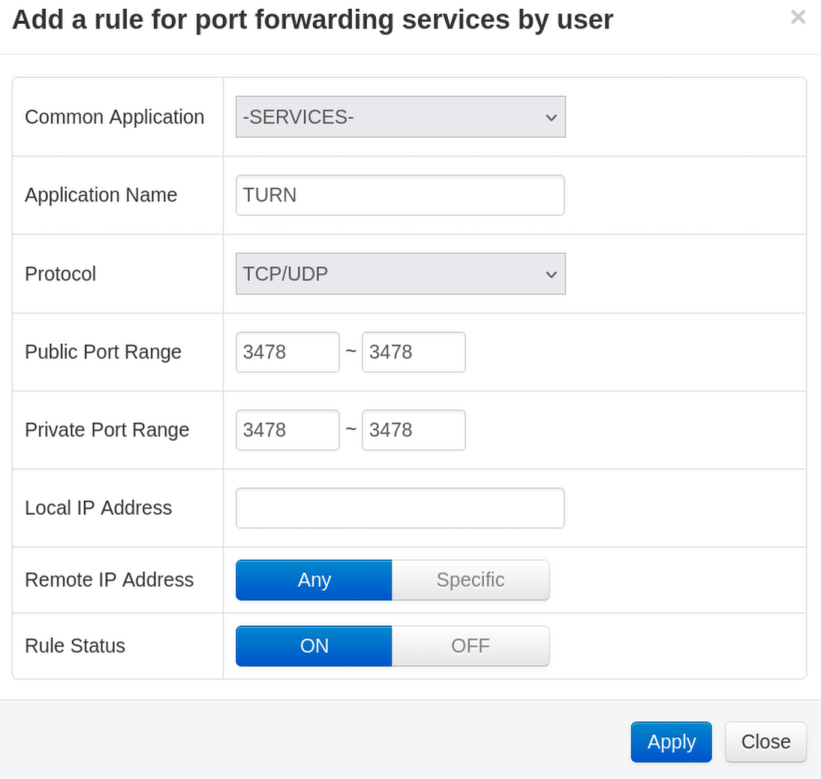
Port forward, local ip found with “ip addr show | grep enp5s0” and using the inet using syntax XXX.XXX.X.XX

chances are high tailscale doesn’t (properly) forward UDP.

I’m not familiar with it but many VPN solutions brake TURN for one or another reason. And even if it would work through VPN - VPN setup is not recommended as you want to setup the shortest possible network path for media - any additional network hop, encryption etc reduces audio and video quality. For this reason I would recommend you expose the TURN server directly, host it separated from your Nextcloud or use paid service e.g. Free WebRTC TURN Server - Open Relay Project | Open Relay Project - Free WebRTC TURN Server

Check if you find something useful in https://github.com/nextcloud/all-in-one/discussions/5439 and

use paid service e.g. Free WebRTC TURN Server - Open Relay Project | Open Relay Project - Free WebRTC TURN Server

I followed their very simple setup, and it still doesn’t work

Are they still offering this service? I have the account and everything (but talk doesn’t have anywhere to input the credentials?)

That said, I can’t even ping it from my host.

$ ping staticauth.openrelay.metered.ca
PING staticauth.openrelay.metered.ca (216.39.253.123) 56(84) bytes of data.
From 38.17.20.195 icmp_seq=1 Destination Host Unreachable
^C
--- staticauth.openrelay.metered.ca ping statistics ---
4 packets transmitted, 0 received, +1 errors, 100% packet loss, time 3054ms

[drm@archlinux ~]$ ping $ ping staticauth.openrelay.metered.ca
PING staticauth.openrelay.metered.ca (216.39.253.123) 56(84) bytes of data.
From 38.17.20.195 icmp_seq=1 Destination Host Unreachable
^C
--- staticauth.openrelay.metered.ca ping statistics ---
4 packets transmitted, 0 received, +1 errors, 100% packet loss, time 3054ms

running a traceroute (with the first few hops removed) shows it dies at their door, not a me problem, I think.

$ traceroute 216.39.253.123

traceroute to 216.39.253.123 (216.39.253.123), 30 hops max, 60 byte packets

 
 8  * * be3018.ccr41.ord03.atlas.cogentco.com (154.54.12.81)  20.813 ms

 9  be2765.ccr41.ord01.atlas.cogentco.com (154.54.45.17)  20.955 ms be2766.ccr42.ord01.atlas.cogentco.com (154.54.46.177)  19.229 ms  25.170 ms

10  port-channel2717.ccr91.cle04.atlas.cogentco.com (154.54.6.222)  27.270 ms port-channel2718.ccr92.cle04.atlas.cogentco.com (154.54.7.130)  28.835 ms port-channel2717.ccr91.cle04.atlas.cogentco.com (154.54.6
.222)  30.404 ms

11  be2994.ccr32.yyz02.atlas.cogentco.com (154.54.31.234)  32.126 ms be2993.ccr31.yyz02.atlas.cogentco.com (154.54.31.226)  34.195 ms be2994.ccr32.yyz02.atlas.cogentco.com (154.54.31.234)  24.533 ms

12  be2055.rcr51.yyz04.atlas.cogentco.com (154.54.81.42)  28.535 ms  36.072 ms  34.512 ms

13  te0-0-2-0.nr11.b011274-1.yyz04.atlas.cogentco.com (154.24.52.178)  27.615 ms te0-0-2-0.nr12.b011274-1.yyz04.atlas.cogentco.com (154.24.54.90)  29.172 ms te0-0-2-0.nr11.b011274-1.yyz04.atlas.cogentco.com (1
54.24.52.178)  34.210 ms

14  38.17.20.195 (38.17.20.195)  32.420 ms 38.17.20.165 (38.17.20.165)  30.739 ms  34.163 ms

15  * * *

16  * * *

17  * * *

18  * * *

19  38.17.20.165 (38.17.20.165)  32.203 ms !H * *


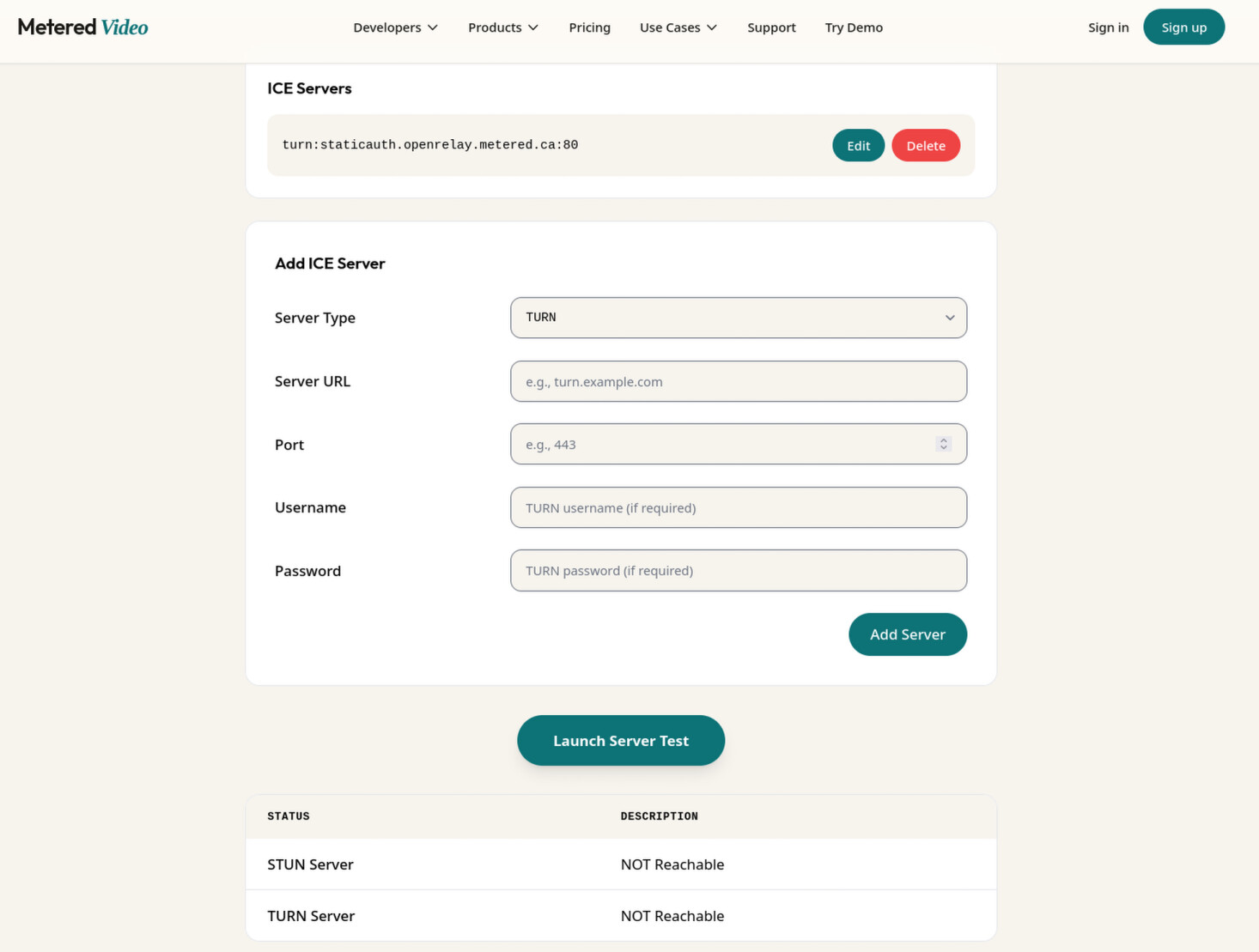
It seems their own test tool fails it as well (this does allow the credentials):

I have experience with their service as my own TURN works well, but port 80 and 443 sound wrong for me. → 80 and 443 are right according to their manual.. :thinking: well no idea.. reach out to the project or look for an alternative - there are more services like this… but at the end you still need a direct connection to TURN server (maybe not the case with your tailscale setup) otherwise calls will suffer.

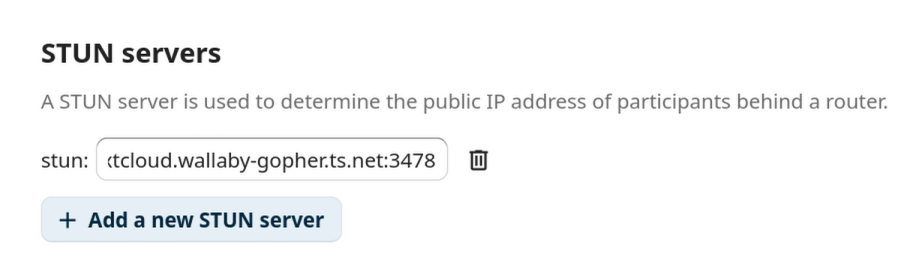
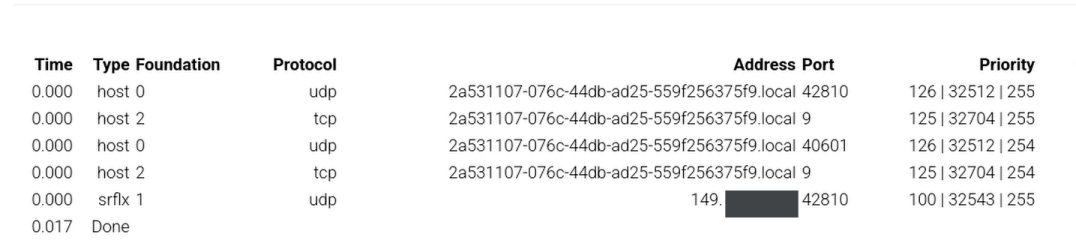
I’m not sure what are drawbacks if you clients can connect to TURN and server not.. maybe it will work well for small calls without HPB

I’ll reach out to them.

In the meantime, would you mind sharing your TURN setup? I’ve tried with eturnal below but with no success.

networks:
  bridge_network:
    name: bridge_network
    external: true
  backend_network:
    name: backend_network
    external: true
  nextcloud-aio:
    name: nextcloud-aio
    external: true

services:
  #for nextcloud talk to work outside of network
  eturnal:
    image: ghcr.io/processone/eturnal:latest
    networks:
      - backend_network
      - nextcloud-aio
    hostname: eturnal
    container_name: eturnal
    restart: unless-stopped
    user: 9000:9000
    ### security options
    read_only: true
    cap_drop:
      - ALL
    cap_add:
      - NET_BIND_SERVICE
    ### Note: if eturnal binds to privileged ports (<1024) directly, the option "security_opt" below must be commented out.
    security_opt:
      - no-new-privileges:true

    ### networking options
    ports:
      - 3480:3480     # STUN/TURN non-TLS | 3478 already in use by nextcloud backend?
      - 3480:3480/udp # STUN/TURN non-TLS | 3478 already in use by nextcloud backend?
       #- 5349:5349   # STUN/TURN TLS
      - 50000-50500:50000-50500/udp # TURN relay range
    #network_mode: "host"

    ### Environment variables - information on https://eturnal.net/doc/#Environment_Variables
    environment:
      - ETURNAL_RELAY_MIN_PORT=50000
      - ETURNAL_RELAY_MAX_PORT=50500
      - STUN_SERVICE=false #"nextcloud.wallaby-gopher.ts.net 3478" #:3478 #port already assumed? they use a space here https://eturnal.net/doc/container.html
  
    volumes:
      - /media/server/server/turn/eturnal.yml:/etc/eturnal.yml:ro 
eturnal:
  ## Shared secret for deriving temporary TURN credentials (default: $RANDOM):
  secret: "snip"     # Shared secret

  ## The server's public IPv4 address (default: autodetected):
  #relay_ipv4_addr: "XXX.XX.XX.XX" #confidential!! Might change? Will VPN break?
  ## The server's public IPv6 address (optional):
  #relay_ipv6_addr: "2001:db8::4"

  listen:
    -
      ip: "::"
      port: 3480
      transport: udp
    -
      ip: "::"
      port: 3480
      transport: tcp

Its stun server is also having trouble, the default does not connect:

Cannot query stun.conversations.im:3478: network is unreachable

so I tried stetting it to nextcloud’s stun:

Cannot query "nextcloud.wallaby-gopher.ts.net:3478": non-existing domain

I don’t get an error in logs when I manually grab my external ip (not optimal obviously) and set it in the .yml

and use the following command to find that ip: curl -s http://tnx.nl/ip

relay_ipv4_addr: "XXX.XX.XXX.XX"

as far as the port forward settings, I’m confused are 50000:50500 supposed to be the public range or 3480:3480? Also just checking, the ip address in nextcloud should be the same one I used in the relay, right?

I don’t get this. nextcloud’s STUN obviously doesn’t run your ..ts.net domain? be aware STUN and TURN are often mentioned together but both are completely different techniques

  • STUN only tells you about external IP which your connection exposes (if you are lucky your firewall allow inbound connections for each open outbound connection)
  • TURN actively participates in connection and relays traffic from one endpoint to another - it is required if both client can’t talk directly to each other e.g. if both are behind NAT - this is a reason why TURN requires many bandwidth and cpu power so almost no free services exist

my coturn is running a separate container

  coturn:
    image: coturn/coturn
    container_name: coturn
    restart: unless-stopped
    ports:
      - 3478:3478
      - 3478:3478/udp
      - 50000-50099:50000-50099/udp
      - 9641:9641
    environment:
      - DETECT_EXTERNAL_IP=yes
      - DETECT_RELAY_IP=yes
    command:
      - -n
      - --log-file=/var/turn.log
      - --realm=${COTURN_FQDN}
      - --use-auth-secret
      - --static-auth-secret=${COTURN_SECRET}
      - --verbose
    volumes:
      - ./coturn/:/var/
      - ./turnserver.conf:/etc/coturn/turnserver.conf
    networks:
      - proxy

I don’t have the conf right now but nothing special there I think.

Port forward from public IP/interface to :3478 tcp and udp (but udp is most important). 50000k range is optional but if you can afford to open is it allows more different media path and potentially faster connects.

Look through existing topics

likely you find similar issues with solutions.

That’s what it set itself as. I also tried adding the coturn server since it also runs a STUN. I test that below on the host machine.


$ turnutils_stunclient -p 3481 149.[snip]

0: (3249075): INFO: IPv4. UDP reflexive addr: 149.[snip]:43617

so 3478 and 50000k should be entirely separate port forward inputs?

I can connect from the host with just 3478 port forward but I still get a red checkmark in nextcloud and calls do not work off of network


$ turnutils_uclient -p 3481 -W 363c570f2f0076e5dae402b83f97f855fce03bd110dbfa3adae9db8930e623cf -v -y 149.[snip]

0: (3186728): INFO: IPv4. Connected from: 192.[snip]:47136

0: (3186728): INFO: IPv4. Connected to: 149.[snip]:3481

0: (3186728): INFO: allocate sent

0: (3186728): INFO: allocate response received:  
0: (3186728): INFO: allocate sent

0: (3186728): INFO: allocate response received:  
0: (3186728): INFO: success

0: (3186728): INFO: IPv4. Received relay addr: 172.[snip]:50098

0: (3186728): INFO: clnet_allocate: rtv=9322772916404601769

0: (3186728): INFO: refresh sent

0: (3186728): INFO: refresh response received:  
0: (3186728): INFO: success

0: (3186728): INFO: IPv4. Connected from: 192.[snip]:50633

0: (3186728): INFO: IPv4. Connected to: 149.[snip]:3481

0: (3186728): INFO: IPv4. Connected from: 192.[snip]:56672

0: (3186728): INFO: IPv4. Connected to: 149.[snip]:3481

0: (3186728): INFO: IPv4. Connected from: 192.[snip]:45824

0: (3186728): INFO: IPv4. Connected to: 149.[snip]:3481

0: (3186728): INFO: IPv4. Connected from: 192.[snip]:58768

0: (3186728): INFO: IPv4. Connected to: 149.[snip]:3481

0: (3186728): INFO: allocate sent

0: (3186728): INFO: allocate response received:  
0: (3186728): INFO: allocate sent

0: (3186728): INFO: allocate response received:  
0: (3186728): INFO: success

0: (3186728): INFO: IPv4. Received relay addr: 172.[snip]:50099

0: (3186728): INFO: clnet_allocate: rtv=0

0: (3186728): INFO: refresh sent

0: (3186728): INFO: refresh response received:  
0: (3186728): INFO: success

0: (3186728): INFO: allocate sent

0: (3186728): INFO: allocate response received:  
0: (3186728): INFO: allocate sent

0: (3186728): INFO: allocate response received:  
0: (3186728): INFO: success

0: (3186728): INFO: IPv4. Received relay addr: 172.[snip]:50042

0: (3186728): INFO: clnet_allocate: rtv=1903392696986157966

0: (3186728): INFO: refresh sent

0: (3186728): INFO: refresh response received:  
0: (3186728): INFO: success

0: (3186728): INFO: allocate sent

0: (3186728): INFO: allocate response received:  
0: (3186728): INFO: allocate sent

0: (3186728): INFO: allocate response received:  
0: (3186728): INFO: success

0: (3186728): INFO: IPv4. Received relay addr: 172.[snip]:50043

0: (3186728): INFO: clnet_allocate: rtv=0

0: (3186728): INFO: refresh sent

0: (3186728): INFO: refresh response received:  
0: (3186728): INFO: success

0: (3186728): INFO: allocate sent

0: (3186728): INFO: allocate response received:  
0: (3186728): INFO: allocate sent

0: (3186728): INFO: allocate response received:  
0: (3186728): INFO: success

0: (3186728): INFO: IPv4. Received relay addr: 172.[snip]:50062

0: (3186728): INFO: clnet_allocate: rtv=17787163063132013488

0: (3186728): INFO: refresh sent

0: (3186728): INFO: refresh response received:  
0: (3186728): INFO: success

0: (3186728): INFO: channel bind sent

0: (3186728): INFO: cb response received:  
0: (3186728): INFO: success: 0x7882

0: (3186728): INFO: channel bind sent

0: (3186728): INFO: cb response received:  
0: (3186728): INFO: success: 0x6f17

0: (3186728): INFO: channel bind sent

0: (3186728): INFO: cb response received:  
0: (3186728): INFO: success: 0x6ba9

0: (3186728): INFO: channel bind sent

0: (3186728): INFO: cb response received:  
0: (3186728): INFO: success: 0x7c05

1: (3186728): INFO: Total connect time is 1

1: (3186728): INFO: start_mclient: msz=4, tot_send_msgs=0, tot_recv_msgs=0, tot_send_bytes ~ 0, tot_recv_bytes ~ 0

2: (3186728): INFO: start_mclient: msz=4, tot_send_msgs=0, tot_recv_msgs=0, tot_send_bytes ~ 0, tot_recv_bytes ~ 0

3: (3186728): INFO: start_mclient: msz=4, tot_send_msgs=0, tot_recv_msgs=0, tot_send_bytes ~ 0, tot_recv_bytes ~ 0

4: (3186728): INFO: start_mclient: msz=4, tot_send_msgs=0, tot_recv_msgs=0, tot_send_bytes ~ 0, tot_recv_bytes ~ 0

5: (3186728): INFO: start_mclient: msz=4, tot_send_msgs=0, tot_recv_msgs=0, tot_send_bytes ~ 0, tot_recv_bytes ~ 0

6: (3186728): INFO: start_mclient: msz=4, tot_send_msgs=5, tot_recv_msgs=5, tot_send_bytes ~ 500, tot_recv_bytes ~ 500

7: (3186728): INFO: start_mclient: msz=4, tot_send_msgs=15, tot_recv_msgs=15, tot_send_bytes ~ 1500, tot_recv_bytes ~ 1500

7: (3186728): INFO: done, connection 0x7f01d124b010 closed.

7: (3186728): INFO: done, connection 0x7f01d11cc010 closed.

7: (3186728): INFO: done, connection 0x7f01d11ab010 closed.

7: (3186728): INFO: done, connection 0x7f01d126c010 closed.

7: (3186728): INFO: start_mclient: tot_send_msgs=20, tot_recv_msgs=20

7: (3186728): INFO: start_mclient: tot_send_bytes ~ 2000, tot_recv_bytes ~ 2000

7: (3186728): INFO: Total transmit time is 6

7: (3186728): INFO: Total lost packets 0 (0.000000%), total send dropped 0 (0.000000%)

7: (3186728): INFO: Average round trip delay 1.350000 ms; min = 1 ms, max = 2 ms

7: (3186728): INFO: Average jitter 0.300000 ms; min = 0 ms, max = 1 ms


it looks like a normal healthy handshake is completed inside coturn

2226: (25): INFO: IPv4. Local relay addr: 172.24.0.17:50042

2226: (25): INFO: IPv4. Local reserved relay addr: 172.24.0.17:50043

2226: (25): INFO: session 011000000000000003: new, realm=<local>, username=<1771730012>, lifetime=777

2226: (25): DEBUG: Global turn allocation count incremented, now 4

2226: (25): INFO: session 011000000000000003: realm <local> user <1771730012>: incoming packet ALLOCATE processed, success

2226: (25): INFO: session 011000000000000003: refreshed, realm=<local>, username=<1771730012>, lifetime=777

2226: (25): INFO: session 011000000000000003: realm <local> user <1771730012>: incoming packet REFRESH processed, success

2226: (23): INFO: session 009000000000000010: realm <local> user <>: incoming packet message processed, error 401: Unauthorized

2226: (23): INFO: IPv4. Local relay addr (RTCP): 172.24.0.17:50043

2226: (23): INFO: session 009000000000000010: new, realm=<local>, username=<1771730012>, lifetime=777

2226: (23): DEBUG: Global turn allocation count incremented, now 5

2226: (23): INFO: session 009000000000000010: realm <local> user <1771730012>: incoming packet ALLOCATE processed, success

2226: (23): INFO: session 009000000000000010: refreshed, realm=<local>, username=<1771730012>, lifetime=777

2226: (23): INFO: session 009000000000000010: realm <local> user <1771730012>: incoming packet REFRESH processed, success

2226: (16): INFO: session 002000000000000007: realm <local> user <>: incoming packet message processed, error 401: Unauthorized

2226: (16): INFO: IPv4. Local relay addr: 172.24.0.17:50062

2226: (16): INFO: IPv4. Local reserved relay addr: 172.24.0.17:50063

2226: (16): INFO: session 002000000000000007: new, realm=<local>, username=<1771730012>, lifetime=777

2226: (16): DEBUG: Global turn allocation count incremented, now 6

2226: (16): INFO: session 002000000000000007: realm <local> user <1771730012>: incoming packet ALLOCATE processed, success

2226: (16): INFO: session 002000000000000007: refreshed, realm=<local>, username=<1771730012>, lifetime=777

2226: (16): INFO: session 002000000000000007: realm <local> user <1771730012>: incoming packet REFRESH processed, success

2226: (23): INFO: session 009000000000000009: peer 172.24.0.17:50043 lifetime updated: 600

2226: (23): INFO: session 009000000000000009: realm <local> user <1771730012>: incoming packet CHANNEL_BIND processed, success

2226: (25): INFO: session 011000000000000003: peer 172.24.0.17:50062 lifetime updated: 600

2226: (25): INFO: session 011000000000000003: realm <local> user <1771730012>: incoming packet CHANNEL_BIND processed, success

2226: (23): INFO: session 009000000000000010: peer 172.24.0.17:50099 lifetime updated: 600

2226: (23): INFO: session 009000000000000010: realm <local> user <1771730012>: incoming packet CHANNEL_BIND processed, success

2226: (16): INFO: session 002000000000000007: peer 172.24.0.17:50042 lifetime updated: 600

2226: (16): INFO: session 002000000000000007: realm <local> user <1771730012>: incoming packet CHANNEL_BIND processed, success

2226: (23): INFO: session 009000000000000009: refreshed, realm=<local>, username=<1771730012>, lifetime=600

2226: (23): INFO: session 009000000000000009: realm <local> user <1771730012>: incoming packet REFRESH processed, success

2226: (23): INFO: session 009000000000000009: peer 172.24.0.17:50043 lifetime updated: 300

2226: (23): INFO: session 009000000000000009: realm <local> user <1771730012>: incoming packet CREATE_PERMISSION processed, success

2226: (23): INFO: session 009000000000000009: peer 172.24.0.17:50043 lifetime updated: 600

2226: (23): INFO: session 009000000000000009: realm <local> user <1771730012>: incoming packet CHANNEL_BIND processed, success

2226: (25): INFO: session 011000000000000003: refreshed, realm=<local>, username=<1771730012>, lifetime=600

2226: (25): INFO: session 011000000000000003: realm <local> user <1771730012>: incoming packet REFRESH processed, success

2226: (25): INFO: session 011000000000000003: peer 172.24.0.17:50062 lifetime updated: 300

2226: (25): INFO: session 011000000000000003: realm <local> user <1771730012>: incoming packet CREATE_PERMISSION processed, success

2226: (25): INFO: session 011000000000000003: peer 172.24.0.17:50062 lifetime updated: 600

2226: (25): INFO: session 011000000000000003: realm <local> user <1771730012>: incoming packet CHANNEL_BIND processed, success

2226: (23): INFO: session 009000000000000010: refreshed, realm=<local>, username=<1771730012>, lifetime=600

2226: (23): INFO: session 009000000000000010: realm <local> user <1771730012>: incoming packet REFRESH processed, success

2226: (23): INFO: session 009000000000000010: peer 172.24.0.17:50099 lifetime updated: 300

2226: (23): INFO: session 009000000000000010: realm <local> user <1771730012>: incoming packet CREATE_PERMISSION processed, success

2226: (23): INFO: session 009000000000000010: peer 172.24.0.17:50099 lifetime updated: 600

2226: (23): INFO: session 009000000000000010: realm <local> user <1771730012>: incoming packet CHANNEL_BIND processed, success

2226: (16): INFO: session 002000000000000007: refreshed, realm=<local>, username=<1771730012>, lifetime=600

2226: (16): INFO: session 002000000000000007: realm <local> user <1771730012>: incoming packet REFRESH processed, success

2226: (16): INFO: session 002000000000000007: peer 172.24.0.17:50042 lifetime updated: 300

2226: (16): INFO: session 002000000000000007: realm <local> user <1771730012>: incoming packet CREATE_PERMISSION processed, success

2226: (16): INFO: session 002000000000000007: peer 172.24.0.17:50042 lifetime updated: 600

2226: (16): INFO: session 002000000000000007: realm <local> user <1771730012>: incoming packet CHANNEL_BIND processed, success

2232: (25): INFO: session 011000000000000003: refreshed, realm=<local>, username=<1771730012>, lifetime=0

2232: (23): INFO: session 009000000000000010: refreshed, realm=<local>, username=<1771730012>, lifetime=0

2232: (16): INFO: session 002000000000000007: refreshed, realm=<local>, username=<1771730012>, lifetime=0

2232: (23): INFO: session 009000000000000010: realm <local> user <1771730012>: incoming packet REFRESH processed, success

2232: (25): INFO: session 011000000000000003: realm <local> user <1771730012>: incoming packet REFRESH processed, success

2232: (16): INFO: session 002000000000000007: realm <local> user <1771730012>: incoming packet REFRESH processed, success

2232: (23): INFO: session 009000000000000009: refreshed, realm=<local>, username=<1771730012>, lifetime=0

2232: (23): INFO: session 009000000000000009: realm <local> user <1771730012>: incoming packet REFRESH processed, success

2233: (23): INFO: session 009000000000000010: usage: realm=<local>, username=<1771730012>, rp=13, rb=1380, sp=13, sb=1020

2233: (23): INFO: session 009000000000000010: peer usage: realm=<local>, username=<1771730012>, rp=5, rb=500, sp=5, sb=500

2233: (23): INFO: session 009000000000000010: closed (2nd stage), user <1771730012> realm <local> origin <>, local 0.0.0.0:3481, remote 149.[snip]:45824, reason: allocation timeout

2233: (23): INFO: session 009000000000000010: delete: realm=<local>, username=<1771730012>

2233: (23): DEBUG: Global turn allocation count decremented, now 5

2233: (23): INFO: session 009000000000000010: peer 172.24.0.17:50099 deleted

2233: (16): INFO: session 002000000000000007: usage: realm=<local>, username=<1771730012>, rp=13, rb=1372, sp=13, sb=1032

2233: (25): INFO: session 011000000000000003: usage: realm=<local>, username=<1771730012>, rp=13, rb=1372, sp=13, sb=1032

2233: (16): INFO: session 002000000000000007: peer usage: realm=<local>, username=<1771730012>, rp=5, rb=500, sp=5, sb=500

2233: (25): INFO: session 011000000000000003: peer usage: realm=<local>, username=<1771730012>, rp=5, rb=500, sp=5, sb=500

2233: (16): INFO: session 002000000000000007: closed (2nd stage), user <1771730012> realm <local> origin <>, local 0.0.0.0:3481, remote 149.[snip]:58768, reason: allocation timeout

2233: (16): INFO: session 002000000000000007: delete: realm=<local>, username=<1771730012>

2233: (16): DEBUG: Global turn allocation count decremented, now 4

2233: (16): INFO: session 002000000000000007: peer 172.24.0.17:50042 deleted

I’m really confused with your logs..

you configure port :3478 in your server but test :3481 in trunutils?

work on one problem at time

  • green checkmark doesn’t mean TURN works - it only means the server can access turn.. still each client requires access
  • check each client one by one - for me best tactic is using a laptop connected to different network e.g. home wifi and mobile data - looking at firefox about:webrtc tells you which candidates worked and which not (or better if it successfully acquired TURN candidates)

Sorry for the confusion, I’ve been using different ports for tests.

Nextcloud’s built in TURN uses the standard 3478, eturnal I set to 3480, and coturn to 3481.

Using trickle ice I can test STUN off network successfully, but TURN asks for a user which isn’t compatible with nextcloud’s secret style, so I’m not sure how to test that. I think if STUN is reachable like this surely TURN would be accessible off network as well?


I can get a green checkmark within nextcloud on the hostmachine using my host’s local ip but obviously that’s incorrect for other clients, but I think it shows that nextcloud IS able to reach coturn and It just doesn’t want to route through the public IP?

Interestingly, running the test from another device shows it CAN reach out, it’s just unauthorized? I notice it’s the device’s tailscale ip address, 100.88.23.57:35608, not it’s actual ip address. This remote value is usually the host’s external ip when I run the turnutil’s test.

17963: (24): INFO: session 010000000000000006: usage: realm=<local>, username=<1771805112:turn-test-user>, rp=3, rb=300, sp=3, sb=224

17963: (24): INFO: session 010000000000000006: peer usage: realm=<local>, username=<1771805112:turn-test-user>, rp=0, rb=0, sp=0, sb=0

17963: (24): INFO: session 010000000000000006: closed (2nd stage), user <1771805112:turn-test-user> realm <local> origin <>, local 0.0.0.0:3481, remote 100.91.72.49:50875, reason: allocation timeout

17963: (24): INFO: session 010000000000000006: delete: realm=<local>, username=<1771805112:turn-test-user>

17963: (24): DEBUG: Global turn allocation count decremented, now 1

18076: (22): INFO: session 008000000000000009: realm <local> user <>: incoming packet message processed, error 401: Unauthorized

18123: (22): INFO: session 008000000000000012: realm <local> user <>: incoming packet message processed, error 401: Unauthorized

18136: (22): INFO: session 008000000000000009: usage: realm=<local>, username=<>, rp=7, rb=308, sp=7, sb=560

18136: (22): INFO: session 008000000000000009: peer usage: realm=<local>, username=<>, rp=0, rb=0, sp=0, sb=0

18136: (22): INFO: session 008000000000000009: closed (2nd stage), user <> realm <local> origin <>, local 0.0.0.0:3481, remote 100.88.23.57:37651, reason: allocation watchdog determined stale session state

18136: (22): INFO: session 008000000000000010: usage: realm=<local>, username=<>, rp=7, rb=308, sp=7, sb=560

18136: (22): INFO: session 008000000000000010: peer usage: realm=<local>, username=<>, rp=0, rb=0, sp=0, sb=0

18136: (22): INFO: session 008000000000000010: closed (2nd stage), user <> realm <local> origin <>, local 0.0.0.0:3481, remote 100.88.23.57:35608, reason: allocation watchdog determined stale session state

18136: (14): INFO: session 000000000000000013: usage: realm=<local>, username=<>, rp=7, rb=308, sp=7, sb=560

18136: (14): INFO: session 000000000000000013: peer usage: realm=<local>, username=<>, rp=0, rb=0, sp=0, sb=0

Also I had to define my host’s external ip in the turnserver.conf and comment out in the docker-compose

#environment: 
    # - DETECT_EXTERNAL_IP=yes
      #- DETECT_RELAY_IP=yes

or else I’d get 0: (1719434): INFO: channel bind: error 403 (Forbidden IP)

I don’t get any off network webrtc info because they’re not connecting.

from: How to test online whether a STUN/TURN server is working properly or not | Our Code World

Rule of thumb

You can easily determine if your server works with both tools or with your own JavaScript:

  • A STUN server works if you can gather a candidate with type "srflx".
  • A TURN server works if you can gather a candidate with type "relay".

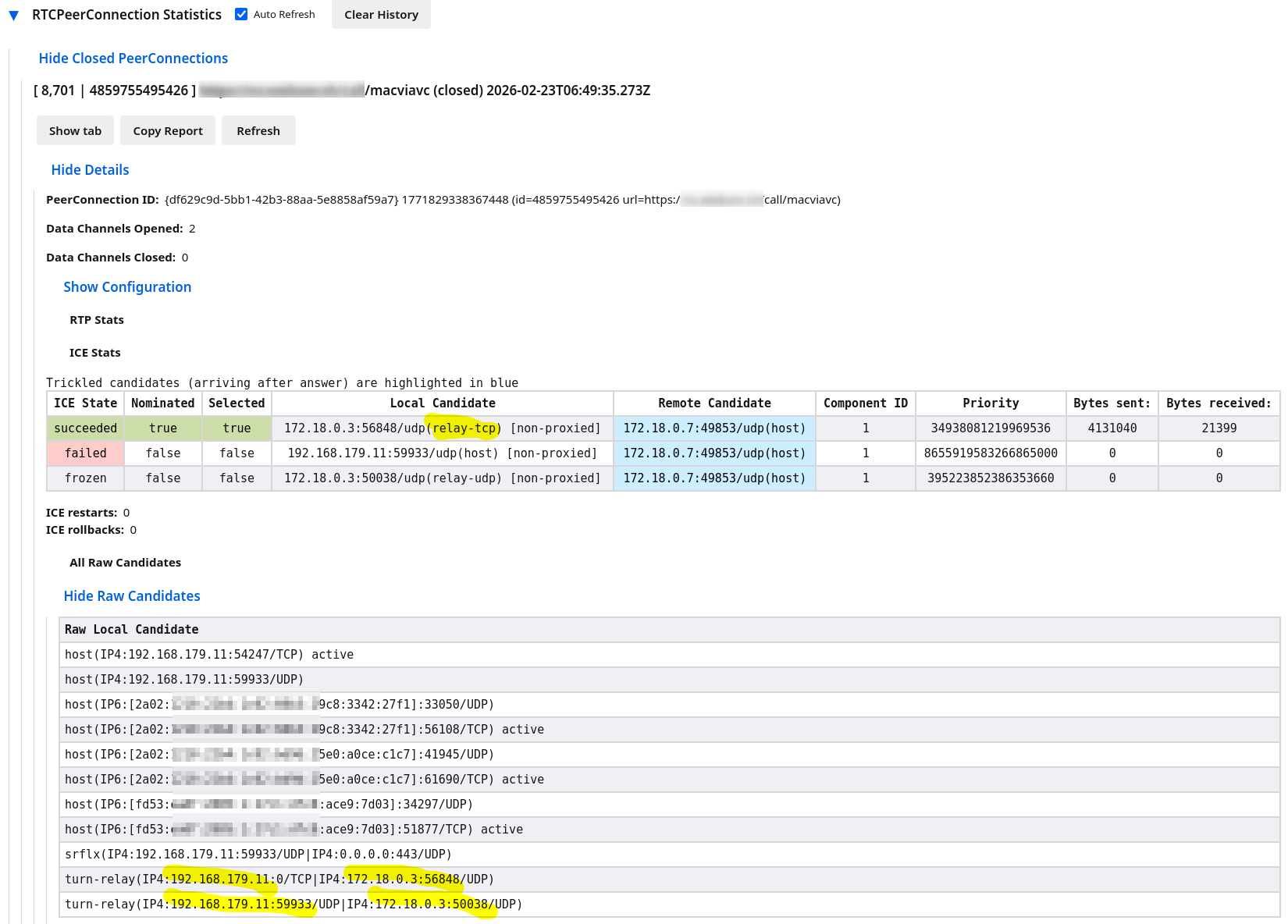
in firefox in an about:webrtc in running Talk call I see candidates like this

  • 192.168.179.11 is the local IP of my client
  • 172.. is obviously a docker IP - it looks it reflects the docker internal IP connecting to turn server, I’m surprised it doesn’t show any public IP there..
  • review relay candidates coming from a TURN server

in the log I see (there is much more - lot of errors as well - search for “turn” tosee relevant entries)
such a process repeats many time for each possible IP/port combination

browser webrtc log
ICE(PC:{df629c9d-5bb1-42b3-88aa-5e8858af59a7} 1771829338367448 (id=4859755495426 url=https://nc.mydomain.tld/call/macviavc)): peer (PC:{df629c9d-5bb1-42b3-88aa-5e8858af59a7} 1771829338367448 (id=4859755495426 url=https://nc.mydomain.tld/call/macviavc):default) pairing local trickle ICE candidate srflx(IP4:192.168.179.11:59933/UDP|IP4:0.0.0.0:443/UDP)
ICE(PC:{df629c9d-5bb1-42b3-88aa-5e8858af59a7} 1771829338367448 (id=4859755495426 url=https://nc.mydomain.tld/call/macviavc)): peer (PC:{df629c9d-5bb1-42b3-88aa-5e8858af59a7} 1771829338367448 (id=4859755495426 url=https://nc.mydomain.tld/call/macviavc):default) starting grace period timer for 5000 ms
Unrecognized attribute: 0x802b
Unrecognized attribute: 0x802c
STUN-CLIENT(srflx(IP4:192.168.179.11:51530/UDP|IP4:0.0.0.0:443/UDP)): Received response; processing
ICE(PC:{df629c9d-5bb1-42b3-88aa-5e8858af59a7} 1771829338367448 (id=4859755495426 url=https://nc.mydomain.tld/call/macviavc)): peer (PC:{df629c9d-5bb1-42b3-88aa-5e8858af59a7} 1771829338367448 (id=4859755495426 url=https://nc.mydomain.tld/call/macviavc):default) pairing local trickle ICE candidate srflx(IP4:192.168.179.11:51530/UDP|IP4:0.0.0.0:443/UDP)
Inconsistent message method: 113 expected 001
STUN-CLIENT(relay(IP4:192.168.179.11:59933/UDP|IP4:0.0.0.0:3478/UDP)::TURN): Received response; processing
STUN-CLIENT(relay(IP4:192.168.179.11:59933/UDP|IP4:0.0.0.0:3478/UDP)::TURN): nr_stun_process_error_response failed
STUN-CLIENT(relay(IP4:192.168.179.11:59933/UDP|IP4:0.0.0.0:3478/UDP)::TURN): Error processing response: Retry may be possible, stun error code 401.
STUN-CLIENT(relay(IP4:192.168.179.11:51530/UDP|IP4:0.0.0.0:3478/UDP)::TURN): Received response; processing
STUN-CLIENT(relay(IP4:192.168.179.11:51530/UDP|IP4:0.0.0.0:3478/UDP)::TURN): nr_stun_process_error_response failed
STUN-CLIENT(relay(IP4:192.168.179.11:51530/UDP|IP4:0.0.0.0:3478/UDP)::TURN): Error processing response: Retry may be possible, stun error code 401.
Inconsistent message method: 103 expected 001
STUN-CLIENT(relay(IP4:192.168.179.11:59933/UDP|IP4:0.0.0.0:3478/UDP)::TURN): Received response; processing
TURN(relay(IP4:192.168.179.11:59933/UDP|IP4:0.0.0.0:3478/UDP)): Succesfully allocated addr IP4:172.18.0.3:50038/UDP lifetime=3600
ICE(PC:{df629c9d-5bb1-42b3-88aa-5e8858af59a7} 1771829338367448 (id=4859755495426 url=https://nc.mydomain.tld/call/macviavc)): peer (PC:{df629c9d-5bb1-42b3-88aa-5e8858af59a7} 1771829338367448 (id=4859755495426 url=https://nc.mydomain.tld/call/macviavc):default) pairing local trickle ICE candidate turn-relay(IP4:192.168.179.11:59933/UDP|IP4:172.18.0.3:50038/UDP)
ICE-PEER(PC:{df629c9d-5bb1-42b3-88aa-5e8858af59a7} 1771829338367448 (id=4859755495426 url=https://nc.mydomain.tld/call/macviavc):default)/CAND-PAIR(os9q): setting pair to state FROZEN: os9q|IP4:172.18.0.3:50038/UDP|IP4:172.18.0.7:49853/UDP(turn-relay(IP4:192.168.179.11:59933/UDP|IP4:172.18.0.3:50038/UDP)|candidate:1 1 udp 2015363327 172.18.0.7 49853 typ host)
ICE(PC:{df629c9d-5bb1-42b3-88aa-5e8858af59a7} 1771829338367448 (id=4859755495426 url=https://nc.mydomain.tld/call/macviavc))/CAND-PAIR(os9q): Pairing candidate IP4:172.18.0.3:50038/UDP (57c1dff):IP4:172.18.0.7:49853/UDP (782000ff) priority=395223852386353662 (57c1dfff04001fe)
STUN-CLIENT(relay(IP4:192.168.179.11:51530/UDP|IP4:0.0.0.0:3478/UDP)::TURN): Received response; processing
TURN(relay(IP4:192.168.179.11:51530/UDP|IP4:0.0.0.0:3478/UDP)): Succesfully allocated addr IP4:172.18.0.3:59600/UDP lifetime=3600
ICE(PC:{df629c9d-5bb1-42b3-88aa-5e8858af59a7} 1771829338367448 (id=4859755495426 url=https://nc.mydomain.tld/call/macviavc)): peer (PC:{df629c9d-5bb1-42b3-88aa-5e8858af59a7} 1771829338367448 (id=4859755495426 url=https://nc.mydomain.tld/call/macviavc):default) pairing local trickle ICE candidate turn-relay(IP4:192.168.179.11:51530/UDP|IP4:172.18.0.3:59600/UDP)

the most relevant item seems TURN(relay(IP4:..)): Succesfully allocated addr

I have no experience with tailscale but from my experience any kind of VPN brakes TURN.. likely this is the case as well. for TURN you need direct connection between client and server (and NC server in this case a TURN client as well). Maybe you ask tailscale forums if it’s possible to run TURN behind tailscale..

Well, I was trying to do the TURN without tailscale but it wouldn’t work, so I gave in and configured as below to use tailscale and although the nextcloud dashboard shows a red mark calls connect off network, so I can’t complain.

That said, how do you disable nextcloud aio talk’s built in TURN and STUN so I’m not burning resources?

turnserver.conf

listening-port="3481:3481"
fingerprint
use-auth-secret
static-auth-secret="snip"
realm=tailcoturn.wallaby-gopher.ts.net #your.domain.org
total-quota=0
bps-capacity=0
stale-nonce
no-multicast-peers


external-ip=100.65.37.99
#tailscale ip above
listening-ip=0.0.0.0
min-port=50000
max-port=50099

docker compose

networks:
  bridge_network:
    name: bridge_network
    external: true
  backend_network:
    name: backend_network
    external: true
  nextcloud-aio:
    name: nextcloud-aio
    external: true
volumes:
  coturn-var:
  tailcoturn-data:
  tailcoturn-state:
  tailcoturn_sock:
services:
  coturn:
    image: coturn/coturn
    container_name: coturn
    restart: unless-stopped
   
    command:
      - -n
      - --log-file=/var/turn.log
      - --realm="tailcoturn.wallaby-gopher.ts.net" 
      - --use-auth-secret
      - --static-auth-secret="snip" #${COTURN_SECRET}
      - --verbose
    volumes:
      - coturn-var:/var/
      - /media/server/server/coturn/turnserver.conf:/etc/coturn/turnserver.conf:ro # for custom config file
    network_mode: service:tailcoturn
    depends_on:
      - tailcoturn


  tailcoturn:
    container_name: tailcoturn
    init: true
    #links:
     # - eturnal
    #hostname: tailtalk #not in host mode
    cap_add:
      - NET_ADMIN
      - NET_RAW
      
    volumes:
      - tailcoturn-data:/var/lib
      - tailcoturn-state:/state
      - /dev/net/tun:/dev/net/tun
      - type: volume
        source: tailcoturn_sock
        target: /tmp
    networks:
      - backend_network
      - nextcloud-aio
    restart: always
    environment:
      - TS_HOSTNAME=tailcoturn
      - TS_STATE_DIR=/state
    image: tailscale/tailscale:latest

1 Like

AiO is not intended for customization - either use AiO how it is or built your own stack Nextcloud Talk High Performance Backend (HPB) - Multi-Domain Setup Guide

This topic was automatically closed 8 days after the last reply. New replies are no longer allowed.