Nextcloud Office running from Ubuntu/Apache will not open files in browser, using Collabora Demo Servers

Support intro

Sorry to hear you’re facing problems. :slightly_frowning_face:

The community help forum (help.nextcloud.com) is for home and non-enterprise users. Support is provided by other community members on a best effort / “as available” basis. All of those responding are volunteering their time to help you.

If you’re using Nextcloud in a business/critical setting, paid and SLA-based support services can be accessed via portal.nextcloud.com where Nextcloud engineers can help ensure your business keeps running smoothly.

Getting help

In order to help you as efficiently (and quickly!) as possible, please fill in as much of the below requested information as you can.

Before clicking submit: Please check if your query is already addressed via the following resources:

(Utilizing these existing resources is typically faster. It also helps reduce the load on our generous volunteers while elevating the signal to noise ratio of the forums otherwise arising from the same queries being posted repeatedly).

Some or all of the below information will be requested if it isn’t supplied; for fastest response please provide as much as you can. :heart:

The Basics

  • Nextcloud Server version (e.g., 29.x.x):
    • v29 also HUB 10 v31
  • Operating system and version (e.g., Ubuntu 24.04):
    • Ubuntu 20.04
  • Web server and version (e.g, Apache 2.4.25):
    • `Apache/2.4.52 (Ubuntu)
  • Reverse proxy and version _(e.g. nginx 1.27.2)
    • Apache/2.4.52 (Ubuntu)
  • PHP version (e.g, 8.3):
    • 8.1
  • Is this the first time you’ve seen this error? (Yes / No):
    • no, going on since v29r,, almost giving up on Nextcloud because of it
  • When did this problem seem to first start?
    • an install instance to v29
  • Installation method (e.g. AlO, NCP, Bare Metal/Archive, etc.)
    • installed manually from github to my own VPS
  • Are you using CloudfIare, mod_security, or similar? (Yes / No)
    • no

Summary of the issue you are facing:

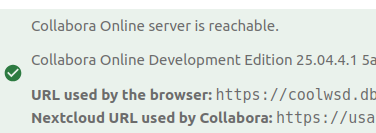
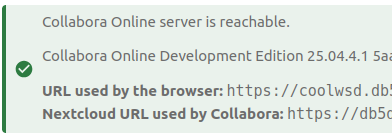
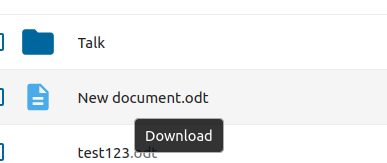
[I have an old instance running v21 nextcloud and on the same server is running the older loolwsd.service behind a reverse proxy on it’s own subdomain, all done with Apache, no Nginx involved. I manually installed and configured correctly the loolwsd and have used it for many years with my nextcloud; However after trying out an instance v29, I could get the Office to connect to server running lool and got a green light, but will no longer open a file in the online version; So I tried again yesterday on another server with new nextcloud v31, and I installed the latest coolwsd from Collabora Ubuntu package, and it’s running properly so it seems, except i still can’t get the admin console link to work.. but I can hook into it from nextcloud v31 and v29 and get the green success 'you are connected to Collabora server" behind a reverse proxy running SSL .. all looks good in the Office Admin section, but still.. you hold your mouse over a file and you even see the link “Download” it never attempts to open the OpenOffice console as it still down on my older instance running v21]

I also ran a test just now from my instance v21 Nextcloud running the old loolwsd Collabora CODE server.. well, I changed the v21 to use the new server I installed yesterday running coolwsd, and it opened the file right in the browser, finally see that this coolwsd server can open a file and edit it. But I can’t get to open from v29 nor 31 using same coolwsd Collabora server!

Steps to replicate it (hint: details matter!):

  1. click file icon in Files
  2. it automatically and immediately downloads that file
  3. it did NOT open in browser as I expected

Log entries

Nextcloud

Please provide the log entries from your Nextcloud log that are generated during the time of problem (via the Copy raw option from Administration settings->Logging screen or from your nextcloud.log located in your data directory). Feel free to use a pastebin/gist service if necessary.

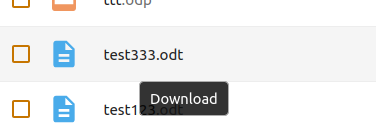
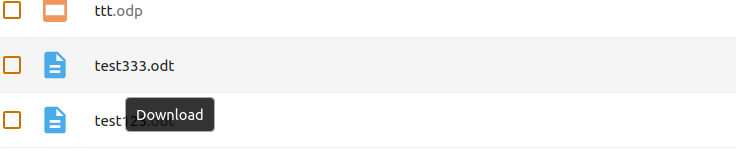
Zero log entries happen.. the mouseover caption reads "download" when hovering over a file

Web Browser

zero console.log, zero attempts to connect to the coolwsd server address.

Web server / Reverse Proxy

The output of your Apache/nginx/system log in /var/log/____:

nothing here that is related

Configuration

Nextcloud

The output of occ config:list system or similar is best, but, if not possible, the contents of your config.php file from /path/to/nextcloud is fine (make sure to remove any identifiable information!):

{
    "system": {
        "instanceid": "***REMOVED SENSITIVE VALUE***",
        "passwordsalt": "***REMOVED SENSITIVE VALUE***",
        "secret": "***REMOVED SENSITIVE VALUE***",
        "trusted_domains": [
            "usa.db5d.net"
        ],
        "datadirectory": "***REMOVED SENSITIVE VALUE***",
        "dbtype": "mysql",
        "version": "31.0.7.1",
        "overwrite.cli.url": "https:\/\/usa.db5d.net",
        "dbname": "***REMOVED SENSITIVE VALUE***",
        "dbhost": "***REMOVED SENSITIVE VALUE***",
        "dbport": "",
        "dbtableprefix": "oc_",
        "mysql.utf8mb4": true,
        "dbuser": "***REMOVED SENSITIVE VALUE***",
        "dbpassword": "***REMOVED SENSITIVE VALUE***",
        "updater.release.channel": "git",
        "installed": true
    }
}

Apps

…
Enabled:

  • calendar: 5.4.0-rc.3
  • cloud_federation_api: 1.14.0
  • comments: 1.21.0
  • contacts: 7.2.2
  • contactsinteraction: 1.12.0
  • dashboard: 7.11.0
  • dav: 1.33.0
  • federatedfilesharing: 1.21.0
  • federation: 1.21.0
  • files: 2.3.1
  • files_external: 1.23.0
  • files_reminders: 1.4.0
  • files_sharing: 1.23.1
  • files_trashbin: 1.21.0
  • files_versions: 1.24.0
  • lookup_server_connector: 1.19.0
  • mail: 5.1.9
  • notes: 4.12.2
  • oauth2: 1.19.1
  • profile: 1.0.0
  • provisioning_api: 1.21.0
  • richdocuments: 8.7.2
  • settings: 1.14.0
  • sharebymail: 1.21.0
  • spreed: 21.1.2
  • systemtags: 1.21.1
  • theming: 2.6.1
  • twofactor_backupcodes: 1.20.0
  • updatenotification: 1.21.0
  • user_status: 1.11.0
  • weather_status: 1.11.0
  • webhook_listeners: 1.2.0
  • workflowengine: 2.13.0
    Disabled:
  • admin_audit: 1.21.0
  • encryption: 2.19.0
  • testing: 1.21.0
  • user_ldap: 1.22.0
    …

versions 29 and 31 when I hover over a file, I get this

whereas on my version 21 running on Ubuntu 20.04, yet using same newly installed coolwsd server shows this in link area of browser when hovering over file:

https://xxxx_____.cloud/index.php/apps/files?dir=/&openfile=14265

it seems a real dynosaur :t_rex: if you didn’t upgrade since than you are lucky lazy admin. both applications evolved since than and loolwsd became coolwsd many years ago. this definitely requires changes in reverseproxy config. I can’t say for sure but chances exist the protocol changed as well so new Nextcloud doesn’t work with ancient Collabora suite. I would recommend you upgrade of if not possible migrate to an installation with modern installation (but your CODE version looks new..). the most simple check if the problem is your Office is to connect with collabora test instance - if this one works you know where to start looking.
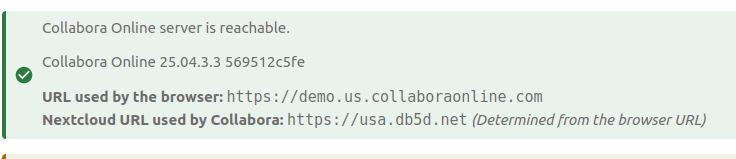
once you have upgraded to supportet versions (which seems the case o the domain you shared) you could review the Collabora integration guide which covers almost every issue.

also I did every step in the document you linked to. and all tests are OK can communicate back and forth with curl and from browser to all parties.. and btw I’m running both NC and CODE on same server but under different domains with LetsEncrypt certs

but I hover over a file and it still says download

once I upgrade??? you didn’t read that correctly I have 2 versions now running nc 31 and the very latest CODE server running coolwsd .. I said ALL of this but maybe you just jumped to the last comment.

with all due respect, I stated correctly that this ticket is concerning version 31, the latest nextcloud I just installed the other day, as well as the latest Collabora running coolwsd.

do you have an official working template to use for Reverse Proxy for Apache ? please where can I find such an official version.. I have the same question as you did which I don’t see answered, I also question why he put the Nextcloud url in the the CODE reverse proxy , also why port 80, you mention never use plain https

this ticket was NOT about the old v21 Nextclou server that still works, I mentioned as a reference. it’s about the fact the for over a year I can’t get Nextcloud and Collabora to work together as I did before. AND I mention the OLD nextcloud somehow works fine with the new coolwsd, so I know that that is running correctly.

I thank for for the link to the instructions document

I did that, and it still downloads files, do I have to run occ commands to reconfigure this? This is from Nextcloud stable31 branch … hooked up demo server and it says good to go..


but I still get this when hovering and file only downloads

Please talk to me.. Demo server does same thing.. does not open files, only downloads.. I did the OCC config steps, add new server as wopi server and activated with new demo server url.. still not working.. two other installations have same problem.. I stated in my message I haven’t been able to use Nextcloud Office for many years and was losing interest in ever upgrading as . every install the same thing occurs. Nextcloud Office does not work, the Files download.. hover over a file and it says “download” so the richdocuments is clearly not working correctly. I’ve tried two different demo servers and my own running latest installation of CODE, yet this new install of coolwsd works on an old nextcloud v21.

I never meant this to be about the v21 and lool … i am on the latest versions, only mentioned them so you saw that I had done this before.

again and again, no luck.. can you tell me what needs to happen WITHIN nextcloud so that when you hold your mouse over the file, instead of displaying “download” and that being the action, it shows that it’s going to load that file and not download it.. There must be a hook* right? the Office admin shows it’s hooked up to a client, has the green light.. yet the files don’t open. This is AFTER instance is successfully connected to a CODE client, either a demo-server or my own coolwsd server?

I think there must be something that I’m missing. I have reverse proxy exactly as Collabora recommends and it even works properly on an old Nextcloud version 21, so it HAS to be the new Nextcloud, there is a bug.. do you guys have a working version yourself of this we can refer to?

*This is crucial, the fact that the Richdocuments is NOT planning on opening up any files in the browser using the Collabora client has already been established so that at the CSS or Javascript level it has “hover” showing “Download”, so before the mouseclick… this is a clue to where you have timing problems.

maybe it needs to use nginx, ??? i only use Apache, could that be it? I’m telling you for over 2 years I’ve not been able to hook up a new Nextcloud to a Collabora server, EVERY single installation the files download… I assumed you got rid of the “edit in browser” and was very disappointed, as I still am now after 48 hours of installing on different servers the nextcloud version 31 to try to have it open a file with Nextcloud OFFICE to edit from my or demo CODE clients.. very frustrating

Hey this is a known issue! Holy smakerollee, this is a bug that is still not fixed going on 3 or 4 versions ??? if version 21 works with a demo server and my old loowsd AND my new coolwsd servers.. So if THAT v21 can run a “demo sever” , but version 29 and 31 .. cannot.. and I’ve just confirmed that with over 5 different installations.. must be a bug. Don’t gaslight me about being a lazy admin, and that it should work.. I follow ever step to the “t” and it DOES NOT work.. Please update me on how to proceed. Nextcloud downloads office files instead of opening in collabora

Darshan said: " Workaround: Just reloading the page after clicking the document often helps (strange, but true)."

omg… really? I tried it, it doesn’t work.. nextcloud OFFICE is broken and has been for years.. I’ll help you figure this out

THIS is for anyone who might know a coder on this issue:

I just now notice that whenever you re-save the connection in Office admin area to a Collabora server, in the Network panel two GET calls go out to [url-of-coolwsd]/hosting/capabilities and also [url-of coolwsd]/hosting/discovery

They both get a status 200 which may explain the green lights, however the response is empty

Whereas if you curl from the Nextcloud server, both calls give long json type documents:

curl https://[my-collabora-server-url]/hosting/capabilities
{"convert-to":{"available":false},"hasDocumentSigningSupport":true,"hasMobileSupport":true,"hasProxyPrefix":false,"hasSettingIframeSupport":true,"hasTemplateSaveAs":false,"hasTemplateSource":true,"hasWASMSupport":false,"hasWopiAccessCheck":true,"hasZoteroSupport":true,"productName":"Collabora Online Development Edition","productVersion":"25.04.4.1","productVersionHash":"5aa2ead294","serverId":"f50a0092"}

So, it’s as if there was some kind of ajax calls but the return was not waited for or else filtered out somehow. This could explain the behavior perhaps or be a clue.

there is no need need to write 20 posts - if you find out something new you can edit your last post with new details.

I don’t think there is a bug my 3 NC installations work good with same latest CODE. and this is the case since years.. in fact I didn’t hit mjor issues with code since they changes to {year}.{month} numbering scheme.

Collabora docs referred in the article include valid config for all relevant reverse proxies.

I know this behavior of very first login after upgrades of either CODE or NC but only than. once the system stabilized a little there is no such issue.

if you read the article you will see that green checkmark only means Nextcloud serve can access code not more and not less. at the same time the question arise - how comes there is an empty response? I can’t repro an empty response for 10+ tests on my instance and also not on your instance.

Not on my instance? How can you even see that if you are not logged in? Which is a great idea.. how about i could send you privately a login/pw to a server running Nextcloud 29 and two more servers running 31… and you can see for yourself that all 3 when you hook it up to a demo-server, it says “connected” but still you hover over a file and it says “download”

and you can see that the GET calls to discovery and capabilities even though status 200 shows empty response.. yet if you double click link it opens the xml right in your browser

Which versions of Nextcloud are your 3 that are working? 29 or 31 ?

Well I asked because in the How To Implement NC + Office document linked to me here in this support chat, if you follow down until the Apache Reverse Proxy, it shows a very different version. If the demo-servers don’t work and my new collabora coolwsd server works fine with older Nextcloud installs, my reverse proxy setup is not likely to be the issue. But I can post it if you like.. and you can test it yourself of course on other nextclouds, it’s coolwsd.db5d.net I can add your Nexcloud to the allowed list on the coolwsd.xml file