[Nextcloud Office] errors and missing parts displaying docs

VPS OVH
OS : Linux Ubuntu 22.04.5 LTS
Kernel : 5.15.0.164-generic
CPU : 4 x AMD EPYC-Milan (4) @ 2.30 GHz
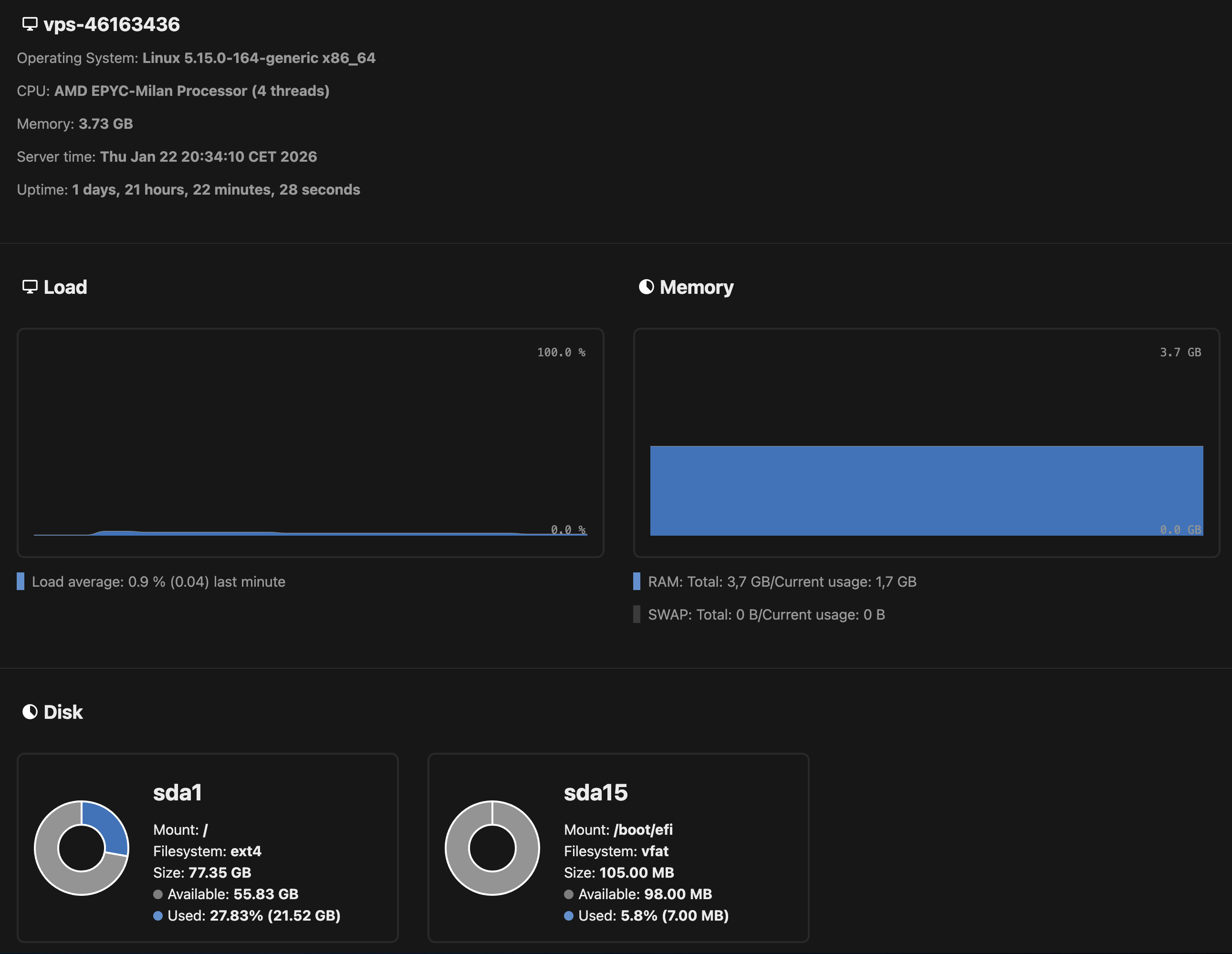
Memory: 1.52 GiB / 3.73 GiB (41%)
Swap: Disabled
Disk (/): 21.42 GiB / 77.35 GiB (28%) - ext4

Apache 2.4.52 (Ubuntu) (fpm-fcgi)
PHP 8.2.30
MySQL 10.6.22
Nextcloud version: 31.0.13 - 31.0.13.1
Nextcloud Office using built-in CODE (25.04.7.2)

Modules loaded: Core, date, libxml, openssl, pcre, zlib, filter, hash, json, random, Reflection, SPL, session, standard, sodium, cgi-fcgi, mysqlnd, PDO, xml, apcu, bcmath, bz2, calendar, ctype, curl, dom, mbstring, FFI, fileinfo, ftp, gd, gettext, gmp, iconv, igbinary, imagick, intl, exif, mysqli, pdo_mysql, Phar, posix, readline, shmop, SimpleXML, sockets, sysvmsg, sysvsem, sysvshm, tokenizer, xmlreader, xmlwriter, xsl, zip, redis, Zend OPcache

[EN] Hello,
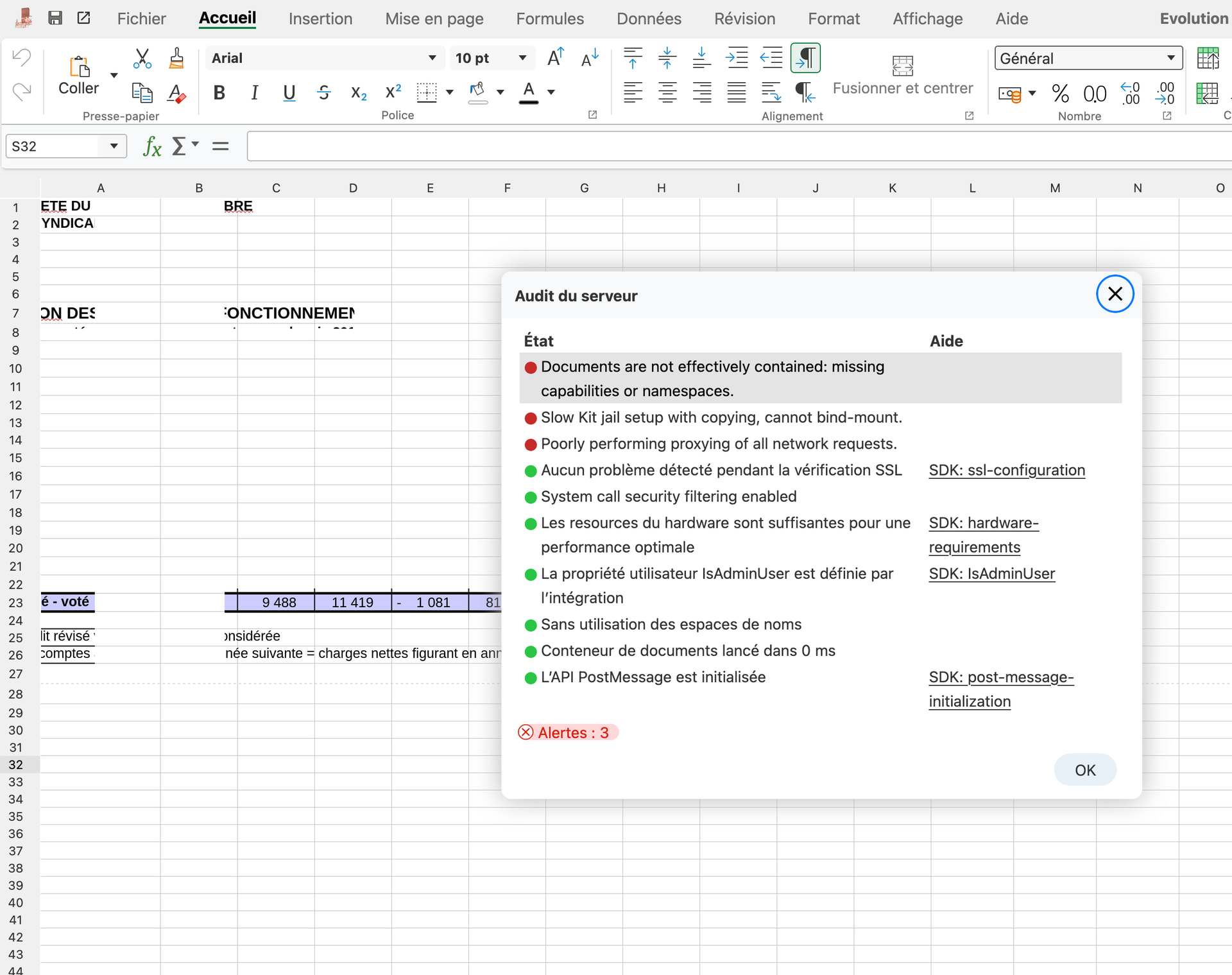
For some time now, I would say about two months, my Office documents (.doc, .xlsx, .odt, etc. -but not .md nor .pdf) that open with the Office suite integrated into Nextcloud are no longer usable: I can’t get a complete display, parts are missing (see included image). In addition, I’m getting errors that I have to find the source of and therefore solutions for.

Do you have any idea what might be happening?

Thank you in advance.

[FR] Bonjour,
Depuis quelques temps, je dirais environ 2 mois, mes documents office (.doc .xlsx .odt … -mais pas les .md ni .pdf) qui s’ouvrent avec l’office intergré a nextcloud ne sont plus utilisables : impossible d’avoir un affichage complet, il manque des morceaux. De plus j’ai des erreurs dont j’ai du mail a trouver l’origine et donc leurs solutions.

Auriez-vous une idée de ce qui se passe ?

Merci d’avance.
F

The error “Poorly performing proxy of all network requests” is the main reason for your issues. However without seeing the actual setup it is not possible to say exactly what is wrong.

About the other two errors, also see here, how to setup Collabora in a Docker container without getting these errors:

Personally I use Apache to provide the reverse proxy as described here, but NGINX is also possible - maybe you need to change your setup:

And by the way: PHP should be version 8.4. Version 8.2 should not be used any longer. Also see PHP: Supported Versions

Hello @awelzel and thank you for your answer.

What do you mean by seeing the actual setup ?

The Nextcloud is hosted on a VPS, it’s the only “big” software running, installed on a fresh Ubuntu LTS from server/releases files, never used docker

It use to work very well and I only have updated it from webadmin page. Don’t remember having to manage proxy/Apache before.

I will update my PHP ASAP but before I need to find a solution for the displaying issue.

No other posts here on forum seems to have the error Poorly performing proxy of all network requests :frowning:

Well “a VPS” is a very generic thing - I don’t know anything about the infrastructure (which other users are on the same VPS host, wich network connectivity is provided and so on.

So you should analyze if there is a bottleneck on the VPS in general (fio to test I/O performance, speedtest-cli to test internet connection speed etc.), check if the CPU cores for that VPS are exclusively allocated or shared with other users (some providers have different categories of virtual servers and overcommit host resources for the cheaper ones).

1 Like

Also important: it is not a “displaying issue” - the problem is the network connection to the machine which hosts Collabora. Because of this, the UI does not work as expected. Collabora runs more or less completely on the server. The UI is just like a remote desktop connection to the Collabora server process running for the document.

1 Like

Thanks for your answers, I’ll keep looking for a solution.

It’s just very frustrating to have a Nextcloud instance that was working fine and suddenly started bugging on important functions, and for the solution to lie in complicated technical intricacies when all I did was update it via the official channel.

I understand your pain, but since Collabora works in general (on my servers I have no problem at all), there may be something odd with your proxy setup. Did you check, that the network on the VPS works in general? Maybe try using NGINX or Apache as proxy as documented just to be sure, that Traefik is not the problem here.

Hey @TheDerf did you perhaps see this in connection with traefik

add the following encodedCharacters blocks to my traefik.yml:

entryPoints:
  http:
    address: ":80"

  https:
    address: ":443"
    http:
      encodedCharacters:
        allowEncodedSlash: true
        allowEncodedBackSlash: true
        allowEncodedNullCharacter: false
        allowEncodedSemicolon: false
        allowEncodedPercent: true
        allowEncodedQuestionMark: true
        allowEncodedHash: false

1 Like

I may be a little noob but what is traefik ? a reverse proxy as nginx or apache ? How do I know it is the one I am using ? :sweat_smile:

I mean, I don’t remember having to configure any proxy settings when Nextcloud has been instaled.

And as you can see, the VPS load is far from high..

Even if the VPS is not under high load - the network connection may still be poor because other users on the same host use that machine heavily.

A VPS is not an exclusive server for you, but a “virtual private server”. This means, there is a big server used to host many of these VPS instances. The cheaper the VPS is, the more likely it is, that the provider overcommits the server - this means, all VPS together have more CPU cores and memory than the real host behind it. For example the real server may have 64 cores and the provider offers 20 VPS on that host, with 4 cores each, which is 80 “virtual” cores.

Virtualization software supports this for use cases, where flexibility is more important than maximum performance. As long as not everyone is using his VPS a lot, that’s not a big problem. But as soon as users start putting load on their VPS, it will affect all others as well.

The other issue may be network performance - the host behind the VPS instances may be connected with only 1 GBit/s. If there are 10 or 20 VPS on that host, they all share this single connection which can result in a very poor performance.

So you should really check the performance of the VPS:

With speedtest-cli you can check the network connection to the public internet (depending on the distrubition you use, you can install this as package like apt install speedtest-cli in Ubuntu).

In addition you find many other benchmark tools at Github: https://github.com/haydenjames/bench-scripts/blob/master/README.md

And so far you did not show your setup of Collabora. How did you install it? What proxy do you use and how exactly is the proxy configured?

Hello @awelzel and again thanks for you time.

Sorry, I am a little lost as I don’t know what’s my reverse proxy :frowning:

My Nextcloud was installed 2 years ago following this guide but I am not able to say exactly where is proxy part.. How can I know wich one is used ? is proxy mandatory (maybe I don’t have one) ?

I am not sure that it’s a VPS issue because display bugs begins after software update.

Here is the network speedtest :
Hosted by Orange Polska S.A. (Lodz) [1255.50 km]: 6.079 ms
Testing download speed…
Download: 962.44 Mbit/s
Testing upload speed…
Upload: 929.52 Mbit/s

So CPU, RAM & network seem to be working fine and not heavily loaded.

The page at Install NextCloud On Ubuntu 22.04 LTS - Complete Guide does not say anything at all about Collabora - just Nextcloud itself. So how did you install that? Collabora will usually be installed as Docker container and with a reverse proxy to make it accessible as public service with its own domain.

Sorry to be so blunt: but if you don’t even know, what your server does in detail (which reverse proxy Collabora uses), you should ask someone to assist you with the setup - which means you and another person with more experience do this together. Running a server which is accessible to the public internet is a security risk if not done properly! You also should take things like regular security updates and backup into account (for example using Borg backup with an external encrypted repository).

My time is limited, but if you like to, we can have a look to the server together, just send me a personal message.

Edit:

You can also check my article about this: Nextcloud Office | Arno Welzel

The “Slow Kit jail setup problem” is already fixed (Slow Kit jail setup warning in Docker caused by a documented error · Issue #14087 · CollaboraOnline/online · GitHub) but it may take a while until updated Docker images will be available. Until then you may have to use this workaround: Workaround for “Slow Kit jail setup …” in Collabora | Arno Welzel

@awelzel its just a workaround, but you can actually disable the server audit:

--o:logging.disable_server_audit=true # disable server-audit

that way I’m not seeing the warnings at all… not good for anything except disabling that annoying warning?

Yes, I am aware of this option. Now, I do not recommend it, since this will only hide the warnings, but does not fix the actual problem. Also the warning will only be display to administrators, not regular users which are not in the admin Nextcloud user group. As administrator you should not ignore these warnings - because these also contain notifications about security updates.

The workaround will make sure, that coolmount inside the Docker container will work as expected. The official fix will also mitigate the problem.

Ah, nice to know they fixed this :slight_smile:

But at the the end of the day, it’s just a warning. After all, things are still working, at least on my instance.

Also, just as a general note, I’m not an expert on containers or Linux namespaces. However, rather than lowering the security of the container by adding endless capabilities (as some apparently seem to do) just to suppress a warning, it might be better to use a dedicated Nextcloud user for your daily work instead of the admin user. In that case, you won’t see any warnings when opening a document.

This approach has two main advantages:

Security and security. :wink:

Simply turning off the notifications is, of course, another option. :wink:

It is not that simple as it sounds. In fact, Collabora creates “sub containers” for each document session to secure things and this is also the reason, why the main container needs certain capabilities.

Edit: also see here: https://sdk.collaboraonline.com/docs/installation/CODE_Docker_image.html#running-with-minimal-capabilities

And about “it’s just a warning”: all error messages of the server audit are “just a warning”. But this does not mean, that you should just ignore it - at least not as administrator. Otherwise having a server audit at all would not make sense. So yes, having a non-admin user for regular work with Nextcloud is also a good advice.

Yes, Collabora is a mess, like all office applications, and a nightmare in terms of security by nature. Ideally, it really needs to be run in a completely separate VM. And I’m sure Collabora recommends this to its business customers, because running something like this on the same server that also runs the publicly accessible web front end is, strictly speaking, madness :wink:

But most people here are probably home users or SMBs, and at least for me, with the current RAM prices, running a separte VM for every application is not really an option.. :wink:

Yep, I think this is generally the best approach for any application. And although Nextcloud asks for the administrator password again after a while when you want to perform administrative tasks, and sorry, maybe I’m a bit too paranoid here, password prompts in web applications can be anything from pure placebo to something that’s actually implemented securely. :wink:

However, I’m not a developer, so in the end I have to rely on trust and on security advisories when it comes to things like this.

Collabora has been installed directly from the AppStore (+ apps) inside Nextcloud, Collabora Online - Built-in CODE server, so was Nextcloud Office. “Use the built-in CODE” is selected in nextcloud Offcie settings.

I never had to manage any Docker thing in this setup, Docker isn’t even installed. Maybe that’s why I dont have any reverse proxy ?

Thank you so much for your support, let me check your links before I ask for more help !