The Basics
- Nextcloud Server version (e.g., 29.x.x):
Nextcloud AIO v11.4.0
- Operating system and version (e.g., Ubuntu 24.04):
Ubuntu 24.04.2 LTS
- Web server and version (e.g, Apache 2.4.25):
replace me
- Reverse proxy and version _(e.g. nginx 1.27.2)
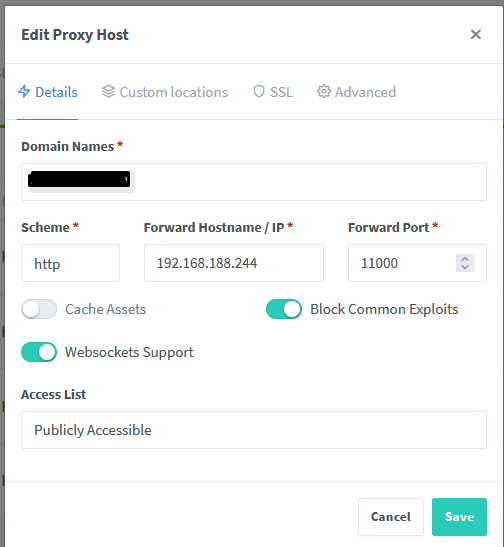
Nginx Proxy Manager 1.2.6
- PHP version (e.g, 8.3):
-
- Is this the first time you’ve seen this error? (Yes / No):
first time installing
- When did this problem seem to first start?
at Installation
- Installation method (e.g. AlO, NCP, Bare Metal/Archive, etc.)
AIO
- Are you using CloudfIare, mod_security, or similar? (Yes / No)
No
Summary of the issue you are facing:
I cant setup past the domain check.
I already tried to skip to domain validation, but it still did not work
Setup:
- Nextcloud AIO is installed on Server A (
192.168.188.244) using Docker Compose. - Port
11000is exposed (APACHE_PORT=11000) - On Server B (TrueNAS Scale), I’m running Docker and Nginx Proxy Manager (NPM).
I already checked alot of forum posts but cant find the right solution, and honestly dont know what what Im doing wrong
Log entries
Nextcloud
Please provide the log entries from your Nextcloud log that are generated during the time of problem (via the Copy raw option from Administration settings->Logging screen or from your nextcloud.log located in your data directory). Feel free to use a pastebin/gist service if necessary.
Initial startup of Nextcloud All-in-One complete!
You should be able to open the Nextcloud AIO Interface now on port 8080 of this server!
E.g. https://internal.ip.of.this.server:8080
⚠️ Important: do always use an ip-address if you access this port and not a domain as HSTS might block access to it later!

If your server has port 80 and 8443 open and you point a domain to your server, you can get a valid certificate automatically by opening the Nextcloud AIO Interface via:
https://your-domain-that-points-to-this-server.tld:8443
{"level":"info","ts":1754158546.0173824,"msg":"maxprocs: Leaving GOMAXPROCS=32: CPU quota undefined"}
{"level":"info","ts":1754158546.0179121,"msg":"GOMEMLIMIT is updated","package":"github.com/KimMachineGun/automemlimit/memlimit","GOMEMLIMIT":3685883904,"previous":9223372036854775807}
{"level":"info","ts":1754158546.0179825,"msg":"using config from file","file":"/Caddyfile"}
{"level":"info","ts":1754158546.018804,"msg":"adapted config to JSON","adapter":"caddyfile"}
{"level":"info","ts":1754158546.0198483,"msg":"serving initial configuration"}
[02-Aug-2025 18:15:46] NOTICE: fpm is running, pid 173
[02-Aug-2025 18:15:46] NOTICE: ready to handle connections
[Sat Aug 02 18:15:46.113096 2025] [mpm_event:notice] [pid 168:tid 168] AH00489: Apache/2.4.62 (Unix) OpenSSL/3.3.4 configured -- resuming normal operations
[Sat Aug 02 18:15:46.113163 2025] [core:notice] [pid 168:tid 168] AH00094: Command line: 'httpd -D FOREGROUND'
</html>nter>openresty</center>1></center>d>nnection attempt to "https://nextcloud.domain.com:443" was: <html>
NOTICE: PHP message: Expected was: 437b331b1d6014aaa841a9392616cca4894ebf7d738d5f72
NOTICE: PHP message: The error message was:
NOTICE: PHP message: Please follow https://github.com/nextcloud/all-in-one/blob/main/reverse-proxy.md#6-how-to-debug-things in order to debug things!
</html>nter>openresty</center>1></center>d>nnection attempt to "https://nextcloud.domain.com:443" was: <html>
NOTICE: PHP message: Expected was: 437b331b1d6014aaa841a9392616cca4894ebf7d738d5f72
NOTICE: PHP message: The error message was:
NOTICE: PHP message: Please follow https://github.com/nextcloud/all-in-one/blob/main/reverse-proxy.md#6-how-to-debug-things in order to debug things!
The output of your Apache/nginx/system log in /var/log/____:
{
  "id": 5,
  "created_on": "2025-08-01 23:25:41",
  "modified_on": "2025-08-02 19:44:38",
  "owner_user_id": 1,
  "domain_names": [
    "nextcloud.domain.com"
  ],
  "forward_host": "192.168.188.244",
  "forward_port": 11000,
  "access_list_id": 0,
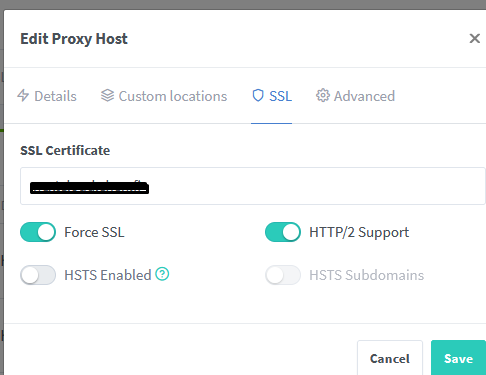
  "certificate_id": "4",
  "ssl_forced": true,
  "caching_enabled": false,
  "block_exploits": true,
  "advanced_config": "client_body_buffer_size 512k;\r\nproxy_read_timeout 86400s;\r\nclient_max_body_size 0;",
  "meta": {
    "letsencrypt_agree": false,
    "dns_challenge": false
  },
  "allow_websocket_upgrade": true,
  "http2_support": true,
  "forward_scheme": "http",
  "enabled": true,
  "locations": [],
  "hsts_enabled": false,
  "hsts_subdomains": false
}
Configuration
Nextcloud
The output of occ config:list system or similar is best, but, if not possible, the contents of your config.php file from /path/to/nextcloud is fine (make sure to remove any identifiable information!):
services:
  nextcloud-aio-mastercontainer:
    image: ghcr.io/nextcloud-releases/all-in-one:latest
    init: true
    restart: always
    container_name: nextcloud-aio-mastercontainer # This line is not allowed to be changed as otherwise AIO will not work correctly
    volumes:
      - nextcloud_aio_mastercontainer:/mnt/docker-aio-config # This line is not allowed to be changed as otherwise the built-in backup solution will not work
      - /var/run/docker.sock:/var/run/docker.sock:ro # May be changed on macOS, Windows or docker rootless. See the applicable documentation. If adjusting, don't forget to also set 'WATCHTOWER_DOCKER_SOCKET_PATH'!
    network_mode: bridge # add to the same network as docker run would do
    ports:
     - 8080:8080
    environment: # Is needed when using any of the options below
      # AIO_DISABLE_BACKUP_SECTION: false # Setting this to true allows to hide the backup section in the AIO interface. See https://github.com/nextcloud/all-in-one#how-to-disable-the-backup-section
      APACHE_PORT: 11000 # Is needed when running behind a web server or reverse proxy (like Apache, Nginx, Caddy, Cloudflare Tunnel and else). See https://github.com/nextcloud/all-in-one/blob/main/reverse-proxy.md
      APACHE_IP_BINDING: 0.0.0.0 # Should be set when running behind a web server or reverse proxy (like Apache, Nginx, Caddy, Cloudflare Tunnel and else) that is running on the same host. See https://github.com/nextcloud/all-in-one/blob/main/reverse-proxy.md
      # APACHE_ADDITIONAL_NETWORK: frontend_net # (Optional) Connect the apache container to an additional docker network. Needed when behind a web server or reverse proxy (like Apache, Nginx, Caddy, Cloudflare Tunnel and else) running in a different docker network on same server. See https://github.com/nextcloud/all-in-one/blob/main/reverse-proxy.md
      SKIP_DOMAIN_VALIDATION: false # This should only be set to true if things are correctly configured. See https://github.com/nextcloud/all-in-one?tab=readme-ov-file#how-to-skip-the-domain-validation
      # TALK_PORT: 3478 # This allows to adjust the port that the talk container is using which is exposed on the host. See https://github.com/nextcloud/all-in-one#how-to-adjust-the-talk-port
      # WATCHTOWER_DOCKER_SOCKET_PATH: /var/run/docker.sock # Needs to be specified if the docker socket on the host is not located in the default '/var/run/docker.sock'. Otherwise mastercontainer updates will fail. For macos it needs to be '/var/run/docker.sock'

volumes: # If you want to store the data on a different drive, see https://github.com/nextcloud/all-in-one#how-to-store-the-filesinstallation-on-a-separate-drive
  nextcloud_aio_mastercontainer:
    name: nextcloud_aio_mastercontainer # This line is not allowed to be changed as otherwise the built-in backup solution will not work
 Important: do always use an ip-address if you access this port and not a domain as HSTS might block access to it later!
