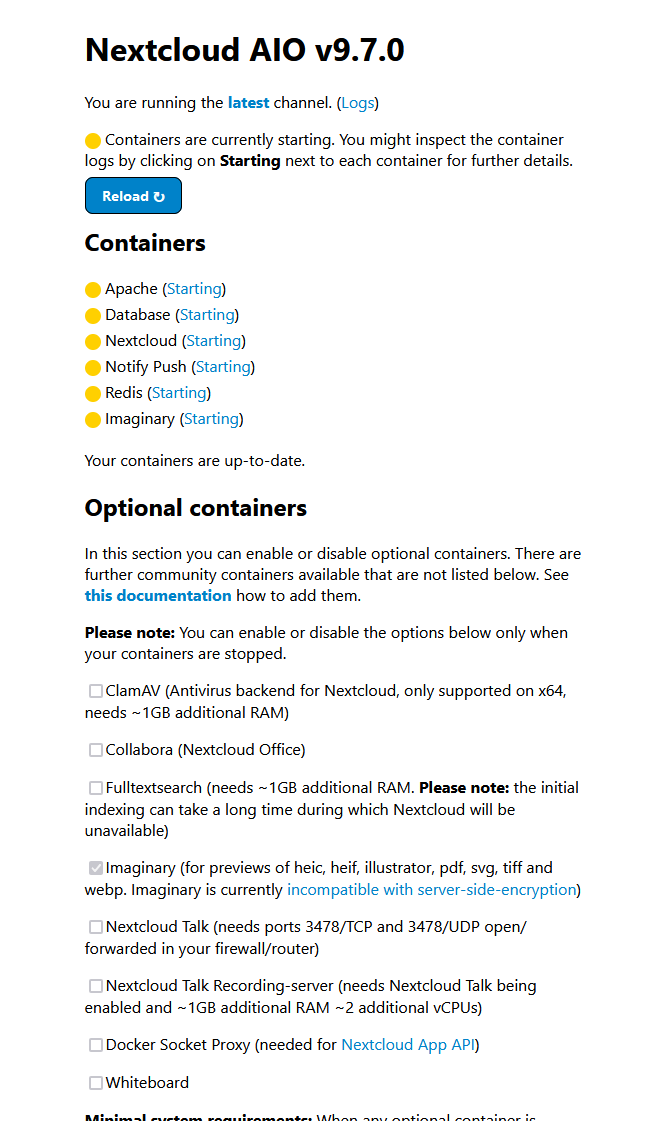
I got a docker compose file for the AIO docker setup (nextcloud/all-in-one:latest) and got it behind an nginx reverse proxy following this guide. And i run this with APACHE_PORT=11000, APACHE_IP_BINDING=127.0.0.1, NEXTCLOUD_DATADIR = /mnt/storagebox, NEXTCLOUD_MOUNT=/mnt
And the directory is a samba networks folder.
And i can go into the setup page, write down the passphrases and get to the start container screen. But once i start them, “nextcloud-aio-nextcloud” takes forever to start. I let it run for like 5+ hours yesterday and its still not finished. And this obivously feels like somethings very wrong.
All containers just say “(Starting)” but theyre all waiting for the nextcloud container to start.
The majority of logs for the container is “System config value … …” which happens with a 2-5 minute gap between every single log and config value
Its not bound to server resources and the servers overall usage is very low.
I have tried to redo the entire installation process 2-3 times, cleaned all containers, volumes and networks. But to no avail.
Ive also tried to search up this issue and found some other people complaining about a really slow startup but they werent exactly like this and their solutions didnt fix my problems.
Ive tried enabling ipv6 on the master docker container
Ive tried re-installing
Ive tried adding my domain to /etc/hosts on 127.0.0.1 (i think?)
But problem still persists
“nextcloud/all-in-one:latest | Nextcloud AIO v9.7.0”
“Docker version 27.3.1, build ce12230”
“Debian GNU/Linux 12 (bookworm)”
And the server got 64gb, 8c 16t, 1tb nvme
I dont know how much sensetive info is contained in these docker logs and or nextcloud.log but i can happily provide more information if needed
(My current attempt start at 17:25 and its not (Started) even after 7 hours. with the last log being: NOTICE: fpm is running, pid 2748 NOTICE: ready to handle connections)
As mentioned in my post i have tried already searching and ive went through that entire thread you linked before but turning off/on bruteforce for example via php occ also takes around 2-5 minutes to execute and does nothing to make it faster and or work properly.
The only thing that appears is a
sudo -u www-data php /var/www/html/occ config:system:set auth.bruteforce.protection.enabled --type=bool
--value=false

Warning: Failed to set memory limit to 0 bytes (Current memory usage is 2097152 bytes) in Unknown on line 0
The current PHP memory limit is below the recommended value of 512MB.
warning when running im trying to change any config value.
And all this inside the nextcloud-aio-nextcloud docker container.
Ive also tried following this thread that is also on a hetzner server, same as me. With slow config delays. But the hints and tips in that thread didnt help at all. And for them after 30 minutes it worked normally but for me even after multiple hours its still not functional and just (Starting).
Isnt turn server for Nextcloud Talk? I havent enabled that container in the setup panel (the only optional that is on is Imaginary). But absolutely feels like some kind timeout. But does it do network stuff upon every single config value change if so?
I tried to capture traffic from the nextcloud-aio-nextcloud container via getting its pid from docker inspect, running nsenter -n -t "pid" and then tcpdump and there is network traffic coming from that container.
Some traffic is to the postgres database. Some goes to ns1.recursivedns.hetzner.com.domain but most seems to just be local redis or postgres traffic IP 172.19.0.6.40186 > 172.19.0.3.postgresql for example
So from a quick glance over it, there doesnt seem to be anyting out of the ordinary?
But if not network traffic related then its even more confusing as to why every config value change is taking near 4 minutes each.
I have tried sooo so many things and feel so totally lost in solving this. No clue even where the problem may be
this was not meant to improve the situation but to test if the issue exists only on startup or remain later. In your case it seems exist all the time so you should be able to focus on the problem once the system has started and you don’t have any noise from the startup.
In the mentioned thread the issue was limited to mature installation and a new one was working well. I would recommend you the same test: setup new independent AiO instance and review if the problem exists there as well. If not compare the config of the new working instance with the failing one, if the problem affect fresh instance as well you must look outside of AiO.
My installation is a 100% fresh new one, with only the given env variables has mentioned in my first post. This is my first time ever trying to install nextcloud.
So probably isnt the AiO’s fault but i have no clue why this problem exists so its quite hard to look for things you dont know.
What i feel is even more weird than the very long startup time and 4 minute delay between each config change is that after a few hours it stops logging anything. ending with:
2024-10-30T15:10:22.448460497Z [30-Oct-2024 15:10:22] NOTICE: fpm is running, pid 1109
2024-10-30T15:10:22.448475655Z [30-Oct-2024 15:10:22] NOTICE: ready to handle connections
# Now 20:19 UTC ^ (5 hours ago)
So it feels like it has done everything and then just wont actually start or do anything (Still (Starting) in the panel).
And once this happens, the Apache container finally gets a connection to the nextcloud container but cant take any requests.
If i try to connect to the Apache container it just never loads anything ever and eventually timeouts on the client.