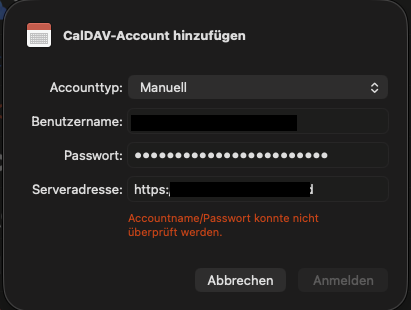
This is a famouse issue:
But all of them are closed without a proper solution or reason.
The official documentation Synchronisierung mit macOS — Nextcloud latest User Manual latest Dokumentation says:
Create a manual account with username / password (or device token)
Set the nextcloud address
I did like:
I also tried the following combinations
Nothing of these options/combinations work.
The traffic on my nextcloud instance looks like:
[15/Dec/2025:07:47:13 +0000] "PROPFIND /.well-known/caldav HTTP/2.0" 301 162 "-" "macOS/26.1 (25B78) accountsd/1.0" 504
[15/Dec/2025:07:47:13 +0000] "PROPFIND / HTTP/2.0" 405 150 "-" "macOS/26.1 (25B78) accountsd/1.0" 505
[15/Dec/2025:07:47:13 +0000] "PROPFIND /principals/ HTTP/2.0" 401 44 "-" "macOS/26.1 (25B78) accountsd/1.0" 506
[15/Dec/2025:07:47:13 +0000] "PROPFIND /calendar/dav/my_user_account/user/ HTTP/2.0" 401 44 "-" "macOS/26.1 (25B78) accountsd/1.0" 507
/.well-known/caldav redirects to remote.php/dav/
“my_user_account” is my actual user account name
Do you hae installed a valid and signed SSL certificate on your Nextcloud server?
That 301 redirects to a wrong location. Apple Cients need Service Discovery:
My certificates are valid and signed by letsencrypt.
What is the correct location?
Click on the link I posted. All you need to know is there.
Well, I’m using the Nextloud Helm chart with Nginx/FPM, an the redirects are already there and working:
location = /.well-known/carddav     { return 301 /remote.php/dav/; }
location = /.well-known/caldav      { return 301 /remote.php/dav/; }
As you can see, that
[15/Dec/2025:07:47:13 +0000] "PROPFIND /.well-known/caldav HTTP/2.0" 301 162 "-" "macOS/26.1 (25B78) accountsd/1.0" 504
responds with a “301 Found”. The auto-discovery should work.
But not this:
[15/Dec/2025:07:47:13 +0000] "PROPFIND /calendar/dav/my_user_account/user/ HTTP/2.0" 401 44 "-" "macOS/26.1 (25B78) accountsd/1.0" 507
When I open https://my-nextcloud.com/remote.php/dav/ , I get a proper response:
This is the WebDAV interface. It can only be accessed by WebDAV clients such as the Nextcloud desktop sync client.
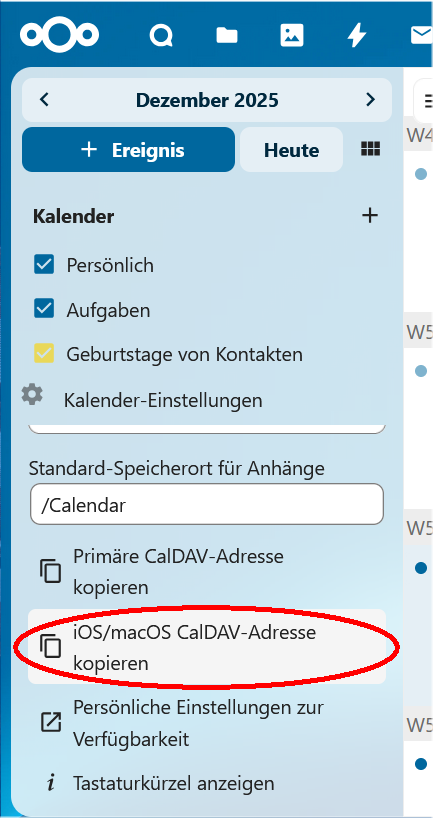
It is the wrong link.
Login in browser to your Nextcloud
Use that link.
No, it does not.
According to the log you posted the redirect redirects to / instead of /remote.php/dav (or /subfolder/remote.php/dav, if nextccloud is installed in a subfolder of webroot)
Mike_Reiche:
I get a proper response:
This is the WebDAV interface. It can only be accessed by WebDAV clients such as the Nextcloud desktop sync client.
If you visit https://example.com/.well-known/caldav with a browser and enter your username and password and you get the same response - then service discovery is working.
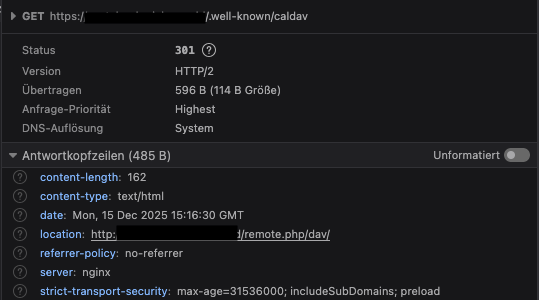
The redirect is working. Proof in Firefox:
It looks like that MacOSX accountsd is not following the location. Because I can see Firefox following the URL:
[15/Dec/2025:15:16:30 +0000] “GET /.well-known/caldav HTTP/2.0” 301 162 “-” “Mozilla/5.0 (Macintosh; Intel Mac OS X 10.15; rv:146.0) Gecko/20100101 Firefox/146.0” [15/Dec/2025:15:16:30 +0000] “GET /remote.php/dav/ HTTP/2.0” 200 111 “-” “Mozilla/5.0 (Macintosh; Intel Mac OS X 10.15; rv:146.0) Gecko/20100101 Firefox/146.0”
Maybe it needs to be a rewrite and no redirect.
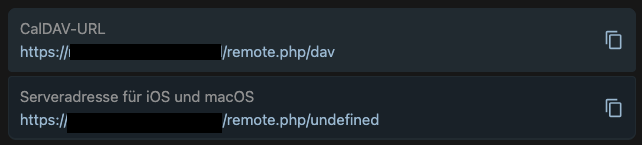
Unfortunately, the URL is “undefined” in my installation. I guess its old or broken:
Can you send me the anonymized address of yours for comparison?
On my server (Nextcloud 31.0.12) it is
https://myserver.de/remote.php/dav/principals/users/username/
But I am not sure, that this also will work in your configuration.
I finally made it. The documentation is misleading: Synchronizing with macOS — Nextcloud latest User Manual latest documentation
You need to setup your CalDav in Extended mode without service-discovery and the following settings:
Username: “my_user_account”
Server: “my-nextcloud.example.com ”
Path: “/remote.php/dav/principals/users/my_user_account”
Port: 443
I filed a documentation bug here: CalDav synchronization on MacOSX is misleading · Issue #13945 · nextcloud/documentation · GitHub
jtr
December 17, 2025, 9:20pm
15
According to your Firefox screen the redirect target is http://. The docs say macOS doesn’t support http:// for CalDAV in the troubleshooting section.
Can you fix that matter then recheck?
Thanks for the hint. I see now, that the location redirects to http instead of https.
I have the configuration for NGINX based on NGINX configuration — Nextcloud latest Administration Manual latest documentation
Nginx is running on port 80, so it’s an issue in my configuration, or the helm chart. Let me check that.
I fixed the Helm chart to respect the `X-Forwarded-Proto` header from Ingress. Now it works also with MacOSX accountds in Manual setup mode.
The solution above is not the correct.
I try to file a bug in the Helm chart and get back here on any result.
Edit: This issue has been fixed in newest Nextcloud Helm Chart.
Just replying to this thread as it was the most recent on this issue.
For me the problem was simply, that my account had 2FA setup. I needed to create an “app password” in order to be able to activate the account in MacOS.