Could not establish connection to the Collabora Online server - Again

I must admit it is highly frustrating to setup working NextCloud Office.

I am using version “Nextcloud Hub 26 Winter (33.0.6)”

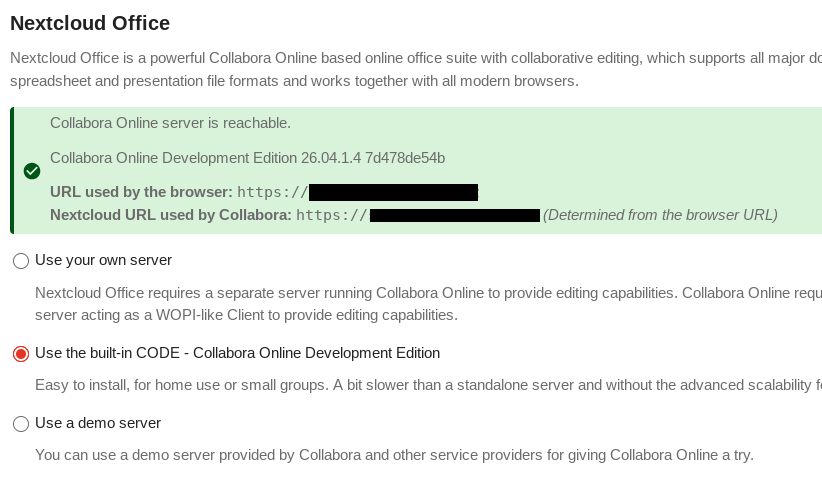
Nextcloud office worked several days, i was able edit ODS, ODT… documents, it was reasonably fast in comparison with past. But i clicked in Administration → Office where i saw red warning. So i just tried change it to from “use yout own server” to “USE built in CODE” and from that moment i am not able force Nextcloud office to start again.

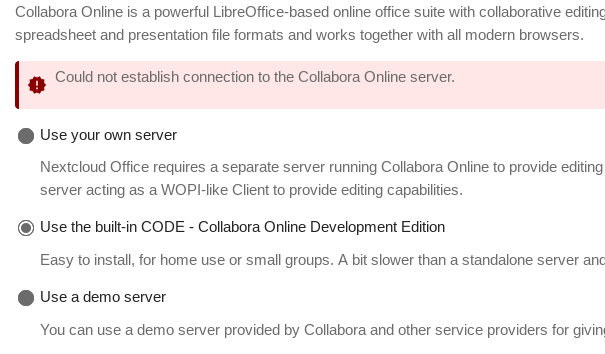
Now for some reason are other options greyed out and cannot be selected. Error messages are very vague, doesn’t help with diagnostics even small bit.

In log i was able see messages like this

Error
	richdocuments
	
ClientExceptionClient error: `GET https://xxxxx.xxxxxxxxxx.cz/hosting/discovery` resulted in a `404 Not Found` response: <!DOCTYPE html> <html class="ng-csp" data-placeholder-focus="false" lang="en" data-locale="en" translate="no" > <head (truncated...) 

Now Nextcloud adding in log only this message (and other very similar) - all about error in Parser.php on line 39.

simplexml_load_string(): ^ at /home/xxxxxxxxxxxxxxxxxx/www/apps/richdocuments/lib/WOPI/Parser.php#39

I suspect, there is probably undefined or empty variable $discovery as parameter of function simplexml_load_string…? Maybe. I have no idea why.

$discoveryParsed = simplexml_load_string($discovery);

I tried change options, paths… through CLI. No luck… I tried remove NextCloud Office and install it again.

When i go into Administration → Office it for second or two displays message “Collabora Online server is reachable” with correct URLs, but it change itself to

I don’t understand, why it doesn’t allow change that options anymore. I consider it is bug.

Only way i am able to unlock it is with command

sudo -u apache php occ config:app:set richdocuments wopi_url --value="https://xxxx.xxxxxxxxx.cz/"
sudo -u apache php occ config:app:set richdocuments public_wopi_url --value="https://xxxx.xxxxxxxxx.cz/"

I have no idea if it is right or not. But menu with options unlocks and again i can see green message “Collabora Online server is reachable.” and this time it does not disappear. And now is active first option “Use you own server” as it was in working state.

Cannot edit documents, but message about line 41 is back

ExceptionCall to a member function xpath() on false in file '/home/xxxxxxxxxxxxxxxxxxxx/www/apps/richdocuments/lib/WOPI/Parser.php' line 41
sudo -u apache php occ config:list richdocuments
{
    "apps": {
        "richdocuments": {
            "canonical_webroot": "",
            "disable_certificate_verification": "",
            "doc_format": "",
            "edit_groups": "",
            "enabled": "yes",
            "external_apps": "",
            "installed_version": "10.2.0",
            "public_wopi_url": "https:\/\/xxxxx.xxxxxxxxxx.cz\/",
            "types": "filesystem,prevent_group_restriction",
            "use_groups": "",
            "wopi_allowlist": "localhost,127.0.0.1\/24,aaa.bbb.ccc.ddd",
            "wopi_callback_url": "",
            "wopi_url": "https:\/\/xxxxx.xxxxxxxxxx.cz\/apps\/richdocumentscode\/proxy.php?req="
        }
    }
}

Any idea what to try?

Can i somehow diagnose it more precisely than just look on details in log?

Why Parser.php is failing? Why are options in Administration → Office locked down?

I have no separate server for Collabora Online. I have no installed docker etc… i probably want to use built in CODE. But no tutorial worked for me. Even this time - when i was able run and use Nextcloud Office for several days it was kinda accidentally after several updates it just happened.

I was hoping it is finally repaired and maybe all strugling are over. But no, it was illusion.
so your system was working with the initial setting and you change it to a different one.. which result in an outage.. why don’t you switch back to the working config?

so your system was working with the initial setting and you change it to a different one.. which result in an outage.. why don’t you switch back to the working config?

Because i did tried switch it back, but it didn’t help.

Do you know exactly which database table contains these config options? Maybe i can compare it with backup. I have dump of database from day before, but i don’t want just import it whole back, NextCloud could have been used by users. And i would like repair it, because it is opportunity understand it better and learn how it works.

@adminsmith, you’re not using the snap, that is clear → but you may try this Built-in CODE & Nextcloud Office configuration as it should work for non snap instances too.

it is important to note, that your server must be clearly recognised by Built-in CODE discovery, so hosts and FQDN is important and especially config.php overwrite-cli see: overwrite-cli

in addition, during our tests we have noticed prolonged discovery times when activating Built-in CODE, probably due to more stringent background connectivity tests… try wait a little and keep hitting (F5) refresh for the connection to turn green. if in doubt, clear the config (steps 5a) and try try again.

hth

you’re not using the snap

No, i don’t. I am running it on often updated Gentoo with Apache and MySQL where i have other small websites. I kinda like it this way.

It has its own FQDN and Let’s Encrypt certificate.

I did check variable ‘overwrite.cli.url’ in config/config.php and URL in it is (was) correct, same as FQDN.

Trusted_proxies contains my IPv4 address and 127.0.0.1, seems correct to me.

Then i followed this sequence of commands (i tried disable richdocuments yesterday, it was enabled before that)

server /path # sudo -u apache php occ app:disable richdocumentscode
richdocumentscode 26.4.104 disabled

server /path # sudo -u apache php occ app:disable richdocuments
No such app enabled: richdocuments

server /path # sudo -u apache php occ config:app:delete richdocuments public_wopi_url
Config value public_wopi_url of app richdocuments deleted

server /path # sudo -u apache php occ config:app:delete richdocuments wopi_url
Config value wopi_url of app richdocuments deleted

server /path # sudo -u apache php occ app:enable richdocuments
richdocuments 10.2.0 enabled

server /path # sudo -u apache php occ app:enable richdocumentscode
richdocumentscode 26.4.104 enabled

After all that i clicked in Administration → Nextcloud Office. There was yellow box with message “Setting up a new server” and it changed itself after second or two to red box “Could not establish connection to the Collabora Online server.”

After all that - option are deactivated again.

Something else is still missing.

I tried experiment with Apache settings, add reverse proxy in virtual host, but it didn’t help either. Apache was restarted several times after every change in config.

ProxyPass /push/ws ws://127.0.0.1:7867/ws
ProxyPass /push/ http://127.0.0.1:7867/
ProxyPassReverse /push/ http://127.0.0.1:7867/

I tried public IPv4 or 127.0.0.1, no difference, now it is commented again. But i don’t think it is bad configuration of Apache. It is now exacly same as it was in state when Nextcloud Office was working.

Error messages in log are still the same as before.

simplexml_load_string(): ^ at /home/xxxxxxxxxxxxxxx/www/apps/richdocuments/lib/WOPI/Parser.php#39

simplexml_load_string(): at /home/xxxxxxxxxxxxxxx/www/apps/richdocuments/lib/WOPI/Parser.php#39

simplexml_load_string(): Entity: line 1: parser error : Document is empty at /home/xxxxxxxxxxxxxxx/www/apps/richdocuments/lib/WOPI/Parser.php#39

It looks like Nextcloud bug to me. At least in the sense Nextcloud cannot catch misconfiguration and report it properly to be understandable for administrator.

should contain the reverse proxy IP’s only!

its unclear if you’re using a reverse proxy

127.0.0.1 is the localhost and should not be amongst the trusted proxies, unless you’re running a reverse proxy on localhost… like notify_push see GitHub - nextcloud/notify_push: Update notifications for nextcloud clients · GitHub which would be running a local reverse proxy service.

thus if you’re running a reverse proxy with termination (even if its running on the local machine, don’t use 127.0.0.1 → use its “real” IP), that’s the IP that should be in there.

should contain the reverse proxy IP’s only!

its unclear if you’re using a reverse proxy

I am not sure if i should run reverse proxy or not. I tried so many variants i am little bit lost. For now i tried disable whole variable trusted_proxies in config.php and i don’t have notify_push installed.

After that i reinstalled Nextcloud office again with occ…

sudo -u apache php occ app:disable richdocumentscode
sudo -u apache php occ app:disable richdocuments
sudo -u apache php occ config:app:delete richdocuments public_wopi_url
sudo -u apache php occ config:app:delete richdocuments wopi_url
sudo -u apache php occ app:enable richdocuments
sudo -u apache php occ app:enable richdocumentscode

Now it finally changed something. It says “Please configure a Collabora Online server to start editing documents” in yellow box.

obrazek

I selected option “Use built-in CODE…” and it is back where it was - cannot change options again, all locked under red box with message “Could not establish connection to the Collabora Online server.”. Options cannot be chanded again. Reloading does nothing - first it display message “Setting up a new server” which always changes to red error message.

well done, that’s a good sign, now do above mentioned steps in 5a and you should be fine!

if in doubt, clear the config (steps 5a) and try try again.

well done, that’s a good sign, now do above mentioned steps in 5a and you should be fine!

But i already did that several times. I did that again and Nextcloud still behaves the same.

Isn’t it there some possibility how increase verbosity or something which could direct me better what exactly is failing?

I will return back to it in several hours. Now i have other obligations, but thank you very much for help.

Problem is solved.

All advices was right and should be working. But for some reason on my server was several processes frozen in state it could not be killed during restart of Apache.

That was the reason, why settings in Nextcloud was greyed out and could not be changed.

Only wrong thing with Nextcloud was it was not able tell me more about failure.

After reboot of my server, which i cannot do anytime and i must do it in the late evening, it started working.

And after start of redis database, which i forgot add in OpenRC default runlevel add before, it started all working.

Thank you very much for help.