Support intro
Sorry to hear you’re facing problems 
help.nextcloud.com is for home/non-enterprise users. If you’re running a business, paid support can be accessed via portal.nextcloud.com where we can ensure your business keeps running smoothly.
In order to help you as quickly as possible, before clicking Create Topic please provide as much of the below as you can. Feel free to use a pastebin service for logs, otherwise either indent short log examples with four spaces:
example
Or for longer, use three backticks above and below the code snippet:
longer
example
here
Some or all of the below information will be requested if it isn’t supplied; for fastest response please provide as much as you can 
Nextcloud version (eg, 20.0.5): 25.0.13
Operating system and version (eg, Ubuntu 20.04): Debian 11.8
Apache or nginx version (eg, Apache 2.4.25): nginx 1.18.0
PHP version (eg, 7.4): 7.4.33
The issue you are facing:
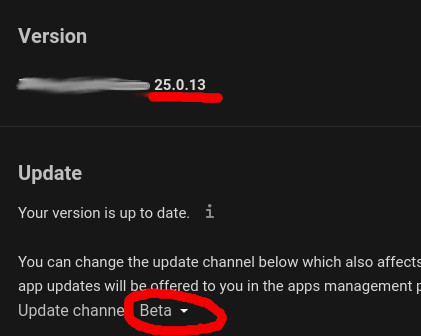
The administrator page does not give me an update , it says "Your version is up to date. "
Is this the first time you’ve seen this error? (Y/N): Y
Steps to replicate it:
- Go to Administrator Settings
- Watch the overview page for upgrading notification.
The output of your Nextcloud log in Admin > Logging:
[updater] Info: \OC\Updater::resetLogLevel: Reset log level to Warning(2)

GET /core/ajax/update.php?requesttoken Some Token Text here
from 187.250.116.198 at 2024-01-26T21:44:04+00:00
The output of your config.php file in /path/to/nextcloud (make sure you remove any identifiable information!):
<?php
$CONFIG = array (
  'instanceid' => 'MyInstanceID',
  'passwordsalt' => 'Some Salt',
  'secret' => 'MY SECRET',
  'trusted_domains' =>
  array (
    0 => 'my.domain.com',
  ),
  'datadirectory' => '/Path/to/my/dataDierectory',
  'dbtype' => 'mysql',
  'version' => '25.0.13.2',
  'overwrite.cli.url' => 'https://my.domain.com',
  'dbname' => 'nextcloud_db',
  'dbhost' => 'localhost',
  'dbport' => '',
  'dbtableprefix' => 'oc_',
  'mysql.utf8mb4' => true,
  'dbuser' => 'MyNextCloudUser',
  'dbpassword' => 'MyPassword',
  'installed' => true,
  'default_phone_region' => 'MX',
  'maintenance' => false,
  'theme' => '',
  'loglevel' => 2,
  'mail_from_address' => 'postmaster',
  'mail_smtpmode' => 'smtp',
  'mail_sendmailmode' => 'smtp',
  'mail_domain' => 'domain.infor',
  'mail_smtpport' => '587',
  'mail_smtphost' => 'smtp.mailgun.org',
  'mail_smtpsecure' => 'tls',
  'mail_smtpauth' => 1,
  'mail_smtpauthtype' => 'LOGIN',
  'mail_smtpname' => 'postmaster@my.domain.com',
  'mail_smtppassword' => 'Another Big Password',
  'updater.release.channel' => 'stable',
  'updater.secret' => 'Some Updating Secret',
);
The output of your Apache/nginx/system log in /var/log/____:
I am not really experiencing Nginx errors that I am aware of. but this is what is in error.log:

2024/01/27 15:59:48 [error] 752#752: *12510 access forbidden by rule, client: IP.Ad.dr.es, server: My.server.com, request: "GET /.well-known/nodeinfo HTTP/2.0", host: "my.server.com"
PASTE HERE
Output errors in nextcloud.log in /var/www/ or as admin user in top right menu, filtering for errors. Use a pastebin service if necessary.

I don't have a file nextcloud.log
