Assitance moving data to new AIO installation

Support intro

Sorry to hear you’re facing problems. :slightly_frowning_face:

The community help forum (help.nextcloud.com) is for home and non-enterprise users. Support is provided by other community members on a best effort / “as available” basis. All of those responding are volunteering their time to help you.

If you’re using Nextcloud in a business/critical setting, paid and SLA-based support services can be accessed via portal.nextcloud.com where Nextcloud engineers can help ensure your business keeps running smoothly.

Getting help

In order to help you as efficiently (and quickly!) as possible, please fill in as much of the below requested information as you can.

Before clicking submit: Please check if your query is already addressed via the following resources:

(Utilizing these existing resources is typically faster. It also helps reduce the load on our generous volunteers while elevating the signal to noise ratio of the forums otherwise arising from the same queries being posted repeatedly).

Some or all of the below information will be requested if it isn’t supplied; for fastest response please provide as much as you can. :heart:

The Basics

  • Nextcloud Server version (e.g., 29.x.x):
    • 12.3.0
  • Operating system and version (e.g., Ubuntu 24.04):
    • Ubuntu 24.04
  • Web server and version (e.g, Apache 2.4.25):
    • Apache AIO latest version
  • Reverse proxy and version _(e.g. nginx 1.27.2)
    • nginx AIO latest version
  • PHP version (e.g, 8.3):
    • php AIO latest version
  • Is this the first time you’ve seen this error? (Yes / No):
    • YES
  • When did this problem seem to first start?
    • 20-Dec-2025
  • Installation method (e.g. AlO, NCP, Bare Metal/Archive, etc.)
    • AIO
  • Are you using CloudfIare, mod_security, or similar? (Yes / No)
    • No

Summary of the issue you are facing:

[

I need advice how to copy ncdata from one location to another

]

Steps to replicate it (hint: details matter!):

Log entries

Nextcloud

Please provide the log entries from your Nextcloud log that are generated during the time of problem (via the Copy raw option from Administration settings->Logging screen or from your nextcloud.log located in your data directory). Feel free to use a pastebin/gist service if necessary.

PASTE HERE

Web Browser

If the problem is related to the Web interface, open your browser inspector Console and Network tabs while refreshing (reloading) and reproducing the problem. Provide any relevant output/errors here that appear.

PASTE

Web server / Reverse Proxy

The output of your Apache/nginx/system log in /var/log/____:

PASTE HERE

Configuration

Nextcloud

The output of occ config:list system or similar is best, but, if not possible, the contents of your config.php file from /path/to/nextcloud is fine (make sure to remove any identifiable information!):

PASTE HERE

Apps

The output of occ app:list (if possible).

Tips for increasing the likelihood of a response

Hello. I have a nextcloud installation that ran on freeBSD which was installed with the system’s packaging system and a dedicated ZFS-backed dataset for the ncdata. The upgrade of OS caused nextcloud to not work anymore. I decided for this type of problem and others, to move to AIO on a dedicated Ubuntu virtual machine. The ncdata is safe and is all I need to preserve.

I’ve read a lot to get to where I am but I need assistance please. I am not familiar with docker at all. In fact this is the first time using it. I am a long time linux and freeBSD user.

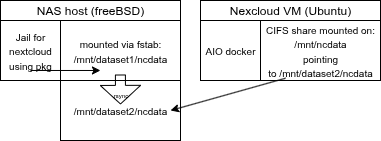
Layout: I have a firewall/router that runs also haproxy for all my internal services which can be reached from the outside or both outside & inside; it terminates all TLS connections. Split brain dns working fine. The host with old NX is one and hosts data as a NAS. The new AIO host is a separate new host and is a VM. Same network and ssh between them works fine. Also, the nc data in the old host will ALSO host it for the AIO installation by way of a CIFS share. That has been setup and working fine as per documentation i.e NEXTCLOUD_DATADIR: /mnt/cloudstorage. On the CIFS host there are two datasets:

NEXTCLOUD_DATADIR: /mnt/cloudstorage #is the new one where I want AIO to use

Also on that host there is another dataset not cifs shared /mnt/cloudstorage_old with the files I want to transfer. Being careful, instead of pointing AIO to old, I want to copy the files to new.

My AIO installation is setup and following NEXTCLOUD_DATADIR: /mnt/cloudstorage is where I got stuck at point 5.

  • Can I rsync the files on the host like sudo rsync -aP /mnt/cloudstorate_old/ /mnt/cloudstorage_new, verify the correct permissions and then do the file scan after starting the containers?

Thank you for your assistance
Hi, see all-in-one/migration.md at main · nextcloud/all-in-one · GitHub

Hi,

alternatively, you can check out these 2 guides of mine. At least they include the command syntaxes for rsync that I used during my migration.

Here’s a guide for migration via rsync – Migrating Nextcloud AIO Docker Server from ext4 to xfs - #2 by vawaver

Here’s the complete guide for VM in Proxmox, including all possible settings – Proxmox + NGINX + Nextcloud AIO + Watchtower Deployment Guide

thanks. Yes I’ve been following that and it is there on my case “Migrate only the files” where on point 5 it reads:

  1. Restore the datadirectory of your former instance: for /path/to/old/nextcloud/data/ run sudo docker cp --follow-link /path/to/old/nextcloud/data/. nextcloud-aio-nextcloud:/mnt/ncdata/ Note: the /. and / at the end are necessary.

I am unable to follow this because those paths are external. The old one I suppose I could also mount with CIFS and is not currently setup as such. That should be doable but is not simple due to the nature of the dataset i.e. additional zfs atributes.

But what is the reason we have to go via docker commands ? when on the real locations an rsync or simple cp would have the files in the right place? Just trying to understand.

Edit: perhaps helpful. This is what it looks like:

So the question is still can I rsync or similar between the two locations on the NAS for the new AIO to use? Otherwise to do the “docker cp…” way, would mean both paths will need to be locally-resolvable. They are not currently both, only the “new one”.

Looking at now, thanks @vawaver

I think I can begin to say I have made the migration. The first signs are positive. This is what I did guided by @vawaver suggestion and How-To.

On the NAS hosting the ncdata old and new directories I compared them:

xigmanas: cloud# ls -alh /mnt/Deimos/cloud
total 124
drwxrwx— 8 www www 14B Mar 5 2025 .
drwxrwxrwx 13 root wheel 13B Dec 18 19:11 ..
-rw-r–r-- 1 www www 542B Nov 13 22:29 .htaccess
-rw-r–r-- 1 www www 52B Nov 13 22:29 .ncdata
drwxr-xr-x 6 www www 6B Feb 12 2025 admin
drwxr-xr-x 11 www www 11B Feb 16 2025 appdata_ocf7vuw111xj
-rw-r----- 1 www www 25K Nov 13 22:29 audit.log
drwxr-xr-x 4 www www 4B Mar 25 2025 gawain
-rw-r–r-- 1 www www 0B Nov 13 22:29 index.html
-rw-r–r-- 1 www www 0B Oct 25 2024 nextcloud.log
drwxr-xr-x 8 www www 8B Jun 29 15:52 penguin
drwxr-xr-x 6 www www 6B Sep 10 15:28 sarah
drwxr-xr-x 4 www www 5B Nov 13 22:29 updater-ocf7vuw111xj
-rw-r–r-- 1 www www 159K Nov 13 22:29 updater.log
xigmanas: cloud# ls -alh /mnt/Deimos/cloud-1/
total 87
drwxrwx— 8 www www 13B Dec 20 22:55 .
drwxrwxrwx 13 root wheel 13B Dec 18 19:11 ..
-rwxrw---- 1 www www 542B Dec 19 17:04 .htaccess
-rwxrw---- 1 www www 52B Dec 19 17:04 .ncdata
drwxrwxrwx 3 www www 3B Dec 19 17:04 .recycle
drwxrwx— 4 www www 4B Dec 19 17:31 admin
drwxrwx— 13 www www 13B Dec 20 22:18 appdata_ocicm4y22jc5
-rwxrw---- 1 www www 0B Dec 19 17:05 audit.log
drwxrwx— 3 www www 3B Dec 20 22:13 gawain
-rwxrw---- 1 www www 0B Dec 19 17:04 index.html
-rwxrw---- 1 www www 0B Dec 19 17:04 nextcloud.log
drwxrwx— 3 www www 3B Dec 20 22:16 penguin
drwxrwx— 3 www www 3B Dec 20 22:17 sarah

I noticed there is an appdata_ocf7vuw111xj directory on the old one and that there is also one but different name on the new one. Makes sense I figure. There is one with an individual id per installation. Therefore I think I would want to NOT transfer the old one.

Then an updater-ocf7vuw111xj . Again seems something I don’t want to transfer.

Based on this, I think I can compose the rsync string to use. I arrive at this for the dry run: xigmanas: cloud# rsync --dry-run -ahPz -o -g -A -X --numeric-ids --bwlimit=97280 /mnt/Deimos/cloud/ /mnt/Deimos/cloud-1

Now I can compare with excludes. It’s only two so wanted to see if could do without an exclude file:

xigmanas: cloud# rsync --dry-run -ahPz -o -g -A -X --numeric-ids --bwlimit=97280 --exclude=‘updater-ocf7vuw111xj’ /mnt/Deimos/cloud/ /mnt/Deimos/cloud-1/ looked good. Then xigmanas: cloud# rsync --dry-run -ahPz -o -g -A -X --numeric-ids --bwlimit=97280 --exclude=‘updater-ocf7vuw111xj’ --exclude=‘appdata_ocf7vuw111xj’ /mnt/Deimos/cloud/ /mnt/Deimos/cloud-1/ looked as what I wanted.

Removed the –dry-run to go real:

xigmanas: cloud# rsync -ahPz -o -g -A -X --numeric-ids --bwlimit=97280 --exclude=‘updater-ocf7vuw111xj’ --exclude=‘appdata_ocf7vuw111xj’ /mnt/Deimos/cloud/ /mnt/Deimos/cloud-1/

After checking the directories and files seemed right i.e. the expected files and the expected permissions, I continued from step: 7 Start the containers again and wait until all containers are running. In other words I skipped steps 5 and 6. Step 8 the file scan completed successfully and impressively quickly. Only 4 users and not very many files.

I’ll update if there are gremlins under the bed.

1 Like