Hello. I installed Nextcloud AIO (31.0.5) on Ubuntu 24.04.2 using Tailscale and Caddy a few weeks ago by following exactly the Tailscale/Caddy instructions at https://github.com/nextcloud/all-in-one/discussions/5439 . All is working great except that I want to change the upload limit and PHP memory limit as described at GitHub - nextcloud/all-in-one: 📦 The official Nextcloud installation method. Provides easy deployment and maintenance with most features included in this one Nextcloud instance. . Can someone tell me how to do that knowing that I installed by following the Tailscale/Caddy instructions? In the instructions for increasing the memory limit, for upload and PHP limits, it mentions adding --env information “to the docker run command of the mastercontainer (but before the last line ghcr.io/nextcloud-releases/all-in-one:latest”, but in the instructions I followed at Tailscale (and Caddy as a sidecar) Reverse Proxy · nextcloud/all-in-one · Discussion #5439 · GitHub , there is no mention of ghcr.io/nextcloud-releases/all-in-one:latest. Any help greatly appreciated. Thanks.
Hello @stevend,
welcome to the community of Nextcloud 
You started a topic in support category. Unfortunately you ignored the template and a lot of information to help you is missing. Please edit your original post and add all required details like Nextcloud version, webserver type and version, os version, related log file content. Use the support template.
You can not expect people read through lengthy Github discussion and guess what you and did what you missed.
there in already on the very beginning:
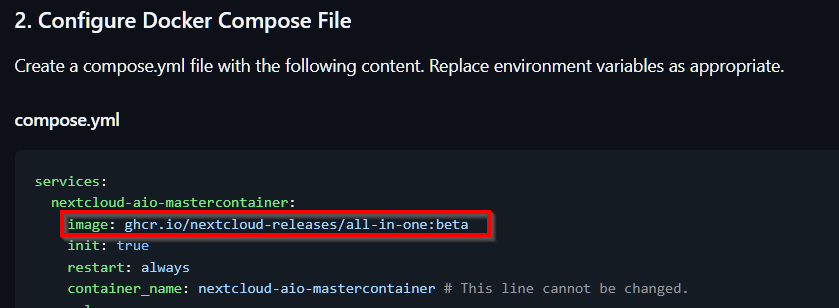
Please post you config files and logs. At the end .env variables are independent from the networking stack and should work as is. I would recommend you familiarize yourself with Docker concepts and configuration options and troubleshooting steps before you run important applications.
Regards,
wwe
Docker basically has two ways of orchestrating your stack: “raw” docker run commands or Compose files. The --env instruction directly applies to the former, but is easily adaptable to the latter. The example AIO Compose file has entries for the supported variables:
These aren’t Nextcloud concepts. They’re Docker. See resources like:
Thank you very much for the advice. I did not post log files because I had a question about procedure rather than a technical issue, but I will be sure to do that next time. Thanks again.
Hi JTR. I understand now. Thanks very much for taking the time to point me in this direction! Much appreciated.
For the record I successfully added the 2 variables to the compose.yml file, stopped and removed the mastercontainer, ran compose again, restarted all containers, and I can now see the changes in the Nextcloud admin settings. Thanks again JTR.
This topic was automatically closed 8 days after the last reply. New replies are no longer allowed.