Support intro
Sorry to hear you’re facing problems. 
The community help forum (help.nextcloud.com) is for home and non-enterprise users. Support is provided by other community members on a best effort / “as available” basis. All of those responding are volunteering their time to help you.
If you’re using Nextcloud in a business/critical setting, paid and SLA-based support services can be accessed via portal.nextcloud.com where Nextcloud engineers can help ensure your business keeps running smoothly.
Getting help
In order to help you as efficiently (and quickly!) as possible, please fill in as much of the below requested information as you can.
Before clicking submit: Please check if your query is already addressed via the following resources:
- Official documentation (searchable and regularly updated)
- How to topics and FAQs
- Forum search
(Utilizing these existing resources is typically faster. It also helps reduce the load on our generous volunteers while elevating the signal to noise ratio of the forums otherwise arising from the same queries being posted repeatedly).
Some or all of the below information will be requested if it isn’t supplied; for fastest response please provide as much as you can. 
The Basics
- Nextcloud Server version (e.g., 29.x.x):
31.0.1
- Operating system and version (e.g., Ubuntu 24.04):
Debian 12.13
- Web server and version (e.g, Apache 2.4.25):
replace me
- Reverse proxy and version _(e.g. nginx 1.27.2)
- 1.22.1-9+deb12u3
- PHP version (e.g, 8.3):
8.2
- Is this the first time you’ve seen this error? (Yes / No):
Yes and no
- When did this problem seem to first start?
Aftermigration to 30. But a click was enough to remove the problem.
- Installation method (e.g. AlO, NCP, Bare Metal/Archive, etc.)
from scratch a long time ago
- Are you using CloudfIare, mod_security, or similar? (Yes / No)
No
Summary of the issue you are facing:
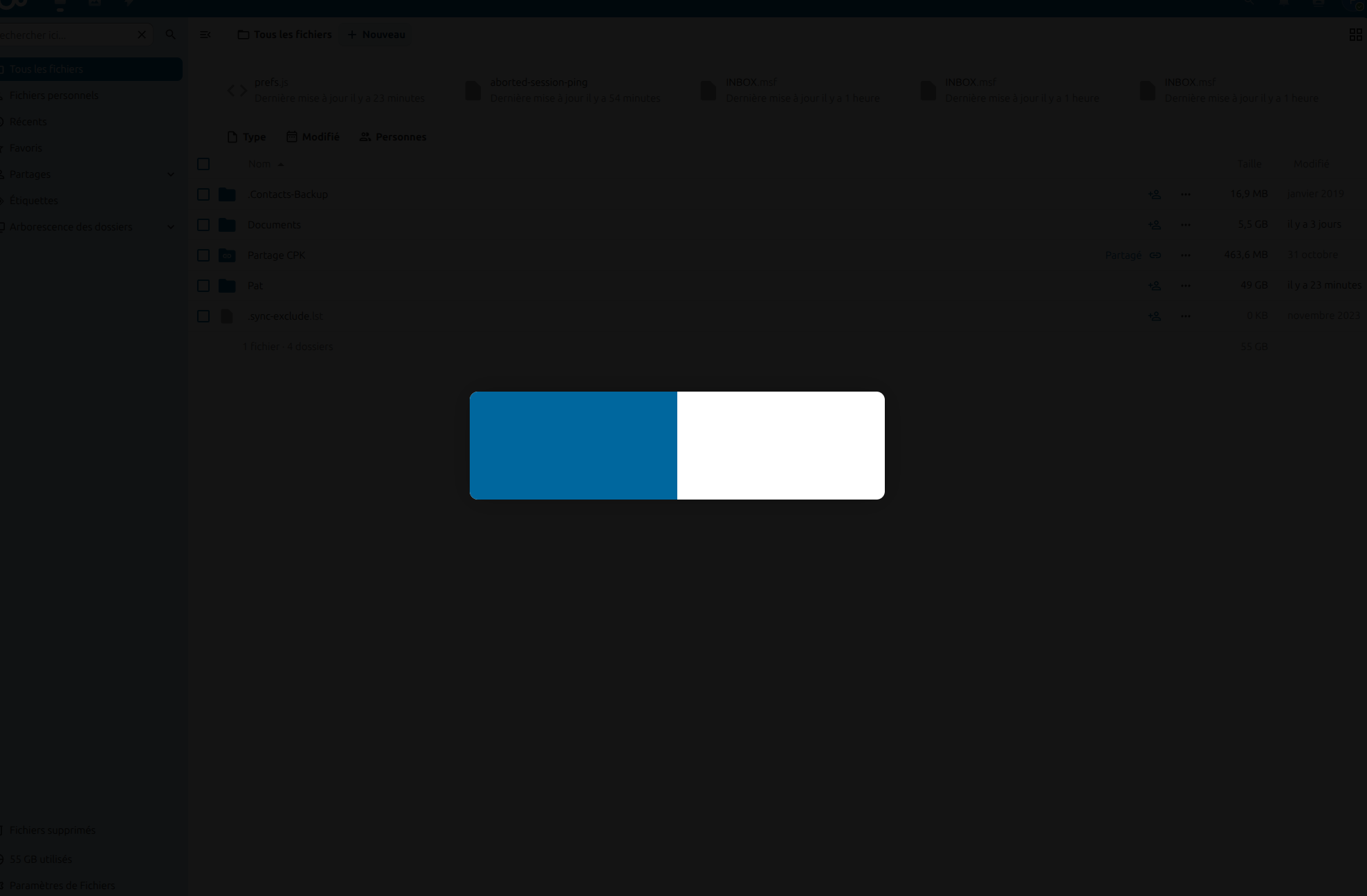
After migration, server seems OK and works fine with nextcloud client. When I try to connect with a local account or admin account, it is possible, but the environment windows is hidden by a sort of big blue switch. This ‘switch’ is unactive with the mouse. The first time I saw it was when I update to 30 or 31. A simple click on the sreen was enough to remove that ‘switch’. Now, it still it and I can’t remove it.
Of course, I can’t use the account. I can guest the screen behind the ‘switch’.
I tried to run again the process by hand with
sudo -u www-data php occ maintenance:mode --on
sudo -u www-data php occ maintenance:repair
sudo -u www-data php occ maintenance:mode --off
There si nothing in the log, except that error, for all account:
“reqId”:“FIeCncL5cc3Id8FuFhNz”,“level”:2,“time”:“2026-01-11T17:35:28+01:00”,“remoteAddr”:“66.132.153.139”,“user”:“–”,“app”:“no app in context”,“method”:“GET”,“url”:“/”,“message”:“Capabilities of OCA\Theming\Capabilities took 0.78 seconds to generate.”,“userAgent”:“Mozilla/5.0 (compatible; CensysInspect/1.1; +https://about.censys.io/)”,“version”:“32.0.3.2”,“data”:}
Steps to replicate it (hint: details matter!):
-
Upgrade from 31 (after upgrade from 30, after upgrade…
Log entries
Nextcloud
Please provide the log entries from your Nextcloud log that are generated during the time of problem (via the Copy raw option from Administration settings->Logging screen or from your nextcloud.log located in your data directory). Feel free to use a pastebin/gist service if necessary.
"reqId":"FIeCncL5cc3Id8FuFhNz","level":2,"time":"2026-01-11T17:35:28+01:00","remoteAddr":"66.132.153.139","user":"--","app":"no app in context","method":"GET","url":"/","message":"Capabilities of OCA\\Theming\\Capabilities took 0.78 seconds to generate.","userAgent":"Mozilla/5.0 (compatible; CensysInspect/1.1; +https://about.censys.io/)","version":"32.0.3.2","data":[]}
Web Browser
If the problem is related to the Web interface, open your browser inspector Console and Network tabs while refreshing (reloading) and reproducing the problem. Provide any relevant output/errors here that appear.
WARN] viewer: Some mimes were ignored because they are not enabled in the server previews config
Object { app: "viewer", uid: "adminPK", level: 2, ignoredMimes: (4) […] }
<anonymous code>:1:147461
OCA.Files.Settings initialized files-main.js:1:580142
OCA.Files.Sidebar initialized files-sidebar.js:1:23377
OCA.Sharing.ShareSearch initialized files_sharing-files_sharing_tab.js:1:800
OCA.Comments.View initialized comments-comments-app.js:1:20372
L’objet « Components » est obsolète. Il sera bientôt supprimé. files
Notifications permissions granted NotificationsApp-0V1-3XAR.chunk.mjs:1:113471
Polling interval updated to 30000 NotificationsApp-0V1-3XAR.chunk.mjs:1:112902
Started background fetcher as session_keepalive is enabled NotificationsApp-0V1-3XAR.chunk.mjs:1:110062
[baseline-browser-mapping] The data in this module is over two months old.  To ensure accurate Baseline data, please update: `npm i baseline-browser-mapping@latest -D` <anonymous code>:1:147461
Got notification data, restoring default polling interval. NotificationsApp-0V1-3XAR.chunk.mjs:1:111857
Le chargement HTTP a échoué avec l’erreur 404. Le chargement de la ressource média https://ns3316452.ip-5-135-166.eu/apps/firstrunwizard/img/Nextcloud.webm a échoué. files
Le chargement HTTP a échoué avec l’erreur 404. Le chargement de la ressource média https://ns3316452.ip-5-135-166.eu/apps/firstrunwizard/img/Nextcloud.mp4 a échoué. files
Le chargement de toutes les ressources possibles a échoué. Le chargement du média a été arrêté. files
OC.requestToken changed yeuJjSRxM1t4uz9ZAMmyN4lquf62TJtm0CuMZrQXqGE=:opLg1X4bQxIV6ws9Ta3rQfoJ3KTOA6I/n0DcEJ9R0Eo= core-main.js:1:638142
OC.requestToken changed k/t/J964cD/OweB32rCAjPa2JUYwK65hF8aOtT+BF8I=:+IIWf4TSAHajkdQTl9TZ+oXVQBxIZJc4WK3ewxTHb+k= core-main.js:1:638142
OC.requestToken changed jV/WTPya/iczbZEr0FOA36AKNWiFl5yBFTRCqE28aTQ=:5ia/FKbwjm5ePaVPnTfZqdNpUDL92KXYWl8S3mb6ER8= core-main.js:1:638142
OC.requestToken changed FguAigW+GKPieFScJeV93C0ti3Fjp4h0kZt4KqNKvU0=:fXLp0l/UaOqPKGD4aIEkql5O7isb6LEt3vAoXIgMxWY= core-main.js:1:638142
OC.requestToken changed Rh20ao16iKqGPJrBReWOZNKEBU1ARYKENLDM9b5eKt8=:LWTdMtcQ+OPrbK6lCIHXEqHnYBc4Crvde9ucg5UYUvQ= core-main.js:1:638142
OC.requestToken changed Aw9VCooADWC59aV0iI0LyxdwPyrLUD3QmYaJOkx9qjg=:aHY8UtBqfSnUpZEQxelSvWQTWnCzHwSJ1u3ZTGc70hM= core-main.js:1:638142
OC.requestToken changed iq32m+ivcQwqyovqIjGH5rENkcuEWcOhTNW2bqRXZFE=:4dSfw7LFAUVHmr+Ob1XekMJu9JH8Fvr4A77mGI8RHHo= core-main.js:1:638142
Web server / Reverse Proxy
The output of your Apache/nginx/system log in /var/log/____:
026/01/11 14:44:57 [crit] 807#807: *3 connect() to unix:/run/php/php-fpm.sock failed (2: No such file or directory) while connecting to upstream, client: 82.65.203.229, server: ns3316452.ip-5-135-166.eu, request: "POST /apps/text/session/577499/sync HTTP/2.0", upstream: "fastcgi://unix:/run/php/php-fpm.sock:", host: "ns3316452.ip-5-135-166.eu"
Configuration
Nextcloud
The output of occ config:list system or similar is best, but, if not possible, the contents of your config.php file from /path/to/nextcloud is fine (make sure to remove any identifiable information!):
"system": {
    "instanceid": "***REMOVED SENSITIVE VALUE***",
    "passwordsalt": "***REMOVED SENSITIVE VALUE***",
    "secret": "***REMOVED SENSITIVE VALUE***",
    "trusted_domains": [
        "ns3316452.ip-5-135-166.eu"
    ],
    "datadirectory": "***REMOVED SENSITIVE VALUE***",
    "dbtype": "mysql",
    "version": "32.0.3.2",
    "overwrite.cli.url": "https:\/\/ns3316452.ip-5-135-166.eu",
    "dbname": "***REMOVED SENSITIVE VALUE***",
    "dbhost": "***REMOVED SENSITIVE VALUE***",
    "dbport": "",
    "dbtableprefix": "oc_",
    "dbuser": "***REMOVED SENSITIVE VALUE***",
    "dbpassword": "***REMOVED SENSITIVE VALUE***",
    "installed": true,
    "memcache.local": "\\OC\\Memcache\\APCu",
    "memcache.locking": "\\OC\\Memcache\\Redis",
    "redis": {
        "host": "***REMOVED SENSITIVE VALUE***",
        "port": 6379
    },
    "loglevel": 2,
    "logtimezone": "Europe\/Paris",
    "default_phone_region": "FR",
    "logfile": "\/var\/log\/nextcloud\/nextcloud.log",
    "log_rotate_size": 104857600,
    "mail_smtpmode": "smtp",
    "mail_smtpsecure": "ssl",
    "mail_from_address": "***REMOVED SENSITIVE VALUE***",
    "mail_domain": "***REMOVED SENSITIVE VALUE***",
    "mail_smtpauthtype": "LOGIN",
    "mail_smtpauth": 1,
    "mail_smtphost": "***REMOVED SENSITIVE VALUE***",
    "mail_smtpport": "465",
    "mail_smtpname": "***REMOVED SENSITIVE VALUE***",
    "mail_smtppassword": "***REMOVED SENSITIVE VALUE***",
    "updater.release.channel": "stable",
    "maintenance": false,
    "theme": "",
    "mysql.utf8mb4": true,
    "encryption.legacy_format_support": false,
    "encryption.key_storage_migrated": false,
    "mail_sendmailmode": "smtp",
    "defaultapp": "files",
    "updater.secret": "***REMOVED SENSITIVE VALUE***"
}
}
Apps
The output of occ app:list (if possible).
Enabled:
- activity: 5.0.0-dev.0
- admin_audit: 1.22.0
- app_api: 32.0.0
- bruteforcesettings: 5.0.0-dev.0
- circles: 32.0.0
- cloud_federation_api: 1.16.0
- comments: 1.22.0
- contactsinteraction: 1.13.1
- dashboard: 7.12.0
- dav: 1.34.2
- encryption: 2.20.0
- federatedfilesharing: 1.22.0
- federation: 1.22.0
- files: 2.4.0
- files_downloadlimit: 5.0.0-dev.0
- files_pdfviewer: 5.0.0-dev.0
- files_reminders: 1.5.0
- files_sharing: 1.24.1
- files_trashbin: 1.22.0
- files_versions: 1.25.0
- firstrunwizard: 5.0.0-dev.0
- logreader: 5.0.0-dev.0
- lookup_server_connector: 1.20.0
- nextcloud_announcements: 4.0.0-dev.0
- notifications: 5.0.0-dev.0
- oauth2: 1.20.0
- password_policy: 4.0.0-dev.0
- photos: 5.0.0-dev.1
- previewgenerator: 5.11.0
- privacy: 4.0.0-dev.0
- profile: 1.1.0
- provisioning_api: 1.22.0
- recommendations: 5.0.0-dev.0
- related_resources: 3.0.0-dev.0
- serverinfo: 4.0.0-dev.0
- settings: 1.15.1
- sharebymail: 1.22.0
- support: 4.0.0-dev.0
- survey_client: 4.0.0-dev.0
- systemtags: 1.22.0
- text: 6.0.1
- theming: 2.7.0
- twofactor_backupcodes: 1.21.0
- updatenotification: 1.22.0
- user_status: 1.12.0
- viewer: 5.0.0-dev.0
- weather_status: 1.12.0
- webhook_listeners: 1.3.0
- workflowengine: 2.14.0
Tips for increasing the likelihood of a response
- Use the
preformatted textformatting option in the editor for all log entries and configuration output. - If screenshots are useful, feel free to include them.
- If possible, also include key error output in text form so it can be searched for.
- Try to edit log output only minimally (if at all) so that it can be ran through analyzers / formatters by those trying to help you.
I include a screenshot of the '“switch”: