UX improvement to files app upload/download

Good afternoon,

My partner and I are using nextcloud for file storage and collaboration. For this, the files app is very important. However, my partner finds the experience confusing. I have to agree that the interface you are greeted with when you open the files app and when you select files does not make the most important actions very obvious.

The most important actions, as you will agree, are: upload file/directory and download file/directory. These are, after all, the primary functionalities needed to interact with a cloud storage solution.

Starting with upload file/directory. It is underneath a button called ‘new’, similar to other file storage solutions. Unlike other files storage solutions, the ‘new’ button is not easily distinguished from other buttons and options in the menu, and surrounded on all sides by other similarly sizes buttons and menus. It’s lost in the interface, so to say.

Currently the only way to distinguish it from other buttons is it’s colour, but even that doesn’t work very well, because it is the same colour as the folder icons, which are more plentiful and the currently selected folder in the tree menu, which is bigger and more to the left as well. It’s in this regard not distinct enough.

Secondly, there is the download button. There are two ways to find it: either by clicking the meatballs menu on a folder/file or by selecting files and clicking the meatballs menu in the new menu bar. Therein lies problem. You have to go out of your way to find it.

Especially that last one is confusing. It’s hidden underneath a meatballs menu that only appears when you select files, next to some buttons that, frankly, are much less important and that I imagine only some of the users use occasionally.

I personally use the meatballs menu on the file/folder itself, but I have not seen my partner or family members use this option. It is much more obvious to select files, since the big blue checkboxes are always in view and seem a primary part of the interface.

My proposal is to make the ‘new’ button more distinct by making it the only interface item with that colour. Changing folder icon colour and selected folder colour will help with making this important piece of the interface easy to find. Other things we could do to help with this problem is: increase margin, move other buttons to less important locations and simply making it bigger.

Secondly, I propose to move the download button for selected files/folders next to the ‘move or copy’ button and have the ‘add to favourites’ and ‘manage tags’ buttons in the meatballs menu instead.

Thirdly, and perhaps least important, I propose to swap the share and download button on the file/folder itself, displaying the download button on the entry itself and share button in the meatballs menu. Alternatively, we could have the download button next to the share button and display both.

I am a developer and could to pick this up myself, if this proposal get some amount of support.

Please review my proposal and let my know what you think.

Kind regards,

Pieter Hagedoorn

Hi Pieter!

Thank you for taking the time to think about how to improve Nextcloud! We appreciate it!

Could you perhaps post screenshots of the offending parts of the UI? For me the “new” button is pretty prominent. And regarding the “download” action, I think nextcloud is expressly not designed to make downloading a primary action. Rather the expectation is that users either edit files directly in the web or set up a desktop client that synchronizes the files automatically. Download and upload is a bit of an old-fashioned notion in this view.

@jan May have more input :slight_smile:

1 Like

Thank you for your reply

I have attached some images of the interface as it is on my installation. No styling has been done here. I have also attached some images of other file hosting services and will try my best to make my case as to why I think this area needs some UX improvement:

This is the interface which shows the ‘new’ button. Roughly from left to right, in this interface, you see the following elements, notated with whether it looks important:

  • Search bar
  • search button
  • tree menu
    • The selected folder is a big blue bar, fairly close to the ‘new’ button, and much bigger
  • close sidebar
  • ‘new’ button
    • Primary colour
  • ‘all files’ button
  • folder icons
    • all primary colour

Notice how the ‘new’ button is not near the top of the list. Most western folk tend to scan from left to right, top to bottom. Also notice how there are multiple elements, which are less important, all designed too look as important as the ‘new’ button. Lastly, notice how the ‘new’ button is sandwiched fairly closely between a bunch of other buttons, without a ton of margin of spacing to differentiate.

Also important, but not something you can do anything about: the app is already nested inside the nextcloud hub UI, which has even more buttons and things to click on.

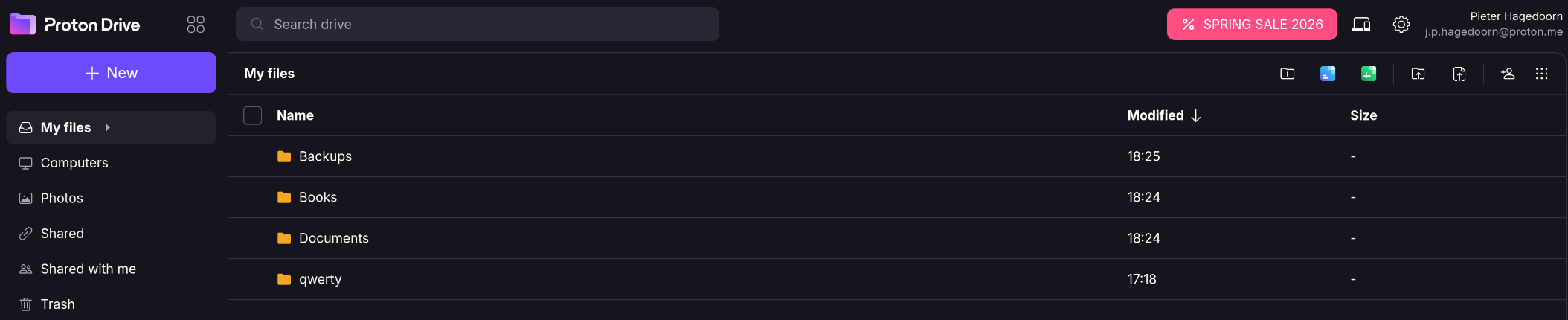
Here proton drive:

And the list goes as follows:

  • proton drive logo
  • some minor other button
  • ‘new’ button
    • Big, uniquely coloured, bunch of space around it
  • tree menu
  • etc

Notice how the ‘new’ button is relatively much closer to the top of the list. Also notice how it is not clustered with a bunch of other buttons. Lastly, notice how it has a unique colour and is much larger than other elements

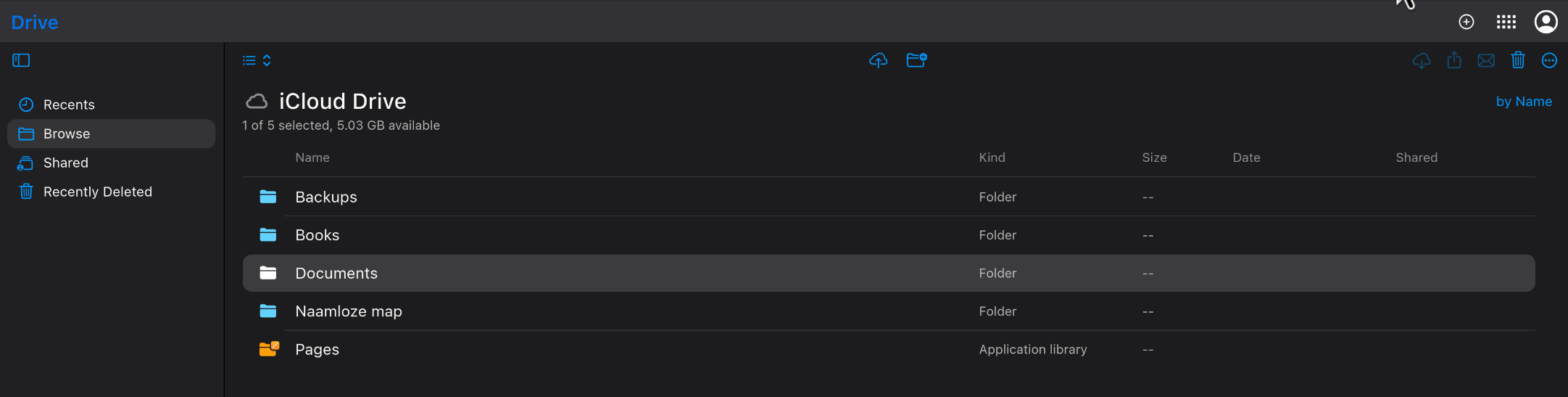
Here is icloud and gdrive:

They have different approaches, relying less on colour (and size, in the case of icloud) and more on sizing for gdrive and margin for icloud. Both interfaces have these buttons out of the way, but are still easily found at a glance because they’re not swarmed with other buttons and options, and are unique in a sense from other less important options.

As for whether download should be more prominent or not, I think relates to how nextcloud files can (easily) be used and how it is actually used by real users. You’d have to do some field testing to figure that out.

However, to support my case: think about gdocs. They don’t have an obvious download button, because you don’t need it. You can edit just by clicking right there in the browser. Their editor is supurb. You can collaborate and share simply by making a link. No plugins or setup needed. On top of that, it’s an app with a single purpose: editing documents. Nothing else.

Does it make sense to apply this model to an app that is primarily focused on working with files? Specifically storing those files on the cloud? Even gdrive, which has extensive integrations with their suite of office applications, from which you would never even have to leave for most business user’s use-cases, has the download button prominent and accessible. It’s in inherent operation to such an application: storing and retrieving files.

All this wasted A.I. compute power just to say that you want the ‘Download’ button to be more prominently placed when files are selected, similar to Google Drive, instead of it being hidden behind a hamburger menu. :wink:

Sorry, I couldn’t resist, and yes, I actually agree. :slight_smile:

Hi there,

I didn’t use AI for this. Genuinely, AI is waste to me. Besides, which AI could produce a breakdown of UX components based on screenshots of different websites and compare them?

It’s rude to assume such things.

Okay. Then I’ll apologize and rephrase


Writing two essays, just to say that you want the ‘Download’ button to be more prominently placed when files are selected, similar to Google Drive, instead of it being hidden behind a hamburger menu.

:wink:

Thank you.

Haha, yeah I do like being thorough. Though I am addressing two issues here, not just the download button, which is still up for debate. That seems to be a question about intent from the nextcloud design team, rather than the unintended non-uniqueness of the ‘new’ button.

1 Like

I definitely don’t think it should be hidden. I mean, why would it be? That said, I do think it’s a good decision to hide the delete button. I also like the overall order of the buttons.

I don’t have strong opinions on that, but I’d argue it’s already distinct enough as it is placed above the file action buttons (when they appear). Also, the file action buttons only appear when one or more files are selected, so they feel unique enough to me.

What I find more confusing is the “All files” button next to the “New” button. At least on my instance, it only offers one option: “Reload content.” Why not just have a refresh button there?

Eiteher way, you might also consider opening an issue on GitHub for these points, perhaps a bit more concise, and with one topic per issue. :slightly_smiling_face:

Oh, and I did use the help of AI to translate my post :wink:

Yes, now that I have written it out, I do think that it would have made sense to split these up.

Regarding the ‘new’ button; it’s of course a matter of taste and I am not arguing that the ‘new’ button is hidden or hard to find. Just that the first-time user experience is hampered by the fact that it is cluttered and not distinct. The practised user might not notice these things, but I’d argue that their experience, too, will be improved by giving important functionality room to breathe in the user-interface. The design of such things has a definite effect on the experience of using the product, conscious or unconscious.

The same goes for the download button of course.

I want to collect some more feedback from people involved in the project :slight_smile: .