I’m having interesting issues upgrading to the next available release.
My admin settings page shows I am on 27.1.5 and 27.1.7 is available. But when starting the upgrade, it immediately stops again.
On the command-line I have a similar effect. The upgrader shows current version 27.1.5. And 27.1.7 available. But then shows everything is up-to-date?!?
Some relevant background. I tried an upgrade a while back from 27.1.5 that failed. It hang at the database upgrade. So I put back the backup
cp -R nextclouddata/updater-5078ca89a33a4/backups/nextcloud-27.1.5.1-1705933909 ./nextcloud
The system worked again and I didn’t find time to pursue the issue further at the time.
Any Idea how I can bring the system in line again? Or should I just wait for the next stable release to cure this?
Below is the output from the command line upgrade, it shows the issue quite nicely.
So you have stuff that you need to clean out in the database. You can not just restore the files. You have to restore the database as well if a backup fails.
The difficult thing is to do that manually. And i dont have it in my head exactly where in the database you need to fix it.
I guessed it was something in that direction. Should I fear other damage, or only the disconnect between the detected version and the real one? And would a a future upgrade to 27.1.8 or so fix this, or do I need to repair this asap. (In which case I could use some advice to know where to look in the database…)
Indeed, I have the separate between the two issues:
why the initial upgrade failed
and the version discrepancy why this one failed.
For the first one, I wanted to carefully try the upgrade. With a backup at hand to revert back when needed.
I checked the database for missing indices, etc. Not sure what I can check for next.
But then I ran into the second problem. So I couldn’t check out the first further.
I’ll wait now for an other upgrade and pursue again!
What are the values of installed and version in your config.php?
And what’s the contents of your Version.php?
Also, try running it interactively. Do the check boxes immediately get checked and everything completed suspiciously fast (like immediately) … Or do things to at a more reasonable speed?
In config.php:
‘version’ => ‘27.1.5.1’,
‘version’ => ‘27.1.5.1’,
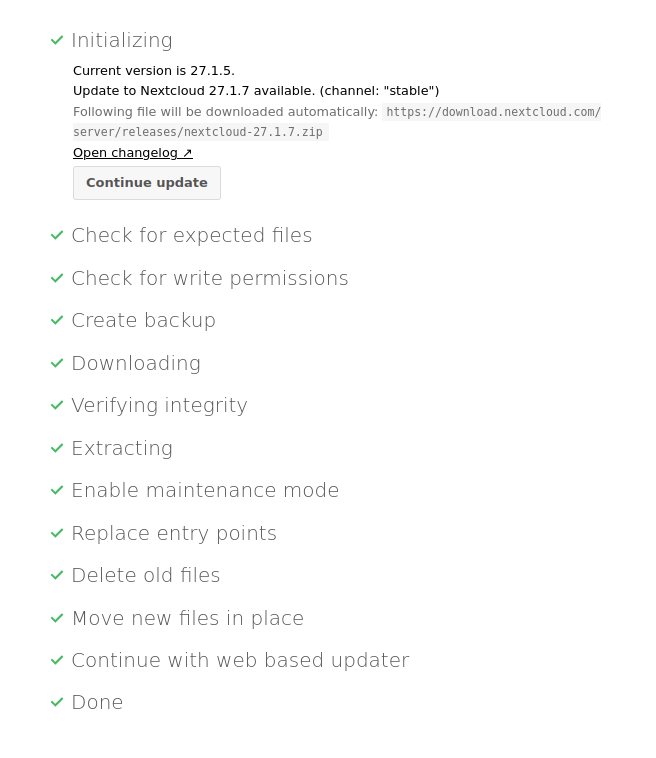
The checkboxes indeed get checked immediately. Same from the commandline btw. It seems to be getting the values from some prestored place or just skip the whole procedure behind it.
Do you have any idea how I can get back to a deterministic state?
Regards,
sharing the exact same experience.
Version is 27.1.5 and shows available upgrade to 27.1.7
As soon as I launch the built-in Upgrade via Web (see picture) I get a screen where I didn’t even launch the process yet but all checkmarks are already set. So when I hit the button I get redirected without delay back to the running instance without any effect. Also I can add, that this is the first time I have an Upgrade-issue with this nextcloud instance.
Unfortunately, due to limitations with my hoster I’m unable to launch any CLI in interactive mode, so I don’t see any log or issue informing me about the current state of the process.
Would be glad to get assistance in figuring out what to try next to fix it

 ] Check for expected files