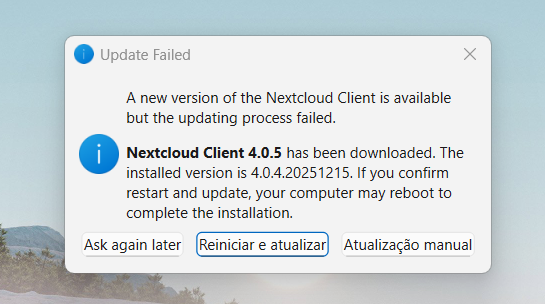
We’re facing an issue after get the 4.0.5 update, when the desktop client display the new update packet to install, usually we got 3 options:
1 - Ask again later
2 - Restart and install
3 - Manually update
The most commum option to use is “Restart and install”, but in this update, when we tried to use this optimum notthing happens, and the page appears again.
Yes, I had the same. The strange thing is, on start, the program was not signed by Nextcloud. However, the manually downloaded version was.
I didn’t have the time to create a report on github. Just stopping the client, downloading the new package from nextcloud.com and restarting the client solved the issue for me.
this is an already known issue
sorry for that
it was fixed by #9350
it is part of the already published 4.0.6
we also changed the way we distribute updates to hopefully provide the update correctly if you retry
First of all Nextcloud-4.0.6-x64.msi was published 3 days after Nextcloud-4.0.5-x64.msi. That makes me asume somthing was wrong with Nextcloud-4.0.5-x64.msi
Second: a always working ways is not update, but
deinstall the old msi (eg. Nextcloud-4.0.4-x64.msi)
reboot Windoof
install the next Version (eg Nextcloud-4.0.6-x64.msi)
I have the same bug and do not understand how I can update manually. I can stop Nextcloud from the task manager, I can download the new version, but where should I save it? How can I start the updater? Can I just clique on the msi-file? There is no nextcloud…msi to remove. I have windows 10 and windows 11. Can you guide me.
solved it. I stopped NC with the Taskmanager. Downloaded the latest .msi file from https://github.com/nextcloud-releases/desktop/releases/tag/v4.0.6 and saved it among my other downloaded files. I then cliqued on the .msi-file and it started the installation. I needed more detailed instructions but could not find it anywhere. In the instructions above it sais I should remove the old .msi but I had no old .msi file on my computer.