Thousands of Files Renamed by Mac Clientd

The Basics

  • Nextcloud Server version (e.g., 29.x.x):
    • 33.02
  • Operating system and version (e.g., Ubuntu 24.04):
    • Debian 11
  • Web server and version (e.g, Apache 2.4.25):
    • Apache 2.4.66
  • Reverse proxy and version _(e.g. nginx 1.27.2)
    • nginx 1.26.3
  • PHP version (e.g, 8.3):
    • 8.3.17
  • Is this the first time you’ve seen this error? (Yes / No):
    • yes
  • When did this problem seem to first start?
    • After upgrading to 33
  • Installation method (e.g. AlO, NCP, Bare Metal/Archive, etc.)
    • Bare Metal installed in LXC on ProxMox
  • Are you using CloudfIare, mod_security, or similar? (Yes / No)
    • Cloudflare

Summary of the issue you are facing:

I moved a large chunk of files into my NextCloud directory on mac with the Mac Client (version 33.0.2). Some files were very large (>100 gb). These seemed to not backup and the client kept skipping files. I could tell that the local directory on my mac was huge and not honoring the virtual files. I would kill the client and restart it and sometimes it picked up an extra file or two, but was still missing 100s.

I later noticed some core folders were duplicated on my mac, like Folder and then Folder 2. I thought that was strange and looked on the server itself and those folders were not showing. To test, I deleted one of the Folder 2 items on my mac, on the server, it deleted Folder. Realizing this was pretty screwed up, I killed the mac app. I have since noticed a lot of random files that were renamed to File Name 2.extension. It’s in the 1000s of files. I see >2k in one folder that end with 2.extension.

At this point, I’m not sure what to do. I think I need to figure out what files were renamed. I can run a find on the server and get lists of files that end like that, but some obviously should, so this is going to be a major pain. Secondly, I very much do not trust the mac client app at this point.

Any suggestions? Thanks!

Log entries

Nextcloud

Please provide the log entries from your Nextcloud log that are generated during the time of problem (via the Copy raw option from Administration settings->Logging screen or from your nextcloud.log located in your data directory). Feel free to use a pastebin/gist service if necessary.

There are plenty of errors in the log, here is one:

{
  "reqId": "<redacted>",
  "level": 3,
  "time": "2026-04-28T16:13:54+00:00",
  "remoteAddr": "<redacted>",
  "user": "<redacted>",
  "app": "no app in context",
  "method": "MOVE",
  "url": "/remote.php/dav/files/<user>/<redacted-path>/<redacted-file>.flac",
  "scriptName": "/remote.php",
  "message": "Uncaught exception",
  "userAgent": "Nextcloud Desktop Client 33.0.2 on macOS",
  "version": "33.0.2.2",
  "exception": {
    "Exception": "Sabre\\DAV\\Exception",
    "Message": "Failed to rename /<redacted-path>/<redacted-file>.flac to /<redacted-path>/<redacted-file> 2.flac",
    "Code": 0,
    "File": "/var/www/nextcloud/apps/dav/lib/Connector/Sabre/Node.php",
    "Line": 128,
    "message": "Uncaught exception",
    "CustomMessage": "Uncaught exception"
  }
}

Configuration

Nextcloud

The output of occ config:list system or similar is best, but, if not possible, the contents of your config.php file from /path/to/nextcloud is fine (make sure to remove any identifiable information!):

{
    "system": {
        "passwordsalt": "***REMOVED SENSITIVE VALUE***",
        "secret": "***REMOVED SENSITIVE VALUE***",
        "trusted_domains": [
            "localhost",
            "<redacted>",
            "<redacted>"
        ],
        "datadirectory": "***REMOVED SENSITIVE VALUE***",
        "dbtype": "mysql",
        "version": "33.0.2.2",
        "overwrite.cli.url": "http:\/\/localhost",
        "dbname": "***REMOVED SENSITIVE VALUE***",
        "dbhost": "***REMOVED SENSITIVE VALUE***",
        "dbport": "",
        "dbtableprefix": "oc_",
        "mysql.utf8mb4": true,
        "dbuser": "***REMOVED SENSITIVE VALUE***",
        "dbpassword": "***REMOVED SENSITIVE VALUE***",
        "installed": true,
        "instanceid": "***REMOVED SENSITIVE VALUE***",
        "memcache.local": "\\OC\\Memcache\\Redis",
        "redis": {
            "host": "***REMOVED SENSITIVE VALUE***",
            "port": 0,
            "timeout": 0
        },
        "filelocking.enabled": true,
        "memcache.locking": "\\OC\\Memcache\\Redis",
        "default_phone_region": "US",
        "mail_smtpmode": "smtp",
        "mail_smtpsecure": "ssl",
        "mail_sendmailmode": "smtp",
        "mail_from_address": "***REMOVED SENSITIVE VALUE***",
        "mail_domain": "***REMOVED SENSITIVE VALUE***",
        "mail_smtphost": "***REMOVED SENSITIVE VALUE***",
        "mail_smtpport": "465",
        "mail_smtpauth": 1,
        "mail_smtpname": "***REMOVED SENSITIVE VALUE***",
        "mail_smtppassword": "***REMOVED SENSITIVE VALUE***",
        "maintenance": false,
        "theme": "",
        "loglevel": 2,
        "twofactor_enforced": "true",
        "twofactor_enforced_groups": [],
        "twofactor_enforced_excluded_groups": [],
        "check_data_directory_permissions": false,
        "maintenance_window_start": 8,
        "app_install_overwrite": [
            "maps"
        ],
        "trusted_proxies": "***REMOVED SENSITIVE VALUE***",
        "updater.secret": "***REMOVED SENSITIVE VALUE***"
    }
}

:eyes: Please update to 33.0.3 (released yesterday) and enable debug level logging with this terminal (works only with 33.0.3+) command and check the logs for anything in regard to the renames:

defaults write com.nextcloud.desktopclient.FileProviderExt debugLoggingEnabled -bool YES

At some point later one should disable the debug logging again to avoid much disk space being consumed by too verbose logs:

defaults write com.nextcloud.desktopclient.FileProviderExt debugLoggingEnabled -bool NO

You hit a very tricky problem I am already investigating on in scope of a customer support ticket. It is impossible to reproduce for me so far and I need to gather every bit of intelligence I can get. I will send you a private message with a link to upload the client debug archive, if you are willing to share it. Also, because the community forum is officially not monitored and we use GitHub for tracking issues, you are welcome to open an issue there. Is there possibility you know how to provoke the renames? You don’t accidentally have a Macbook which you close and reopen? :wink:

Really, this is a tricky one. We do not have any code which does this kind of renaming. It is typical behavior of Finder. And somehow, it even ends up in the metadata database of the file provider extension. :thinking:


PS: The debug level commands above will end up in the official documentation later on, too. I did not get to open a pull request for that yet.

I’ll be happy to provide what I can.

You don’t accidentally have a Macbook which you close and reopen? :wink:

Well, of course? I actually have the Nextcloud client installed on two macs. On the one where I moved the large files, I was out of disk space (because things weren’t moving to virtual files). I needed some disk space to save some large audio exports, so I purged Nextcloud from that mac entirely. I checked every file in /Users/myuser/Library/CloudStorage/Nextcloud-user@server.com/ to see if it had a size, if so, I verified if it was on my actual server. I then rsynched many over. I deleted the app and the library folder.

I should also clarify that many of the files that were renamed were not in the directory where I had moved the large files that were not syncing. They were in an entirely different parent directory and the files were most likely not accessed for months.

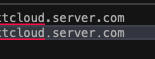
On the other mac, I see now that I actually have two /Nextcloud-user@server.com/ entries. One has a . and one has a different looking . That’s hard to actually see in how it pasted on the forum, but here’s what it looks like in a notepad as well. You can see the second one seems ot have slightly less bold looking periods.

drwx------@   2 user  staff     64 Mar 24 13:49 Nextcloud-user@nextcloud.server.com
drwx------@  20 user  staff    640 Mar 30 12:59 Nextcloud-user@nextcloud․server․com

image

I killed the Nextcloud app on this mac as well because I wasn’t sure what was happening. I’m happy to start it back and upgrade to 33.0.3, and set the log commands, if you think it’ll help diagnose something.

I realized (d’uh), all of these renames would be in the activity tables. So I did this:

mariadb -u DBUSER -p -D DBNAME --batch --raw -e "
SELECT
  FROM_UNIXTIME(timestamp) AS ts,
  app,
  subject,
  file,
  affecteduser,
  subjectparams
FROM oc_activity
WHERE FROM_UNIXTIME(timestamp) >= CURDATE()
ORDER BY timestamp ASC;
" > nextcloud-activity-today.tsv

I then stripped the file to only my user:

awk -F '\t' '$5=="user"' nextcloud-activity-today.tsv > user-activity.tsv

Then looked only for renamed rows:

grep -iE ā€˜rename|renamed|move|moved| 2.’ user-activity.tsv > user-suspect-activity.tsv

I then parsed this to only files that were moved to 2.extension:

python3 - <<'PY' > user-rename-pairs.tsv
import csv, json, re

pat = re.compile(r" 2\.[^/]+$")

with open("user-suspected-today.tsv", newline="") as f:
    reader = csv.reader(f, delimiter="\t")
    for row in reader:
        if len(row) < 6:
            continue
        ts, app, subject, filecol, user, params = row[:6]
        if user != "user" or subject != "renamed_self":
            continue
        try:
            data = json.loads(params)
            new_path = next(iter(data[0].values()))
            old_path = next(iter(data[1].values()))
        except Exception:
            continue
        if not pat.search(new_path):
            continue
        print(f"{old_path}\t{new_path}")
PY

I now have a file with 2100 rows like this:

/<redacted-path>/<file>.txt    /<redacted-path>/<file> 2.txt

That’s a relief because I can script a rename process after reviewing all of this content to verify it’s what I think was renamed.

Never sync a huge folder with 1000s of files in one run. Always split into parts and wait until the sync is finished before adding the next part.

To clarify, the directory I copied into my Nextcloud path had 150 files across 14 sub-directories, totaling ~ 250 gb. This was in a path like Nextcloud-root/Backup. The client then renamed a few thousand in a totally different path, like Nexcloud-root/Files.

Out of curiosity, I ran the the directory listing of this for Unicode characters:

user@mac CloudStorage % python3 - <<'PY'
import os, unicodedata
for name in sorted(os.listdir(".")):
    print("NAME:", name)
    print("REPR:", repr(name))
    print("CHARS:", " ".join(f"U+{ord(c):04X}:{unicodedata.name(c, 'UNKNOWN')}" for c in name))
    print()
PY

NAME: Nextcloud-user@server.com
REPR: ā€˜Nextcloud-user@server.com’
CHARS: U+004E:LATIN CAPITAL LETTER N U+0065:LATIN SMALL LETTER E U+0078:LATIN SMALL LETTER X U+0074:LATIN SMALL LETTER T U+0063:LATIN SMALL LETTER C U+006C:LATIN SMALL LETTER L U+006F:LATIN SMALL LETTER O U+0075:LATIN SMALL LETTER U U+0064:LATIN SMALL LETTER D U+002D:HYPHEN-MINUS U+0075:LATIN SMALL LETTER U U+0073:LATIN SMALL LETTER S U+0065:LATIN SMALL LETTER E U+0072:LATIN SMALL LETTER R U+0040:COMMERCIAL AT U+0073:LATIN SMALL LETTER S U+0065:LATIN SMALL LETTER E U+0072:LATIN SMALL LETTER R U+0076:LATIN SMALL LETTER V U+0065:LATIN SMALL LETTER E U+0072:LATIN SMALL LETTER R U+002E:FULL STOP U+0063:LATIN SMALL LETTER C U+006F:LATIN SMALL LETTER O U+006D:LATIN SMALL LETTER M

NAME: Nextcloud-user@server․com
REPR: ā€˜Nextcloud-user@server․com’
CHARS: U+004E:LATIN CAPITAL LETTER N U+0065:LATIN SMALL LETTER E U+0078:LATIN SMALL LETTER X U+0074:LATIN SMALL LETTER T U+0063:LATIN SMALL LETTER C U+006C:LATIN SMALL LETTER L U+006F:LATIN SMALL LETTER O U+0075:LATIN SMALL LETTER U U+0064:LATIN SMALL LETTER D U+002D:HYPHEN-MINUS U+0075:LATIN SMALL LETTER U U+0073:LATIN SMALL LETTER S U+0065:LATIN SMALL LETTER E U+0072:LATIN SMALL LETTER R U+0040:COMMERCIAL AT U+0073:LATIN SMALL LETTER S U+0065:LATIN SMALL LETTER E U+0072:LATIN SMALL LETTER R U+0076:LATIN SMALL LETTER V U+0065:LATIN SMALL LETTER E U+0072:LATIN SMALL LETTER R U+2024:ONE DOT LEADER U+0063:LATIN SMALL LETTER C U+006F:LATIN SMALL LETTER O U+006D:LATIN SMALL LETTER M

You can see that one is using FULL STOP and one is using ONE DOT LEADER. I’m not sure if this is at all responsible, but it seems like a problem that should be cleaned up regardless.

As an interjection, please see this issue on GitHub in regard to the topic of dots:

Hopefully, this clears up what is happening, how we got there and why we cannot leave it at that and how it is supposed to change again soon so everyone using our client finds satisfaction in regard to this topic.

I’ve noticed on the second mac that I’m seeing lots of local files with a 2.extension ending. Nothing new has been renamed since debug logging was turned on, but I’m just noticing these. My client says that I’m synched, but the icon says otherwise:

image

it appears these were triggered March 30th - that is before I attempted to copy the larger folder over from Mac #1. Not sure what happened then, perhaps that was when I upgraded to the 33 version client. EDIT: See note at end Here is a sanitized version of a folder on my mac:

user@host client-folder % ls -all
total 98800
drwx------@ 14 user  staff       448 Mar 30 15:34 .
drwxr-xr-x@ 10 user  staff       320 Mar 30 15:40 ..
-rw-------@  1 user  staff   2322739 Mar 30 15:34 2. Client Requirements 2.xlsx
-rw-------@  1 user  staff   2322739 Jul 18  2022 2. Client Requirements.xlsx
-rw-------@  1 user  staff    240665 Mar 30 15:34 Vendor schedule and scripts updated 2.pdf
-rw-------@  1 user  staff    240665 Jul 18  2022 Vendor schedule and scripts updated.pdf
-rw-------@  1 user  staff     17578 Mar 30 15:34 Internal Demo Agenda_Client 2.xlsx
-rw-------@  1 user  staff     17578 Jul 18  2022 Internal Demo Agenda_Client.xlsx
-rw-------@  1 user  staff  11004887 Mar 30 15:34 Client - Reporting and Regulatory 2.pptx
-rw-------@  1 user  staff  11004887 Jul 22  2022 Client - Reporting and Regulatory.pptx
-rw-------@  1 user  staff  25910886 Mar 30 15:34 Client_Vendor Overview 2.pptx
-rw-------@  1 user  staff  25910886 Jul 18  2022 Client_Vendor Overview.pptx
-rw-------@  1 user  staff  11077822 Mar 30 15:34 Client_Users Session 2.pptx
-rw-------@  1 user  staff  11077822 Jul 22  2022 Client_Users Session.pptx
user@host client-folder %

Here that same folder is on my server:

user@host:/mnt/storage/user/Clients/client-folder$ ls -all
total 44227
drwxrwxr-x 2 user user        8 Mar 30 15:34 .
drwxrwxr-x 9 user user        9 Mar 30 15:31 ..
-rw-rw-r-- 1 user user  2322739 Mar 30 15:34 '2. Client Requirements.xlsx'
-rw-rw-r-- 1 user user   240665 Mar 30 15:34 'Vendor schedule and scripts updated.pdf'
-rw-rw-r-- 1 user user    17578 Mar 30 15:34 'Internal Demo Agenda_Client.xlsx'
-rw-rw-r-- 1 user user 25910886 Mar 30 15:34 'Client_Vendor Overview.pptx'
-rw-rw-r-- 1 user user 11077822 Mar 30 15:34 'Client_Users Session.pptx'
-rw-rw-r-- 1 user user 11004887 Mar 30 15:34 'Client - Reporting and Regulatory.pptx'
user@host:/mnt/storage/user/Clients/client-folder$

Notice that all of the server versions are also March 30th, though these files predate that and the July 2022 dates are likely accurate.

ETA: I recall what happened that day. I did in fact attempt to copy a large directory on Mac 2, and it included these files. This might be part of the problem then. Perhaps the local client is facing a problem when writing and then this results in Finder creating duplicates? I’m not sure I want to clean this up locally at all because I see 7k files created on March 30th on my server. Unless you tell me otherwise, I will likely repeat what I did on Mac 1 by the end of today. I will disconnect the client, verify files between my client and the server, rsync any missing ones to the server (that don’t end with 2.extension), purge all instances of the client on this mac and then start over with a new client install.

Just another quick update. I removed the nextcloud app, but I’m unable to delete this directory with the weird dots. I was able to mv to another name, but it’s totally stuck:

CloudStorage % sudo rm -rf OLDNEXTCLOUD
rm: OLDNEXTCLOUD: Directory not empty
CloudStorage % cd OLDNEXTCLOUD 
OLDNEXTCLOUD % ls -all
total 0
ls: fts_read: Operation timed out

At this point, I’m not sure what to do, but I’m sure I won’t reinstall 33 of the client until it’s stable, this has been a mess to clean up.

I mean, sure. That is right up there with, ā€œNever have a huge folder with thousands of files in it,ā€ in the first place. However, on MacOS the Mac Nextcloud Client has long had issues with freezing, restarting, and getting all-around hung-up on directories that either have data changing too often or are in the client’s opinion too large. What’s not clear is the actual cause of this.

I suppose we could also say, ā€œDon’t upgrade to 33.0.x?ā€

I’m not meaning to be combative here. Just joining the chat to say that the MacOS Client has issues. I observed the aforementioend issue on a second computer, but already cleaned it up otherwise I would have logs to share (I just simply restored everything for it). I haven ot managed to get it to do it again, but if I do I’ll post.

Yeah and this happened on a 3rd mac (different account on my server). No massive amount of files were copied on this one. I cleaned it up and setup rclone instead of the client. Something is certainly wrong with the mac client at this point.

In this regard: Those are not ordinary files and folders in the ā€œCloudStorageā€ directory. sudo can help. But in general, those are files and folders managed by macOS and are backed by the internal file provider framework and its metadata database. It roots deep in macOS which can mess up itself (and used to a few years ago on macOS 12). That deletion does not work as expected is not a surprise anymore and unrelated to our client.

In general, I have a customer support ticket and another (unrelated) problem in which I could provoke the same behavior. This apparent renames are not renames by themselves, technically we return metadata for an already known item but with a different file provider identifier format which needs to be mapped first and then the file provider framework of macOS performs this " 2" appendage (our whole client code does not contain any such behavior). At least this is the current suspicion. This rename problem is particularly tiny and nasty and hard to pin down. It still is unclear under which circumstances data is handed in and returned without occasionally necessary identifier mapping.