Support intro
Sorry to hear you’re facing problems. 
The community help forum (help.nextcloud.com) is for home and non-enterprise users. Support is provided by other community members on a best effort / “as available” basis. All of those responding are volunteering their time to help you.
If you’re using Nextcloud in a business/critical setting, paid and SLA-based support services can be accessed via portal.nextcloud.com where Nextcloud engineers can help ensure your business keeps running smoothly.
Getting help
In order to help you as efficiently (and quickly!) as possible, please fill in as much of the below requested information as you can.
Before clicking submit: Please check if your query is already addressed via the following resources:
- Official documentation (searchable and regularly updated)
- How to topics and FAQs
- Forum search
(Utilizing these existing resources is typically faster. It also helps reduce the load on our generous volunteers while elevating the signal to noise ratio of the forums otherwise arising from the same queries being posted repeatedly).
The Basics
- Nextcloud Server version (e.g., 29.x.x):
- 32.0.2
- Operating system and version (e.g., Ubuntu 24.04):
- Debian 13.2
- Web server and version (e.g, Apache 2.4.25):
- Nginx 1.26.3-3+deb13u1
- Reverse proxy and version _(e.g. nginx 1.27.2)
- Nginx 1.26.3-3+deb13u1
- PHP version (e.g, 8.3):
- 8.3
- Is this the first time you’ve seen this error? (Yes / No):
- yes
- When did this problem seem to first start?
- When I first tried setting up mail
- Installation method (e.g. AlO, NCP, Bare Metal/Archive, etc.)
- Bare Metal
- Are you using CloudfIare, mod_security, or similar? (Yes / No)
- No
Summary of the issue you are facing:
I set up a Stalwart Mail Server and I was having problems with getting shared folders made using groups to show. I couldn’t see them no matter what; so I tried subscribing to them via Thunderbird, suddenly they showed, except everything was in root, except the INBOXs.
It seems subscribing in Nextcloud Mail doesn’t change the LSUB subscribe output.
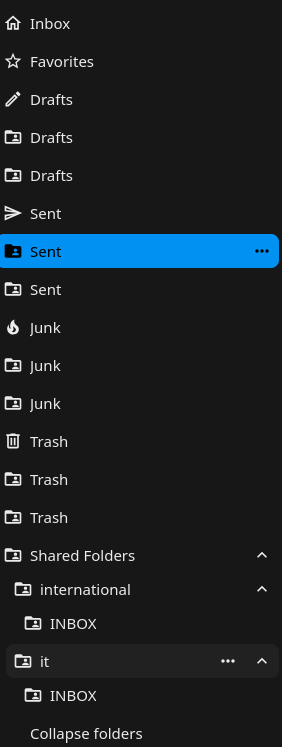
That sent folder I’ve selected is “Shared Folders/international/Sent Items”
The IMAP LIST command manually for info:
A2 LIST "" "*"
* LIST () "/" "Deleted Items"
* LIST () "/" "Drafts"
* LIST () "/" "INBOX"
* LIST () "/" "Junk Mail"
* LIST () "/" "Sent Items"
* LIST (\NoSelect) "/" "Shared Folders"
* LIST (\NoSelect) "/" "Shared Folders/it"
* LIST () "/" "Shared Folders/it/Deleted Items"
* LIST () "/" "Shared Folders/it/Drafts"
* LIST () "/" "Shared Folders/it/INBOX"
* LIST () "/" "Shared Folders/it/Junk Mail"
* LIST () "/" "Shared Folders/it/Sent Items"
* LIST (\NoSelect) "/" "Shared Folders/international"
* LIST () "/" "Shared Folders/international/Deleted Items"
* LIST () "/" "Shared Folders/international/Drafts"
* LIST () "/" "Shared Folders/international/INBOX"
* LIST () "/" "Shared Folders/international/Junk Mail"
* LIST () "/" "Shared Folders/international/Sent Items"
A2 OK LIST completed
It also seems Nextcloud doesn’t respect \NoSelect, because I keep getting errors ending with the trace:
"File": "/var/www/nextcloud/apps/mail/vendor/bytestream/horde-imap-client/lib/Horde/Imap/Client/Socket.php", "Line": 4622, "message": "IMAP error reported by server.", "exception": { "details": "Mailbox does not exist.", "logged": false, "raw_msg": "IMAP error reported by server."
It also doesn’t respect deleted folders by the mail server. If an account loses access to an account it stays in the list of folders, but won’t work, and syncing will fail as the folder doesn’t exist for the user.
It seems for me there’s a problem with Nextcloud Mail: Discovering and adding new shared folders using LIST or a similar command; respecting \NoSelect; respecting folders being deleted if not deleted by Nextcloud Mail; Respecting folder hierarchy if they are named something it expects like: “Sent Items”
There should really be a solution to newly shared folders like the Thunderbird Account Context Menu > Subscribe… > Refresh button; it’s quite a hassle to log in and out to check for that.
Nextcloud Mail should (in my opinion) respect shared folder hierarchy, deleted Mailboxes, and \NoSelect.
Steps to replicate it (hint: details matter!):
-
Create Group in Stalwart Web UI with an E-mail
-
Add your own individual to that Group
-
At this point pecting folders being deleted if not by Nextcloud Mail;it won’t appear in Nextcloud Mail
-
Subscribe to the folders using Thunderbird
-
At this point it’s appeared in Nextcloud Mail for me (Why do I have to user Thunderbird to make it appear?)
-
Delete the group in the Stalwart Web UI
-
Now try to sync:
sudo -u www-data php8.3 /var/www/nextcloud/occ mail:account:sync 3 In ImapToDbSynchronizer.php line 282: Sync failed for 3:Shared Folders/testmail/Sent Items: The object could not be deleted because it does not exist. In Socket.php line 5150: The object could not be deleted because it does not exist. mail:account:sync [-f|–force] [–] -
At this point I tried to replicate what I just did and I cannot get the new Shared Folder to appear at all in Nextcloud Mail; works perfectly in Thunderbird.
-
Log out of your account on Nextcloud Mail, log back in. Now it appears as it should, expect of course the folder hiearchy.
-
Select a \NoSelect folder like: Shared Folders, and inspect the page: a bunch of 400 errors; and if you check the logs:
"exception": { "details": "Mailbox does not exist.", "logged": false, "raw_msg": "IMAP error reported by server." },
I really hope you can help as it would be nice to use Nextcloud Mail as we already use Nextcloud for our intranet, and it would be nice for mail to also be handled by Nextcloud.