Nextcloud Server version (e.g., 29.x.x): 33.0.5.1
Operating system and version (e.g., Ubuntu 24.04): Rocky Linux 9.8
Web server and version (e.g, Apache 2.4.25): 2.4.67 Debian
Reverse proxy and version _(e.g. nginx 1.27.2): nginx 1.25.3.2
PHP version (e.g, 8.3): 8.4.22
Is this the first time you’ve seen this error? (Yes / No): No
When did this problem seem to first start? When using desktop client 33.X
Installation method (e.g. AIO, NCP, Bare Metal/Archive, etc.) Docker
Are you using Cloudflare, mod_security, or similar? (Yes / No) No
Summary of the issue you are facing:
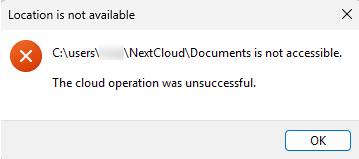
On Windows 11, when updating windows desktop client 4.0.X to 33.X some folders become unavailable with error message “Location is not available C:\users\XXX\Nextcloud is not accessible. The cloud operation was unsuccessful.”
I have to roll back to version 4.0.X to restore access to more folders, but usually need to restore previous configuration file and/or reset synchronization database to have access to (nearly) all folders (I still have a folder unavailable, “Documents” in the following logs).
Folders are available when accessed on web server . I have a virtual desktop with windows client 4.0.8 which can access all folders (I never upgrade it to 33.X).
I tried to install desktop client 33.X on another laptop, just to be sure the problem was not my laptop profile. On this one, it is the folder C:\users\XXX\Nextcloud which is not available, so I can’t access any folder.
Steps to replicate it (hint: details matter!):
Install desktop client 33.X on windows 11
Log entries
Nextcloud
Please provide the log entries from your Nextcloud log that are generated during the time of problem (via the Copy raw option from Administration settings->Logging screen or from your nextcloud.log located in your data directory). Feel free to use a pastebin/gist service if necessary.
2026-06-19 14:50:14:324 [ critical nextcloud.sync.vfs.cfapi.wrapper C:\Users\User\AppData\Local\Temp\windows-38966\client-building\desktop\src\libsync\vfs\cfapi\cfapiwrapper.cpp:557 ]: wrong path “C:/Users/xxx/Nextcloud/Documents” “C:/users/xxx/NextCloud” 2026-06-19 14:50:14:324 [ info nextcloud.sync.vfs.cfapi.wrapper C:\Users\User\AppData\Local\Temp\windows-38966\client-building\desktop\src\libsync\vfs\cfapi\cfapiwrapper.cpp:203 ]: number of processes entries: 0 2026-06-19 14:50:17:700 [ info nextcloud.gui.socketapi C:\Users\User\AppData\Local\Temp\windows-38966\client-building\desktop\src\gui\socketapi\socketapi.cpp:351 ]: Lost connection QLocalSocket(0x17659367cb0) 2026-06-19 14:50:20:307 [ info nextcloud.gui.socketapi C:\Users\User\AppData\Local\Temp\windows-38966\client-building\desktop\src\gui\socketapi\socketapi.cpp:351 ]: Lost connection QLocalSocket(0x17659367e90) 2026-06-19 14:50:26:052 [ info nextcloud.gui.folder.manager C:\Users\User\AppData\Local\Temp\windows-38966\client-building\desktop\src\gui\folderman.cpp:1030 ]: Etag poll timer timeout 2026-06-19 14:50:26:052 [ info nextcloud.gui.folder.manager C:\Users\User\AppData\Local\Temp\windows-38966\client-building\desktop\src\gui\folderman.cpp:1034 ]: Folders to sync: 1 2026-06-19 14:50:26:052 [ info nextcloud.gui.folder.manager C:\Users\User\AppData\Local\Temp\windows-38966\client-building\desktop\src\gui\folderman.cpp:1044 ]: Number of folders that don’t use push notifications: 1 2026-06-19 14:50:26:052 [ info nextcloud.gui.folder.manager C:\Users\User\AppData\Local\Temp\windows-38966\client-building\desktop\src\gui\folderman.cpp:1061 ]: Run etag job on folder OCC::Folder(0x1764afa1260) 2026-06-19 14:50:26:053 [ info nextcloud.gui.folder C:\Users\User\AppData\Local\Temp\windows-38966\client-building\desktop\src\gui\folder.cpp:353 ]: Trying to check “``https://nextcloud.server.com/remote.php/dav/files/8228A211-FBFC-47B8-AED1-23E3575E004F/”`` for changes via ETag check. (time since last sync: 1559 s) 2026-06-19 14:50:26:053 [ info nextcloud.sync.accessmanager C:\Users\User\AppData\Local\Temp\windows-38966\client-building\desktop\src\libsync\accessmanager.cpp:72 ]: 6 “PROPFIND” “``https://nextcloud.server.com/remote.php/dav/files/8228A211-FBFC-47B8-AED1-23E3575E004F/”`` has X-Request-ID “81a97242-b224-4538-bb41-5202728679f5” 2026-06-19 14:50:26:053 [ info nextcloud.sync.networkjob C:\Users\User\AppData\Local\Temp\windows-38966\client-building\desktop\src\libsync\abstractnetworkjob.cpp:382 ]: OCC::RequestEtagJob created for “``https://nextcloud.server.com``” + “/” “OCC::Folder” 2026-06-19 14:50:26:238 [ info nextcloud.sync.credentials.webflow C:\Users\User\AppData\Local\Temp\windows-38966\client-building\desktop\src\gui\creds\webflowcredentials.cpp:411 ]: request finished QUrl(“``https://nextcloud.server.com/remote.php/dav/files/8228A211-FBFC-47B8-AED1-23E3575E004F/”``) with request id “81a97242-b224-4538-bb41-5202728679f5” 2026-06-19 14:50:26:238 [ info nextcloud.sync.networkjob.etag C:\Users\User\AppData\Local\Temp\windows-38966\client-building\desktop\src\libsync\networkjobs.cpp:95 ]: Request Etag of QUrl(“``https://nextcloud.server.com/remote.php/dav/files/8228A211-FBFC-47B8-AED1-23E3575E004F/”``) FINISHED WITH STATUS “OK” 2026-06-19 14:50:26:675 [ info nextcloud.gui.socketapi C:\Users\User\AppData\Local\Temp\windows-38966\client-building\desktop\src\gui\socketapi\socketapi.cpp:351 ]: Lost connection QLocalSocket(0x1765936a830) 2026-06-19 14:50:26:827 [ critical nextcloud.sync.vfs.cfapi.wrapper C:\Users\User\AppData\Local\Temp\windows-38966\client-building\desktop\src\libsync\vfs\cfapi\cfapiwrapper.cpp:557 ]: wrong path “C:/Users/xxx/Nextcloud/Documents” “C:/users/xxx/NextCloud” 2026-06-19 14:50:26:827 [ info nextcloud.sync.vfs.cfapi.wrapper C:\Users\User\AppData\Local\Temp\windows-38966\client-building\desktop\src\libsync\vfs\cfapi\cfapiwrapper.cpp:203 ]: number of processes entries: 0 2026-06-19 14:50:30:408 [ critical nextcloud.sync.vfs.cfapi.wrapper C:\Users\User\AppData\Local\Temp\windows-38966\client-building\desktop\src\libsync\vfs\cfapi\cfapiwrapper.cpp:557 ]: wrong path “C:/Users/xxx/Nextcloud/Documents” “C:/users/xxx/NextCloud” 2026-06-19 14:50:30:409 [ info nextcloud.sync.vfs.cfapi.wrapper C:\Users\User\AppData\Local\Temp\windows-38966\client-building\desktop\src\libsync\vfs\cfapi\cfapiwrapper.cpp:203 ]: number of processes entries: 0 2026-06-19 14:50:47:457 [ info nextcloud.gui.socketapi C:\Users\User\AppData\Local\Temp\windows-38966\client-building\desktop\src\gui\socketapi\socketapi.cpp:351 ]: Lost connection QLocalSocket(0x1765936a5f0) 2026-06-19 14:50:47:492 [ critical nextcloud.sync.vfs.cfapi.wrapper C:\Users\User\AppData\Local\Temp\windows-38966\client-building\desktop\src\libsync\vfs\cfapi\cfapiwrapper.cpp:557 ]: wrong path “C:/Users/xxx/Nextcloud/Documents” “C:/users/xxx/NextCloud”
Thank you for your help. I tried every new release since 33.0.0, hoping I won’t have the problem. Perhaps I missed a prerequisite.
It is a critical error, one time you have “Nextcloud” the other time “NextCloud” in the path! Not sure where the difference comes from, if one is the actual filesystem and the other in a config file…?
Thank you for your answer, you were right, the typo was in the configuration file I restored after the error. Unfortunately, correcting this typo did not solve the problem; the error message is still present, with “Nextcloud” spelled correctly this time.
Seems like the 33.X version changed some folder security settings, I am unable to delete the problematic folders. I tried with an admin user, Nextcloud client closed, and after uninstalling the client. Even the deletion of the Windows profile is not fully working, I still have the C:\Users\xxx\Nextcloud\" in the old profile (and only these ones).
@tflidd yes I have the same problem on others laptops and with different users.
I tried installing version 33.0.7, seems like I have access to all folders (except my former “Documents” folder, but I think it will be lost forever on my laptop), but I have a lot of “Couldn’t update placeholder info” on files in severals subfolders, and I can’t open these files.
If I come back to 4.0.11 i don’t have any file or folder problem.
I don’t know what changed with windows clients 33.X, but my laptops doesn’t like it. I just hope that it is not one of the programs I need to stop to uninstall Nextcloud (Outlook, firefox, zoom, …) that is causing this problem…
If yes a report to the developers is required, that they are aware of the problem. If it is not the case-sensitivity for the other laptops, then something else could be the issue. Then I’d look a bit, if there are folders with non-ascii-characters, total path lengths etc., perhaps start with a new user and very few files, if that works fine. Perhaps the problems appears under certain conditions (number of files/folders, use of shared or group folder, total path length, special characters, remote storage, …)
It’s already great that the 4.xx client versions are working fine, since this proves that you don’t seem to have a server problem.
No the upper/lower cases problem was due to a typo in the configuration file I used on the first laptop when I edited it manually to pre-fill the server url and the FoldersWithPlaceholders . The configuration file used for the tests doesn’t integrate this typo.
Sorry, I thought I had answered when jtr wrote about it.
Hope they continue to provide 4.X versions in the next weeks…
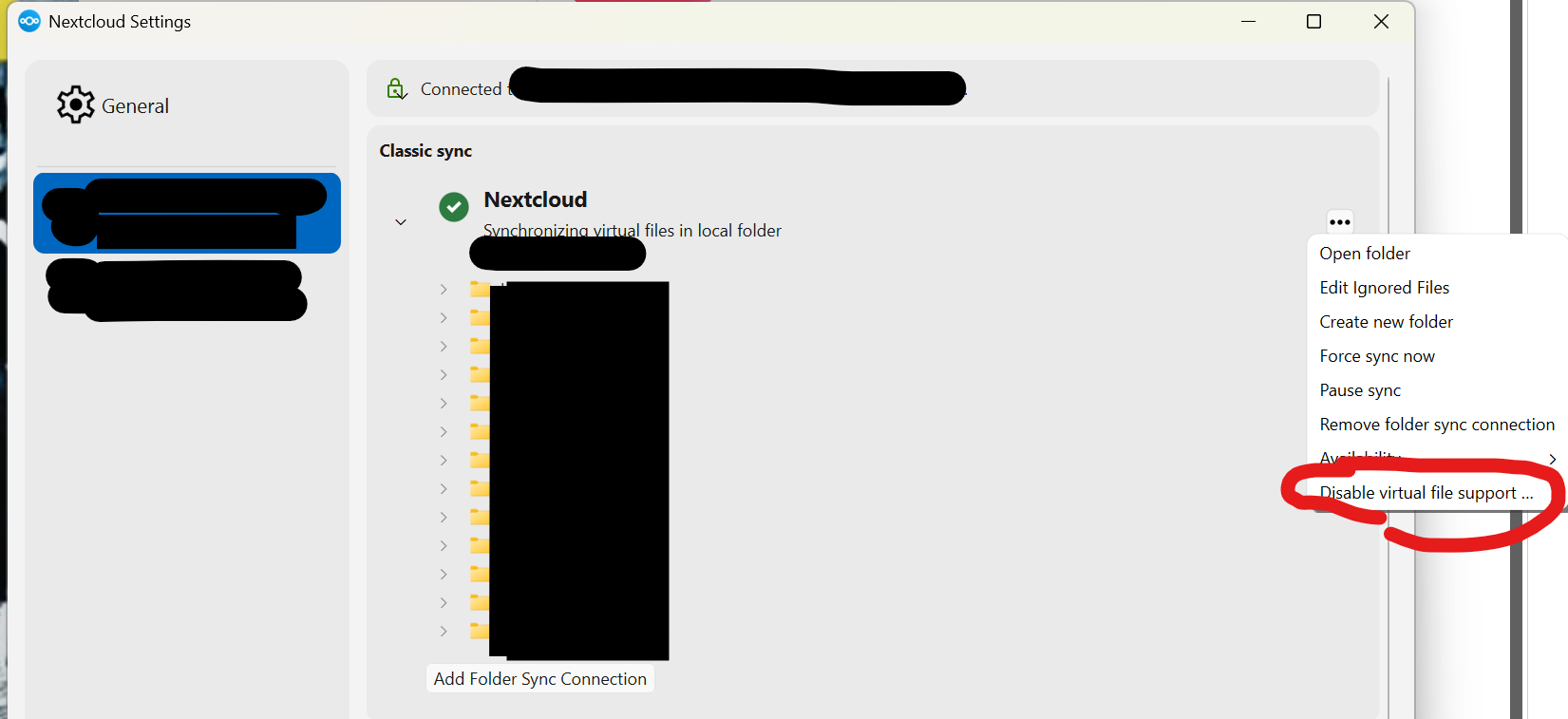
It was the most obvious thing from the initial post. And do you get the same errors? And you have the virtual file support enabled (problem exists also with VFS disabled)?
And regarding file/folder names, you don’t have anything with strange characters that might be forbidden on certain OS (<>#*|\/?:)?
If the problem happens with a user that is connected to a larger shared drive, do you see the problem as well on a user just connected to their own personal space (ideally with few files/folders).
I made searches in the folders synchronized with Nextcloud, but I didn’t find strange characters in the names.
But when connecting to just few files and folders with a test account, I don’t have any file or folder blocked. So you could be right, it can be a problem with a folder/file name or a long path too long to access a file.
I found the script which changed me “Nextcloud” to “NextCloud”…
My folder “Desktop” is now available on my laptop.
And I was able to use Nextcloud desktop 34.0 with success since several days ! (with the VFS enable)