The Basics
- Nextcloud Server version (e.g., 29.x.x):
- Operating system and version (e.g., Ubuntu 24.04):
- Reverse proxy and version _(e.g. nginx 1.27.2)
- Is this the first time you’ve seen this error? (Yes / No):
- When did this problem seem to first start?
- Installing the recording container
- Installation method (e.g. AlO, NCP, Bare Metal/Archive, etc.)
- Are you using CloudfIare, mod_security, or similar? (Yes / No)
Summary of the issue you are facing:
The container does not start, with following logs:
talk_talk-recording.1.pqrx52d6p5wc@docker3    | /start.sh: line 22: /conf/recording.conf: Read-only file system
talk_talk-recording.1.pqrx52d6p5wc@docker3    | Configuration file not found: /conf/recording.conf
talk_talk-recording.1.pqrx52d6p5wc@docker3    | No configured backends
talk_talk-recording.1.pqrx52d6p5wc@docker3    | No configured signalings
talk_talk-recording.1.pqrx52d6p5wc@docker3    |  * Serving Flask app 'nextcloud.talk.recording.Server'
talk_talk-recording.1.pqrx52d6p5wc@docker3    |  * Debug mode: off
talk_talk-recording.1.pqrx52d6p5wc@docker3    | INFO:werkzeug:WARNING: This is a development server. Do not use it in a production deployment. Use a production WSGI server instead.
talk_talk-recording.1.pqrx52d6p5wc@docker3    |  * Running on http://127.0.0.1:8000
talk_talk-recording.1.pqrx52d6p5wc@docker3    | INFO:werkzeug:Press CTRL+C to quit
Steps to replicate it (hint: details matter!):
- Deploy Nextcloud
- Deploy Talk
- Setup Talk in Nextcloud (everything seem to work up to here)
- Deploy Talk Recordings
Configuration
    environment:
      - NC_DOMAIN=nextcloud.domain.com
      - HPB_DOMAIN=talk.domain.com
      - TZ=Europe/Rome
      - RECORDING_SECRET=secret
      - INTERNAL_SECRET=secret
Hi, I guess it would help if you could post the complete docker-compose file here…
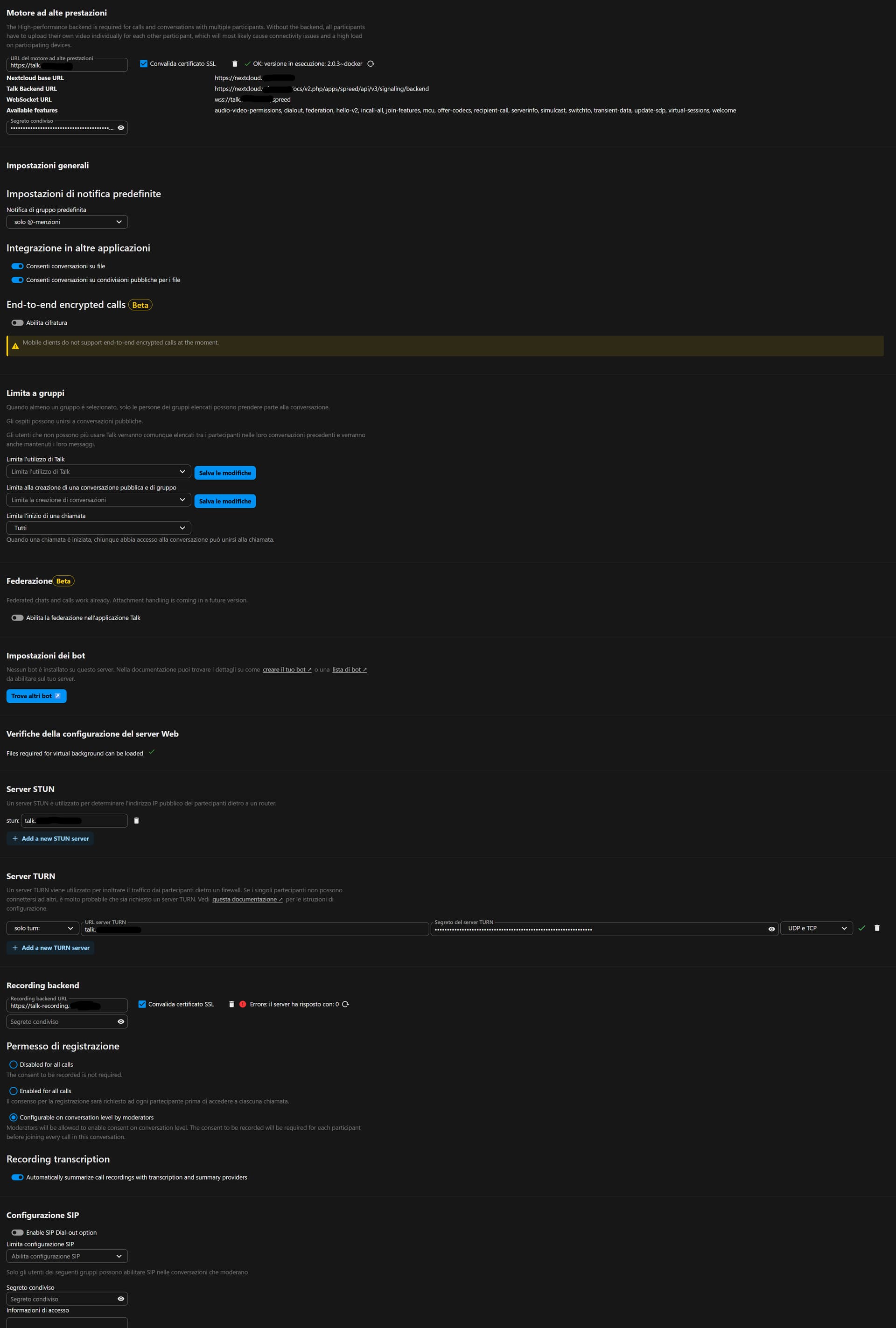
Here it is (talk and talk-recording). I add the Nextcloud Talk settings page to see Talk seems to be ok, not recording.
networks:
  tools:
    external: true

services:
  talk:
    image: ghcr.io/nextcloud-releases/aio-talk:latest
    init: true
    networks:
      - tools
    environment:
      - TZ=Europe/Rome
      - NC_DOMAIN=nextcloud.domain.com
      - TALK_HOST=talk.domain.com
      - TURN_SECRET=secret1
      - SIGNALING_SECRET=secret3
      - TALK_PORT=3478
      - INTERNAL_SECRET=secret2
    deploy:
      mode: replicated
      replicas: 1
      labels:
        - "org.label-schema.group=tools"
        - "traefik.enable=true"
        - "traefik.swarm.network=tools"
        # HTTP Routers
        - "traefik.http.routers.talk-router.entrypoints=websecure"
        - "traefik.http.routers.talk-router.rule=Host(`talk.domain.com`)" # HostRegexp:talk.${DOMAINNAME_1},{catchall:.*}" # Host(`talk.domain.com`)"
        # Middlewares
        - "traefik.http.routers.talk-router.middlewares=secure-headers@file"
        # HTTP Services
        - "traefik.http.routers.talk-router.service=talk-service"
        - "traefik.http.services.talk-service.loadbalancer.server.port=8081"
        # Talk udp
        - "traefik.udp.routers.talk-udp-router.entrypoints=talk-udp"
        - "traefik.udp.routers.talk-udp-router.service=talk-udp-service"
        - "traefik.udp.services.talk-udp-service.loadbalancer.server.port=3478"
        # Talk tcp
        - "traefik.tcp.routers.talk-tcp-router.entrypoints=talk-tcp"
        - "traefik.tcp.routers.talk-tcp-router.rule=HostSNI(`*`)"
        - "traefik.tcp.routers.talk-tcp-router.service=talk-tcp-service"
        - "traefik.tcp.services.talk-tcp-service.loadbalancer.server.port=3478"
        - homepage.group=Office
        - homepage.name=Nextcloud Talk
        - homepage.icon=nextcloud-talk.png
        - homepage.href=https://talk.domain.com
        - homepage.description=Nextcloud Talk
        #- homepage.showStats=true
        #- homepage.widget.type=emby
        #- homepage.widget.url=http://emby.home
        #- homepage.widget.key=yourembyapikeyhere
        #- homepage.widget.fields=["field1","field2"] # optiona

  talk-recording:
    image: ghcr.io/nextcloud-releases/aio-talk-recording:latest
    init: true
    environment:
      - NC_DOMAIN=nextcloud.domain.com
      - HPB_DOMAIN=talk.domain.com
      - TZ=Europe/Rome
      - RECORDING_SECRET=secret1
      - INTERNAL_SECRET=secret2
    volumes:
      - /SwarmVolumes/data/talk-recording:/tmp:rw
    read_only: true
    ports:
      - 1234
    networks:
      - tools
    cap_drop:
      - NET_RAW
    deploy:
      mode: replicated
      replicas: 1
      labels:
        - "org.label-schema.group=tools"
        - "traefik.enable=true"
        - "traefik.swarm.network=tools"
        # HTTP Routers
        - "traefik.http.routers.talk-recording-router.entrypoints=websecure"
        - "traefik.http.routers.talk-recording-router.rule=Host(`talk-recording.domain.com`)" # HostRegexp:talk.${DOMAINNAME_1},{catchall:.*}" # Host(`talk.domain.com`)"
        # Middlewares
        - "traefik.http.routers.talk-recording-router.middlewares=secure-headers@file"
        # HTTP Services
        - "traefik.http.routers.talk-recording-router.service=talk-service"
        - "traefik.http.services.talk-recording-service.loadbalancer.server.port=1234"
        - homepage.group=Office
        - homepage.name=Nextcloud Talk Recording
        - homepage.icon=nextcloud-talk.png
        - homepage.href=https://talk-recording.domain.com
        - homepage.description=Nextcloud Talk Recording
        #- homepage.showStats=true
        #- homepage.widget.type=emby
        #- homepage.widget.url=http://emby.home
        #- homepage.widget.key=yourembyapikeyhere
        #- homepage.widget.fields=["field1","field2"] # optiona
Nextcloud settings:
Please compare your config with the upstream config available at all-in-one/manual-install/latest.yml at 0f84872fbf8e2ead9c464ad8ee77e06705ea320f · nextcloud/all-in-one · GitHub.
Hint: it looks like you are missing some of the config which breaks talk-recoding.
FYI: see how to correctly update: all-in-one/manual-install at main · nextcloud/all-in-one · GitHub
Hi,
Seems to be due to the shm part not properly working on Docker Swarm, I’m trying to get around it.
Seems to be solved:
- Moving traefik from HTTP to TCP
- Using tmpfs/shm this way:
    volumes:
      - /SwarmVolumes/data/talk-recording:/tmp:rw
      - type: tmpfs
        target: /conf
        tmpfs:
           size: 2147483648
    tmpfs:
      - /conf