Talk client applications unable to login to nextcloud aio docker

Support intro

Sorry to hear you’re facing problems :slightly_frowning_face:

Some useful links to gather information about your Nextcloud Talk installation:
Information about Signaling server: /index.php/index.php/settings/admin/talk#signaling_server
Information about TURN server: /index.php/settings/admin/talk#turn_server
Information about STUN server: /index.php/settings/admin/talk#stun_server

Nextcloud version : 31.0.7
Talk Server version (eg, 14.0.2): Unsure? Is this different than the signaling server version?
Custom Signaling server configured: no - using built in 2.0.3
Custom TURN server configured: no - built in
Custom STUN server configured: no - built in

Web version of nextcloud talk works just fine.

In case mobile Nextcloud Talk apps are involved:
Talk iOS version: Most current version
Talk Android version: Most current version
Talk Windows Version: Most current version

The issue you are facing:
When logging in to windows talk client, I receive “Login was successful but something went wrong” and if I try to log in again, I get “nextcloud server not found.” Restarting the client lets me connect and attempt to login again but always gives the same error.

On both iPhone and android, I can login but cannot send messages, view messages, do anything really except search users.

Is this the first time you’ve seen this error? : Yes, and since I installed nextcloud AIO. Previously I had just the regular nextcloud instance working just fine but decided to move to nextcloud-aio from scratch for all the built in features and greater ease of use.

Steps to replicate it:

  1. Setup nextcloud-aio docker
  2. Forward 443 and 80 to Caddy container(Caddy forwards literally everything to apache it is NOT the issue at this point, websockets connect and everything and all else works)
  3. Caddy is forwarding everything to apache container inside of nextcloud-aio docker network. As I said all else works and websockets connect when tested separately. Hello message is received.

The output of your Nextcloud log in Admin > Logging or errors in nextcloud.log in /var/www/:
There are no errors

The output of your Apache/nginx/system log in /var/log/____:
Non-existent?

Your browser log if relevant (javascript console log, network log, etc.):
Its not.

What I have tried in this insanity:
I have tried using nginx, caddy, having 443 and 80 go directly to both apache and AIO docker containers. Nothing.
I have tried the most basic of Caddy setups and had to use this to get socket working:

Caddy File

nextcloud.hidden.com {
tls -omitted-
encode gzip zstd

header {
	Strict-Transport-Security "max-age=31536000; includeSubDomains; preload"
	X-Content-Type-Options "nosniff"
	X-Frame-Options "SAMEORIGIN"
	Referrer-Policy "no-referrer"
	X-XSS-Protection "1; mode=block"
}

# ───── rewrite /ocm‐provider → index.php ─────
@ocmProvider path /ocm-provider /ocm-provider/*
rewrite @ocmProvider /index.php

    #web socket handling
reverse_proxy /ocs/v2.php/apps/spreed/ws* {
	to nextcloud-aio-apache:11000
	transport http {
		versions h2c 2
	}
	header_up Host {host}
	header_up X-Real-IP {remote_host}
	header_up X-Forwarded-For {remote_host}
	header_up X-Forwarded-Proto {scheme}
	header_up Upgrade {header.Upgrade}
	header_up Connection {header.Connection}
	header_up Origin {header.Origin}
}

# OCM provider endpoints
reverse_proxy /ocs-provider/* {
	to nextcloud-aio-apache:11000
	header_up Host {host}
	header_up X-Real-IP {remote}
	header_up X-Forwarded-For {remote}
	header_up X-Forwarded-Proto {scheme}
}

reverse_proxy /* nextcloud-aio-apache:11000 {
	header_up Host {host}
	header_up X-Real-IP {remote_host}
	header_up X-Forwarded-For {remote_host}
	header_up X-Forwarded-Proto {scheme}
	header_up X-Forwarded-Host {host}
	header_up X-Forwarded-Port {server_port}
}

}

Nginx would work for everything but again still no worky with talk.

I have tried doing a complete re-setup on a completely different machine and gotten the same error.

I have tried DMZing to apache container, no worky.

I only theorize at this point that the apache container in this AIO is somehow just screwed because I can not find any issues online that are even remotely helpful in resolving this.

Setting websocket forwarding in caddy to the talk container seemed to also work for connecting to websocket.

I really just dont know at this point. Web version works just fine, but any of the client applications tell me to kick rocks and die. There are no logs for the client application either! So that is fantastic!

Best I could find in talk server logs was:

2025-07-20T21:15:29.660723546Z hub.go:867: Register user test@backend-1 from -omitted- in unknown-country (Mozilla/5.0 (Windows NT 10.0; Win64; x64) AppleWebKit/537.36 (KHTML, like Gecko) Chrome/138.0.0.0 Safari/537.36 Edg/138.0.0.0) --OMITTED KEY-- (private=--OMITTED KEY--)
2025-07-20T21:15:29.661139084Z hub.go:965: Unregister --SAME OMITTED KEY-- (private=--SAME OMITTED KEY--)
Further info found:
When logging in on talk app and monitoring network traffic, error 500 is returned on (domain).com/ocs/v2.php/cloud/capabilities with
Referrer Policy strict-origin-when-cross-origin

Navigating to /ocs/v2.php/cloud/capabilities gives me access forbidden, CSRF check failed.

overwrite.cli.url and overwriteprotocol are both set correctly in config.php, so that is not the issue.

Further info, error I was getting was in regards to missing a $key in crypto file or whatever.
Anyways cloud_federation_api app was throwing an error due to that, and removing that app manually and forcefully resolved my inability to login to nextcloud talk application.

Not a great solution, but its not generating a key, so.

Here is relevant logs if anyone wants to take a look

{"reqId":"BAdkb06sm8uh9JJ5F3ZL","level":3,"time":"2025-07-21T18:48:32+00:00","remoteAddr":"1.2.3.4","user":"user","app":"no app in context","method":"GET","url":"/ocs/v2.php/cloud/capabilities","message":"hash_hkdf(): Argument #2 ($key) cannot be empty in file '/var/www/html/lib/private/Security/Crypto.php' line 147","userAgent":"Mozilla/5.0 (Windows NT 10.0; Win64; x64) AppleWebKit/537.36 (KHTML, like Gecko) Chrome/138.0.0.0 Safari/537.36 Edg/138.0.0.0","version":"31.0.7.1","exception":{"Exception":"Exception","Message":"hash_hkdf(): Argument #2 ($key) cannot be empty in file '/var/www/html/lib/private/Security/Crypto.php' line 147","Code":0,"Trace":[{"file":"/var/www/html/lib/private/AppFramework/App.php","line":161,"function":"dispatch","class":"OC\\AppFramework\\Http\\Dispatcher","type":"->","args":[{"__class__":"OC\\Core\\Controller\\OCSController"},"getCapabilities"]},{"file":"/var/www/html/lib/private/Route/Router.php","line":315,"function":"main","class":"OC\\AppFramework\\App","type":"::","args":["OC\\Core\\Controller\\OCSController","getCapabilities",{"__class__":"OC\\AppFramework\\DependencyInjection\\DIContainer"},{"_route":"ocs.core.ocs.getcapabilities"}]},{"file":"/var/www/html/ocs/v1.php","line":49,"function":"match","class":"OC\\Route\\Router","type":"->","args":["/ocsapp/cloud/capabilities"]},{"file":"/var/www/html/ocs/v2.php","line":7,"args":["/var/www/html/ocs/v1.php"],"function":"require_once"}],"File":"/var/www/html/lib/private/AppFramework/Http/Dispatcher.php","Line":146,"Previous":{"Exception":"ValueError","Message":"hash_hkdf(): Argument #2 ($key) cannot be empty","Code":0,"Trace":[{"file":"/var/www/html/lib/private/Security/Crypto.php","line":147,"function":"hash_hkdf","args":["sha512",{"__class__":"SensitiveParameterValue"}]},{"file":"/var/www/html/lib/private/Security/Crypto.php","line":102,"function":"decryptWithoutSecret","class":"OC\\Security\\Crypto","type":"->","args":["*** sensitive parameters replaced ***"]},{"file":"/var/www/html/lib/private/Security/IdentityProof/Manager.php","line":100,"function":"decrypt","class":"OC\\Security\\Crypto","type":"->","args":["*** sensitive parameters replaced ***"]},{"file":"/var/www/html/lib/private/Security/IdentityProof/Manager.php","line":144,"function":"retrieveKey","class":"OC\\Security\\IdentityProof\\Manager","type":"->","args":["app-core-ocm_external"]},{"file":"/var/www/html/lib/private/OCM/OCMSignatoryManager.php","line":103,"function":"getAppKey","class":"OC\\Security\\IdentityProof\\Manager","type":"->","args":["core","ocm_external"]},{"file":"/var/www/html/apps/cloud_federation_api/lib/Capabilities.php","line":81,"function":"getLocalSignatory","class":"OC\\OCM\\OCMSignatoryManager","type":"->","args":[]},{"file":"/var/www/html/lib/private/CapabilitiesManager.php","line":61,"function":"getCapabilities","class":"OCA\\CloudFederationAPI\\Capabilities","type":"->","args":[]},{"file":"/var/www/html/core/Controller/OCSController.php","line":70,"function":"getCapabilities","class":"OC\\CapabilitiesManager","type":"->","args":[]},{"file":"/var/www/html/lib/private/AppFramework/Http/Dispatcher.php","line":200,"function":"getCapabilities","class":"OC\\Core\\Controller\\OCSController","type":"->","args":[]},{"file":"/var/www/html/lib/private/AppFramework/Http/Dispatcher.php","line":114,"function":"executeController","class":"OC\\AppFramework\\Http\\Dispatcher","type":"->","args":[{"__class__":"OC\\Core\\Controller\\OCSController"},"getCapabilities"]},{"file":"/var/www/html/lib/private/AppFramework/App.php","line":161,"function":"dispatch","class":"OC\\AppFramework\\Http\\Dispatcher","type":"->","args":[{"__class__":"OC\\Core\\Controller\\OCSController"},"getCapabilities"]},{"file":"/var/www/html/lib/private/Route/Router.php","line":315,"function":"main","class":"OC\\AppFramework\\App","type":"::","args":["OC\\Core\\Controller\\OCSController","getCapabilities",{"__class__":"OC\\AppFramework\\DependencyInjection\\DIContainer"},{"_route":"ocs.core.ocs.getcapabilities"}]},{"file":"/var/www/html/ocs/v1.php","line":49,"function":"match","class":"OC\\Route\\Router","type":"->","args":["/ocsapp/cloud/capabilities"]},{"file":"/var/www/html/ocs/v2.php","line":7,"args":["/var/www/html/ocs/v1.php"],"function":"require_once"}],"File":"/var/www/html/lib/private/Security/Crypto.php","Line":147},"message":"hash_hkdf(): Argument #2 ($key) cannot be empty in file '/var/www/html/lib/private/Security/Crypto.php' line 147","exception":{},"CustomMessage":"hash_hkdf(): Argument #2 ($key) cannot be empty in file '/var/www/html/lib/private/Security/Crypto.php' line 147"}}

hey @cappleapple

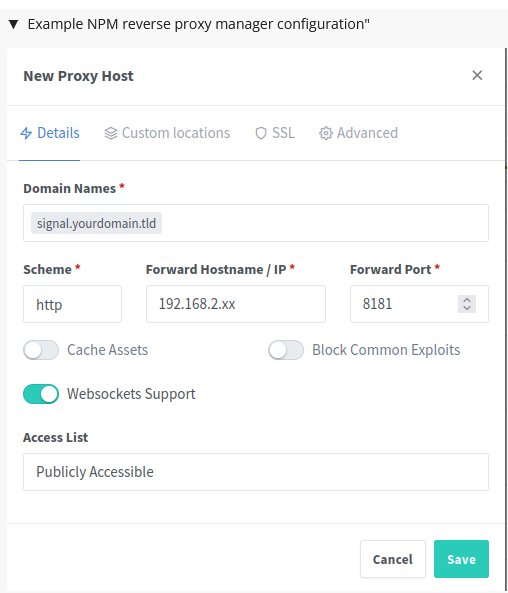
I’m not using AIO nor Caddy, but that error seems familiar and has to do with “caching”… in NPM if “Cache Assets” is disabled the error disappears;

maybe there is a similar function in your reverse proxy that you could disable?

Hello @cappleapple,

welcome to the Nextcloud community! :handshake:

you Caddy config is really different from the example one please start easy and add complexity slowly.

Please show reverse proxy logs - this seems to be the best place to troubleshoot so far.

Maybe you find some hints in the Github issues:

1 Like

Hey all thanks for the responses.

So I figured out that one, I needed to forward the request token and API request in the header, as well as allow the Oci-Apirequest and Request token to be sent to the relevant path on the site. That fixed the CSRF check. Afterward I had crypto key issues, but found out it was due to old keys being stored in the appdata identity folder per user.

After deleting said keys inside those folders, nextcloud regenerated them and all now works smoothly. Hope this assists whoever may run in to this in the future.

Current working Caddy config:

https://nextcloud.example.com:443 {
	@ocmProvider path /ocm-provider /ocm-provider/*
	rewrite @ocmProvider /index.php

	@spreed path /ws /ws/* /wss /wss/* /webrtc /webrtc/*
	reverse_proxy @spreed nextcloud-aio-apache:11000 {
		header_up Connection {>Connection}
		header_up Upgrade {>Upgrade}
	}

	@ocs path /ocs/*

	reverse_proxy @ocs nextcloud-aio-apache:11000 {
		header_up X-Forwarded-For {remote_host}
		header_up Host {host}
		header_up X-Forwarded-Proto {scheme}
		header_up X-Real-IP {remote_host}
		header_up requesttoken {>requesttoken}
		header_up OCS-APIRequest "true"
	}

	reverse_proxy nextcloud-aio-apache:11000 {
		header_up X-Forwarded-For {remote_host}
		header_up Host {host}
		header_up X-Forwarded-Proto {scheme}
		header_up X-Real-IP {remote_host}
	}

	header {
		Access-Control-Allow-Origin *
		Access-Control-Allow-Methods "GET, POST, PUT, DELETE, OPTIONS"
		Access-Control-Allow-Headers "Content-Type, Authorization, Ocs-Apirequest, Requesttoken"
		Referrer-Policy "strict-origin-when-cross-origin"
		Permissions-Policy "interest-cohort=()"
		X-Frame-Options "SAMEORIGIN"
		X-Content-Type-Options "nosniff"
		Strict-Transport-Security "max-age=31536000; includeSubDomains; preload"
	}

	encode gzip
}
2 Likes

Unless I’m missing something, I believe your Caddyfile can be streamlined. Placing Caddy in front of AIO shouldn’t require more than a couple of lines typically.

See AIO: Caddy RP.

1 Like