Support intro
Sorry to hear you’re facing problems 
help.nextcloud.com is for home/non-enterprise users. If you’re running a business, paid support can be accessed via portal.nextcloud.com where we can ensure your business keeps running smoothly.
In order to help you as quickly as possible, before clicking Create Topic please provide as much of the below as you can. Feel free to use a pastebin service for logs, otherwise either indent short log examples with four spaces:
example
Or for longer, use three backticks above and below the code snippet:
longer
example
here
Some or all of the below information will be requested if it isn’t supplied; for fastest response please provide as much as you can 
Some useful links to gather information about your Nextcloud Talk installation:
Information about Signaling server: /index.php/index.php/settings/admin/talk#signaling_server
Information about TURN server: /index.php/settings/admin/talk#turn_server
Information about STUN server: /index.php/settings/admin/talk#stun_server
Nextcloud version (eg, 24.0.1): `32.0.1`
Talk Server version (eg, 14.0.2): 22.0.2
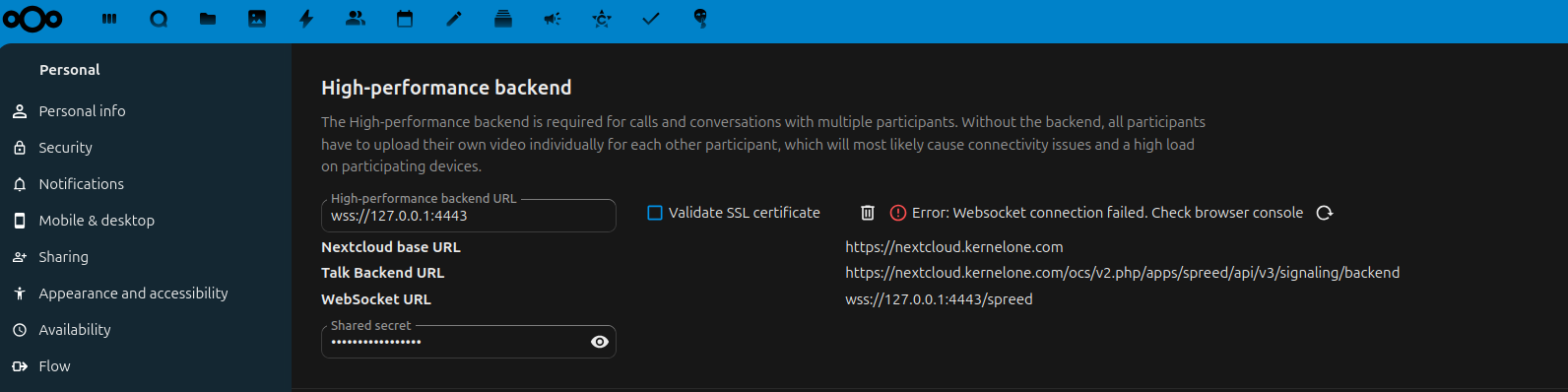
Custom Signaling server configured: yes version: nextcloud-spreed-signaling version ed94aeacec2758f99439c7d230c1b6889eb3b84e/go1.24.0
Custom TURN server configured: yes
Custom STUN server configured: yes
The issue you are facing: Can’t connect to high performance backend running on port 4443