Sync not working after upgrade to Desktop-Client Version 35.0.1

Dear community,

the day before yesterday, the automatic update of Nextcloud updated my Nextcloud Client to version 35.0.1. Initially I did not realize something was wrong afterwards - but Nextcloud was no longer running/starting.

I managed to fix this using Goggle search and reset the Nextcloud Client. Though, after login in to my Nextcloud server again I got a bad surprise:

  • Instead of the usual sync a (new?) feature “Enable File Providers” was enabled by default, my sync folder was no longer recognized
  • I disabled the ‘Enable File Providers’ and tried to add my existing sync folder with the button ‘add folder synchronization’ as I did before when Nextcloud stopped working.
  • Now, I get the error message ‘this folder is already used for synchronization’ and my existing folder is not accepted.

How can I solve this? I was working for two days in different projects/folders, unaware that sync is no longer working. Is there any way apart from hours of manual diff to get the folder back in sync?

I’d appreciate any ideas to get this back working.

Thanks in advance for your help!

Kind regards,

Michael

I had the same issue; remove vs. 35.0.1 and give Nextcloud Desktop 35.0.0 another go – it’s working nicely for me, at least!

Lexan

Nextcloud-crash.log


2026-10-30 17:11:22:434 [ warning nextcloud.sync.database.sql /Volumes/builds/42791/macos-42791/src/common/ownsql.cpp:308 ]:    Sqlite exec statement error: 19 "UNIQUE constraint failed: metadata.inode" in "CREATE UNIQUE INDEX$

2026-10-30 17:11:22:436 [ warning nextcloud.sync.database /Volumes/builds/42791/macos-42791/src/common/syncjournaldb.cpp:293 ]: SQL Error "updateMetadataTableStructure: create index unique inode" "UNIQUE constraint failed: met$

2026-10-30 17:11:22:438 [ critical default /Volumes/builds/42791/macos-42791/src/common/syncjournaldb.cpp:295 ]:        ASSERT: "false" in file /Volumes/builds/42791/macos-42791/src/common/syncjournaldb.cpp, line 295

2026-10-30 17:11:22:438 [ warning nextcloud.sync.database /Volumes/builds/42791/macos-42791/src/common/syncjournaldb.cpp:268 ]: ERROR starting transaction: ""

2026-10-30 17:11:22:438 [ warning nextcloud.sync.database.sql /Volumes/builds/42791/macos-42791/src/common/ownsql.cpp:254 ]:    Sqlite prepare statement error: "out of memory" in "CREATE INDEX IF NOT EXISTS metadata_path ON me$

2026-10-30 17:11:22:438 [ fatal default /Volumes/builds/42791/macos-42791/src/common/ownsql.cpp:255 ]:  ENFORCE: "allow_failure" in file /Volumes/builds/42791/macos-42791/src/common/ownsql.cpp, line 255 with message: SQLITE Pr$

I have the same issue. Nextcloud Desktop Client has updated today and crashes upon start since.

Windows protocols contain the following under Error ID 1000:

Fehlerhafter Anwendungsname: nextcloud.exe, Version: 35.0.1.10405, Zeitstempel: 0x6ae2fb78
Fehlerhafter Modulname: Qt6Core.dll, Version: 6.11.2.0, Zeitstempel: 0x6ac53df3
Ausnahmecode: 0xc0000409
Fehleroffset: 0x000000000001cf98
Fehlerhafte Prozess-ID: 0x43CC
Fehlerhafte Anwendungsstartzeit: 0x1DD688F1283B903
Fehlerhafter Anwendungspfad: C:\Program Files\Nextcloud\nextcloud.exe
Fehlerhafter Modulpfad: C:\Program Files\Nextcloud\Qt6Core.dll
Berichts-ID: 6d1e43c6-e1b9-4fe9-a010-55bc3d6cec53
VollstÀndiger Name des fehlerhaften Pakets: 
Fehlerhafte paketbezogene Anwendungs-ID: 

Downloading the current version manually and trying to repair the installation did not solve the problem. It appears, the current update is bugged.

OS is Windows 11 26H2

I will now try to restore to a previous Windows backup, as that usually is the only way to have older versions of the app to reconnect to the synchronization. I suppose that would not necessarily mean that files are lost unless they are being deleted by Windows recovery

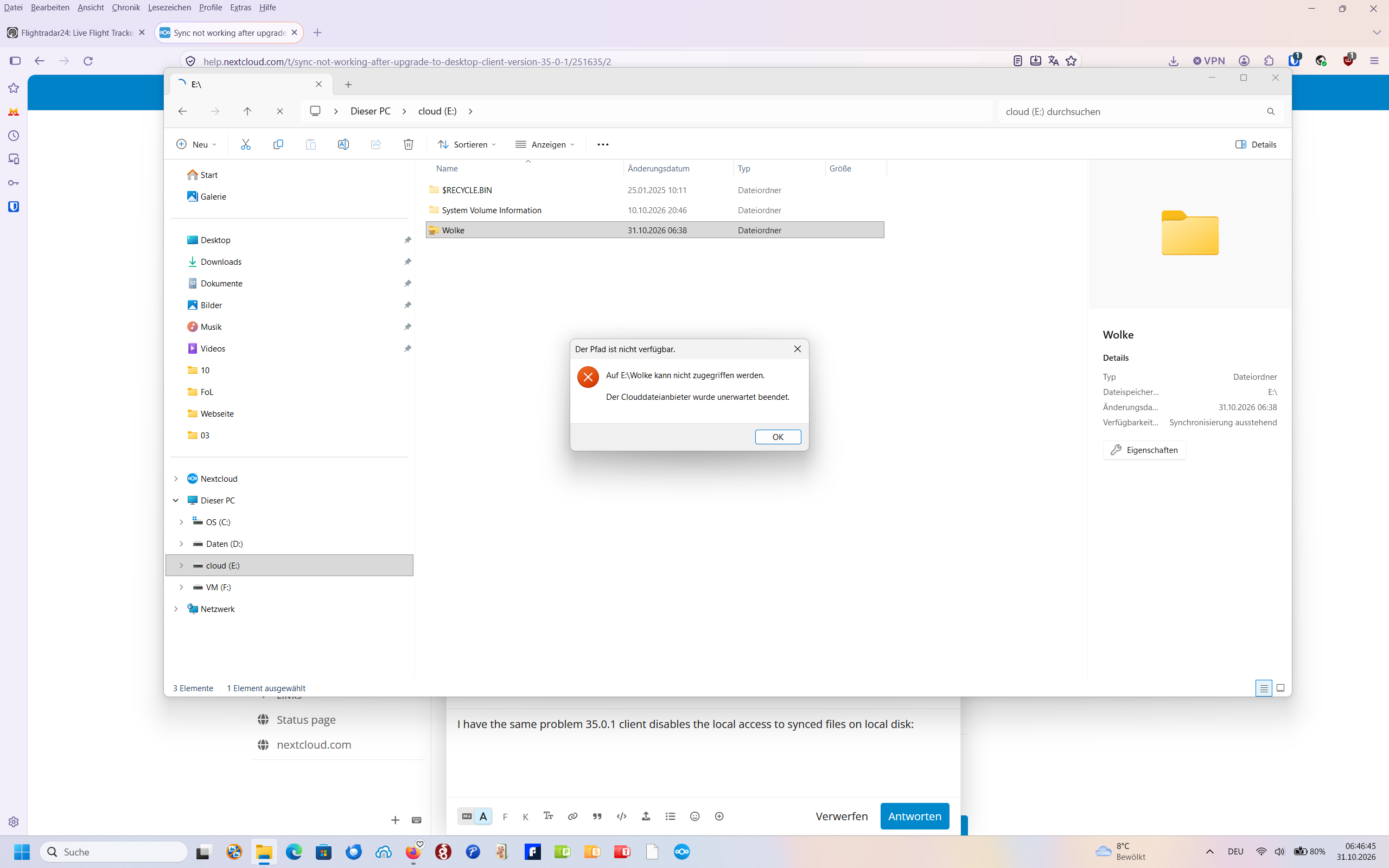
I have the same problem 35.0.1 client disables the local access to synced files on local disk:

As far as I know, version 35.0.1 has withdrawn and is no longer offered as an update (at least, that’s what I assume, since it’s no longer offered to me).

There are many reasons for this, for Example, all 35.0.1 bugs on GitHub:
If I were you, I’d downgrade to 35.0.0 and wait for 35.0.2. I don’t think there’s anything else you can do.