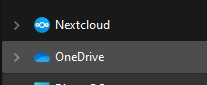
Hi, I have a problem with 2 Nextcloud Accounts on one (Windows) desktop client.
In Windows Explorer, there is a Nextcloud icon in the sidebar. But I have 2 accounts in my client. It just says “Nextcloud” and it only links to my 2nd account (In my case the less important one)
I can’t change it and I can’t have both in the sidebar.
It would be good if I could have them both in the sidebar or at least be able to select which account it will get linked to.
Does somebody have any tips or is this just not possible?
I know that I can “change” accounts there, but that does not change anything in the explorer.
The problem is, that this nextcloud button will go to my secondary account, because I added it after the other. So I would either want all accounts there or somewhere where I can change which account is the primary account.
Also the window you sent, doesn’t always open when I click the icon in the system tray.
For me it follows the “selected” account - double click open the root folder of the account which is chosen from the top menu - Windows 10, client 3.13.3