StarRate – Lightroom-style photo rating for Nextcloud (new app, looking for feedback)

Hi Nextcloud community!

I just released StarRate – a Nextcloud app that brings Lightroom-style photo ratings to your self-hosted workflow.

What it does:

  • :star: Star ratings (1–5) + color labels per photo
  • :link: Guest links – clients can rate photos without a Nextcloud account
  • :house: 100% self-hosted, AGPL-3.0 licensed
  • :white_check_mark: Nextcloud 29–32

The use case: Photographers can share a shooting session with clients or models via a simple guest link. Clients click stars to select their favorites – no account, no Google Drive, no chaos.

Find it by searching “StarRate” in the built-in App Store.

GitHub: GitHub - merlin1de/starrate: StarRate — Photo rating and review Tool for Nextcloud photographers · GitHub

Would love feedback from the community – especially on UX, feature requests, or compatibility issues. Thanks!

4 Likes

Quick update: StarRate is launching on Product Hunt today! If you find it useful, an upvote would mean a lot :folded_hands:

:backhand_index_pointing_right: https://www.producthunt.com/posts/starrate

1 Like

Hi @merlin1de,

the concept behind StarRate is genuinely compelling — bringing Lightroom-style rating and curation workflows into Nextcloud is a real gap in the ecosystem, and the idea of writing XMP metadata directly into JPEG files for cross-app compatibility is exactly the right approach.

Unfortunately, the current release has a critical packaging defect that makes it impossible to use for anyone installing through the App Store, so I’d strongly recommend pulling it until that’s resolved.


The problem

The make package build target explicitly excludes three interdependent files from the archive:

--exclude='vendor' \        # autoloader not included
--exclude='composer.json' \ # can't recreate it without this
--exclude='composer.lock' \ # can't recreate it without this

Without vendor/composer/autoload_psr4.php, Nextcloud has no way to map the OCA\StarRate\ namespace to the lib/ directory. The result is an immediate fatal error on every request:

OC\AppFramework\Utility\QueryNotFoundException:
Could not resolve OCA\StarRate\Controller\GalleryController!
Class "OCA\StarRate\Controller\GalleryController" does not exist

Because composer.json and composer.lock are also stripped from the archive, there is no way to repair this after installation — composer install has nothing to work with. The package is broken by construction.

The manual installation path in your README is correct and would work — git clone preserves composer.json and composer install --no-dev is explicitly called. The package target simply hasn’t been tested end-to-end.

Fix: Run composer install --no-dev --optimize-autoloader as part of the package target and keep vendor/ in the archive. Since your composer.json has no runtime dependencies at all (only "php": ">=8.1"), this only generates the autoloader files — no third-party packages are added, and the size impact is negligible.


Two minor things, (since I was in the code anyway):

  • German comments and log messages — the entire codebase comments in German, including exception messages and log output. There’s no hard rule against it, but it does make the project harder to approach for non-German speakers and somewhat unusual in the Nextcloud ecosystem where English is the de-facto standard. Worth considering for the next iteration.

  • Dead code in XmpService — three methods (writeSidecarLocal, readSidecarLocal, findMatchingLocalFiles) reference a SyncService in their docblocks that doesn’t exist in the codebase and are never called from anywhere. This looks like a planned feature that didn’t make it into the release. No harm done, but worth cleaning up to avoid confusion.


What looks good

the architecture is solid in several places:

  • TagService::getMetadataBatch() correctly batches all metadata into a single SQL query with an IN (...) clause instead of querying per file — exactly right for a gallery.
  • per-request tag cache in getOrCreateTag() avoids redundant DB roundtrips during batch rating.
  • the use of Nextcloud’s official ISystemTagManager/ISystemTagObjectMapper APIs, parameterized QueryBuilder queries, and correct #[NoAdminRequired] attribute usage shows familiarity with the platform. The foundation is there.

Fix the packaging, and this could be a genuinely useful app.

h.t.h.


ernolf

Hey, let me first say that’s an amazing idea and I came across it because I google the problem now and then to see if someone finally built it. So… great!
Unfortunately it produces an internal server error when you install it from the app store and then click on its icon. You never get to even see it.
I guess the poster before me already explained it. Not sure.

Anyway unfortunately it’s not working but would be super helpful if it would. :slight_smile:

I’m on (33.0.1) in case that helps.

Update:
I’m on 1.0.3 now manually installed from Githup.
Seems to work fine mostly.

I can only set green, blue, purple colours. Pressing 6 or 7 for red and yellow leads to “Rating could not be saved”.
Stars seem to work so far.

Just for feedback I think the filter’s standard setting should be > because that is the Lightroom standard setting. Right now it is set to =

On the mobile page I figured out you can “click” with two fingers to checkmark an image and then a ratings bar appears from which you can choose ratings.
Obviously for customers this is too complicated, they won’t figure this out in a hundred years but the bigger issue is that on a computer there seems to be no way to make this bar appear so on a big screen you have to press number keys or view the image in full size to be able to set ratings.
Maybe on a big screen this bar should always be visible at the bottom.

On the other hand it be much easier if you could simply click the stars inside the thumbnail to set a rating. I know you cannot do this in Lightroom as well but that seems to be the most intuitive way and let’s not forget the people we send photos to are not LR users. :wink:

Thanks again for doing this. Looks great so far.

Quick Update:
I installed the App manually from Githup.
If I do that and run version 1.0.0 it seems to work. If I update the app in the backend to 1.0.2 I get the internal server error again.

Edit: Seems to work more or less.
I can only give 4, 5 and 0 stars. 1-3 says it was unable to save the rating.

Also a minor issue I have encountered so far: When the image is in full size mode the star rating buttons at the bottom of the page are partly hidden under my nextcloud footer line.

When you create a share link from inside Starrate and then open that link in a new tab the Folder name is not displayed in the header as it is in normal Nextcloud shared folders.

I’ll wait for the next version to work. :slight_smile:

Thanks in advance.

Hi @ernolf,

thank you for this thorough and precise analysis — and for the kind words about the architecture. It’s genuinely motivating to hear that the batched SQL queries, tag cache, and NC API usage landed well.

You are completely right. The --exclude=’vendor’ in the Makefile package target was the root cause. Fixed in v1.0.3: composer install –no-dev –optimize-autoloader now runs as part of the package target, vendor/ is included in the archive, and a CI install test against a fresh NC33 container runs on every release — v1.0.3 passed ✓

Your two minor points are addressed in v1.0.4 (releasing shortly):slight_smile: - Dead code in XmpService (writeSidecarLocal, readSidecarLocal, findMatchingLocalFiles) removed.

  • All log and error messages migrated to English.
    • Bonus: FilterBar default operator changed from = to — matching Lightroom behavior.
  • Really appreciated that you took the time to dig into the code.

Thanks,
Mathias

1 Like

Hi @christianx,

you’ve hit a race condition in getOrCreateTag: when clicking quickly, a second request arrives before the first createTag completes → Nextcloud throws TagAlreadyExistsException → unhandled → HTTP 500 → “Rating could not be saved”. Red/Yellow and stars 1–3 are more affected because those tags don’t exist yet on a fresh install.

Fixed in v1.0.4 (releasing shortly): the exception is now caught and the already-existing tag is fetched in a retry.

Thanks for reporting — this was a real bug.

Mathias

1 Like

Hey, thanks.

All in all considering how new this piece of software is it really runs well.
Much better functionality than everything I’ve seen over the last year while looking for something to solve my problems.

Obviously it’s easy to come up with “feedback” and I guess I could give you a whole list of things to improve but I guess it’s too early for this (Version 1 haha).

So far.. great job!

On 1.0.5 now… the errors when setting ratings or colours seem to have gone. Thank you!

Edit:
Sorry, found another colour error. :smiley:
If you click on a thumbnail and press 6 it gets marked red. If you press 6 again the colour is gone. So far so good.
If you COMMAND-Click on one or more images giving them blue checkmarks you can change the colours but you cannot remove them anymore.
If you click the X-button on the right hand side of the bar that appears the colours will not go away.
You can’t do it by pressing number keys either because the number keys do not work if you select (with blue checkmark) one or more images.
Only way to remove a colour is to click on a file (not selecting it with a blue checkmark) and then press 6 (or whatever colour it has).

Is there a reason why the star-colour-bar that appears when you COMMAND-click an image doesn’t appear when you simply click an image selecting it without giving it a checkmark?
Would make things a lot easier.

Hi @ChristianX,

glad the errors are gone in v1.0.5!

All three issues you’ve found are fixed in the next release:

Color removal in multi-select: The X-button is replaced by an unobtrusive empty circle at the end of the color row — clicking it removes the color from all selected images. Pressing the same color key twice also toggles it off (e.g. press 6 → red, press 6 again → no color).

Number keys in multi-select: Keys 0-9, V, P and X now work while images are selected with Cmd+Click / Shift+Click / Ctrl+A.

Why the bar doesn’t appear on a single click: This is intentional. When you click a single image normally (no blue checkmark), keys 0-9 apply directly to that image — no bar needed, it’s the fastest possible workflow. The bar only appears for genuine multi-selection (Cmd+Click etc.) where you need to act on several images at once.

Thanks for the detailed report — this helped a lot.

Mathias

Hi Mathias,

thanks for the quick reaction. I’ll try it. :slight_smile:
I was suspecting that the method of selection was intentional and I understand it helps your workflow - because you know it by heart.
Let’s just say I know my customers - to whom I might send 300 images for them to select - and they will have trouble doing that.

Maybe in a future version - in case you feel like it - you can make it optional as in have an options panel that will allow the admin to choose a method of selection.

I was also confused by it because in Lightroom - which seems to be what you’re trying to emulate - your selection method does not exist. There is only selection of one image or selection of multiple images but no selection and blue-check-selection of one images. :slight_smile:

One thing I noticed that might be a bug but maybe you have already fixed it: If we have 5 thumbnails on the screen and I normal-click on the first, then hold shift and click on the last, all five images including the first will have blue checkmarks.
BUT: If you normal-click on the first, then hold COMMAND/STRG and click on the third image one would expect the first and the third image to have a blue checkmark. Instead only the third will have the checkmark and you have to CMD-click the first one again.

I guess that’s part of what is itching me with the selection, because in Lightroom that problem never occurs. :slight_smile:

Also it means that when you normal-click images you HAVE to use the numbers for rating. For many people it will be easier to click on the rating.
Maybe that can be achieved without even changing your method of selection simply by showing the ratings-bar all the time so that you CAN normal-select an image but still click to rate it?

In case this is all too much work please feel free to ignore me. It’s already a really helpful app! :slight_smile:

EDIT:

Just an Idea: If you don’t like to show the ratings-bar all the time the much better way would be to

  1. make the stars in every thumbnail clickable just as they work in the ratings bar with mouse-over and everything. They are already there taking up space so why not use them? Would be super elegant.

  2. Put the color dots and the pick/reject buttons in the middle of every thumnail but show them ONLY ON MOUSEOVER.
    So people who don’t want to or don’t know how to use the keyboard can change everything directly inside each thumb.

It could be controlled by a small options panel where you have these options
1: make stars clickable yes/no
2: make color dots appear on A) mouseover B) all the time
3: make p/x appear A) on mouseover B) all the time
4: make colors and p/x appear permanently on mobile (because no mouseover)

Like I said feel free to ignore me and thanks. :slight_smile:

Hi @ChristianX,

thanks for the detailed feedback — really appreciated!

The feature ideas (clickable stars in thumbnails, hover overlays for color/pick-reject, options panel) are all logged as feature requests on GitHub and will be considered for a future version.

The Cmd/Ctrl+click bug you described (first image losing its checkmark) is already fixed — grab the latest from fix: Cmd/Ctrl+click after normal click now selects both images (#13) by merlin1de · Pull Request #15 · merlin1de/starrate · GitHub, otherwise it’ll be in the next App Store release (v1.1.0).

Thanks again for taking the time!
Mathias

1 Like

Hi @merlin1de,

quick heads-up: v1.0.10 introduced a new fatal error. GalleryController now uses \OCP\App::getAppVersion(), which was removed in Nextcloud 26 — on NC 32 the app crashes immediately on every page load.

Please revoke v1.0.10 from the App Store until this is fixed. The fix itself is straightforward — the version injection isn’t needed at all since Gallery.vue already falls back to the build-time
__APP_VERSION__ constant.

More details in PM


ernolf

Hi @ernolf,

thanks for the quick catch

v1.0.10 has been revoked. v1.1.0 is now available on the App Store with the fix — getAppVersion() removed, Gallery.vue uses __APP_VERSION__ as it should.

StarRate v1.2.9

Since v1.1.0 there have been over 100 commits. Here’s what changed:

:sparkles: New features

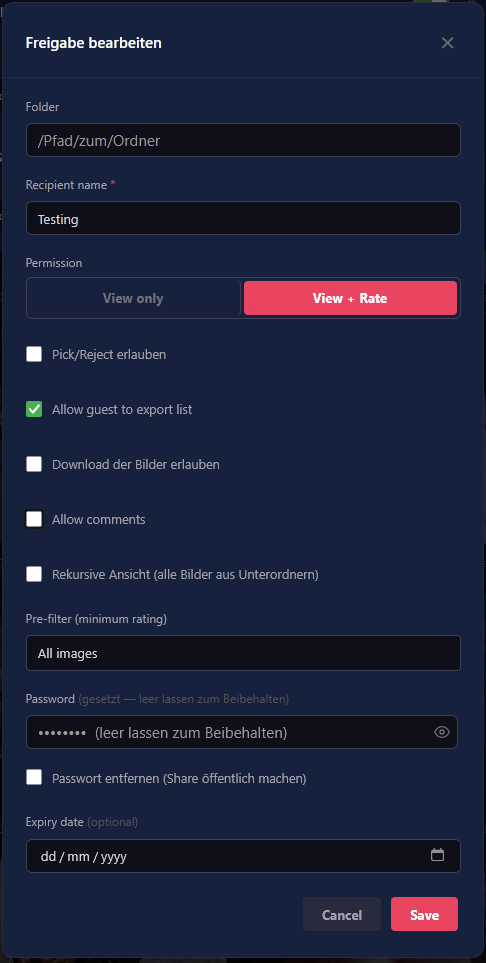
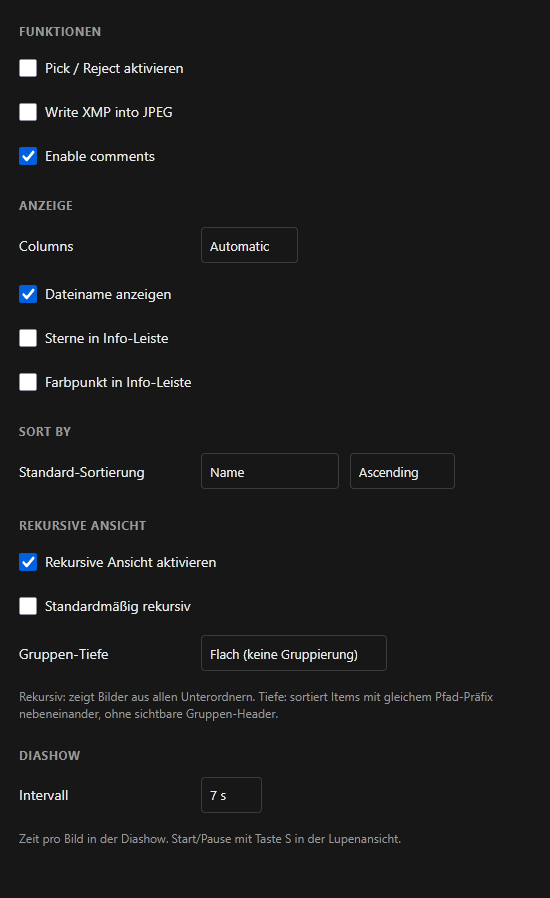
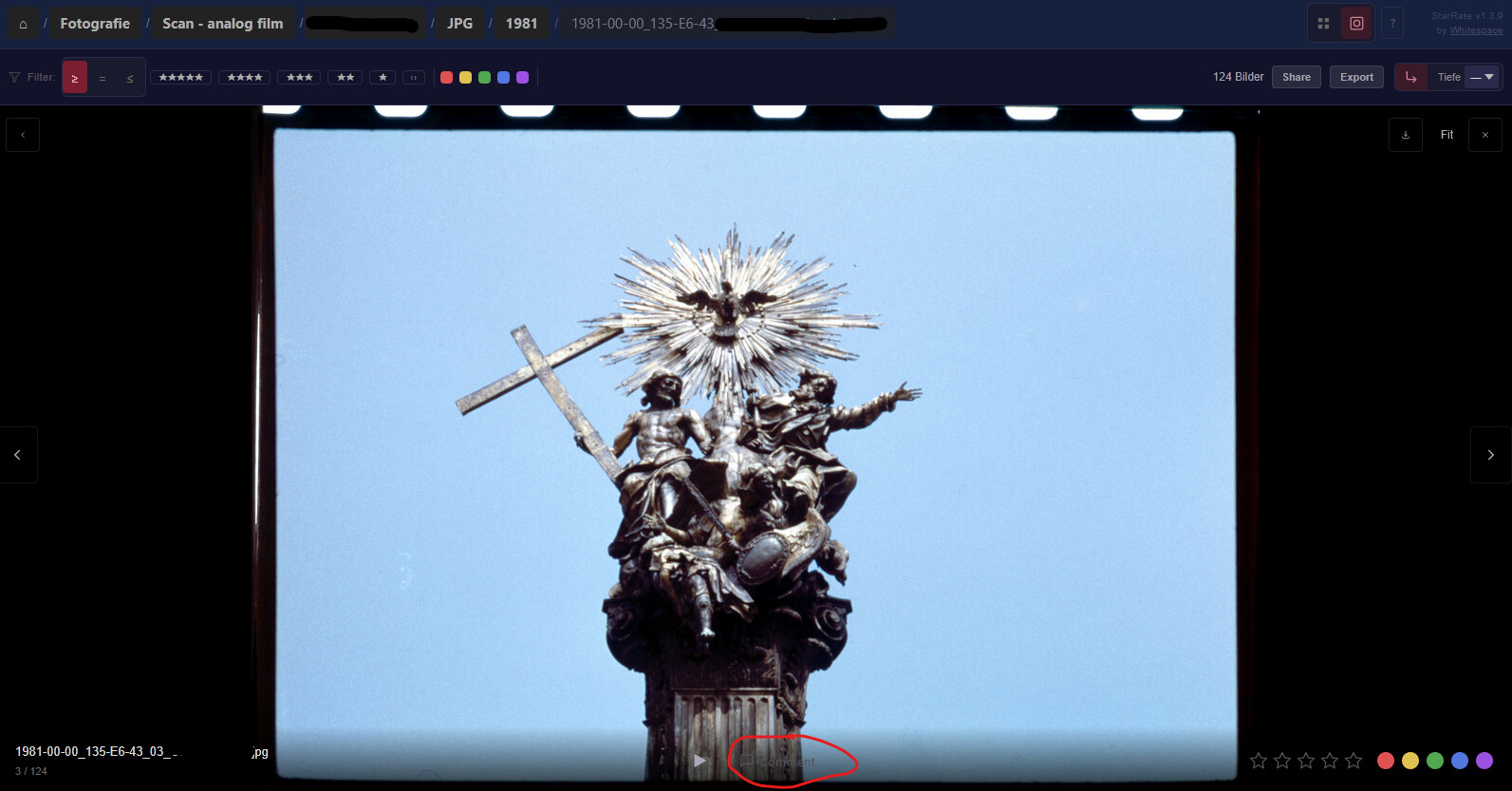
Comments — Photographers and guests can leave notes on individual images. Useful for client feedback rounds or self-reminders during culling. Toggleable per user, works in guest galleries too.

Export — CSV export of rated images with selectable columns (filename, stars, color, pick/reject). Download or copy to clipboard. Guest export can be enabled per share.

Batch Pick/Reject — Select multiple images, flag them all in one click.

XMP importocc starrate:import-xmp reads existing ratings from Lightroom, digiKam and others into StarRate. --recursive covers whole folder trees.

XMP write as a user setting — XMP writing can be disabled per account for users who prefer unmodified JPEGs or work on read-only storage.

Guest login log — Sign-ins and failed password attempts now appear in the share log alongside ratings.


:artist_palette: UI & mobile

Nav row cleaned up — Share and Export moved into the filter bar, subfolders have their own row on desktop and a popover on mobile. Filter bar scrolls horizontally on mobile, loupe rating footer no longer overlaps the image, ESC reliably closes dialogs.


:bug: Stability & compatibility

XMP compatibility extended — covers the xap: alias (older Nokia and Olympus devices), digiKam ColorLabel, multi-block files. A regression from v1.1 that overwrote Lightroom’s XMP fields on rating updates is fixed (issue #16). Batch ratings are debounced to prevent concurrent JPEG writes.


Bug reports and feedback welcome — here or on GitHub.

If it works for your workflow, a rating on the App Store helps a lot. :folded_hands:

:backhand_index_pointing_right: Nextcloud App Store · Release notes