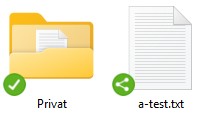
I recently noticed that while the sharing settings for a file/folder are listed in Windows Explorer (right-click Nextcloud > Sharing options), there’s no visual indication that a share is enabled. Only the green icon with a checkmark is displayed. It would be nice if a share were indicated by a different icon. Or am I missing something?
Best regards,
Max
Hallo NC-Freunde,
mir ist neulich aufgefallen, dass die Freigaben einer Datei/eines Ordners im Windows-Explorer (rechte Maustaste Nextcloud > Freigabeoptionen ) zwar aufgelistet sind, aber man äußerlich an der Datei/ dem Ordner nicht erkennen kann, dass eine Freigabe hinterlegt ist. Es wird immer nur das grüne Icon mit Häckchen angezeigt. Es wäre doch schön, wenn eine Freigabe bereits durch ein anderes Icon sichtbar wäre. Oder habe ich etwas übersehen?
I shared the file via the web interface. This is what the icon looks like on my device. I can’t see a share symbol, even when I hover over it with the mouse.
interesting, so you aren’t even showing the Status column. If you right click on the header row (Name, Date Modified, etc), can you select Status as something to show?
EDIT:
For reference, here is a more detailed view of what I show in my file explorer:
So I’m fairly new to nextcloud myself, the only other thing I can think to check is the version of the sync client you are using? I’m on the latest stable (4.0.4 iirc).
You’re referring to the icons in the legacy sync view, where all files are synchronized without support for virtual files while @muzicman0 its screenshot:
… are from a file synchronization that supports virtual files.
If you want to see the icons like in your browser, you should enable virtual file support.
But just a suggestion for the developers, if they’re reading this:
It would be nice if the icon for shared folders/files were a bit clearer and more visible when virtual file support is disabled, for example, by using a different color (e.g., black instead of green) or a status icon like the one used when virtual file support is enabled.
Perhaps this could be implemented. Thank you very much.
Best regards,
Max
Update:
I’ve now enabled “Virtual File Support” and also selected the “Always make files available locally” option. These options are mutually exclusive, but the shared files/folders are now easily identifiable by the icon in the Status column. That works for me.