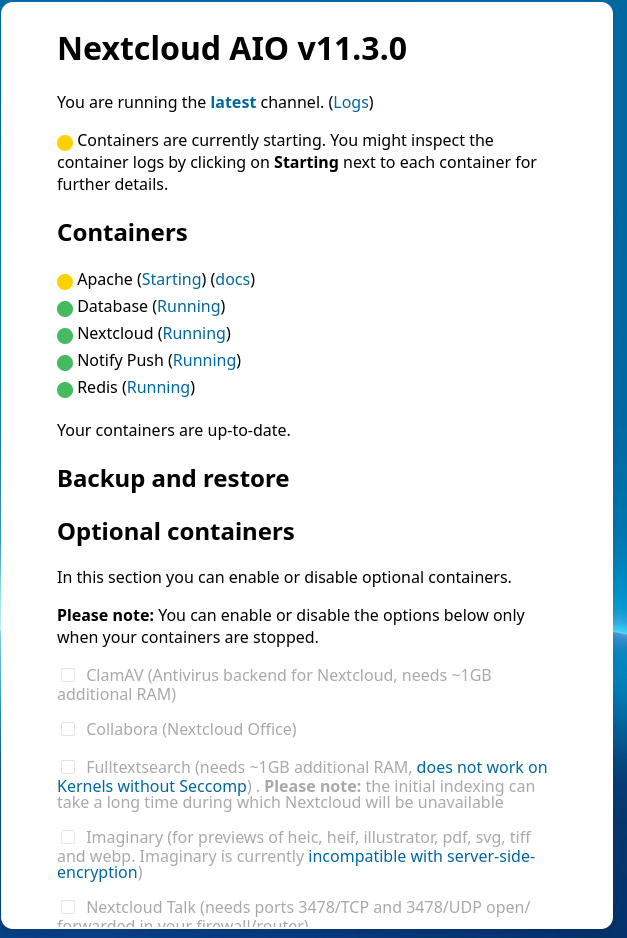
Some containers not starting

The Basics

  • Nextcloud Server version (e.g., 29.x.x):
    [ Nextcloud AIO v11.3.0)
  • Operating system and version (e.g., Ubuntu 24.04):
    • Ubuntu 24.04.2 LTS x86_64
  • Web server and version (e.g, Apache 2.4.25):
    • 2.4.58-1ubuntu8.6
  • Reverse proxy and version _(e.g. nginx 1.27.2)
    • Sorry. No idea how to get that
  • PHP version (e.g, 8.3):
    • 8.3.22
  • Is this the first time you’ve seen this error? (Yes / No):
    • Yes
  • When did this problem seem to first start?
    • Roughly 3 days ago
  • Installation method (e.g. AlO, NCP, Bare Metal/Archive, etc.)
    • Docker AIO
  • Are you using CloudfIare, mod_security, or similar? (Yes / No)
    • No

Summary of the issue you are facing:

Two or three days ago, without me having stopped any containers, I noticed on the AIO admin page, that the apache container was not “started”, but instead stuck in a “starting” state. However, my nextcloud instance seemed to be working fine. I was able to use links I’ve shared with clients to view pictures with no problems, the server was serving out contacts and calendar data as normal, etc.

I had a backup of the entire server so restored it, and after that apache was showing as “started”. I thought the problem was resolved.

Today I checked the aio admin page and found that it’s showing that redis was stuck in a starting state. After searching for a fix online, and trying some random stuff, I once again restored a full server backup. The result of this is that now redis shows as started but apache is stuck in a starting state.

Steps to replicate it (hint: details matter!):

  1. Described above.

Log entries

Nextcloud

Please provide the log entries from your Nextcloud log that are generated during the time of problem (via the Copy raw option from Administration settings->Logging screen or from your nextcloud.log located in your data directory). Feel free to use a pastebin/gist service if necessary.

Cannot get relevant logs. Sorry. I've just restored a backup and it's not showing the errors I was seeing before.

Web Browser

If the problem is related to the Web interface, open your browser inspector Console and Network tabs while refreshing (reloading) and reproducing the problem. Provide any relevant output/errors here that appear.

PASTE

Web server / Reverse Proxy

The output of your Apache/nginx/system log in /var/log/____:

I think this needs to come from inside the docker container. I am new to docker and don't know how to obtain these logs. Sorry.

Configuration

Nextcloud

The output of occ config:list system or similar is best, but, if not possible, the contents of your config.php file from /path/to/nextcloud is fine (make sure to remove any identifiable information!):

{
    "system": {
        "one-click-instance": true,
        "one-click-instance.user-limit": 100,
        "memcache.local": "\\OC\\Memcache\\APCu",
        "apps_paths": [
            {
                "path": "\/var\/www\/html\/apps",
                "url": "\/apps",
                "writable": false
            },
            {
                "path": "\/var\/www\/html\/custom_apps",
                "url": "\/custom_apps",
                "writable": true
            }
        ],
        "check_data_directory_permissions": false,
        "memcache.distributed": "\\OC\\Memcache\\Redis",
        "memcache.locking": "\\OC\\Memcache\\Redis",
        "redis": {
            "host": "***REMOVED SENSITIVE VALUE***",
            "password": "***REMOVED SENSITIVE VALUE***",
            "port": 6379
        },
        "overwritehost": "removed",
        "overwriteprotocol": "https",
        "passwordsalt": "***REMOVED SENSITIVE VALUE***",
        "secret": "***REMOVED SENSITIVE VALUE***",
        "trusted_domains": [
            "localhost",
            "removed"
        ],
        "datadirectory": "***REMOVED SENSITIVE VALUE***",
        "dbtype": "pgsql",
        "version": "31.0.6.2",
        "overwrite.cli.url": "https:\/\/removed\/",
        "dbname": "***REMOVED SENSITIVE VALUE***",
        "dbhost": "***REMOVED SENSITIVE VALUE***",
        "dbport": "",
        "dbtableprefix": "oc_",
        "dbuser": "***REMOVED SENSITIVE VALUE***",
        "dbpassword": "***REMOVED SENSITIVE VALUE***",
        "installed": true,
        "instanceid": "***REMOVED SENSITIVE VALUE***",
        "maintenance": false,
        "loglevel": 1,
        "log_type": "file",
        "logfile": "\/var\/www\/html\/data\/nextcloud.log",
        "log_rotate_size": 10485760,
        "log.condition": {
            "apps": [
                "admin_audit"
            ]
        },
        "preview_max_x": 2048,
        "preview_max_y": 2048,
        "jpeg_quality": 60,
        "enabledPreviewProviders": {
            "1": "OC\\Preview\\Image",
            "2": "OC\\Preview\\MarkDown",
            "3": "OC\\Preview\\MP3",
            "4": "OC\\Preview\\TXT",
            "5": "OC\\Preview\\OpenDocument",
            "6": "OC\\Preview\\Movie",
            "7": "OC\\Preview\\Krita"
        },
        "enable_previews": true,
        "upgrade.disable-web": true,
        "mail_smtpmode": "smtp",
        "trashbin_retention_obligation": "auto, 30",
        "versions_retention_obligation": "auto, 30",
        "activity_expire_days": 30,
        "simpleSignUpLink.shown": false,
        "share_folder": "\/Shared",
        "one-click-instance.link": "https:\/\/nextcloud.com\/all-in-one\/",
        "upgrade.cli-upgrade-link": "https:\/\/github.com\/nextcloud\/all-in-one\/discussions\/2726",
        "updatedirectory": "\/nc-updater",
        "maintenance_window_start": 100,
        "allow_local_remote_servers": true,
        "davstorage.request_timeout": 3600,
        "htaccess.RewriteBase": "\/",
        "dbpersistent": false,
        "auth.bruteforce.protection.enabled": true,
        "ratelimit.protection.enabled": true,
        "files_external_allow_create_new_local": true,
        "trusted_proxies": "***REMOVED SENSITIVE VALUE***",
        "preview_imaginary_key": "***REMOVED SENSITIVE VALUE***",
        "mail_sendmailmode": "smtp",
        "mail_from_address": "***REMOVED SENSITIVE VALUE***",
        "mail_domain": "***REMOVED SENSITIVE VALUE***",
        "default_phone_region": "GB",
        "mail_smtpsecure": "ssl",
        "mail_smtpauth": 1,
        "mail_smtphost": "***REMOVED SENSITIVE VALUE***",
        "mail_smtpport": "465",
        "mail_smtpname": "***REMOVED SENSITIVE VALUE***",
        "mail_smtppassword": "***REMOVED SENSITIVE VALUE***",
        "documentation_url.server_logs": "https:\/\/github.com\/nextcloud\/all-in-one\/discussions\/5425",
        "updatechecker": false,
        "data-fingerprint": "db8baacc8a17fecce408c38a84a510dd",
        "DOMAIN": "removed"
    }
}

Apps

The output of occ app:list (if possible).

Enabled:
  - activity: 4.0.0
  - admin_audit: 1.21.0
  - bruteforcesettings: 4.0.0
  - calendar: 5.3.3
  - cloud_federation_api: 1.14.0
  - comments: 1.21.0
  - contacts: 7.1.3
  - contactsinteraction: 1.12.0
  - dashboard: 7.11.0
  - dav: 1.33.0
  - federatedfilesharing: 1.21.0
  - files: 2.3.1
  - files_downloadactivity: 1.18.1
  - files_downloadlimit: 4.0.0
  - files_pdfviewer: 4.0.0
  - files_reminders: 1.4.0
  - files_sharing: 1.23.1
  - files_trashbin: 1.21.0
  - files_versions: 1.24.0
  - firstrunwizard: 4.0.0
  - logreader: 4.0.0
  - lookup_server_connector: 1.19.0
  - nextcloud-aio: 0.8.0
  - nextcloud_announcements: 3.0.0
  - notes: 4.12.1
  - notifications: 4.0.0
  - notify_push: 1.1.0
  - oauth2: 1.19.1
  - password_policy: 3.0.0
  - photos: 4.0.0-dev.1
  - privacy: 3.0.0
  - profile: 1.0.0
  - provisioning_api: 1.21.0
  - recommendations: 4.0.0
  - related_resources: 2.0.0
  - serverinfo: 3.0.0
  - settings: 1.14.0
  - sharebymail: 1.21.0
  - support: 3.0.0
  - systemtags: 1.21.1
  - text: 5.0.0
  - theming: 2.6.1
  - twofactor_backupcodes: 1.20.0
  - twofactor_totp: 13.0.0-dev.0
  - updatenotification: 1.21.0
  - viewer: 4.0.0
  - webhook_listeners: 1.2.0
  - workflowengine: 2.13.0
Disabled:
  - app_api: 5.0.2 (installed 4.0.3)
  - circles: 31.0.0 (installed 30.0.0)
  - encryption: 2.19.0 (installed 2.18.0)
  - federation: 1.21.0 (installed 1.20.0)
  - files_external: 1.23.0 (installed 1.22.0)
  - survey_client: 3.0.0 (installed 1.17.0)
  - suspicious_login: 9.0.1 (installed 8.0.0)
  - twofactor_nextcloud_notification: 5.0.0
  - user_ldap: 1.22.0 (installed 1.21.0)
  - user_status: 1.11.0 (installed 1.9.0)
  - weather_status: 1.11.0 (installed 1.9.0)

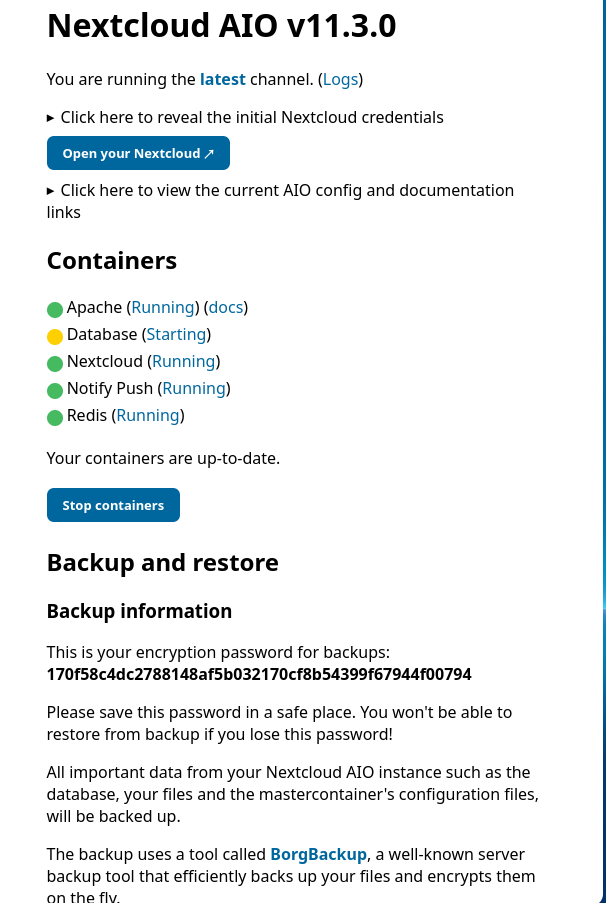
Just rebooted the server and now apache shows as started, but the database is showing as starting. See image below.

There’s something weird going on here. If the database was not started nextcloud would not be working, but it’s working.
1 Like

It looks like your issue might be caused by a corrupted or incomplete Docker image, which can happen even if containers were not manually stopped. I’ve experienced similar behavior with the apache container in Nextcloud AIO, where they got stuck in the “starting” state without any obvious reason.

Here’s a method that has consistently worked for me and could help in your case:

:hammer_and_wrench: Steps to resolve containers stuck in “starting”:

  1. Open the Nextcloud AIO interface
    – Stop all running containers.

  2. Go to Portainer (or use the CLI if you’re not using Portainer):

    • Delete all stopped containers except for the mastercontainer.
    • Identify the container that is stuck (e.g., apache or redis) and delete its associated Docker image as well.
      (In Portainer: Images > find the problematic one > remove it)
  3. Let AIO recreate the container and download the image again.
    – Go back to the AIO interface and wait for it to automatically pull a fresh copy and start the container.

  4. Optional: Clean up unused images once everything is working.
    – In Portainer: Images > delete old and unused Nextcloud-related images to save space.

This approach has helped me recover from update issues or random startup problems without needing to restore full server backups. Give it a try — it’s a safe and clean method that might fix your issue with minimal disruption.

Note: This post was written with the help of an AI assistant as a writing aid only. The opinions, solutions, and technical recommendations are fully based on my personal experience.
More about how and why I use AI to write forum posts:
:right_arrow: Is there limitations to installing Nextcloud via CT template on Proxmox - #4 by vawaver

Thanks. I am just about to go through your post and try what you have suggested, but straight away what you’ve said about not stopping containers has me wondering if I’ve been making a big mistake.

When I need to reboot the server, I just do a sudo reboot with no other preparation first. Should I be stopping the docker containers first??

No worries — doing a sudo reboot without stopping the containers first is completely fine. Docker and Nextcloud AIO are built to handle reboots gracefully. On reboot, Docker will automatically restart containers that were previously running, unless configured otherwise.

What I meant earlier about manually stopping containers applies only to update or troubleshooting procedures, not to normal system reboots.

Summary:

  • For regular reboots (sudo reboot):
    – No need to stop containers manually. It’s safe.
  • For updates or fixing stuck containers:
    – It’s better to stop containers via the AIO interface and clean up old ones in Portainer or CLI to avoid issues with partially updated containers or images.

You’re not making a mistake — you’re doing the standard thing. :wink:

2 Likes

Sorry. This is embarrassing. I knew I should have installed the snap version instead.

I have no idea how to do some of the things listed in your reply.

I have never heard of portainer.

I’d rather do it via the terminal but this is the first docker install I’ve ever had and I basically know nothing.

I’ve just searched up how to list docker containers, and then how to delete them.

I started with

sudo docker container ls -all

And this is what I get.

sudo docker container ls -all
CONTAINER ID   IMAGE                                          COMMAND                  CREATED      STATUS                       PORTS     NAMES
cff786821317   ghcr.io/nextcloud-releases/aio-apache:latest   "/start.sh /usr/bin/…"   2 days ago   Exited (137) 7 minutes ago             nextcloud-aio-apache

Since I can’t find the containers I can’t delete them.

1 Like

Thanks for that. I had no idea if I was breaking my install or not.

Thanks for your post with the details on how to fix this.

I have now learned how to list and delete docker containers and images and have gone through the process three times.

The reason I did it three times was because I did not at first realise that some of the containers and images I was seeing were old and apparently no longer used, and I failed to delete them first time round. I may have also failed to get them all the second time. I am sure I got all of them the 3rd time.

Since then I’ve restarted the currently offending redis container and image another couple of times, rebooted the server, restarted the master container, and I still could not get the redis container to show as started on the aio admin page.

I eventually gave up and started reading about installing the bare metal nextcloud version and the snap, trying to decide which to setup and migrate to.

Around half an hour later I returned to to the aio admin page for a look and redis was running, along with all other containers.

Can it take a container half an hour to start?

Yes, it can sometimes happen that a container — like Redis or Apache — takes a while to start. While 30 minutes is unusual, it’s not impossible, especially if there were changes to container images or if outdated ones were still in use.

From what you described, it looks like some older container images were still present, which likely caused some mismatch or inconsistency. Once you cleaned them up and pulled fresh ones, the system eventually resolved itself and started working again.

If you followed the guide I shared earlier, you saw that during AIO updates I always:

  • Stop all containers via the AIO interface,
  • Then delete all stopped containers in Portainer (except the mastercontainer),
  • And if there’s a problem, I also delete the image of the problematic container to force a clean download.

Doing this prevents situations like the one you encountered.

It’s also important to regularly update your AIO setup, so you always run the latest container versions and avoid these kinds of problems.

The good news is that everything is running fine now — I’d recommend keeping an eye on the system and updating AIO regularly to keep things stable.

1 Like

I certainly did, and I’m very grateful. Many thanks for all that information. Without it I’d still have containers failing to start. It’s looking like it’s fixed now.

I had lots of old containers, or images, or both (I don’t remember the details too well). I noticed that a lot were 3 months old, and one was 10 months old. They are all gone now.

This problem, and your post, has provoked my first step into doing a bit of maintenance with docker. I have learned a little this evening.

By the way, I tried to install portainer and it looked like it had gone fine, but then I lost access to my nextcloud completely. I followed a guide I found online but must have gotten something very wrong. It was easy fixed with a server backup though. :grinning_face:

I’m really glad my post helped and that you managed to get everything working again. Sometimes it’s exactly these kinds of issues that push us to dive a bit deeper and learn how things like Docker work — and that’s always a big step forward.

Personally, I always aim to achieve a working result in the simplest and cleanest way possible, which is why I prefer running applications in Docker. It gives me full control, flexibility, and makes backups and recovery much easier.

I use Portainer as a visual management tool that really simplifies Docker maintenance. It helps me keep an overview of all containers, clean up unused images, check logs, and easily access the shell of running containers.

I’d definitely encourage you to give Portainer another try — once you get a bit more familiar with it, you’ll see it can save you a lot of time and frustration. For me, it’s become an essential part of any Docker environment.

I got portainer successfully installed, and I can see straight away that it makes it very easy to see the images and containers, and other things that docker has that I did not even know existed.

I still have a very woolly idea of what docker is. I believe it’s similar to a virtual machine, but it pulls some resources from the base os on which it’s installed? Or something.

Great to hear that you got Portainer running successfully! Yes — once you start exploring it, you’ll realize how much is going on under the hood with Docker, and how much easier Portainer makes it to manage everything.

As for what Docker is — you’re absolutely right, it’s similar to a virtual machine, but much lighter. Instead of emulating a whole operating system, Docker containers share the host OS kernel and run isolated applications with their own filesystem and environment. Think of it as running apps in little “boxes” that include everything they need — but without the heavy overhead of full VMs.

If you want to dive a bit deeper, I’d recommend checking out a few beginner-friendly videos on YouTube — just search something like “What is Docker” or “Docker explained simply.”
Also, if you use AI tools like ChatGPT, you can ask questions step by step and get explanations tailored to your current understanding — that’s how I learned a lot myself.

It’s great that you’re exploring this — it’ll pay off quickly if you keep going!

1 Like

Over time I’ll get it. Everything I’ve learned about linux I’ve kind of picked up along the way - almost by mistake. :grinning_face:

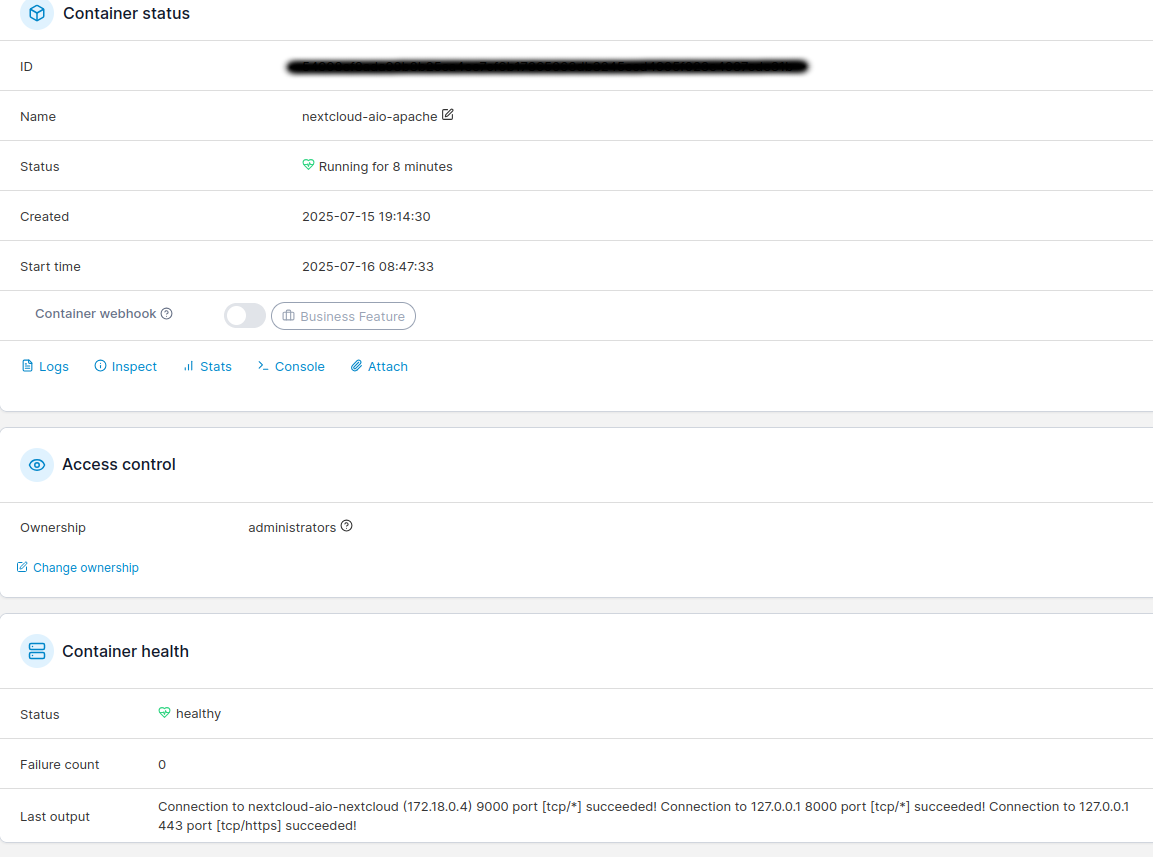
Look at this. I think there’s something weird going on with the aio admin interface. Portainer shows that apache is up (I believe), and nextcloud is working as it should, but the aio admin page shows it as being in a “starting” state.

And every time I reboot the server it’s a different container that does this. I’ve had it with nextcloud, redis, and apache. It seems random.

See screenshots below. These were taken within seconds of each other.

You’re absolutely right to trust your instincts here — what you’re seeing isn’t unusual.

Personally, I always treat Portainer as the primary reference for container status.
If Portainer shows that the container is running and healthy, and everything works as expected (like accessing Nextcloud normally), then it’s safe to say things are fine.

The AIO admin interface sometimes lags behind or doesn’t fully refresh after boot, especially right after a reboot. I’ve also seen cases where a container is marked as “Starting” even though it’s clearly up and passing all health checks — just like in your screenshots.

From what you described — that it happens randomly with redis, apache, or nextcloud — it seems like a minor UI sync bug in the AIO admin panel. As long as:

  • Portainer shows the container as healthy,
  • Logs look clean,
  • Services are reachable and working,

…then I just ignore the “Starting” label on the AIO page.

Portainer tells the real story :wink:

That’s the answer. That was what I was guessing was going on.

I can’t thank you enough for your help in this thread. You have been super helpful, and I’ve learned a lot. The portainer tip is a big step forward for me, and I have now learned a little about docker too.

Thanks so much. :+1:

1 Like

Sounds like a Docker-related issue with container health checks or startup order. Since services like Apache, Redis, and DB show as “starting” while still functioning, it may be a false status from the AIO interface. Try updating AIO and Docker to the latest versions, and check container logs using docker logs <container-name>. You can also run docker ps to verify running containers. Let us know what you find!

Thanks for your reply.

Here is the log for apache, which is still showing as “starting” on the aio admin page.

sudo docker logs nextcloud-aio-apache
Waiting for Nextcloud to start...
Connection to nextcloud-aio-nextcloud (172.18.0.4) 9000 port [tcp/*] succeeded!
[Tue Jul 15 20:14:52.058638 2025] [mpm_event:notice] [pid 39:tid 39] AH00489: Apache/2.4.63 (Unix) configured -- resuming normal operations
[Tue Jul 15 20:14:52.058694 2025] [core:notice] [pid 39:tid 39] AH00094: Command line: '/usr/local/apache2/bin/httpd -D FOREGROUND'
{"level":"info","ts":1752606892.0782452,"msg":"maxprocs: Leaving GOMAXPROCS=2: CPU quota undefined"}
{"level":"info","ts":1752606892.0784647,"msg":"GOMEMLIMIT is updated","package":"github.com/KimMachineGun/automemlimit/memlimit","GOMEMLIMIT":3695593881,"previous":9223372036854775807}
{"level":"info","ts":1752606892.0784981,"msg":"using config from file","file":"/tmp/Caddyfile"}
{"level":"info","ts":1752606892.0802755,"msg":"adapted config to JSON","adapter":"caddyfile"}
{"level":"info","ts":1752606892.0825584,"msg":"failed to sufficiently increase receive buffer size (was: 208 kiB, wanted: 7168 kiB, got: 416 kiB). See https://github.com/quic-go/quic-go/wiki/UDP-Buffer-Sizes for details."}
{"level":"info","ts":1752606892.0843825,"msg":"serving initial configuration"}
[Tue Jul 15 20:33:51 2025] [error] [client: 31.94.68.5] [AH01067: Failed to read FastCGI header] [Mozilla/5.0 (X11; Linux x86_64; rv:140.0) Gecko/20100101 Firefox/140.0]
[Tue Jul 15 20:33:51 2025] [error] [(104)Connection reset by peer] [client: 31.94.68.5] [AH01075: Error dispatching request to : ] [Mozilla/5.0 (X11; Linux x86_64; rv:140.0) Gecko/20100101 Firefox/140.0]
Waiting for Nextcloud to start...
Connection to nextcloud-aio-nextcloud (172.18.0.7) 9000 port [tcp/*] succeeded!
{"level":"info","ts":1752608145.2484856,"msg":"maxprocs: Leaving GOMAXPROCS=2: CPU quota undefined"}
{"level":"info","ts":1752608145.2487788,"msg":"GOMEMLIMIT is updated","package":"github.com/KimMachineGun/automemlimit/memlimit","GOMEMLIMIT":3695593881,"previous":9223372036854775807}
{"level":"info","ts":1752608145.2488291,"msg":"using config from file","file":"/tmp/Caddyfile"}
{"level":"info","ts":1752608145.2552135,"msg":"adapted config to JSON","adapter":"caddyfile"}
[Tue Jul 15 20:35:45.266974 2025] [mpm_event:notice] [pid 41:tid 41] AH00489: Apache/2.4.63 (Unix) configured -- resuming normal operations
[Tue Jul 15 20:35:45.267055 2025] [core:notice] [pid 41:tid 41] AH00094: Command line: '/usr/local/apache2/bin/httpd -D FOREGROUND'
{"level":"info","ts":1752608145.2718565,"msg":"failed to sufficiently increase receive buffer size (was: 208 kiB, wanted: 7168 kiB, got: 416 kiB). See https://github.com/quic-go/quic-go/wiki/UDP-Buffer-Sizes for details."}
{"level":"info","ts":1752608145.2762835,"msg":"serving initial configuration"}
[Wed Jul 16 09:20:53 2025] [error] [client: 31.94.68.5] [AH01067: Failed to read FastCGI header] [Mozilla/5.0 (X11; Linux x86_64; rv:140.0) Gecko/20100101 Firefox/140.0]
[Wed Jul 16 09:20:53 2025] [error] [(104)Connection reset by peer] [client: 31.94.68.5] [AH01075: Error dispatching request to : ] [Mozilla/5.0 (X11; Linux x86_64; rv:140.0) Gecko/20100101 Firefox/140.0]
Waiting for Nextcloud to start...
Connection to nextcloud-aio-nextcloud (172.18.0.5) 9000 port [tcp/*] succeeded!
{"level":"info","ts":1752654196.897473,"msg":"maxprocs: Leaving GOMAXPROCS=2: CPU quota undefined"}
{"level":"info","ts":1752654196.8977418,"msg":"GOMEMLIMIT is updated","package":"github.com/KimMachineGun/automemlimit/memlimit","GOMEMLIMIT":3695593881,"previous":9223372036854775807}
{"level":"info","ts":1752654196.897769,"msg":"using config from file","file":"/tmp/Caddyfile"}
[Wed Jul 16 09:23:16.900023 2025] [mpm_event:notice] [pid 41:tid 41] AH00489: Apache/2.4.63 (Unix) configured -- resuming normal operations
[Wed Jul 16 09:23:16.901051 2025] [core:notice] [pid 41:tid 41] AH00094: Command line: '/usr/local/apache2/bin/httpd -D FOREGROUND'
{"level":"info","ts":1752654196.9027092,"msg":"adapted config to JSON","adapter":"caddyfile"}
{"level":"info","ts":1752654196.908775,"msg":"failed to sufficiently increase receive buffer size (was: 208 kiB, wanted: 7168 kiB, got: 416 kiB). See https://github.com/quic-go/quic-go/wiki/UDP-Buffer-Sizes for details."}
{"level":"info","ts":1752654196.9112792,"msg":"serving initial configuration"}
Connection to nextcloud-aio-nextcloud (172.18.0.5) 9000 port [tcp/*] succeeded!
[Wed Jul 16 09:29:02.914243 2025] [mpm_event:notice] [pid 31:tid 31] AH00489: Apache/2.4.63 (Unix) configured -- resuming normal operations
[Wed Jul 16 09:29:02.914306 2025] [core:notice] [pid 31:tid 31] AH00094: Command line: '/usr/local/apache2/bin/httpd -D FOREGROUND'
{"level":"info","ts":1752654542.9358964,"msg":"maxprocs: Leaving GOMAXPROCS=2: CPU quota undefined"}
{"level":"info","ts":1752654542.9361348,"msg":"GOMEMLIMIT is updated","package":"github.com/KimMachineGun/automemlimit/memlimit","GOMEMLIMIT":3695593881,"previous":9223372036854775807}
{"level":"info","ts":1752654542.9361742,"msg":"using config from file","file":"/tmp/Caddyfile"}
{"level":"info","ts":1752654542.9384418,"msg":"adapted config to JSON","adapter":"caddyfile"}
{"level":"info","ts":1752654542.9422574,"msg":"failed to sufficiently increase receive buffer size (was: 208 kiB, wanted: 7168 kiB, got: 416 kiB). See https://github.com/quic-go/quic-go/wiki/UDP-Buffer-Sizes for details."}
{"level":"info","ts":1752654542.942833,"msg":"serving initial configuration"}
[Wed Jul 16 09:45:52 2025] [error] [client: 31.94.68.5] [AH01067: Failed to read FastCGI header] [Mozilla/5.0 (X11; Linux x86_64; rv:140.0) Gecko/20100101 Firefox/140.0]
[Wed Jul 16 09:45:52 2025] [error] [(104)Connection reset by peer] [client: 31.94.68.5] [AH01075: Error dispatching request to : ] [Mozilla/5.0 (X11; Linux x86_64; rv:140.0) Gecko/20100101 Firefox/140.0]
Waiting for Nextcloud to start...
Connection to nextcloud-aio-nextcloud (172.18.0.4) 9000 port [tcp/*] succeeded!
[Wed Jul 16 09:48:01.267487 2025] [mpm_event:notice] [pid 41:tid 41] AH00489: Apache/2.4.63 (Unix) configured -- resuming normal operations
[Wed Jul 16 09:48:01.267538 2025] [core:notice] [pid 41:tid 41] AH00094: Command line: '/usr/local/apache2/bin/httpd -D FOREGROUND'
{"level":"info","ts":1752655681.2672238,"msg":"maxprocs: Leaving GOMAXPROCS=2: CPU quota undefined"}
{"level":"info","ts":1752655681.267622,"msg":"GOMEMLIMIT is updated","package":"github.com/KimMachineGun/automemlimit/memlimit","GOMEMLIMIT":3695601254,"previous":9223372036854775807}
{"level":"info","ts":1752655681.2676826,"msg":"using config from file","file":"/tmp/Caddyfile"}
{"level":"info","ts":1752655681.2755575,"msg":"adapted config to JSON","adapter":"caddyfile"}
{"level":"info","ts":1752655681.280433,"msg":"failed to sufficiently increase receive buffer size (was: 208 kiB, wanted: 7168 kiB, got: 416 kiB). See https://github.com/quic-go/quic-go/wiki/UDP-Buffer-Sizes for details."}
{"level":"info","ts":1752655681.2838156,"msg":"serving initial configuration"}

This topic was automatically closed 8 days after the last reply. New replies are no longer allowed.