The Basics
- Nextcloud Server version (e.g., 29.x.x):
33.0.1
- Operating system and version (e.g., Ubuntu 24.04):
Debian 12
- Web server and version (e.g, Apache 2.4.25):
Apache 2.4.62
- Reverse proxy and version _(e.g. nginx 1.27.2)
Cloudflare Tunnel
- PHP version (e.g, 8.3):
8.2
- Is this the first time you’ve seen this error? (Yes / No):
Yes, occurred right after moving to NC 33.
- When did this problem seem to first start?
Immediately after the upgrade/fresh install of version 33.
- Installation method (e.g. AlO, NCP, Bare Metal/Archive, etc.)
proxmox community-script turnkey
- Are you using CloudfIare, mod_security, or similar? (Yes / No)
yes
Summary of the issue you are facing:
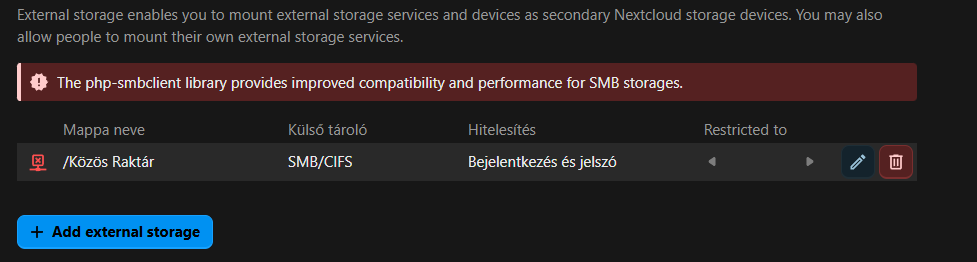
I am unable to connect to my local SMB/CIFS share (TurnKey Fileserver) via the External Storage app. While the share is perfectly accessible from Windows clients, Nextcloud 33 can’t connect. This setup worked flawlessly on NC 32.
Steps to replicate it (hint: details matter!):
-
Install Nextcloud 33 on Debian 12.
-
Enable “External Storage Support” app.
-
Attempt to add an SMB/CIFS share using “Username and password” authentication.
-
The status indicator turns red with an “Error” message.
Log entries
Nextcloud
ConnectionRefusedException
Error while getting file info
/var/www/nextcloud/3rdparty/icewind/smb/src/Wrapped/Share.php
113. sor
Icewind\SMB\Wrapped\Connection->clearTillPrompt()
/var/www/nextcloud/3rdparty/icewind/smb/src/Wrapped/Share.php
127. sor
Icewind\SMB\Wrapped\Share->getConnection()
/var/www/nextcloud/3rdparty/icewind/smb/src/Wrapped/Share.php
456. sor
Icewind\SMB\Wrapped\Share->connect()
/var/www/nextcloud/3rdparty/icewind/smb/src/Wrapped/Share.php
206. sor
Icewind\SMB\Wrapped\Share->execute()
/var/www/nextcloud/apps/files_external/lib/Lib/Storage/SMB.php
169. sor
Icewind\SMB\Wrapped\Share->stat()
/var/www/nextcloud/apps/files_external/lib/Lib/Storage/SMB.php
338. sor
OCA\Files_External\Lib\Storage\SMB->getFileInfo()
/var/www/nextcloud/lib/private/Files/Storage/Common.php
419. sor
OCA\Files_External\Lib\Storage\SMB->stat()
/var/www/nextcloud/apps/files_external/lib/Lib/Storage/SMB.php
709. sor
OC\Files\Storage\Common->test()
/var/www/nextcloud/apps/files_external/lib/MountConfig.php
94. sor
OCA\Files_External\Lib\Storage\SMB->test()
/var/www/nextcloud/apps/files_external/lib/Controller/StoragesController.php
225. sor
OCA\Files_External\MountConfig::getBackendStatus(
  "*** sensitive parameters replaced ***"
)
/var/www/nextcloud/apps/files_external/lib/Controller/StoragesController.php
275. sor
OCA\Files_External\Controller\StoragesController->updateStorageStatus(
  "*** sensitive parameters replaced ***"
)
/var/www/nextcloud/lib/private/AppFramework/Http/Dispatcher.php
205. sor
OCA\Files_External\Controller\StoragesController->show()
/var/www/nextcloud/lib/private/AppFramework/Http/Dispatcher.php
118. sor
OC\AppFramework\Http\Dispatcher->executeController()
/var/www/nextcloud/lib/private/AppFramework/App.php
153. sor
OC\AppFramework\Http\Dispatcher->dispatch()
/var/www/nextcloud/lib/private/Route/Router.php
321. sor
OC\AppFramework\App::main()
/var/www/nextcloud/lib/base.php
1155. sor
OC\Route\Router->match()
/var/www/nextcloud/index.php
25. sor
OC::handleRequest()
Configuration
Nextcloud
The output of occ config:list system
    "passwordsalt": "\*\*\*REMOVED SENSITIVE VALUE\*\*\*",
    "secret": "\*\*\*REMOVED SENSITIVE VALUE\*\*\*",
    "trusted_domains": \[
	"\*\*\*REMOVED SENSITIVE VALUE\*\*\*"
    \],
    "datadirectory": "\*\*\*REMOVED SENSITIVE VALUE\*\*\*",
    "dbtype": "mysql",
    "version": "33.0.1.2",
    "overwrite.cli.url": "http:\\/\\/localhost",
    "dbname": "\*\*\*REMOVED SENSITIVE VALUE\*\*\*",
    "dbhost": "\*\*\*REMOVED SENSITIVE VALUE\*\*\*",
    "dbport": "",
    "dbtableprefix": "oc\_",
    "mysql.utf8mb4": true,
    "dbuser": "\*\*\*REMOVED SENSITIVE VALUE\*\*\*",
    "dbpassword": "\*\*\*REMOVED SENSITIVE VALUE\*\*\*",
    "installed": true,
    "instanceid": "\*\*\*REMOVED SENSITIVE VALUE\*\*\*",
    "memcache.local": "\\\\OC\\\\Memcache\\\\Redis",
    "redis": {
        "host": "\*\*\*REMOVED SENSITIVE VALUE\*\*\*",
        "port": 0,
        "timeout": 0
    },
    "filelocking.enabled": true,
    "memcache.locking": "\\\\OC\\\\Memcache\\\\Redis",
    "log_type": "file",
    "logfile": "\\/var\\/www\\/nextcloud-data\\/nextcloud.log",
    "loglevel": 3,
    "updater.secret": "\*\*\*REMOVED SENSITIVE VALUE\*\*\*",
    "maintenance": false,
    "theme": ""
}
}
Apps
Enabled:
- activity: 6.0.0-dev.0
- app_api: 33.0.0
- bruteforcesettings: 6.0.0-dev.0
- circles: 33.0.0
- cloud_federation_api: 1.17.0
- comments: 1.23.0
- contactsinteraction: 1.14.1
- dashboard: 7.13.0
- dav: 1.36.0
- federatedfilesharing: 1.23.0
- federation: 1.23.0
- files: 2.5.0
- files_downloadlimit: 5.1.0-dev.0
- files_external: 1.25.1
- files_pdfviewer: 6.0.0-dev.0
- files_reminders: 1.6.0
- files_sharing: 1.25.2
- files_trashbin: 1.23.0
- files_versions: 1.26.0
- firstrunwizard: 6.0.0-dev.0
- logreader: 6.0.0
- lookup_server_connector: 1.21.0
- nextcloud_announcements: 5.0.0
- notifications: 6.0.0
- oauth2: 1.21.0
- password_policy: 5.0.0-dev.0
- photos: 6.0.0-dev.0
- privacy: 5.0.0-dev.0
- profile: 1.2.0
- provisioning_api: 1.23.0
- recommendations: 6.0.0-dev.0
- related_resources: 4.0.0-dev.0
- serverinfo: 5.0.0-dev.0
- settings: 1.16.0
- sharebymail: 1.23.0
- support: 5.0.0
- survey_client: 5.0.0-dev.0
- systemtags: 1.23.0
- text: 7.0.0-dev.3
- theming: 2.8.0
- twofactor_backupcodes: 1.22.0
- twofactor_totp: 15.0.0-dev.0
- updatenotification: 1.23.0
- user_status: 1.13.0
- viewer: 6.0.0-dev.0
- weather_status: 1.13.0
- webhook_listeners: 1.5.0
- workflowengine: 2.15.0
Disabled: - admin_audit: 1.23.0
- encryption: 2.21.0
- suspicious_login: 11.0.0-dev.0
- testing: 1.23.0
- twofactor_nextcloud_notification: 7.0.0
- user_ldap: 1.24.0
Tips for increasing the likelihood of a response
- Use the
preformatted textformatting option in the editor for all log entries and configuration output. - If screenshots are useful, feel free to include them.
- If possible, also include key error output in text form so it can be searched for.
- Try to edit log output only minimally (if at all) so that it can be ran through analyzers / formatters by those trying to help you.