Slow and weird desktop client behavior (Linux AppImage 4.0.4)

I am evaluating Nextcloud (as alternative for Seafile).

Basics

Server: Ubuntu 22.04.5 running Nextcloud AOI 32.0.3
8 cores > 70% idle, > 18 GB ram free: this should not be the bottleneck

Client: Mint 20.3 running Nextcloud-4.0.4-x86_64.AppImage
4 cores >80% idle, > 1GB RAM free
speedtest.net reports upload bandwidth of 28 Mbps (down 475 Mbps)
The client is using almost no CPU, as if it hangs.

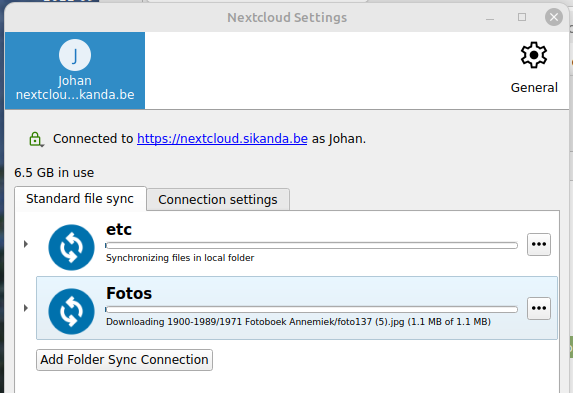
I have two folder sync connections:

”etc” is a small folder that I used for experiments, nothing changed there recently, should be fully in sync

“Fotos” is a large folder with photos and some videos: 77476 files, 367GB. About 6.5GB has already been uploaded to the server, the rest is pending.

Observed behavior after starting the client and opening the “Nextcloud settings” GUI:

  • “etc” initially looked fully synced (as it should), now “Synchronizing files in local folder” like forever (> 30 minutes).
  • ”Fotos” also showed fully synced for a few moments, now “Downloading ” for over 30 minutes. Filename changes every 10 seconds or so.
  • Clicking the three dots after “Fotos” takes about 30 seconds just to open the popup menu

Expected behavior:

  • “etc” should be synced and remain synced
  • “Fotos” should not download anything (there is nothing new on the server) and start uploading fast (taking into account available bandwidth to server)
  • Menus should react fast (< 0.5s) on an almost idle computer

Additional info:

  • progress bars (almost) do not move at all
  • “general” menu also opens slowly: takes about 10s to open
I’d try first to sync the etc only and pause the Foto sync for the moment. And then check with the etc sync what might be the problem. Do you see network activity when it is syncing? What does the server logs say?

Ok, you know it but the client is perhaps trying to check this. Is it just small in size or also small in terms of number of files?

Did you try an older version to exclude a bug in the recent version?
https://github.com/nextcloud-releases/desktop/releases
(Expand “Assets” at the end of each “Contribution”-entry)

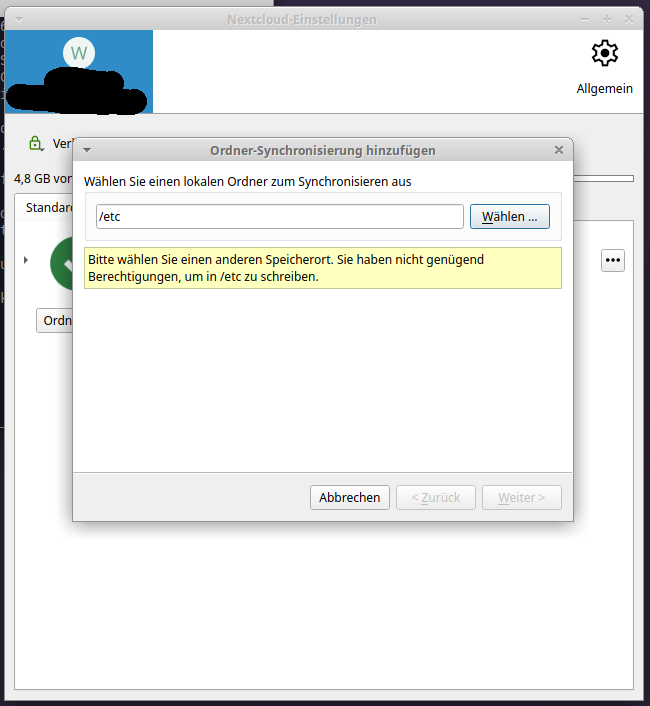
I killed the client, restarted it and then immediately tried to pause syncing of Fotos.
When I restart the client, it writes this to the terminal from which it is started:
```
nextcloud.gui.application: Migrating old config from “/home/johan/.local/share/Nextcloud” to “/home/johan/.config/Nextcloud”
nextcloud.gui.application: Failed to move the old config directory to its new location ( “/home/johan/.local/share/Nextcloud” to “/home/johan/.config/Nextcloud” )
nextcloud.gui.application: Will move the individual files QList(“etc_sync.log”, “Fotos_sync.log”, “Nextcloud_sync.log”)
nextcloud.gui.application: Fallback move of “etc_sync.log” also failed
nextcloud.gui.application: Fallback move of “Fotos_sync.log” also failed
nextcloud.gui.application: Fallback move of “Nextcloud_sync.log” also failed
```
and only a few minutes later, an icon appears in the system tray.

5 minutes after pausing the syncing of Fotos, it is still “syncing”, i.e. still Downloading.

So I decided to kill it and try an older version.

I downloaded Nextcloud-3.17.4-x86_64.AppImage. This produces the same output at startup:
```
nextcloud.gui.application: Migrating old config from “/home/johan/.local/share/Nextcloud” to “/home/johan/.config/Nextcloud”
nextcloud.gui.application: Failed to move the old config directory to its new location ( “/home/johan/.local/share/Nextcloud” to “/home/johan/.config/Nextcloud” )
nextcloud.gui.application: Will move the individual files QList(“etc_sync.log”, “Fotos_sync.log”, “Nextcloud_sync.log”)
nextcloud.gui.application: Fallback move of “etc_sync.log” also failed
nextcloud.gui.application: Fallback move of “Fotos_sync.log” also failed
nextcloud.gui.application: Fallback move of “Nextcloud_sync.log” also failed
```
A few minutes later, the systray icon appears. Right-click, or left-click + Open main dialog does nothing. Right-click + Settings opens the settings window. It reacts with the same as version 4.0.4 to open menus. This time, I was able to pause the syncing of Fotos in less than a minute. It continues to sync etc for a minute or so, then shows etc as synced. Small changes are synced almost immediately.

So I restarted syncing of Fotos. It shows Synchronizing files in local folder for a minute or so, then starts Downloading … just like version 4.0.4, and continues to do so for a very long time (it is still running).

FYI: etc is 404 KB spread over 22 folders/files.

Here is the current content of ~/.local/share/Nextcloud and ~/.config/Nextcloud:

johan@morla:~/work/flopro/etc\> l ~/.local/share/Nextcloud
total 748K
-rw-r--r-- 1 johan johan  24K Jan  5 17:58 etc_sync.log
-rw-r--r-- 1 johan johan 692K Jan  5 18:00 Fotos_sync.log
-rw-r--r-- 1 johan johan  20K Dec 29 11:14 Nextcloud_sync.log
johan@morla:~/work/flopro/etc\> l ~/.config/Nextcloud
total 792K
-rw-r--r-- 1 johan johan  302 Jan  5 17:37  cookies0.db
-rw-r--r-- 1 johan johan 2.8K Dec 27 20:02  etc_sync.log
-rw-r--r-- 1 johan johan 728K Dec 31 11:38  Fotos_sync.log
drwxr-xr-x 2 johan johan  12K Jan  5 18:00  logs
-rw-r--r-- 1 johan johan 2.0K Jan  5 17:59  nextcloud.cfg
-rw-r--r-- 1 johan johan  403 Dec 27 19:38  nextcloud.cfg.backup_20251227_193838
-rw-r--r-- 1 johan johan 2.0K Jan  5 17:38 'nextcloud.cfg.backup_20260105_173839_4.0.4 (build 35937)'
-rw-r--r-- 1 johan johan  21K May 24  2019  Nextcloud_sync.log
-rwxr--r-- 1 johan johan  371 May 17  2019  sync-exclude.lst

I have no clue why the client fails to remove ~/.local/share/Nextcloud; I guess I can remove it manually.

What else can I do to debug this, especially the syncing of Fotos?

I don’t know, how the Linux-clients work. Maybe the files still are locked by a background process after killing the desktop-client process. So moving the files may fail.

there is a longer bug report for this and no solution so far:

For >300 GB, I suppose it take quite some time. But do you see a reasonable data transfer?

No, and that is my main issue.

The client shows that it is downloading files, making no or almost no progress. It should be uploading files, and make reasonable progress. I can understand that maybe, when just started, the client wants to check for changes on the server before uploading local changes. But that shouldn’t take very long, and I know that there are no changes on the server. I waited for multiple hours, but noticed no real change.

I understand that uploading >300GB of data can take time, maybe even several days, even with good quality network connections (I have ~30Gbps upload, the server itself is a lot faster). That is not the issue. But now, I see no progress at all.

It might be better, to copy such a lot of files via SMB/scp or other into the data folder of the server, set correct file- and folder-permissions (see no 13.) from command-line and finally call occ files:scan

Thanks for the clarification. If your folder isn’t empty, it must first detect the situation on your client and on your server, and this part seems to be blocked. Now it depends, if you want to find the issue or just have a workaround.

Find the issue: dig a bit deeper, check the logfiles for some errors. If they are not specific to your system, check if you can find references on the bug tracker: GitHub · Where software is built, if not create a new topic with your scenario. It is extremely helpful, if you have a simple procedure to reproduce the error.
Don’t forget to check the server logs as well, perhaps you have missed something in your setup, and it is trying to do something in the background, or if you haven’t set up caches (shouldn’t be the case for AIO) that slows everything down.

Workaround: First sync with an empty local folder, make sure that the client and the server are in sync. Then move the files into the folder. You split the task, the client then knows that all of the files are new and need to be uploaded. This should then work, and if not, you have a nice scenario to reproduce a problem. If all the files at once are too hard, folder-by-folder can be easier.

Problem, in the end all of this should work without any problem, it is just the task of the sync client. Problem is that it can depend a lot on the server as well.

1 Like