Set Datadir, Docker Volume. Windows Server 2025

Support intro

Sorry to hear you’re facing problems. :slightly_frowning_face:

The community help forum (help.nextcloud.com) is for home and non-enterprise users. Support is provided by other community members on a best effort / “as available” basis. All of those responding are volunteering their time to help you.

If you’re using Nextcloud in a business/critical setting, paid and SLA-based support services can be accessed via portal.nextcloud.com where Nextcloud engineers can help ensure your business keeps running smoothly.

Getting help

In order to help you as efficiently (and quickly!) as possible, please fill in as much of the below requested information as you can.

Before clicking submit: Please check if your query is already addressed via the following resources:

(Utilizing these existing resources is typically faster. It also helps reduce the load on our generous volunteers while elevating the signal to noise ratio of the forums otherwise arising from the same queries being posted repeatedly).

Some or all of the below information will be requested if it isn’t supplied; for fastest response please provide as much as you can. :heart:

The Basics

  • Nextcloud Server version (e.g., 29.x.x):
    • 32.0.3.2
  • Operating system and version (e.g., Ubuntu 24.04):
    • Windows Server 2025
  • Web server and version (e.g, Apache 2.4.25):
    • Apache
  • Reverse proxy and version _(e.g. nginx 1.27.2)
    • Nginx Proxy Manager
  • PHP version (e.g, 8.3):
    • PHP
  • Is this the first time you’ve seen this error? (Yes / No):
    • Yes
  • When did this problem seem to first start?
    • When trying to install
  • Installation method (e.g. AlO, NCP, Bare Metal/Archive, etc.)
    • AIO / Docker
  • Are you using CloudfIare, mod_security, or similar? (Yes / No)
    • No

Summary of the issue you are facing:

I’m Trying to install docker with the AIO package. That all works fine.

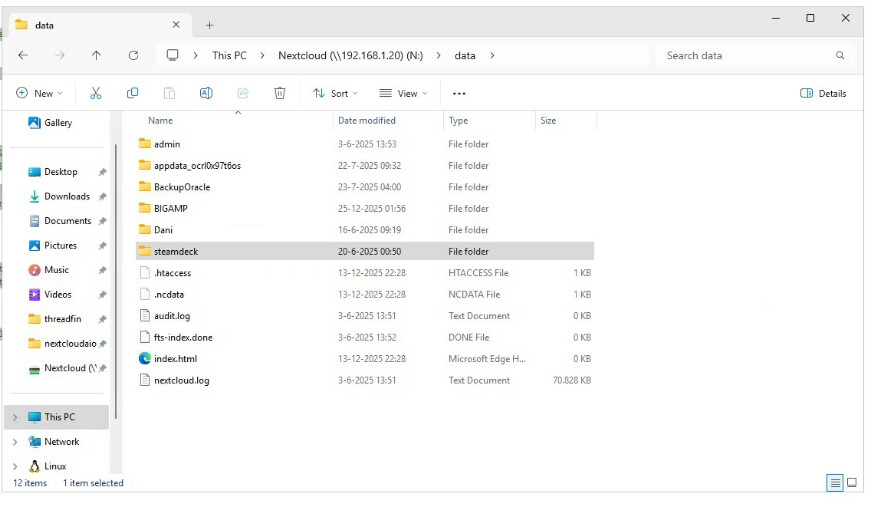
The only thing is im trying to set my datadir as a external share that runs on my truenas server.

I run windows server 2025 with docker engine and docker compose. I also have WSL installed.

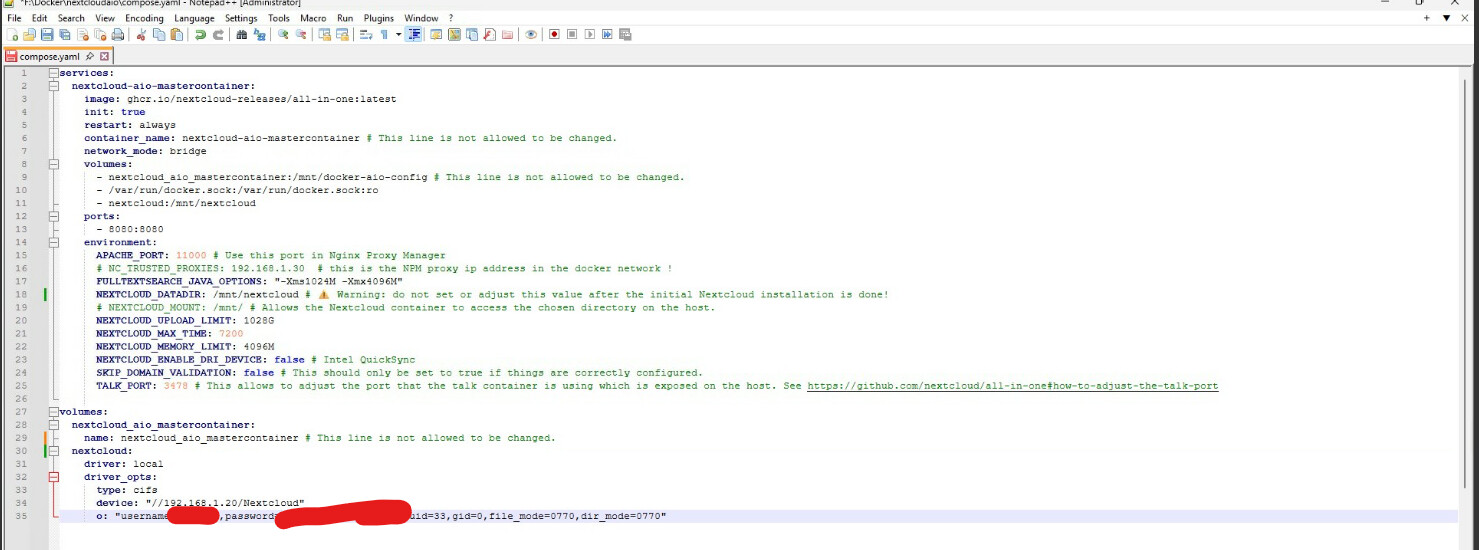
In the compose.yaml i made a new volume that links to my share(see photo).

But when i try to set that volume as my netxloud_datadir i get the error that my datadir needs to start with a “/”. But how can i do that if it needs to link to the docker volume?

My master container also links to that volume(see photo). When i enter my mastercontainer and cd to its location i can see the files.

So my question is what is the right way to set the datadir for my nextclou-aio-nextcloud container?
Hi, please carefully read through GitHub - nextcloud/all-in-one: 📦 The official Nextcloud installation method. Provides easy deployment and maintenance with most features included in this one Nextcloud instance.

Thanks for the quick reply. I did try what the docs says but that also doesn’t seem to work.

I’m trying to mount my N drive. This drive is a networkshare.

But when i try to mount it using devices: “/host_mnt/N/data” i get this error:

Error response from daemon: error while mounting volume ‘/var/lib/docker/volumes/nextcloudaio_nextcloud_aio_nextcloud_datadir/_data’: failed to mount local volume: mount /run/desktop/mnt/host/N/data:/var/lib/docker/volumes/nextcloudaio_nextcloud_aio_nextcloud_datadir/_data, flags: 0x1000: no such file or directory


Compose.yaml

services:
  nextcloud-aio-mastercontainer:
    image: ghcr.io/nextcloud-releases/all-in-one:latest
    init: true
    restart: always
    container_name: nextcloud-aio-mastercontainer # This line is not allowed to be changed.
    network_mode: bridge
    volumes:
      - nextcloud_aio_mastercontainer:/mnt/docker-aio-config # This line is not allowed to be changed.
      - /var/run/docker.sock:/var/run/docker.sock:ro
      - nextcloud_aio_nextcloud_datadir:/mnt/nextcloud
    ports:
      - 8080:8080
    environment:
      APACHE_PORT: 11000 # Use this port in Nginx Proxy Manager
      # NC_TRUSTED_PROXIES: 192.168.1.30  # this is the NPM proxy ip address in the docker network !
      FULLTEXTSEARCH_JAVA_OPTIONS: "-Xms1024M -Xmx4096M"
      NEXTCLOUD_DATADIR: "nextcloud_aio_nextcloud_datadir" # ⚠️ Warning: do not set or adjust this value after the initial Nextcloud installation is done!
      # NEXTCLOUD_MOUNT: /mnt/ # Allows the Nextcloud container to access the chosen directory on the host.
      NEXTCLOUD_UPLOAD_LIMIT: 1028G
      NEXTCLOUD_MAX_TIME: 7200
      NEXTCLOUD_MEMORY_LIMIT: 4096M
      NEXTCLOUD_ENABLE_DRI_DEVICE: false # Intel QuickSync
      SKIP_DOMAIN_VALIDATION: false # This should only be set to true if things are correctly configured. 
      TALK_PORT: 3478 # This allows to adjust the port that the talk container is using which is exposed on the host. See https://github.com/nextcloud/all-in-one#how-to-adjust-the-talk-port

volumes:
  nextcloud_aio_mastercontainer:
    name: nextcloud_aio_mastercontainer # This line is not allowed to be changed.
  nextcloud_aio_nextcloud_datadir:
    driver: local
    driver_opts:
      type: none
      device: "/host_mnt/N/data"
      o: "bind"

Is N:\ an external drive or an internal one?

1 Like

Btw, have you already tried “/host_mnt/n/data” (so with small n)? Also does the data folder exist on that drive?

1 Like