Unfortunately nothing changed
“internal Server problem”
Unfortunately nothing changed
“internal Server problem”
What version of php is running and enabled in the webserver. Could you check?
sudo php -v
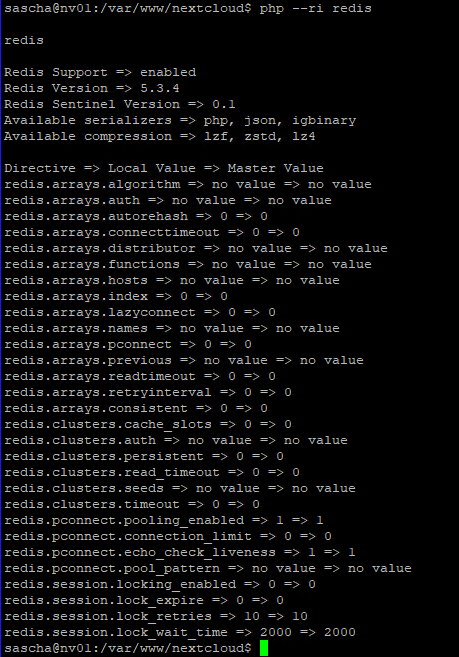
Could you double check if redis is enabled as a module?
php --ri redis
It should look like:
php --ri redis

redis

Redis Support => enabled
Redis Version => 5.3.4
PHP 8.0.13

That’s it!
sudo apt install php8.0-redis
sudo phpenmod redis
sudo systemctl reload apache2
and could you check again:
php --ri redis
edit: added apache2 restart
You are live! You just have to fix the R in Trusted domains.
YEAH omg thank you sooo much, now its up again… I had this problem for 2 weeks now haha… and you fixed it in minutes… Thank you very much 

Do you have a solution for this problem too?
Ive tried a lot, but it never disappeared… would be very great
As @bb77 wrote in the second post:
sudo apt install php-redis
strange that this did not install and enable php8.0-redis. It normally should.
But I’m glad that is working again for you.
Okey thats really strange…
sudo apt install php8.0-imagick
I thank you very much! Looks like the php version 8 caused the problems… Though the normal commands for installation didnt work for version 8 or sth like that…
php-redis is the name of the distribution package and I think the PHP version included in Ubuntu 20.04 is 7.3. If you want to install another version e.g. from a PPA, you have to specify which version you want to install, e.g. php7.4-redis, php8.0-redis etc… Didn’t think of that or that this could be the issue. Anyways, glad that it is working now 
Hey guys, this article is still helpful in January 2023, after update to 1.50.5
Tanks a lot
This topic was automatically closed 90 days after the last reply. New replies are no longer allowed.