The Basics
- Nextcloud Server version (e.g., 29.x.x):
- Nextcloud Hub 25 Autumn (32.0.5)
- Operating system and version (e.g., Ubuntu 24.04):
- Linux 6.12.15-production+truenas x86_64
- Web server and version (e.g, Apache 2.4.25):
N/A/ Docker
- Reverse proxy and version _(e.g. nginx 1.27.2)
Pangolin (Traefik)
- PHP version (e.g, 8.3):
- 8.3.30
- Is this the first time you’ve seen this error? (Yes / No):
No
- When did this problem seem to first start?
A few months ago
- Installation method (e.g. AlO, NCP, Bare Metal/Archive, etc.)
Docker
- Are you using CloudfIare, mod_security, or similar? (Yes / No)
Yes(Pangolin)
Summary of the issue you are facing:
The option “permanently delete” is only available on some files and directories, I am unable to delete files or directories that do not show that option. The same affected items also cannot be moved, only copied.
Steps to replicate it:
-
Navigate to a file that cannot be deleted
-
Click the three dots
-
Search for the “permanently delete” option
Log entries
Nothing relevant is logged at the time of the issue, because I cannot click the option in the first place.
Configuration
Nextcloud
{
    "system": {
        "htaccess.RewriteBase": "\/",
        "memcache.local": "\\OC\\Memcache\\APCu",
        "memcache.locking": "\\OC\\Memcache\\Redis",
        "redis": {
            "host": "***REMOVED SENSITIVE VALUE***",
            "port": 6379,
            "timeout": 0
        },
        "filelocking.enabled": true,
        "apps_paths": [
            {
                "path": "\/var\/www\/html\/apps",
                "url": "\/apps",
                "writable": false
            },
            {
                "path": "\/var\/www\/html\/custom_apps",
                "url": "\/custom_apps",
                "writable": true
            }
        ],
        "upgrade.disable-web": true,
        "instanceid": "***REMOVED SENSITIVE VALUE***",
        "passwordsalt": "***REMOVED SENSITIVE VALUE***",
        "secret": "***REMOVED SENSITIVE VALUE***",
        "trusted_domains": [
            "cloud.ruwe.dev"
        ],
        "datadirectory": "***REMOVED SENSITIVE VALUE***",
        "dbtype": "mysql",
        "version": "32.0.5.0",
        "overwrite.cli.url": "https:\/\/cloud.XXXXXX.dev",
        "overwriteprotocol": "https",
        "dbname": "***REMOVED SENSITIVE VALUE***",
        "dbhost": "***REMOVED SENSITIVE VALUE***",
        "dbport": "",
        "dbtableprefix": "oc_",
        "mysql.utf8mb4": true,
        "dbuser": "***REMOVED SENSITIVE VALUE***",
        "dbpassword": "***REMOVED SENSITIVE VALUE***",
        "installed": true,
        "maintenance": false,
        "maintenance_window_start": 1,
        "app_install_overwrite": [
            "unsplash",
            "camerarawpreviews",
            "calendar",
            "theming_customcss",
            "deadmanswitch",
            "extract"
        ],
        "loglevel": 2,
        "default_phone_region": "CH"
    }
}
Apps
Enabled:
  - calendar: 6.2.0
  - cloud_federation_api: 1.16.0
  - contacts: 8.3.3
  - contactsinteraction: 1.13.1
  - cospend: 3.2.0
  - data_request: 4.0.0
  - dav: 1.34.2
  - federatedfilesharing: 1.22.0
  - files: 2.4.0
  - files_archive: 1.2.8
  - files_pdfviewer: 5.0.0-dev.0
  - files_sharing: 1.24.1
  - files_versions: 1.25.0
  - logreader: 5.0.0-dev.0
  - lookup_server_connector: 1.20.0
  - notifications: 5.0.0-dev.0
  - oauth2: 1.20.0
  - password_policy: 4.0.0-dev.0
  - privacy: 4.0.0-dev.0
  - profile: 1.1.0
  - provisioning_api: 1.22.0
  - recommendations: 5.0.0-dev.0
  - serverinfo: 4.0.0-dev.0
  - settings: 1.15.1
  - survey_client: 4.0.0-dev.0
  - text: 6.0.1
  - theming: 2.7.0
  - twofactor_backupcodes: 1.21.0
  - updatenotification: 1.22.0
  - user_status: 1.12.0
  - viewer: 5.0.0-dev.0
  - weather_status: 1.12.0
  - workflowengine: 2.14.0
Disabled:
  - activity: 5.0.0-dev.0 (installed 3.0.0)
  - admin_audit: 1.22.0
  - app_api: 32.0.0 (installed 32.0.0)
  - bruteforcesettings: 5.0.0-dev.0 (installed 4.0.0)
  - camerarawpreviews: 0.8.8 (installed 0.8.8)
  - circles: 32.0.0 (installed 32.0.0)
  - comments: 1.22.0 (installed 1.22.0)
  - dashboard: 7.12.0 (installed 7.10.0)
  - deadmanswitch: 1.0.0 (installed 1.0.0)
  - encryption: 2.20.0
  - federation: 1.22.0 (installed 1.22.0)
  - files_downloadlimit: 5.0.0-dev.0 (installed 5.0.0-dev.0)
  - files_external: 1.24.1
  - files_reminders: 1.5.0 (installed 1.3.0)
  - files_trashbin: 1.22.0 (installed 1.22.0)
  - firstrunwizard: 5.0.0-dev.0 (installed 4.0.0)
  - integration_github: 3.2.2 (installed 3.2.2)
  - nextcloud_announcements: 4.0.0-dev.0 (installed 4.0.0-dev.0)
  - notes: 4.13.0 (installed 4.13.0)
  - photos: 5.0.0-dev.1 (installed 3.0.2)
  - related_resources: 3.0.0-dev.0 (installed 3.0.0-dev.0)
  - richdocuments: 9.0.3 (installed 9.0.3)
  - richdocumentscode: 25.4.901 (installed 25.4.901)
  - sharebymail: 1.22.0 (installed 1.22.0)
  - support: 4.0.0-dev.0 (installed 2.0.0)
  - suspicious_login: 10.0.0-dev.0
  - systemtags: 1.22.0 (installed 1.22.0)
  - theming_customcss: 1.19.0 (installed 1.19.0)
  - twofactor_nextcloud_notification: 6.0.0-dev.0
  - twofactor_totp: 14.0.0
  - unsplash: 3.1.0 (installed 3.1.0)
  - user_ldap: 1.23.0
  - webhook_listeners: 1.3.0 (installed 1.3.0)
  - whiteboard: 1.5.6 (installed 1.5.6)
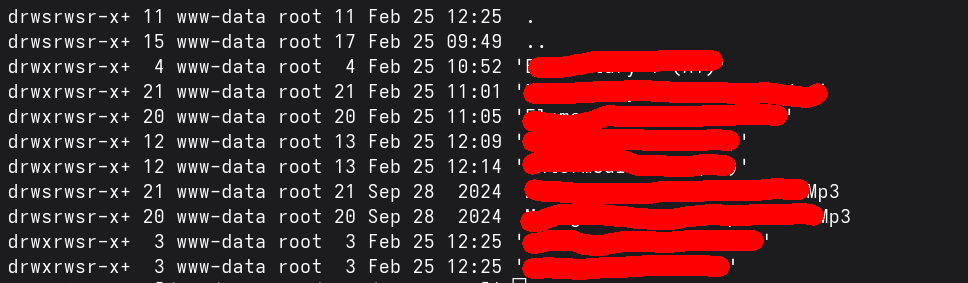
The two directories ending with “Mp3” cannot be deleted for example. There are tons of other examples, that I cannot delete.
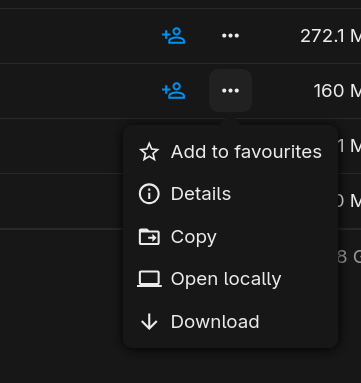
Other directories can be deleted permanently just fine.