### ⚠️ This issue respects the following points: ⚠️
- [x] This is a **bug**, no…t a question or a configuration/webserver/proxy issue.
- [x] This issue is **not** already reported on [Github](https://github.com/nextcloud/server/issues?q=is%3Aopen+is%3Aissue+label%3Abug) OR [Nextcloud Community Forum](https://help.nextcloud.com/) _(I've searched it)_.
- [x] Nextcloud Server **is** up to date. See [Maintenance and Release Schedule](https://github.com/nextcloud/server/wiki/Maintenance-and-Release-Schedule) for supported versions.
- [x] I agree to follow Nextcloud's [Code of Conduct](https://nextcloud.com/contribute/code-of-conduct/).
### Bug description
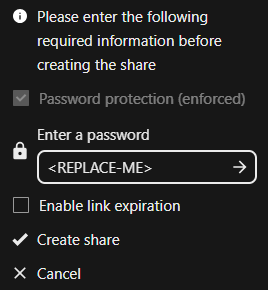
After updating to Nextcloud 31.0.9, users encountered an issue with public share links that have manually set passwords.
When a user creates a share link and sets a custom password (according to the defined password policy) instead of using the automatically generated password, the recipient is unable to access the share.
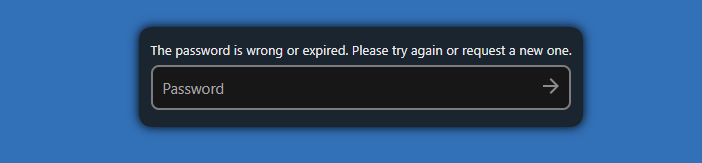
The recipient gets the following error message when entering the correct password:
"Wrong password or link expired. Please try again or ask the person who sent you the link to resend it."
However, if the user keeps the automatically generated password, the link works without any issues.
### Steps to reproduce
1.Update to Nextcloud 31.0.9.
2.Create a share link.
3.Replace the automatically generated password with a manual password that complies with the password policy.
4.Share the link and password with another user.
5.The recipient enters the password.
### Expected behavior
The recipient should be able to access the shared file/folder with the manually set password.
### Nextcloud Server version
31
### Operating system
Debian/Ubuntu
### PHP engine version
PHP 8.1
### Web server
Apache (supported)
### Database engine version
MySQL
### Is this bug present after an update or on a fresh install?
Updated from a MINOR version (ex. 32.0.1 to 32.0.2)
### Are you using the Nextcloud Server Encryption module?
None
### What user-backends are you using?
- [x] Default user-backend _(database)_
- [x] LDAP/ Active Directory
- [ ] SSO - SAML
- [ ] Other
### Configuration report
```json
{
"system": {
"instanceid": "***REMOVED SENSITIVE VALUE***",
"passwordsalt": "***REMOVED SENSITIVE VALUE***",
"secret": "***REMOVED SENSITIVE VALUE***",
"trusted_domains": [
"bulut.yasar.com.tr",
"172.17.1.53",
"127.0.0.1",
"localhost",
"yasar.com.tr",
"10.65.8.100"
],
"datadirectory": "***REMOVED SENSITIVE VALUE***",
"dbtype": "mysql",
"version": "31.0.9.1",
"overwrite.cli.url": "https:\/\/bulut.yasar.com.tr",
"overwrite.host": "bulut.yasar.com.tr",
"overwrite.protocol": "https",
"dbname": "***REMOVED SENSITIVE VALUE***",
"dbhost": "***REMOVED SENSITIVE VALUE***",
"dbport": "",
"dbtableprefix": "oc_",
"mysql.utf8mb4": true,
"dbuser": "***REMOVED SENSITIVE VALUE***",
"dbpassword": "***REMOVED SENSITIVE VALUE***",
"installed": true,
"default_phone_region": "TR",
"default_language": "tr",
"default_locale": "tr_TR",
"force_locale": "tr_TR",
"force_language": false,
"available_languages": [
"tr",
"en"
],
"maintenance": false,
"maintenance_window_start": 1,
"updater.release.channel": "stable",
"memcache.local": "\\OC\\Memcache\\Redis",
"memcache.locking": "\\OC\\Memcache\\Redis",
"filelocking.enabled": "true",
"filesystem_check_changes": 1,
"redis": {
"host": "***REMOVED SENSITIVE VALUE***",
"port": 6379,
"timeout": 0
},
"htaccess.RewriteBase": "\/",
"ldapIgnoreNamingRules": false,
"ldapUserCleanupInterval": 0,
"ldapBackgroundSyncInterval": 60,
"remember_login_cookie_lifetime": 86400,
"session_lifetime": 7200,
"session_keepalive": true,
"auto_logout": true,
"auth.webauthn.enabled": false,
"trashbin_retention_obligation": "auto,7",
"enable_avatars": false,
"enable_previews": true,
"profile.enabled": false,
"allow_user_to_change_display_name": false,
"allow_user_to_change_mail_address": false,
"theme": "",
"lost_password_link": "disabled",
"defaultapp": "files",
"knowledgebaseenabled": false,
"mail_from_address": "***REMOVED SENSITIVE VALUE***",
"mail_smtpmode": "smtp",
"mail_sendmailmode": "smtp",
"mail_domain": "***REMOVED SENSITIVE VALUE***",
"mail_smtphost": "***REMOVED SENSITIVE VALUE***",
"mail_smtpport": "25",
"log_type": "file",
"syslog_tag": "nextcloud",
"logfile": "\/data\/nextcloud.log",
"loglevel": 2,
"logdateformat": "d.m.Y, H:i:s",
"logtimezone": "Europe\/Istanbul",
"log.condition": {
"apps": [
"admin_audit",
"files",
"dav",
"core",
"encryption"
]
},
"log_type_audit": "syslog",
"syslog_tag_audit": "nextcloud",
"logfile_audit": "",
"app_install_overwrite": [
"group_default_quota",
"impersonate",
"apporder",
"webhooks",
"adwelcomemail",
"admin_notifications"
],
"connectivity_check_domains": [
"www.startpage.com",
"www.eff.org"
],
"activity_webhook": "https:\/\/bulut.yasar.com.tr\/nextcloud-webhook.php",
"allow_local_remote_servers": true,
"appstoreenabled": true,
"skeletondirectory": "\/var\/www\/custom_skeleton",
"templatedirectory": "",
"ldapProviderFactory": "OCA\\User_LDAP\\LDAPProviderFactory",
"impersonate_include_groups": [],
"blacklisted_files": [],
"files.chunked_upload.max_size": 20971520
}
}
```
### List of activated Apps
```shell
Enabled:
- activity: 4.0.0
- admin_audit: 1.21.0
- admin_notifications: 1.0.2
- announcementcenter: 7.2.1
- app_api: 5.0.2
- apporder: 0.15.0
- bruteforcesettings: 4.0.0
- cloud_federation_api: 1.14.0
- comments: 1.21.0
- contactsinteraction: 1.12.0
- dashboard: 7.11.0
- dav: 1.33.0
- federatedfilesharing: 1.21.0
- files: 2.3.1
- files_accesscontrol: 2.0.0
- files_automatedtagging: 2.0.0
- files_downloadlimit: 4.0.0
- files_pdfviewer: 4.0.0
- files_reminders: 1.4.0
- files_retention: 2.0.1
- files_sharing: 1.23.1
- files_trashbin: 1.21.0
- files_versions: 1.24.0
- group_default_quota: 0.1.11
- groupfolders: 19.1.5
- groupquota: 0.2.2
- impersonate: 2.0.0
- lookup_server_connector: 1.19.0
- mail: 5.5.1
- metadata: 0.22.0
- nextcloud_announcements: 3.0.0
- notifications: 4.0.0
- oauth2: 1.19.1
- password_policy: 3.0.0
- photos: 4.0.0
- privacy: 3.0.0
- profile: 1.0.0
- provisioning_api: 1.21.0
- quota_warning: 1.21.0
- recommendations: 4.0.0
- related_resources: 2.0.0
- serverinfo: 3.0.0
- settings: 1.14.0
- sharebymail: 1.21.0
- side_menu: 5.1.1
- support: 3.0.0
- survey_client: 3.0.0
- systemtags: 1.21.1
- text: 5.0.0
- theming: 2.6.1
- theming_customcss: 1.18.0
- twofactor_backupcodes: 1.20.0
- updatenotification: 1.21.0
- user_ldap: 1.22.0
- user_retention: 1.15.0
- viewer: 4.0.0
- webhook_listeners: 1.2.0
- workflow_script: 2.0.0
- workflowengine: 2.13.0
Disabled:
- circles: 31.0.0 (installed 24.0.0)
- encryption: 2.19.0
- federation: 1.21.0 (installed 1.14.0)
- files_antivirus: 6.0.2 (installed 6.0.2)
- files_external: 1.23.0
- files_rightclick: 0.15.1 (installed 1.6.0)
- firstrunwizard: 4.0.0 (installed 2.13.0)
- geoblocker: 0.5.17 (installed 0.5.17)
- ldap_contacts_backend: 1.11.0 (installed 1.11.0)
- logreader: 4.0.0 (installed 2.13.0)
- mail-main: 4.3.0-alpha.1
- suspicious_login: 9.0.1
- testapp: 1.0.0 (installed 1.0.0)
- twofactor_nextcloud_notification: 5.0.0
- twofactor_totp: 13.0.0-dev.0
- user_status: 1.11.0 (installed 1.4.0)
- weather_status: 1.11.0 (installed 1.4.0)
- webhookapp: 1.0.0 (installed 1.0.0)
```
### Nextcloud Signing status
```shell
No errors have been found.
```
### Nextcloud Logs
```json
{"reqId":"KgPPDtJq6gCAzbn8WBqs","level":1,"time":"19.09.2025, 15:30:46","remoteAddr":"10.32.11.151","user":"--","app":"core","method":"POST","url":"/s/4pkM9xHgi9E9xn5/authenticate/showshare","message":"Bruteforce attempt from \"10.32.11.151\" detected for action \"publicLinkAuth\".","userAgent":"Mozilla/5.0 (Windows NT 10.0; Win64; x64) AppleWebKit/537.36 (KHTML, like Gecko) Chrome/138.0.0.0 Safari/537.36","version":"31.0.9.1","data":{"app":"core"}}
```
### Additional info
Automatic passwords generated by Nextcloud work fine.
Issue only happens with custom passwords set manually by users.