Sorry for the confusion, I’ve been using different ports for tests.
Nextcloud’s built in TURN uses the standard 3478, eturnal I set to 3480, and coturn to 3481.
Using trickle ice I can test STUN off network successfully, but TURN asks for a user which isn’t compatible with nextcloud’s secret style, so I’m not sure how to test that. I think if STUN is reachable like this surely TURN would be accessible off network as well?
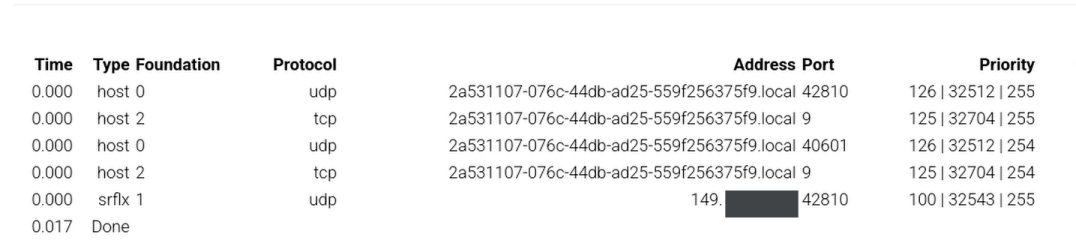
I can get a green checkmark within nextcloud on the hostmachine using my host’s local ip but obviously that’s incorrect for other clients, but I think it shows that nextcloud IS able to reach coturn and It just doesn’t want to route through the public IP?

Interestingly, running the test from another device shows it CAN reach out, it’s just unauthorized? I notice it’s the device’s tailscale ip address, 100.88.23.57:35608, not it’s actual ip address. This remote value is usually the host’s external ip when I run the turnutil’s test.
17963: (24): INFO: session 010000000000000006: usage: realm=<local>, username=<1771805112:turn-test-user>, rp=3, rb=300, sp=3, sb=224

17963: (24): INFO: session 010000000000000006: peer usage: realm=<local>, username=<1771805112:turn-test-user>, rp=0, rb=0, sp=0, sb=0

17963: (24): INFO: session 010000000000000006: closed (2nd stage), user <1771805112:turn-test-user> realm <local> origin <>, local 0.0.0.0:3481, remote 100.91.72.49:50875, reason: allocation timeout

17963: (24): INFO: session 010000000000000006: delete: realm=<local>, username=<1771805112:turn-test-user>

17963: (24): DEBUG: Global turn allocation count decremented, now 1

18076: (22): INFO: session 008000000000000009: realm <local> user <>: incoming packet message processed, error 401: Unauthorized

18123: (22): INFO: session 008000000000000012: realm <local> user <>: incoming packet message processed, error 401: Unauthorized

18136: (22): INFO: session 008000000000000009: usage: realm=<local>, username=<>, rp=7, rb=308, sp=7, sb=560

18136: (22): INFO: session 008000000000000009: peer usage: realm=<local>, username=<>, rp=0, rb=0, sp=0, sb=0

18136: (22): INFO: session 008000000000000009: closed (2nd stage), user <> realm <local> origin <>, local 0.0.0.0:3481, remote 100.88.23.57:37651, reason: allocation watchdog determined stale session state

18136: (22): INFO: session 008000000000000010: usage: realm=<local>, username=<>, rp=7, rb=308, sp=7, sb=560

18136: (22): INFO: session 008000000000000010: peer usage: realm=<local>, username=<>, rp=0, rb=0, sp=0, sb=0

18136: (22): INFO: session 008000000000000010: closed (2nd stage), user <> realm <local> origin <>, local 0.0.0.0:3481, remote 100.88.23.57:35608, reason: allocation watchdog determined stale session state

18136: (14): INFO: session 000000000000000013: usage: realm=<local>, username=<>, rp=7, rb=308, sp=7, sb=560

18136: (14): INFO: session 000000000000000013: peer usage: realm=<local>, username=<>, rp=0, rb=0, sp=0, sb=0
Also I had to define my host’s external ip in the turnserver.conf and comment out in the docker-compose
#environment:
    # - DETECT_EXTERNAL_IP=yes
      #- DETECT_RELAY_IP=yes
or else I’d get 0: (1719434): INFO: channel bind: error 403 (Forbidden IP)
I don’t get any off network webrtc info because they’re not connecting.