The Basics
- Nextcloud Server version:
32.0.5
- Operating system and version:
- Docker Verion 24.0.2(build 610b8d0) ON
Synology DiscStation 723+ WITH DiscManager 7.3.2
- Docker Verion 24.0.2(build 610b8d0) ON
- MariaDB Version:
- 1:10.11.15+maria~ubu2204
- PHP Version:
8.3.30
- Reverse proxy
Synology NAS Reverse Proxy
- phpMyAdmin version:
5.2.3
- Redis Verson:
- 7.4.7
- Is this the first time you’ve seen this error?
Yes
- When did this problem seem to first start?
I never got Nextcloud to run under Docker on my NAS, but without Docker with an implemented Nextcloud Server Version under my Synology NAS
- Installation method
- Docker
- Are you using CloudfIare, mod_security, or similar? (Yes / No)
No
Summary of the issue you are facing:
Nextcloud Installation stopps at creating Database.
Steps to replicate it (hint: details matter!):
-
Creating new Docker-Project in my “ContainerManager” and start Downloading of the images and the Installation-Process.
-
Wait 15 Minutes, then access the Web-Interface of Nextcloud http://feldNAS.fritz.box:38888 to continue the Installation-Process and the Installation of the admin account.
-
I can access the Web-Interface of phpMyAdmin, but login doesnt work with “root” or “ncuser”.
-
Also, after several minutes i can access the Web-Interface of Nextcloud. Then i try to create the “admin” account. Again it takes several minutes, but get only error message.
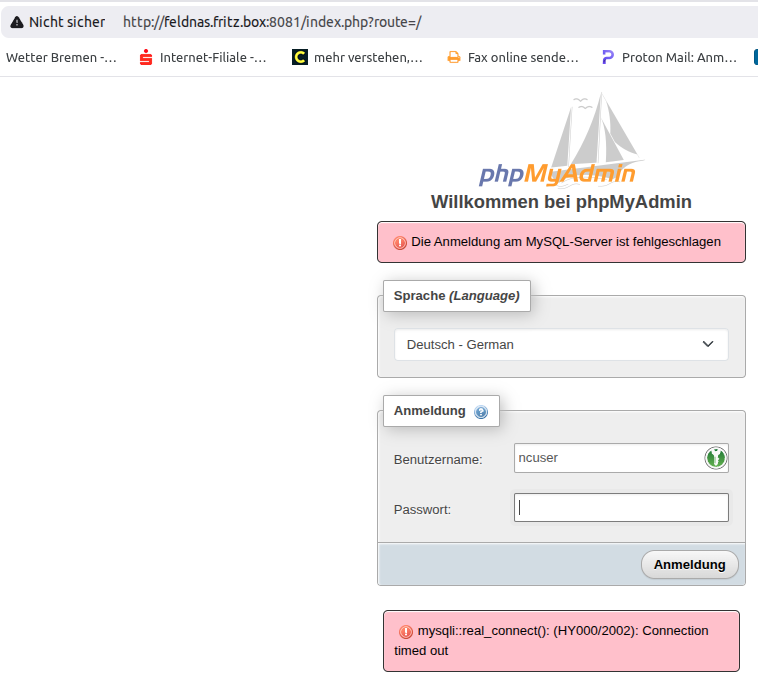
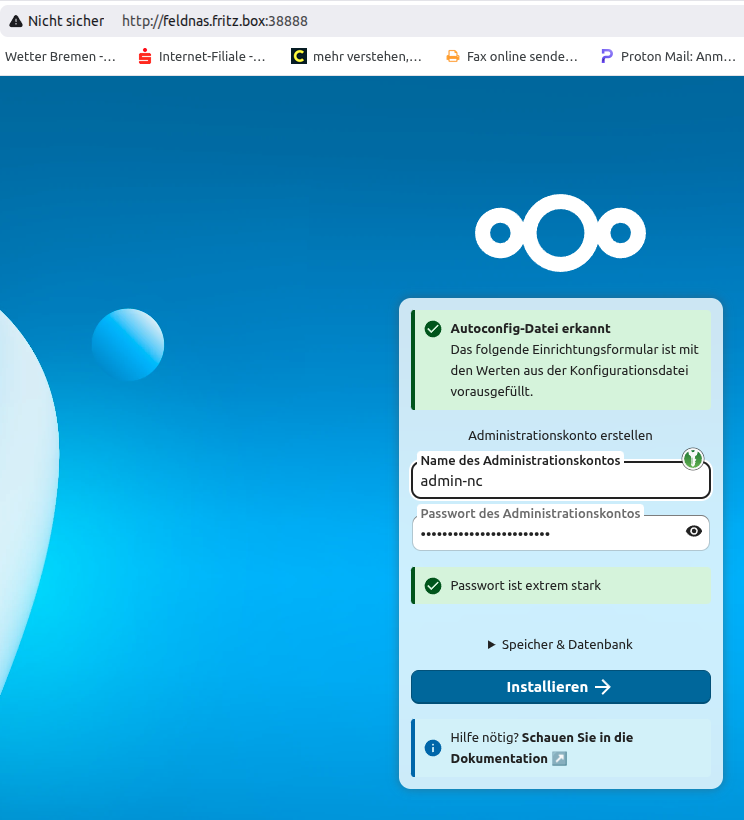
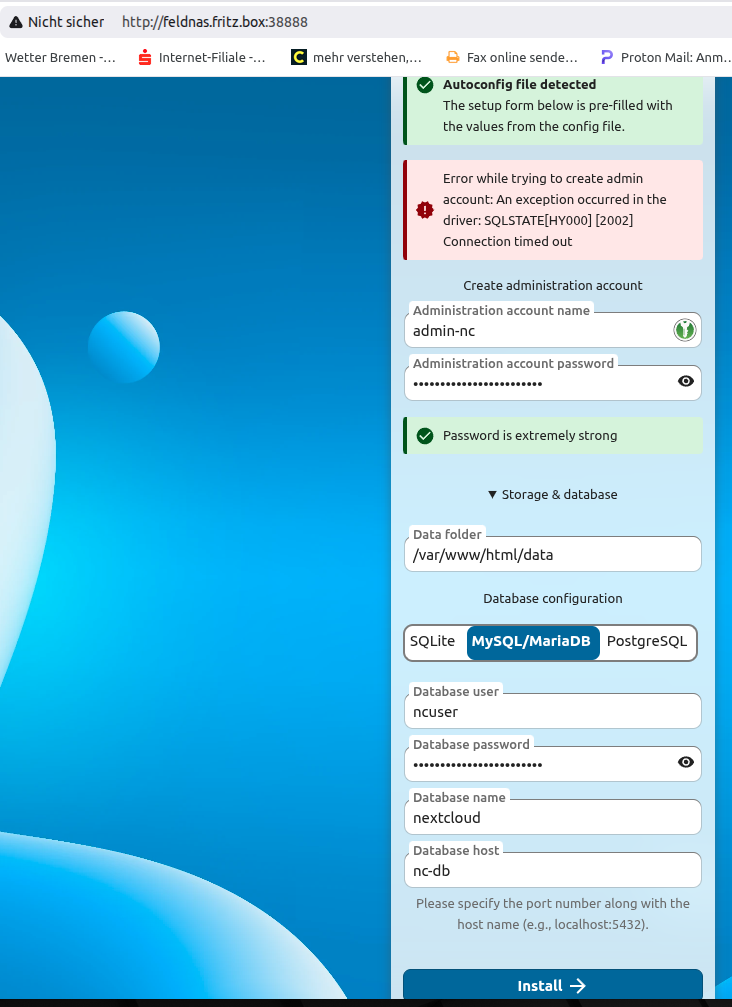
Log entries
Nextcloud Log
2026/01/29 23:15:59,stdout,"172.23.0.1 - - [29/Jan/2026:22:01:41 +0000] \"POST / HTTP/1.1\" 200 2661 \"-\" \"Mozilla/5.0 (X11; Linux x86_64) AppleWebKit/537.36 (KHTML, like Gecko) Chrome/144.0.0.0 Safari/537.36\"
"
2026/01/29 22:33:55,stdout,"172.23.0.1 - - [29/Jan/2026:21:33:55 +0000] \"GET /dist/core-common.js?v=ba222ded25d957b900c03bef914333cd HTTP/1.1\" 200 1283523 \"-\" \"Mozilla/5.0 (X11; Linux x86_64) AppleWebKit/537.36 (KHTML, like Gecko) Chrome/144.0.0.0 Safari/537.36\"
"
2026/01/29 22:33:55,stdout,"172.23.0.1 - - [29/Jan/2026:21:07:24 +0000] \"GET / HTTP/1.1\" 200 3219 \"-\" \"Mozilla/5.0 (X11; Linux x86_64) AppleWebKit/537.36 (KHTML, like Gecko) Chrome/144.0.0.0 Safari/537.36\"
"
2026/01/27 23:37:44,stdout,"172.23.0.1 - - [27/Jan/2026:22:23:27 +0000] \"POST / HTTP/1.1\" 200 2661 \"-\" \"Mozilla/5.0 (X11; Linux x86_64) AppleWebKit/537.36 (KHTML, like Gecko) Chrome/144.0.0.0 Safari/537.36\"
"
MariaDB Log(No Log at this day)
2026/01/27 23:08:07,stderr,Version: '10.11.15-MariaDB-ubu2204'  socket: '/run/mysqld/mysqld.sock'  port: 3306  mariadb.org binary distribution

2026/01/27 23:08:07,stderr,2026-01-27 22:08:07 0 [Note] mariadbd: ready for connections.

2026/01/27 23:08:07,stderr,2026-01-27 22:08:07 0 [Note] InnoDB: Buffer pool(s) load completed at 260127 22:08:07

2026/01/27 23:08:07,stderr,"2026-01-27 22:08:07 0 [Note] Server socket created on IP: '::', port: '3306'.
"
phpMyAdmin Log
2026/01/29 22:20:39,stdout,"172.23.0.1 - - [29/Jan/2026:21:19:39 +0000] \"POST /index.php?route=/ HTTP/1.1\" 200 6340 \"http://feldnas.fritz.box:8081/index.php?route=/\" \"Mozilla/5.0 (X11; Linux x86_64) AppleWebKit/537.36 (KHTML, like Gecko) Chrome/144.0.0.0 Safari/537.36\"
"
2026/01/29 22:18:51,stdout,"172.23.0.1 - - [29/Jan/2026:21:18:51 +0000] \"GET /themes/pmahomme/img/s_error.png HTTP/1.1\" 200 898 \"http://feldnas.fritz.box:8081/themes/pmahomme/css/theme.css?v=5.2.3\" \"Mozilla/5.0 (X11; Linux x86_64) AppleWebKit/537.36 (KHTML, like Gecko) Chrome/144.0.0.0 Safari/537.36\"
"
2026/01/29 22:18:51,stdout,"172.23.0.1 - - [29/Jan/2026:21:17:51 +0000] \"POST /index.php?route=/ HTTP/1.1\" 200 6343 \"http://feldnas.fritz.box:8081/\" \"Mozilla/5.0 (X11; Linux x86_64) AppleWebKit/537.36 (KHTML, like Gecko) Chrome/144.0.0.0 Safari/537.36\"
"
2026/01/29 22:17:21,stdout,127.0.0.1 - - [29/Jan/2026:21:17:21 +0000] "OPTIONS * HTTP/1.0" 200 126 "-" "Apache/2.4.66 (Debian) PHP/8.3.30 (internal dummy connection)"

2026/01/29 22:17:20,stdout,127.0.0.1 - - [29/Jan/2026:21:17:20 +0000] "OPTIONS * HTTP/1.0" 200 126 "-" "Apache/2.4.66 (Debian) PHP/8.3.30 (internal dummy connection)"

2026/01/29 22:17:12,stdout,"172.23.0.1 - - [29/Jan/2026:21:17:12 +0000] \"GET /favicon.ico HTTP/1.1\" 200 22788 \"http://feldnas.fritz.box:8081/\" \"Mozilla/5.0 (X11; Linux x86_64) AppleWebKit/537.36 (KHTML, like Gecko) Chrome/144.0.0.0 Safari/537.36\"
"
2026/01/29 22:17:12,stdout,"172.23.0.1 - - [29/Jan/2026:21:17:12 +0000] \"GET /js/vendor/codemirror/lib/codemirror.js?v=5.2.3 HTTP/1.1\" 200 107221 \"http://feldnas.fritz.box:8081/\" \"Mozilla/5.0 (X11; Linux x86_64) AppleWebKit/537.36 (KHTML, like Gecko) Chrome/144.0.0.0 Safari/537.36\"
"
2026/01/29 22:17:12,stdout,"172.23.0.1 - - [29/Jan/2026:21:17:12 +0000] \"GET /js/messages.php?l=de&v=5.2.3 HTTP/1.1\" 200 9680 \"http://feldnas.fritz.box:8081/\" \"Mozilla/5.0 (X11; Linux x86_64) AppleWebKit/537.36 (KHTML, like Gecko) Chrome/144.0.0.0 Safari/537.36\"
"
2026/01/29 22:17:12,stdout,"172.23.0.1 - - [29/Jan/2026:21:17:12 +0000] \"GET /js/vendor/jquery/jquery-ui.min.js?v=5.2.3 HTTP/1.1\" 200 68336 \"http://feldnas.fritz.box:8081/\" \"Mozilla/5.0 (X11; Linux x86_64) AppleWebKit/537.36 (KHTML, like Gecko) Chrome/144.0.0.0 Safari/537.36\"
"
2026/01/29 22:17:12,stdout,"172.23.0.1 - - [29/Jan/2026:21:17:12 +0000] \"GET /themes/pmahomme/css/theme.css?v=5.2.3 HTTP/1.1\" 200 67651 \"http://feldnas.fritz.box:8081/\" \"Mozilla/5.0 (X11; Linux x86_64) AppleWebKit/537.36 (KHTML, like Gecko) Chrome/144.0.0.0 Safari/537.36\"
"
2026/01/29 22:17:12,stdout,"172.23.0.1 - - [29/Jan/2026:21:17:11 +0000] \"GET / HTTP/1.1\" 200 6245 \"-\" \"Mozilla/5.0 (X11; Linux x86_64) AppleWebKit/537.36 (KHTML, like Gecko) Chrome/144.0.0.0 Safari/537.36\"
"
Redis Log
2026/01/27 23:08:02,stdout,1:M 27 Jan 2026 22:08:02.409 * Ready to accept connections tcp

2026/01/27 23:08:02,stdout,1:M 27 Jan 2026 22:08:02.409 * Server initialized

2026/01/27 23:08:02,stdout,1:M 27 Jan 2026 22:08:02.409 # WARNING: The TCP backlog setting of 511 cannot be enforced because /proc/sys/net/core/somaxconn is set to the lower value of 128.

2026/01/27 23:08:02,stdout,"1:M 27 Jan 2026 22:08:02.409 * Running mode=standalone, port=6379.
"
2026/01/27 23:08:02,stdout,1:M 27 Jan 2026 22:08:02.408 * monotonic clock: POSIX clock_gettime

2026/01/27 23:08:02,stdout,1:C 27 Jan 2026 22:08:02.408 * Configuration loaded

2026/01/27 23:08:02,stdout,"1:C 27 Jan 2026 22:08:02.408 * Redis version=7.4.7, bits=64, commit=00000000, modified=0, pid=1, just started
"
2026/01/27 23:08:02,stdout,1:C 27 Jan 2026 22:08:02.408 * oO0OoO0OoO0Oo Redis is starting oO0OoO0OoO0Oo

2026/01/27 23:08:02,stdout,"1:C 27 Jan 2026 22:08:02.408 # WARNING Memory overcommit must be enabled! Without it, a background save or replication may fail under low memory condition. Being disabled, it can also cause failures without low memory condition, see https://github.com/jemalloc/jemalloc/issues/1328. To fix this issue add 'vm.overcommit_memory = 1' to /etc/sysctl.conf and then reboot or run the command 'sysctl vm.overcommit_memory=1' for this to take effect.
Configuration
Nextcloud+MariaDB+php+Redis Versions
ash-4.4# echo "Nextcloud:" && docker exec nc-app php occ status \
> && echo "MariaDB:" && docker exec nc-db mariadb --version \
> && echo "Redis:" && docker exec nc-redis redis-server --version
Nextcloud:
Nextcloud is not installed - only a limited number of commands are available
  - installed: false
  - version: 32.0.5.0
  - versionstring: 32.0.5
  - edition:
  - maintenance: false
  - needsDbUpgrade: false
  - productname: Nextcloud
  - extendedSupport: false
MariaDB:
mariadb  Ver 15.1 Distrib 10.11.15-MariaDB, for debian-linux-gnu (x86_64) using  EditLine wrapper
Redis:
Redis server v=7.4.7 sha=00000000:0 malloc=jemalloc-5.3.0 bits=64 build=93c92d75e0b0e510
Nextcloud config.php
ash-4.4# docker exec nc-app cat /var/www/html/config/config.php
<?php
$CONFIG = array (
  'htaccess.RewriteBase' => '/',
  'memcache.local' => '\\OC\\Memcache\\APCu',
  'apps_paths' =>
  array (
    0 =>
    array (
      'path' => '/var/www/html/apps',
      'url' => '/apps',
      'writable' => false,
    ),
    1 =>
    array (
      'path' => '/var/www/html/custom_apps',
      'url' => '/custom_apps',
      'writable' => true,
    ),
  ),
  'memcache.distributed' => '\\OC\\Memcache\\Redis',
  'memcache.locking' => '\\OC\\Memcache\\Redis',
  'redis' =>
  array (
    'host' => 'nc-redis',
    'password' => '',
    'port' => 6379,
  ),
  'upgrade.disable-web' => true,
  'instanceid' => 'ocadc7vc02zc',
  'passwordsalt' => '0AswGC07CcOk9H71vTtev/as3cMLR6',
  'secret' => 'w84QaZfCRvqSNSMltl+J1QM4YCIQKc6TbpRooJPoSwBDWIBB',
  'trusted_domains' =>
  array (
    0 => 'feldnas.fritz.box:38888',
  ),
  'datadirectory' => '/var/www/html/data',
  'dbtype' => 'mysql',
  'version' => '32.0.5.0',
  'overwrite.cli.url' => 'http://feldnas.fritz.box:38888',
  'dbname' => 'nextcloud',
  'dbhost' => 'nc-db',
  'dbtableprefix' => 'oc_',
);
Nextcloud(Docker Compose/YAML)
version: "3.9"

services:

  nc-db:
    image: mariadb:10.11
    container_name: nc-db
    restart: unless-stopped
    command:
      - --transaction-isolation=READ-COMMITTED
      - --binlog-format=ROW
      - --innodb_flush_log_at_trx_commit=2
      - --sync_binlog=0
      - --innodb_buffer_pool_size=2G
    environment:
      MYSQL_ROOT_PASSWORD: DB_ROOT_XXX
      MYSQL_DATABASE: nextcloud
      MYSQL_USER: ncuser
      MYSQL_PASSWORD: DB_USER_XXX
    volumes:
      - nc-db-data:/var/lib/mysql
    tmpfs:
      - /tmp
    shm_size: "256m"

  nc-redis:
    image: redis:7
    container_name: nc-redis
    restart: unless-stopped
    command: redis-server --save "" --appendonly no
    mem_limit: 256m

  nc-app:
    image: nextcloud:apache
    container_name: nc-app
    restart: unless-stopped
    depends_on:
      - nc-db
      - nc-redis
    environment:
      MYSQL_HOST: nc-db
      MYSQL_DATABASE: nextcloud
      MYSQL_USER: ncuser
      MYSQL_PASSWORD: DB_USER_XXX
      REDIS_HOST: nc-redis
      PHP_MEMORY_LIMIT: 1024M
    volumes:
      - nc-app-data:/var/www/html
      - /volume1/nextcloud-data:/var/www/html/data
    ports:
      - "38888:80"
    tmpfs:
      - /tmp
    shm_size: "256m"

  nc-phpmyadmin:
    image: phpmyadmin:latest
    container_name: nc-phpmyadmin
    restart: unless-stopped
    depends_on:
      - nc-db
    environment:
      PMA_HOST: nc-db
      PMA_PORT: 3306
      UPLOAD_LIMIT: 256M
    ports:
      - "8081:80"

volumes:
    nc-db-data:
    nc-app-data:
Apps
ash-4.4# docker exec -u www-data -it nc-app php occ app:list
Nextcloud is not installed - only a limited number of commands are available


  There are no commands defined in the "app" namespace.