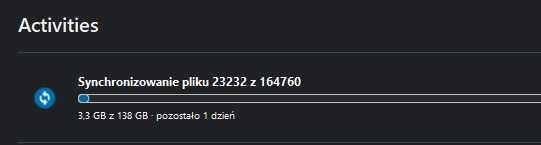
I try make windows profile sync with nextcloud. But - this is very slooooooow. I make initial sync with a loooong lime operation, i get error “Not all files synced” or something like this, clink on this and sync start again. This should sync only failed files, but sync all again. Lan 1gbit.
On Android client i have similiar problem with photo sync - is terrible slow, even with local WiFi6 connection.
I install nextcloud on bare metal with ssd storage, under proxmox with ssd storage, now is on TrueNas on SSD for app and HDD+SSD cache for storage.
This i have from many years, web interface work smooth and fast, all nextcloud clients work terrible slow. New versions not make difference except new functions which works slow too. In this time i test app on many configs, with different network configs, with different hardware, always web app works fast and smooth and nextcloud client app is almost unusable. WebDAV client from file managers works well, but i need other apps for sync, Nextcloud should handle this as well like OneDrive od Dropbox. Nextcloud Client on LAN is tens times slower on LAN compared to Onedrive on internet connection.
Is there plan to refactoring Nextcloud clients to reliable and fast app, especially on local LAN?
Have you some numbers? Also your server configuration can matter a lot, e.g. if you use caching, if you have optimized db-caches.
There are some test out there with different tools, so developers are aware of large differences:
I’d first try with a “normal” folder. Profile data might be a bit special, updating file time stamps very often, lock files, add a lot of cached files, … all things that the desktop client might not like.
That is a much better and a more “typical” use case.
Yesterday i uncheck AppData folder and make sync again. And… NextCloud sync remove folder from my computer because not exist on server side. And i now have broken profile.
One file blocked by Defender make me notification flood from NC Sync, from yesterday i get notification every 10-20 second.
Install method - as i say before - bare metal with a lot optimizations from NC help, now a docker version. Official image from docker hub. Hardware now is a i7 6th, 48GB Ram, VM with NC have 4 cores and 8GB Ram, FTTH with 300mbit upload.
Immich for photos work like crazy in the same hardware. Sync work a lot faster. I know, there is a big files, Nextcloud handles a lot ~1kb files from profile, maybye app should not make transaction for any 1kb file, but make package 100 ~1kb files and then make transaction with server?
Yes, Nextcloud considers to have unique access to a folder. I think such things might be able to be handled through exceptions. Start with a simple folder, there you can control better what is written and done with software. We don’t know what Windows does in the profiles and how well this works with the sync protocols. Especially if you already have doubt about sync performance, I’d try to check this out specifically (have a dedicated folder, place a lot of small files, check performance).
Depending on the server settings, the actual cache sizes need to be adjusted. E.g. if you have a lot of RAM and just use a small fraction of it, or if you over-use it and the systems starts to cache on hard drives, this all affects the performance of the server.
Thanks for clarify. My fault. I not know file sync not reaaly file syncing, this is only for small folders, not for backup.
In phone with +1M Antutu and 8GB ram opening a .md file in nextcloud app take 15-30 secs… yes, my fault - bad phone. But make the same from Web via browser on phone opening files instantly. Hmmm, maybye not so bad?
Sync photos on phone via app - 10GB - day is not enough. But copy via WebDAV app to nextcloud take less than hour. Yes, my fault - phone is not compatible with app.
On PC sync - too many files - yes, my fault. Files sync is not for backup. Should skip problematic files… but no - start notifications flood, cannot see problematic files on list, try resolve conflicts? No - start again from beginning. with fresh notifation floods.
No performance server tuning? Yes my fault. Docker compose is perfect but i not added cache app, my ssd is not efficient enough, CPU/RAM/etc not have enough performance, etc. All my fault. App is perfect.
Really, i like nextcloud and I keep trying to go back to it, but still most important functions not work like should. New versions have new icons, functions for 20 people o the world, but most basic functions still is not refined.